
There is plenty of information out there about connecting from an on-premises network to OCI. But if you want to see a step-by step-procedure that configures to completion an actual VPN you will have a hard time finding it. And rather than writing about it, this time I will actually show it.
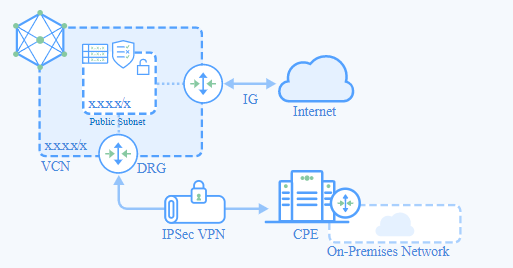
This link will take you to the list of OCI’s verified CPE (Customer Premises Equipment) devices. If your On-Premises CPE is in this list then the VPN configuration should be very easy. In my case, the router I used is not in the list. It is a SOHO (Small Office-Home Office) type of router. For this configuration the on-premises network is my Home-Office LAN. For routers not on the list, there is an option called “other”. OCI offers a lists of supported configuration parameters for VPN connections that you can use for “other” types of routers. Here is the link to these parameter. And I explain them in the video. I hope that you find it useful:
https://tinyurl.com/OCI2HomeVPN

 RedThunder.Blog
The Oracle Networking A-Team just released a set of videos that provide step-by-step guidance on how to configure VPN routers from the official OCI list of supported CPEs. The 1st set of routers include Cisco, Fortinet, Juniper and Palo Alto. More information here: https://www.ateam-oracle.com/vpn-cpe-videos-posted-to-youtube
LikeLike
This is really helpful!
https://tangenz.com/infrastructure/
LikeLike