
Kubernetes has been proven the best way that we have today to run microservices deployments, whether it is via a Serverless approach or by managing your own deployments in the cluster. This has solidified with the strong adoption of Kubernetes by all the major Cloud Vendors, as the strategic way to orchestrate containers and run serverless functions.
However, one of the situations that we need to be mindful, is that kubernetes creates by default a super powerful user that has full access to almost every resource in the cluster (accessible via kubectl or directly though APIs). This is very convenient for most dev & test scenarios, but it is imperative that for production workloads, we limit such power and use Role Base Access Control (RBAC), stable since version 1.8, for fine-grained authorisation access control to kubernetes cluster resources.
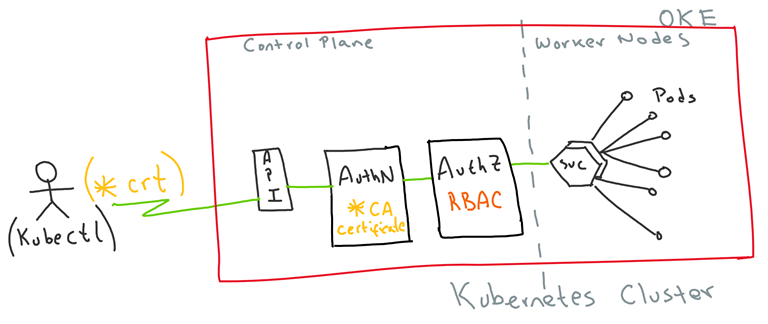
For the purpose of this demo, I am assuming some familiarity with Kubernetes and kubectl. I will mainly focus on the Authentication and Authorisation aspects that allow us to use Client certificates to get access to protected resources in a Kubernetes cluster.
In a nutshell this is what I am going to do:
- Create and use Client certificates to authenticate into a Kubernetes cluster
- Create a Role Base Access Control to fine grain authorise resources in the Kubernetes cluster
- Configure kubectl with the new security context, to properly limit access to resources in the Kubernetes cluster.
This is a super simplified visual representation:
 In November 2018, I had the privilege to attend the Australian Oracle User Group national conference “#AUSOUG Connect” in Melbourne. My role was to have video interviews with as many of the speakers and exhibitors at the conference. Overall, 10 interviews over the course of the day, 90 mins of real footage, 34 short clips to share and plenty of hours reviewing and post-editing to capture the best parts.


 RedThunder.Blog