It provides deep visibility into the application performance from end-user experience down through to the application server requests.
For many customers, the PeopleSoft (PSFT) Application is critical to business operations. With OCI Application Performance Monitoring (APM) service, administrators can:
Analyze all end user experience with accessing PeopleSoft web pages.
Trace transactions across various components and isolate problems to the impacting application or infrastructure tier.
Has ability to drill into application code.
Generally, APM tools cannot drill into the SQL code for the PeopleSoft application. This inability occurs is because, the SQL call is performed in the Tuxedo layer. However, OCI APM service offers a unique feature to overcome this limitation. It can perform instrumentation of outbound JOLT calls from WebLogic to Tuxedo. This helps at least understand how much time is spent in this layer.
Easily Capture End Username for user sessions without modifying application code
Search in context based on PeopleSoft attributes including: – Portal Name – Portal Object Name – and more
Business rules (later “decisions”) always play a crucial role in a process automation platform
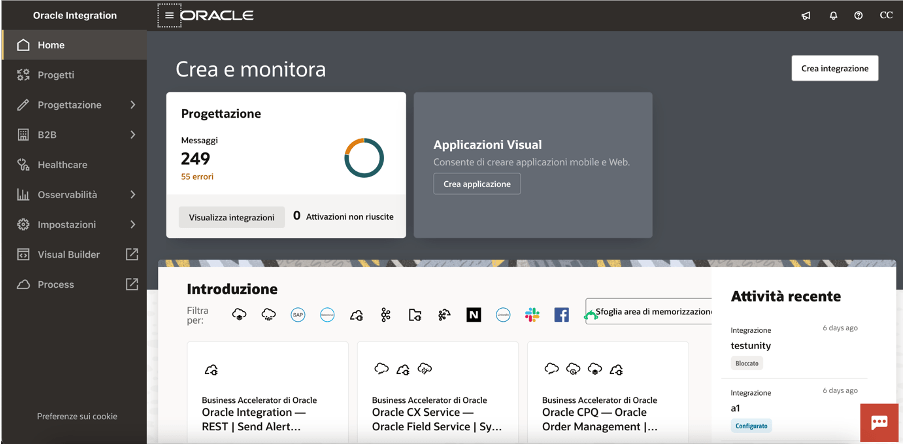
As you probably already know, Oracle Integration (OIC) is a complete business automation platform cloud based, fully Oracle managed, that enables customers to connect their applications and data, automate business processes, and innovate with AI. This is what we define a unique and complete toolkit for integrating and connecting applications and technologies
Today, as a new enhancement of this platform, we have the chance to build decision rules directly in integration projects giving you the power of the flexibility and agility in building new automation processes leveraging rules based on “if-then-else” or “decision tables” patterns
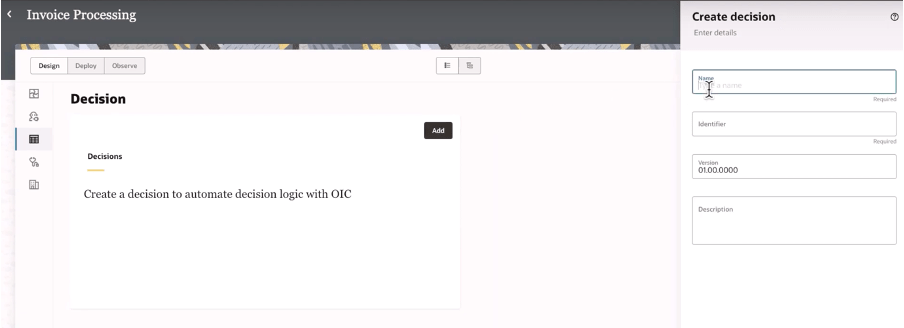
When building your integration projects in OIC, you are now able to add several components so to build your specific implementation leveraging the components you need adding to the project the functionalities like the pure integration flows with connections, robots, B2B, Healthcare and now Decisions, too
Once decisions are added to your project, you can design and later test what you have implemented to verify the correctness of the rules
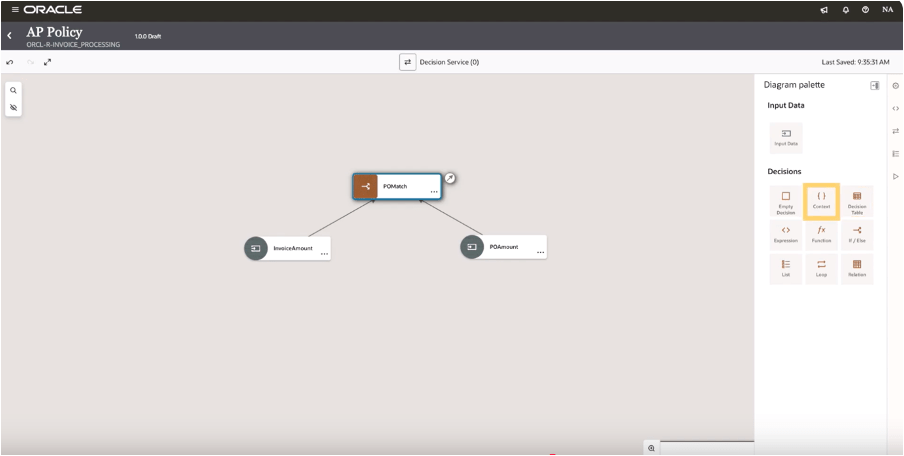
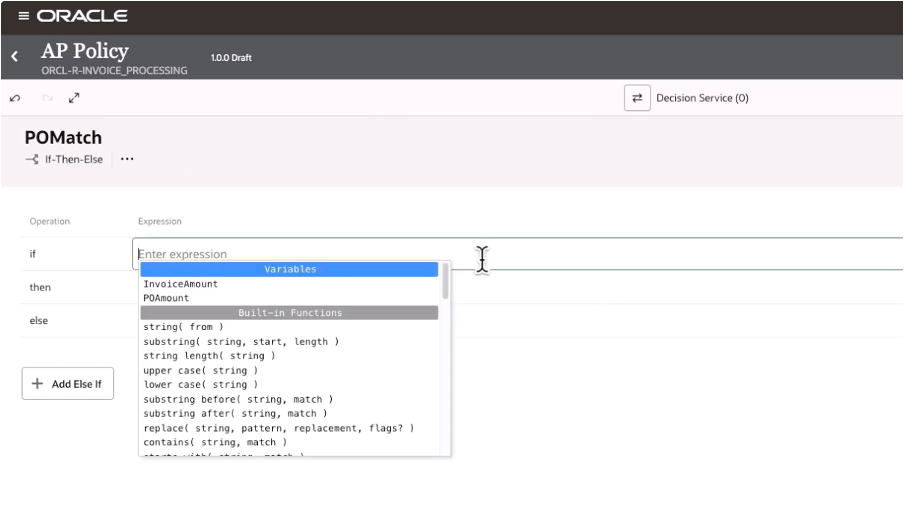
And selecting the decision type you can design your logic
In this way, decisions allow you to ensure consistency in decision-making throughout the organization. Decisions ensure that the same conditions always lead to the same outcomes, reducing the risk of errors due to subjective or inconsistent judgments. This standardization now extended to all components in OIC, and it’s particularly useful when the same decisions are made across multiple processes helping also the reuse of those rules
Decisions define a clear decision points which can be automated within a process, such as determining eligibility for a loan, assessing the risk level of a transaction, or triggering approvals. Automating these rules you can reduce manual intervention, accelerating processes, and ensuring timely and accurate outcomes.
Consider that “decisions” are typically decoupled from the process logic, meaning they can be modified independently of the core workflow. This makes easier to adjust processes when business requirements change—whether due to new regulations, market conditions, or organizational changes—without needing to re-engineer the entire process. This flexibility helps the business to remain agile and responsive.
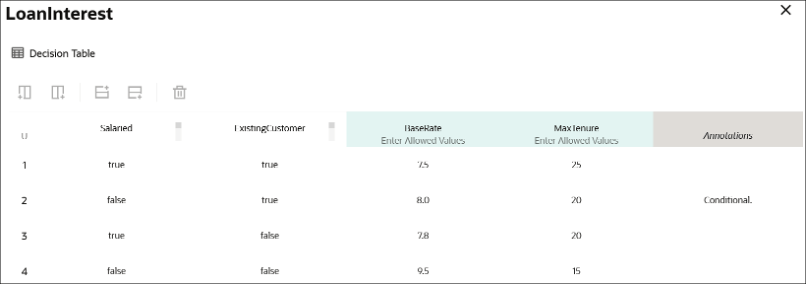
Below a sample just to consider how business rules, via a decision table, can be built leveraging a flexible and easy way to maintain the changes and using a simple and standard browser
A decision table, like that one shown before, can consist of an input expression and several input entries. It is represented as columns within a table. You can use input variables, outputs of other decisions, or built-in functions to define input expressions.
Of course, business rules (decisions) are essential for ensuring that processes are compliant with laws, regulations, and internal policies. For example, in industries such as finance, healthcare, or insurance, where compliance is critical, business rules ensure that processes adhere to the necessary legal requirements. Decisions can be updated when regulations change, ensuring ongoing compliance without the need for manual oversight.
Looking at the decisions use, we can put in evidence and summarize some advantages and especially those ones listed below.
Reusability: you can build your rules once and reuse those ones, gaining efficiency in making & maintaining them with a faster policy change approach without impacting an automation solution. Furthermore you can reuse those from within an integration flow, process workflow or any application
Efficiency: the policy maker doesn’t have to rely upon an integration specialist; he can build and maintain their own policies by themself
Fast policy change: you can change policies quickly without disrupting the areas of an automation solution that’s because you can change policy details independently from the components which use a decision
Now, stay tuned… very soon this feature will be available in GA, and not only Limited Availability, on all OIC instances
In summary:
Decisions and business rules in general enable greater flexibility, reducing operational risks, and improving both internal operations and external customer experience
The Oracle Cloud Application Performance Monitoring (APM) service collects end user trace sessions for Real User Monitoring (RUM). By default the client IP is not captured for the end user session. For some customers, default Geolocation info (eg. Country, Region, City) may be sufficient for end user monitoring. However, for those who want to collect Client IP information as well, to enable this setting please see the following example.
Enable Client IP Collection for End User Session
For every End User Session, we want to capture the Client IP address location.
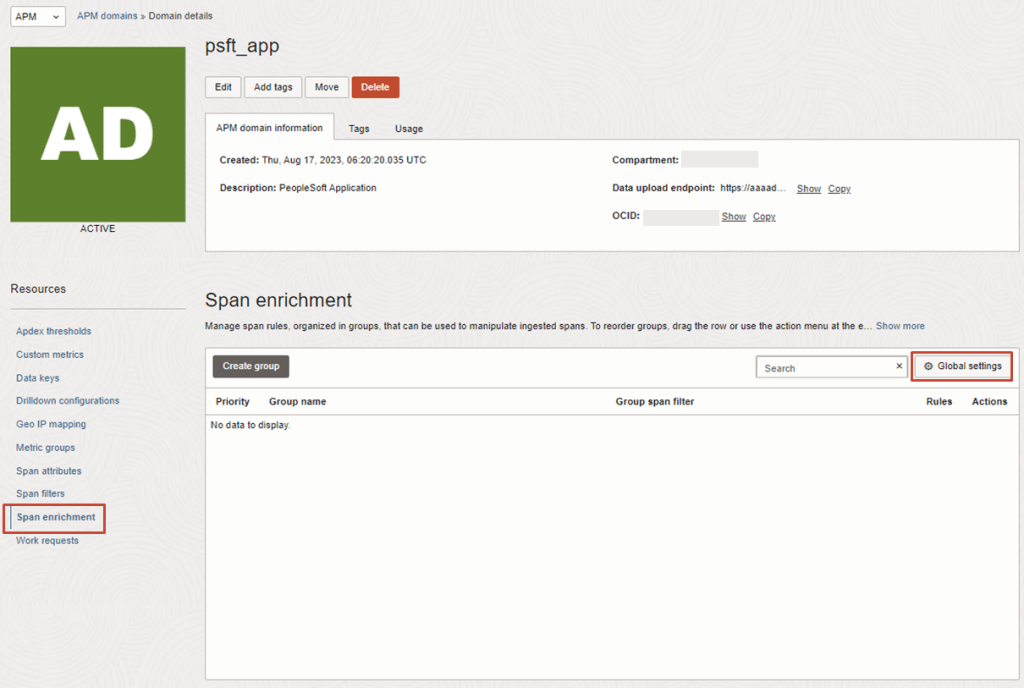
1. To do this, in the OCI Console, navigate to the OCI APM Service
Today, Oracle Process Automation with its Recipes helps organizations to reach process excellence faster. The recipes are business process solutions developed with OCI Process Automation (OPA) and available for you once you have provisioned OCI Process Automation service.
Recipes can be deployed as-is, or extended to meet requirements customer-specific.
In addition, to expediting time-to-value for new deployments, the available recipes can be used also as a sort of blueprints for organizations who want to start with new processes built on OPA.
So, just to position the recipes and when better to use them, we can try to post some questions.
Are you a Developer and looking for quickly deploying new business processes?
Are you a System Integrator needing to start from a pre-built asset so to be later customized meeting better your needs without reinventing the wheel?
Are you looking for some samples to be used for demo purposes to test capabilities and functionalities without starting from scratch?
All these questions can find in the OPA Recipes the right answer.
Now, OPA includes the following recipes … and much more will come soon.
Every single Recipe has its own documentation to drive the implementer.
I suggest to carefully look at the system requirements before using those ones; all those recipes are intended only for guidance.
In order to run those recipes, you must perform the following configuration tasks on your Oracle Identity Cloud Service (IDCS) instance in order to successfully run the recipe.
Assign IDCS application roles
Create the required users in IDCS
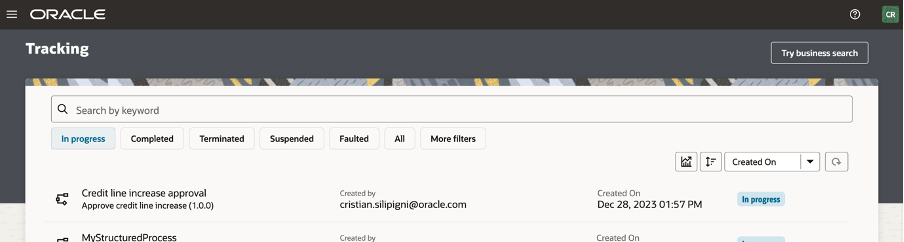
After you’ve configured the roles and other resources, you can activate and run the application and test the process and some capabilities like business searches, how to escalate tasks using the native workspace or the analytics graphical view to see if the process flow is altered by manual intervention.
Now you can see how the “Credit Increase Request” can be imported into your own OPA instance:
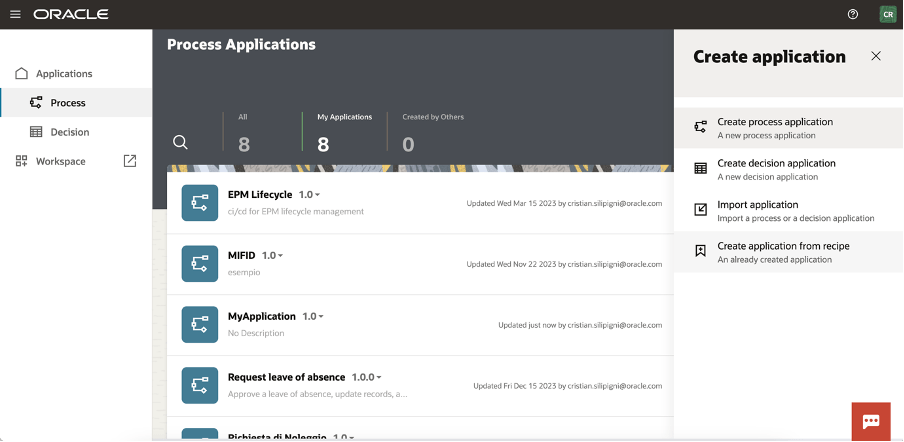
Create a new process in the application process section
Click on the “Create Application from Recipe” action from the palette:
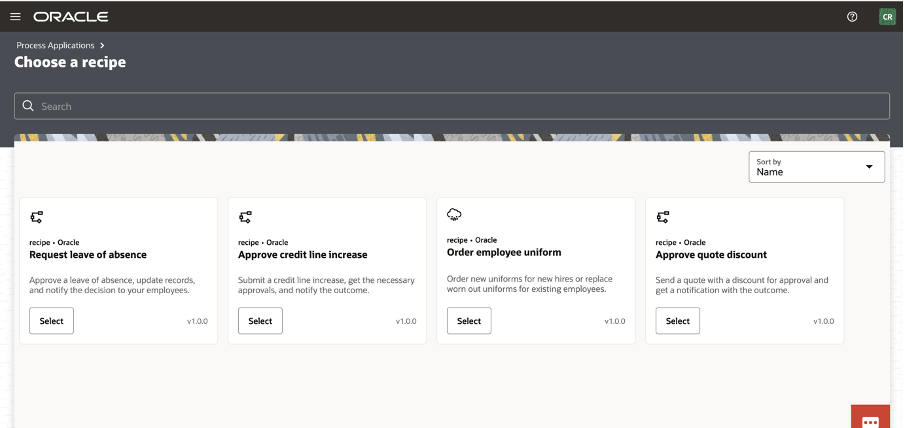
Select, for example, the Approve Credit Line increase
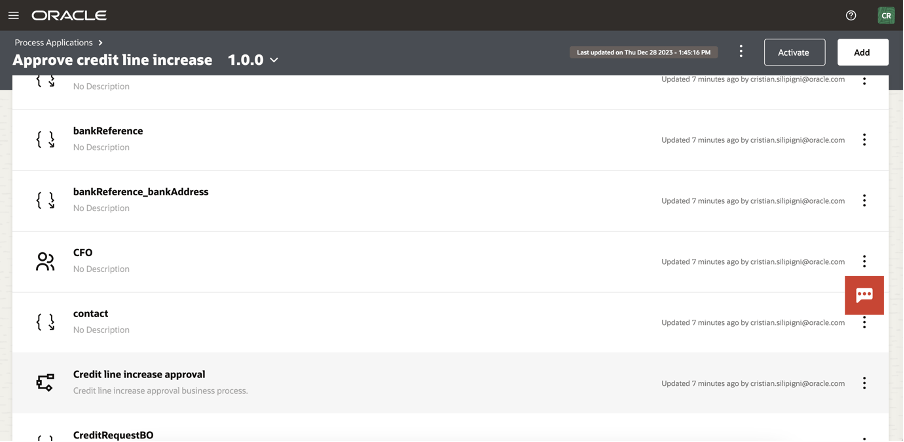
And now, you can see all the artifact imported in your application.
Selecting the “Credit Line Increase Approval” link, you can access the BPMN design of the process
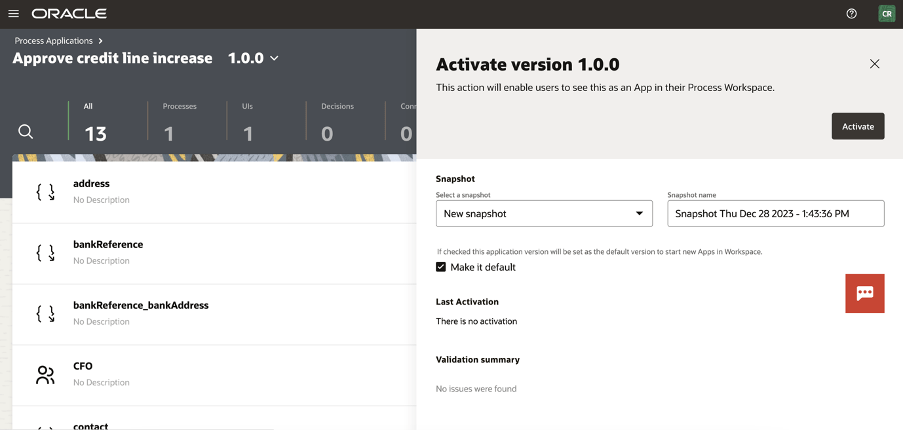
The process is now ready for you to be activated (or customized) selecting the “activate” button at the top of your page
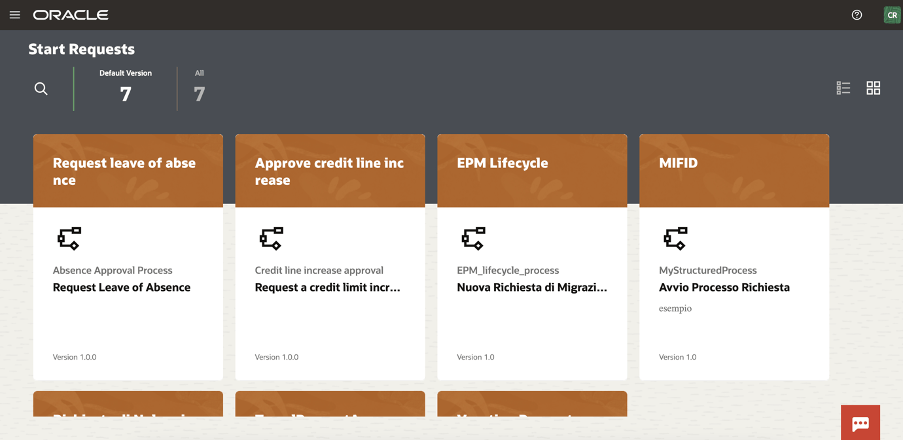
And now ready to be tested in the workspace
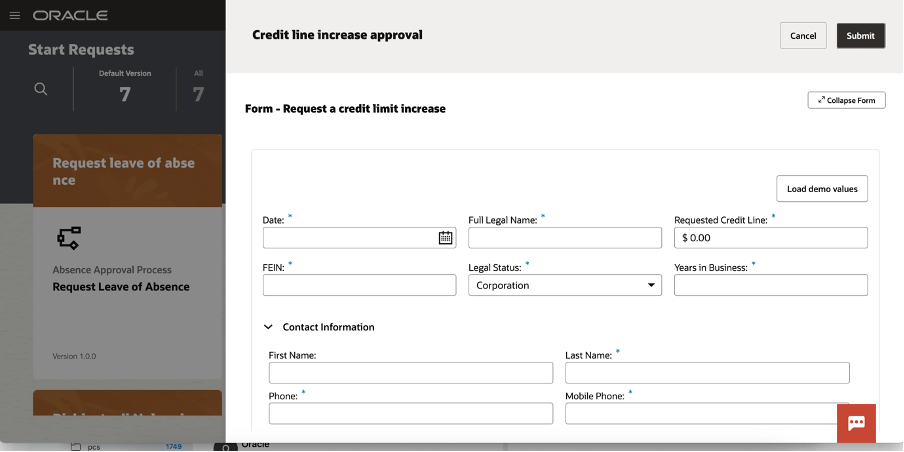
You can now start a new request and the web application will appear to you, something like that one here included:
You can load demo values to speed up the test so to quickly see the outcomes of the execution
A new item is now available to be worked by the assignee approving, rejecting, … all the actions that the human workflow will be configured for the specific user, group or application role
As we know, OPA can be used to support business processes to build “system 2 system” or “system 2 human” implementations and when the User Interface is required to interact with the running process you can also modify or extend the web UI leveraging the powerful features to adapt your web page, embedding basic and advanced controls so to drive the business user and simplifying his job reducing errors due to wrong data input
Try it by yourself… it’s a very good accelerator!!
It’s very interesting feature what recently delivered with OCI Process Automation.
It’s possible now to upload in your workflow a document such a passport, driver license, … documents from where it’s possible to automatically extract data.
No more manual procedures but everything managed by the solution to automate business processes.
This is a meaningful improvement of the OCI offering highlighting synergies and native integration among the big number of OCI services available in each OCI region of the world.
Artificial Intelligence is today the most relevant technology from which we can take advantage in simplifying our lifestyle, reducing time with bureaucracy, and getting a benefit from other several new services before unimaginable.
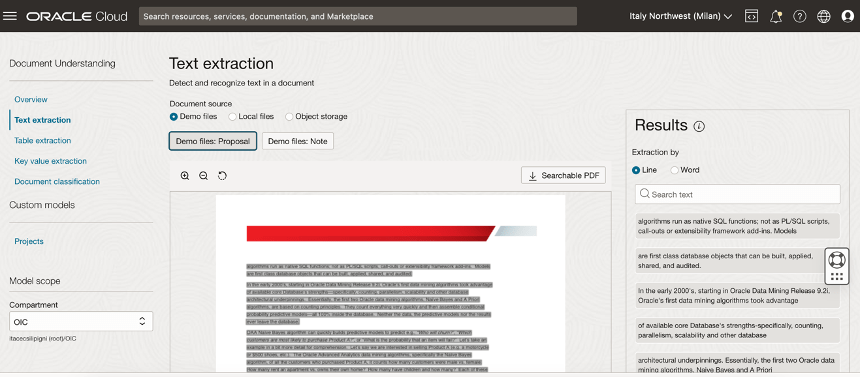
Oracle Cloud Infrastructure (OCI) Document Understanding, what natively integrated in Oracle Process Automation, is an Oracle AI service that enables developers to extract text, tables, and other key data from document files through APIs and command line interface tools. With OCI Document Understanding, you can automate tedious business processing tasks with prebuilt AI models and customize document extraction to fit your industry-specific needs.
You can easily identity this service navigating the OCI Console in the Analytics & AI section.
With this service, you can upload documents to detect and classify text and objects in them. You can process individual files or batches of documents using the ProcessorJob API endpoint.
The following pre-trained models are supported and offering support for different pre-trained model like:
Optical Character Recognition (OCR)
Text extraction
Key-value extraction
Table extraction
Document classification
Optical Character Recognition (OCR) PDF
In your daily life, how many times you need to show your passport, your driver license, or your health insurance card to start a new request?
Some examples are:
Renting a car
Accessing the hospital to do triage
Medical checkup in healthcare
Hotel check-in
…
This is the reason why today Oracle can offer this added value in his Cloud offering… to simplify your daily activity, to make your life better.
A simple process, as I said before, can be that one about the “Car Rental”. Trying to imagine a human workflow behind, we can think about a BPMN process used to manage every step where for example an approval is required.
We can also imagine, not necessarily a process behind but simply the need to upload some info or data which need to be sent to other applications or database so that OPA can be used to easily configure a webpage from where it’s possible to upload data into an Oracle Database using its REST adapter or leveraging the DB adapter included in Oracle Integration Cloud Enterprise Edition (which includes OCI Process Automation).
I have tried to imagine a “Car Rental” process designing a step by step process for example when a long term rental is requested and its acceptance needs to be approved
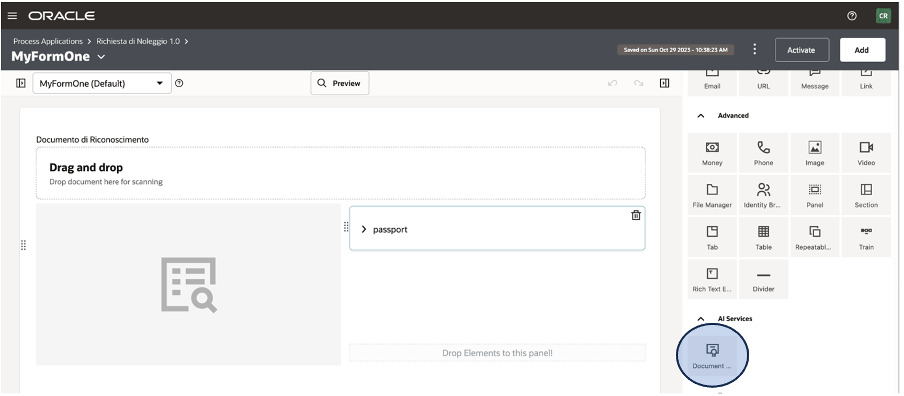
As you can see below, when you design your WebForm from OCI OPA Console you can find on the right side, included in the activities section, the new icon about the AI Document Understanding.
This icon can be dragged & dropped into your canvas to model the web UI as you prefer and need.
It’s a pre-built integration, so you don’t need to think about REST invocation or similar. Everything is pre-configured for you and then you can easily use it without coding or similar stuff.
Once the process is implemented (here a quick overview how to do it), you can enable this one for production purposes
The operator can use the web UI to start a new request, clicking on the pre-defined process and/or including the new application in a web portal or into the Oracle SaaS springboard in according to the specific process.
Once the operator has identified the right process, clicking on the “Nuova Richiesta di Noleggio”, the webform appears to accept the required info.
If, AI Document understanding, has been properly configured, the end user can upload the image of the passport, or other provided documentation, so to start the automatic data acquisition
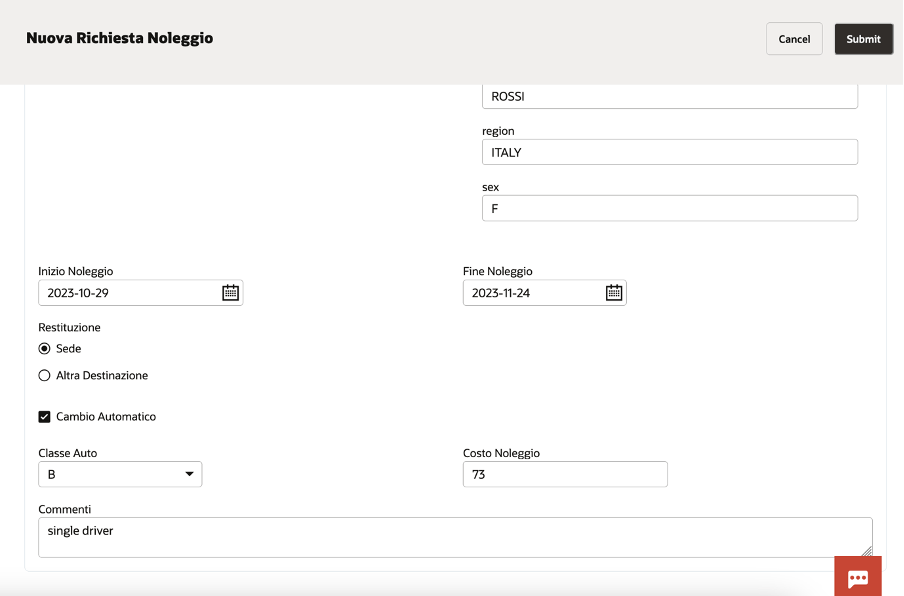
In a while, you can see how automatically all personal data appear on the right side of the page, filling the right field.
You can, of course, add other info to enrich the information required … something like below included. The web UI is highly customizable, and you can build your own web page as the business requires.
In this way, the desk operator can scan your documents and with a simple click, uploading the image, it’s possible to collect all the required information without huge effort taking advantage of:
Less time for data entry
Less errors for manual activities (i.e. reading passport and typing them)
Better and quicker customer experience
I encourage you to test it by yourself to personally understand how much it’s easy to do it. A very low effort to improve processes introducing in your business innovation, efficiency, and automation.
The below public documentation will give you step by step instructions what needs to be done to protect OIC from malicious and unwanted internet traffic with OCI WAF (Oracle Cloud Infrastructure Web Application Firewall).
A while back I witnessed a Terraform presentation where a subnet’s IPv4 CIDR block was constructed from a parent VCN by invoking a Hashicorp function called cidrsubnet. This function is very useful because it can save time when you have multiple VCNs in your Terraform code. And it is universal, it can be used when there are several concurrent Terraform providers in the same code.
The function’s format is like this: cidrsubnet(prefix, newbits, netnum).
The prefix field is for the VCN CIDR. You can enter a variable in the prefix field. For example cidrsubnet(var.vcn_cidr, 8,1). Let’s say that the VCN CIDR is 10.0.0.0/16, then the value of var.vcn_cidr is 10.0.0.0/16. So, the function looks like this: cidersubnet(“10.0.0.0/16”,8,1).
The newbits value is the number of digits that you will be adding to the actual CIDR value. 16 + 8 = 24, so the subnet will be a /24 subnet.
The netnum value is for completing the actual subnet, and it depicts the “raw” decimal number of the binary portion of the subnet side of the CIDR, in this case is the third octet. The result for the subnet is 10.0.1.0/24.
This example illustrates it better:
cidrsubnet(“10.1.2.0/24”, 4, 15). 24+4 = 28, so the subnet will be a x.x.x.x/28 subnet.
The value in the netnum field will help us identify which of the 16 possible /28 subnets we’re creating. On a /28 subnet, in the fourth octet, the four left bits are the subnetwork bits. Convert 15 (the netnum value) to binary and you will get 1111. Place it on the subnetwork side of the fourth octet and you will get 1111|0000. The decimal value of the whole octet is 240, therefore the subnet is 10.1.2.240/28.
With the recent announcement from Gartner Magic Quadrant Report, it’s no surprise that Oracle Integration Cloud (OIC) is the Leader in Data Integration.
As a result, we have seen an explosion of demand for the service over the past 12 months. What we have seen is that many customers have been reaching out to my colleague @lsiliver and myself across APAC (Asia Pacific) and we are seeing that OIC customers want observability and deeper insights into their integration processes, data pipelines, workflows, automation and services.
So, in this blog post, we will walk you through this scenario on how you can get started on achieving this.
Many customers may not be aware but we already have existing native integration capabilities for OIC with our Observability & Management platform.
If you’re running workloads in Oracle Cloud Infrastructure (OCI) then it’s likely you’ll be familiar with Virtual Cloud Network (VCN) resources such as Subnets, Route Tables, Gateways etc. These software defined components allow you to build networks in OCI for you to deploy and run your workloads.
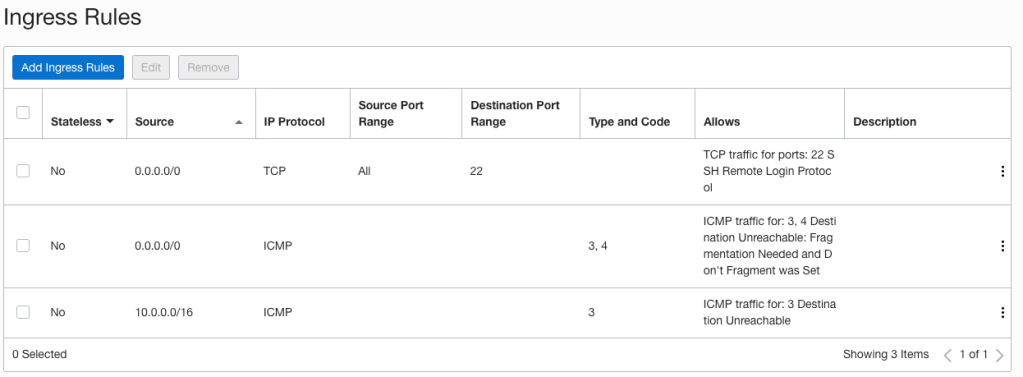
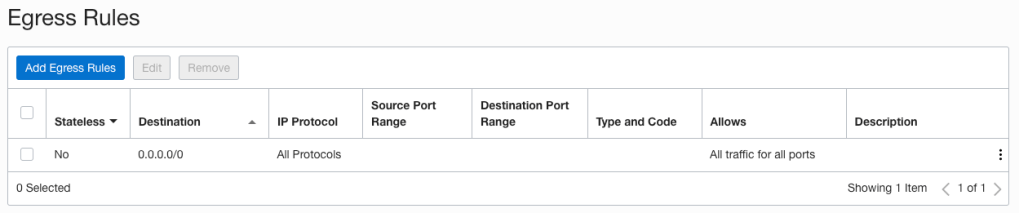
Oracle has documentation that explains VCN access and security features which include things like Security Rules, Security Zones, Local and Network Firewalls, and IAM policies. Security rules are made up of Security Lists and Network Security Groups (NSG’s) and are a foundational element of every VCN and Subnet that you create. They define what traffic is allowed in and out of your subnets and what hosts can talk to one another. When you create a subnet a Security List is automatically created with some default rules:
Default Security List Ingress RulesDefault Security List Egress Rules
When it comes to implementing network access controls, you can use Security Lists, Network Security Groups or both. They are virtual firewall features that control traffic at the packet level. I’ll be covering Network Security Group reviews in a later post as I want to focus on Security Lists, specifically how you can easily review and validate rules to ensure they align with your workload, organisational, security and compliance requirements.
In my previous post I explained how you can use Let’s Encrypt and Oracle Cloud Infrastructure (OCI) serverless functions to obtain a publicly signed SSL certificate, and automatically manage its renewal lifecycle. The solution works as expected; I have a Let’s Encrypt certificate for my website automatically renewing 30 days before expiry. If you haven’t read my previous post I’d recommend taking a look before following the setup outlined below as it covers how the solution works, and some prerequisites.
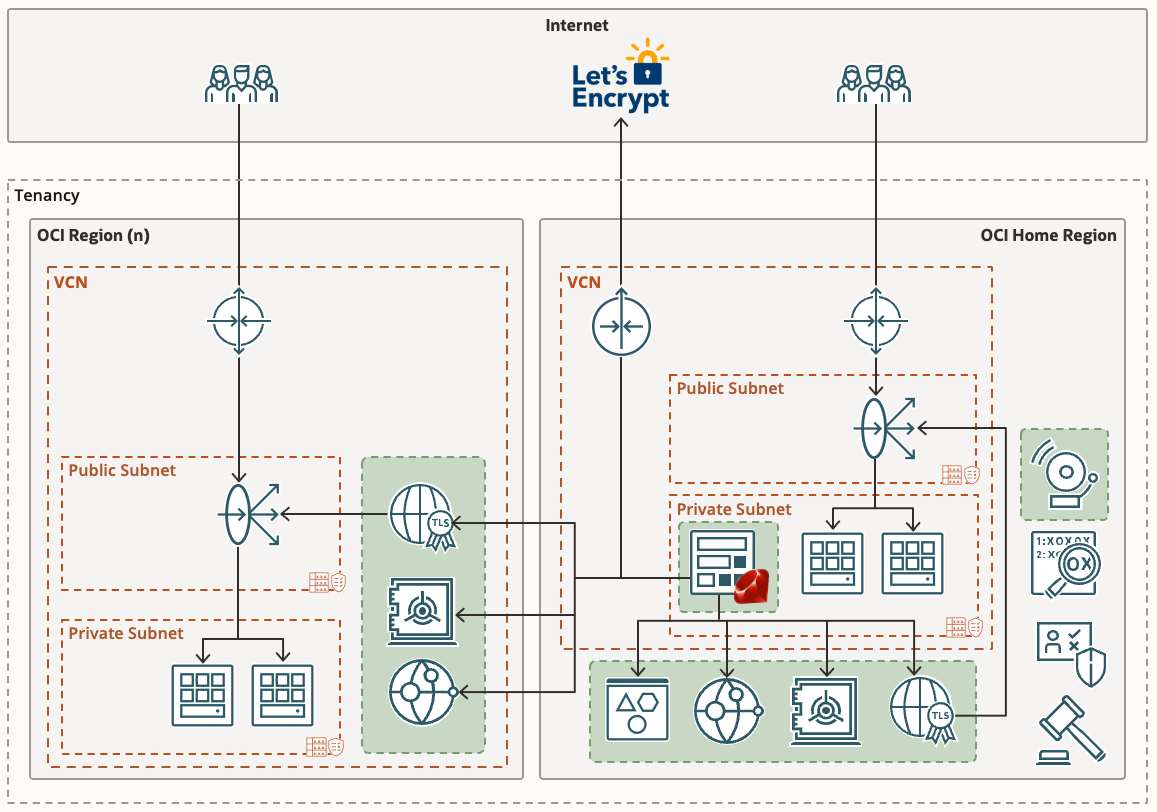
Having multiple workloads running in various OCI regions I started thinking about a more elegant way to provision certificates across multiple regions. Certificates stored in the certificate service are only available to resources in the same region and would have required a function to be deployed in each region, and for each SSL certificate required.
I’ve since updated the solution to address this requirement. It is now possible to provision certificates across multiple OCI regions using a single OCI Function application. I’ve also taken the opportunity to implement other features such as:
Loading a list of certificates you want to manage from a JSON file stored in Object Storage.
Adding support for wildcard SSL certificates.
Adding support for Subject Alternative Names (SAN) in addition to the CN name.
Adding support for the use of DNS zones and Vaults that reside in different regions to the OCI Function.
Adding support to specify which vault, and region to use for a given certificate ensures that workloads with strict cryptographic key material requirements can still benefit from this solution.
If you’ve already followed the instructions from my previous post, the solution will continue to work as described. The only limitation being that it’ll only work for a single certificate. By following the steps below you can easily upgrade to issuing multiple certificates. If you haven’t set anything up yet that’s also fine as I’ll be covering the full install again here.








 RedThunder.Blog