Your Place or Ours

Sometimes you just want to build a local environment on your own equipment simply because it’s quick and easy. But you soon realise that other people need access and resources get a bit tight (memory, CPU, etc). That’s when it makes sense to move it from your place into the cloud.

Just recently I realised how useful Oracle Virtual Box’s new export feature is for migrating local VMs into Oracle Public Cloud Infrastructure – Compute Classic. Oracle Virtual Box’s new export formats give me the ability to easily migrate Images to the Oracle Public Cloud where I can scale my environments as required.

Earlier this week I was building a new Oracle Identity and Access Management development environment on my laptop. This worked well from an initial build and configure perspective but there comes a time when I need to make this environment available to my Developers, Testers and other stakeholders. Running this image continuously on my laptop quickly becomes impractical even for development teams.
Continue reading “Your Place or Ours”

Teaching How to use Terraform to automate Provisioning of Oracle API Platform

Previously, I showed how to use Terraform and PSM CLI to spin up a “Build Server” and use it to provision Oracle Integration Cloud (OIC) environments. You can find this blog here.

In this blog I am going to show you how to do the same, but to provision Oracle API Platform environments.

The approach that I will be following is the same:

Continue reading “Teaching How to use Terraform to automate Provisioning of Oracle API Platform”

Teaching How to use Terraform to automate Provisioning of Oracle Integration Cloud (OIC)

In a previous blog, I explained how to treat your Infrastructure as Code by using technologies such as Vagrant and Terraform in order to help automate provisioning and decommissioning of environments in the cloud. Then, I evolved those concepts with this other blog, where I explained how to use Oracle PaaS Service Manager (PSM) CLI in order to provision Oracle PaaS Services into the Cloud.

In this blog, I am going to put together both concepts and show how simply you can automate the provisioning of Oracle Integration Cloud with Terraform and PSM CLI together.

To provision a new PaaS environment, I first create a “Build Server” in the cloud or as my boss calls it a “cockpit” that brings all the required bells and whistles (e.g. Terraform, PSM CLI, GIT, etc) to provision PaaS environments. I will add all the tooling it requires as part of its bootstrap process. To create the “Build Server” in the first place, I am using Vagrant + Terraform as well, just because I need a common place to start and these tools highly simplify my life. Also, this way, I can also treat my “Build Server” as “infrastructure as code” and I can easily get rid of it after I built my target PaaS environments and save with that some bucks in the cloud consumption model.

Once I build my “Build Server”, I will then simply git clone a repository that contains my scripts to provision other PaaS environments, setup my environment variables and type “terraform apply”. Yes, as simple as that!

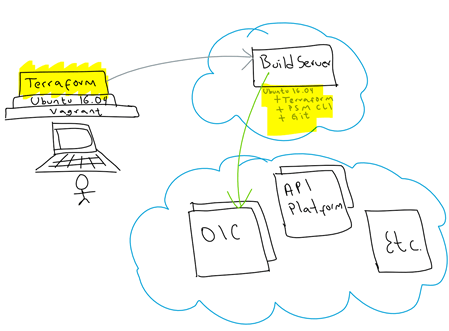
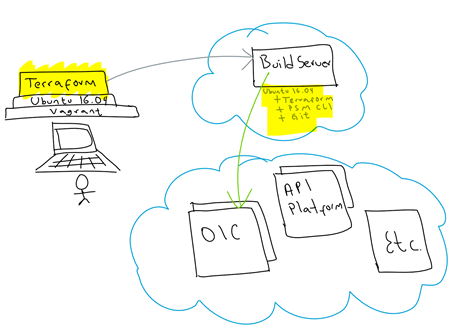
This is a graphical view of what I will be doing:

Continue reading “Teaching How to use Terraform to automate Provisioning of Oracle Integration Cloud (OIC)”

Teaching How to use Oracle Load Balancer as a Service (LBaaS) to front end your APIs

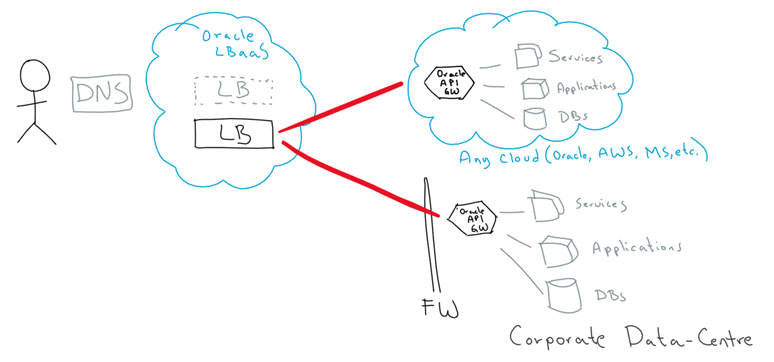
In this blog, I am going to show you how to configure Oracle Load Balancer as a Service (LBaaS) to proxy/redirect traffic into multiple APIs. For the sake of this example, I am going to point to running APIs hosted on my Oracle API Gateway, as well as running on a 3rd party Cloud provider. However, you can use Oracle LBaaS to proxy traffic to any HTTP or HTTPS endpoint(s).

In this example, I am going to consume an existing API that I built some time ago that when invoked returns a random joke. In order to test it in high availability mode, I am also going to configure yet another “jokes” API that will serve as a redundant backend endpoint/API.

This is the high-level view of how Oracle LBaaS can easily enable multiple proxy/redirections to backend APIs hosted across various places:

Continue reading “Teaching How to use Oracle Load Balancer as a Service (LBaaS) to front end your APIs”

Teaching How to use Terraform to Manage Oracle Cloud Infrastructure as Code

Infrastructure as Code is becoming very popular. It allows you to describe a complete blueprint of a datacentre using a high-level configuration syntax, that can be versioned and script-automated. This brings huge improvements in the efficiency and reliability of provisioning and retiring environments.

Terraform is a tool that helps automate such environment provisioning. It lets you define in a descriptor file, all the characteristics of a target environment. Then, it lets you fully manage its life-cycle, including provisioning, configuration, state compliance, scalability, auditability, retirement, etc.

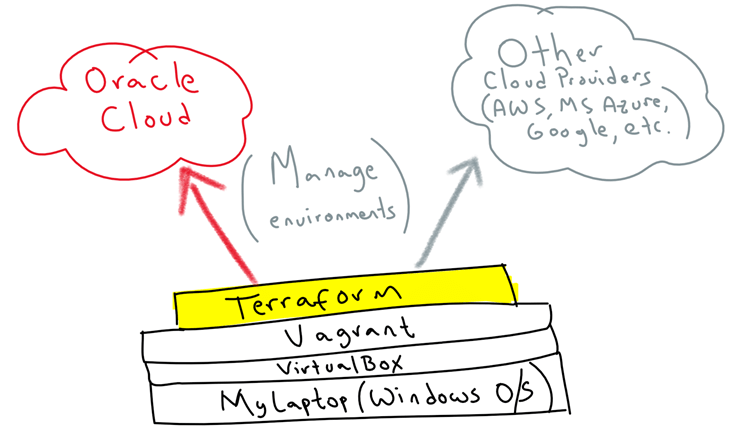
Terraform can seamlessly work with major cloud vendors, including Oracle, AWS, MS Azure, Google, etc. In this blog, I am going to show you how simple it is to use it to automate the provisioning of Oracle Cloud Infrastructure from your own laptop/PC. For this, we are going to use Vagrant on top of VirtualBox to virtualise a Linux environment to then run Terraform on top, so that it doesn’t matter what OS you use, you can quickly get started.

This is the high-level idea:

Continue reading “Teaching How to use Terraform to Manage Oracle Cloud Infrastructure as Code”

Teaching how to use Vagrant to simplify building local Dev and Test environments

The adoption of Cloud and modern software automation, provisioning and delivery techniques, are also requiring a much faster way to simplify the creation and disposal of Dev and Test environments. A typical lifespan of a Dev environment can go from minutes to just a few days and that’s it, we don’t need it anymore.

Regardless of whether you use a Windows, Apple or Linux based PC/laptop, virtualisation of environments via Virtual Machines, help with this problem, besides it leaves your host OS clean. Vagrant takes VMs to the next level, by offering a very simple, lightweight and elegant solution to simplify such Virtual Machine life-cycle management, easy way to bootstrap your software/libraries requirements and sharing files across your host and guest machines.

In this blog I am going to show you how to get started with Vagrant. You will find it a very useful to quickly create and destroy virtual environments that help you develop and test your applications, demystify a particular topic, connecting to cloud providers, run scripts, etc.

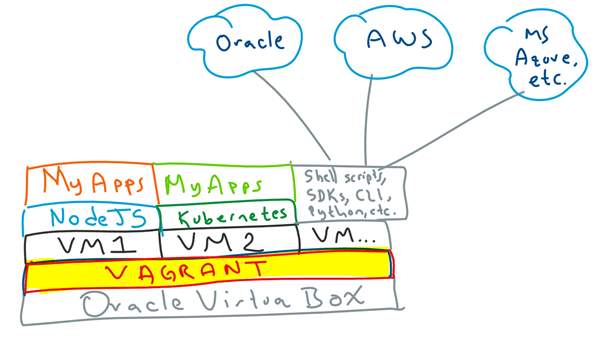
For example, typical scenarios I use Vagrant for include: Dev and Test my NodeJS Applications, deploy and test my Applications on Kubernetes, run shell scripts, SDKs, use CLIs to interact with Cloud providers e.g. Oracle, AWS, Azure, Google, etc. All of this from my personal laptop, without worrying about side effects, i.e. if I break it, I can simply dispose the VM and start fresh.

I can assure you that once you give it a go, you will find it hard to live without it. So, let’s wait no more…

Continue reading “Teaching how to use Vagrant to simplify building local Dev and Test environments”

Exploring GitHub Docker Hub and OCCS Part 4

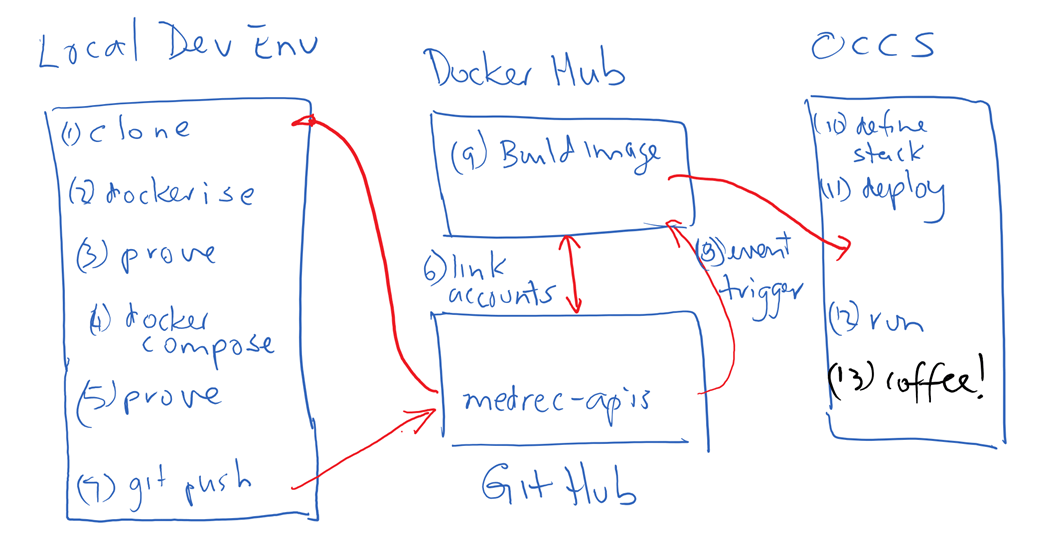
In my previous post in this series I covered linking GitHub and DockerHub and configuring the environment such that a build of a Docker image was triggered on updates to GitHub. In this final post of the series I will take you through the steps to pull the image from Docker Hub into OCCS in order to run the application. It should be noted that the image built on Docker Hub in my example is only the web tier that contains my Node.js project (APIs and SwaggerUI). The MongoDB component of my OCCS Stack is pulled directly from Docker Hub when my Stack containing the Web Tier and Database Tier services is deployed to OCCS. Continue reading “Exploring GitHub Docker Hub and OCCS Part 4”

Exploring GitHub DockerHub and OCCS Part 3

In my previous post I described how I created a stack definition including my Node.js web application and a MongoDB service using docker-compose. In this article I will describe the steps I took to link my GitHub and Docker Hub accounts in order to automatically build a docker image triggered by a git push command.

Trigger a Build of the MedRec API Docker Image on Docker Hub

Combining internet / cloud based services such as GitHub and Docker Hub allows developers to experience productivity gains without having to fund a local server to provide this capability. I wanted to explore and experience this for myself.

Link Docker Hub and Git Hub accounts

As I didn’t have a docker account for my user I pointed my browser to docker hub … https://hub.docker.com/ and clicked the SignUp option. Continue reading “Exploring GitHub DockerHub and OCCS Part 3”

Exploring GitHub, DockerHub and OCCS Part 2

In my previous post I detailed how I Dockerised the MedRec app. In this post I will show how I added MongoDB and defined a stack using Docker-Compose.

Add MongoDB layer using Docker-Compose

According to the official docker documentation ;

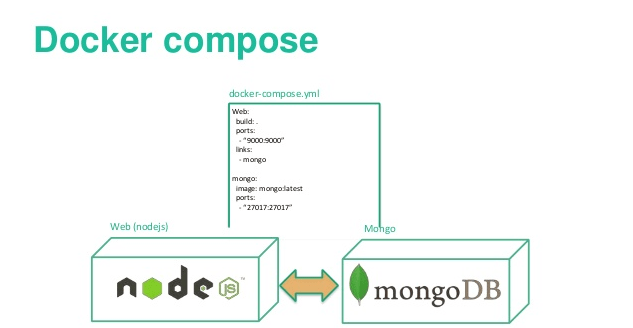
“Compose is a tool for defining and running multi-container Docker applications. With Compose, you use a Compose file to configure your application’s services. Then, using a single command, you create and start all the services from your configuration. ”

A single command to create and start all the services in a configuration sounded pretty good to me. I definitely was keen on exploring docker-compose.

Add a docker-compose.yml file

Having proved that my web application runs up, I now need to address the persistence layer. The above Dockerfile contains the steps to create the required runtime platform for my node app, and installs the node application and package dependences (as specified in the package.json) file by doing the npm install. However if I tried to do a GET or a PUT my app will fail as it won’t find a MongoDB inside my container. I therefore still need a MongoDB somewhere in my environment to hold my application data. Continue reading “Exploring GitHub, DockerHub and OCCS Part 2”

Exploring GitHub Docker Hub and OCCS Part 1

In my previous post in this series I provided an Introduction describing the high level steps I planned to take.
In this post I will walk through the detailed steps to Dockerise the MedRec application.

Dockerise the MedRec APIs

Git clone the project repository

I used my Windows Surface Pro-4 with Oracle VM Virtual Box installed to host my development VM. I managed to source a VBox image that already had Ubuntu 16.04 and Docker installed so that helped get me started. In my development environment on my laptop, I created a directory under my home directory named gitprojects.
I cd into that directory.

cd gitprojects
Continue reading “Exploring GitHub Docker Hub and OCCS Part 1”