Certificate expiry monitoring in Oracle Cloud Infrastructure

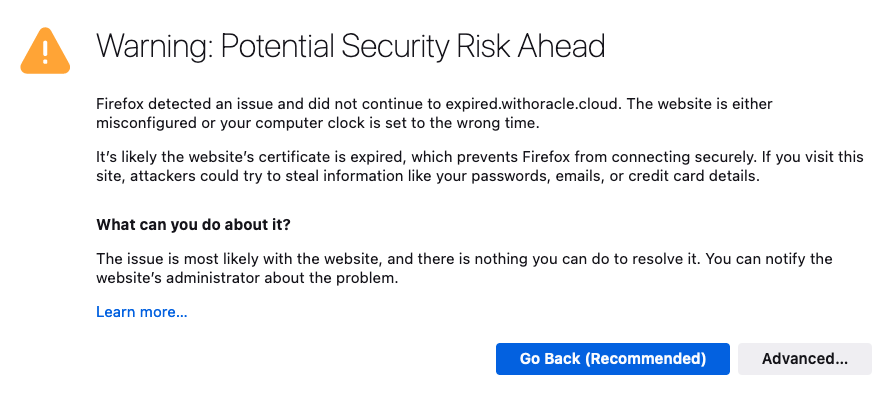
I’m sure we’ve all experienced it, either as a user, or as a system administrator. You know, that important SSL certificate everyone forgot about so didn’t renew, and now has expired?

When an SSL/TLS certificate expires it can create a number of problems, including:

  • Users’ web browsers will display warning messages, indicating that the website’s connection is not secure. This can lead to a loss of trust and deter user engagement.
  • API clients will often refuse to establish a connection if an SSL certificate is not valid potentially disrupting crucial data exchanges and integrations.
  • Search engines may flag the site as unsafe, leading to a drop in rankings and reduced organic traffic.

Also regularly encountering certificate warnings conditions users to accept future certificate errors, which makes them more likely to accept an SSL certificate warning should they be targeted in a Man In The Middle Attack.

To avoid these issues, it’s important to have enough advance warning that a certificate is going to expire so you can obtain a new one, install, and test it thoroughly.

If you’re already using Domain Validated (DV) certificates, such as those issued by Let’s Encrypt you might want to consider my automated Let’s Encryption Solution. This solution automatically handles the entire certificate lifecycle using serverless functions inside OCI. For those who prefer to bring their own certificates, these can be imported into OCI’s certificate service.

As at June 2023, certificate expiry monitoring in OCI is primarily focused on certificates associated with Load Balancers. To improve monitoring, I’ve developed a serverless solution that examines all certificates expiration dates. The solution emits logs and sends email notifications, also allowing for customisable lead time to align with your organisation’s certificate procurement process. Logs can also be forwarded to your SIEM solution if required.

Continue reading “Certificate expiry monitoring in Oracle Cloud Infrastructure”
#BuildWithAI 2021 – Another Step

Last weekend (from Friday 29th Oct to Tuesday 2nd Nov), was the #BuildWithAI Hackathon 2021 where participants, mentors, sponsors and organisers gathered together to solve real world challenges with AI. This event does not standalone. In a world full of change, this (from my perspective) started last year in the #BuildWithAI Hackathon 2020 and continued to build.

This article is about the event but the event itself is just “Another Step”.

Continue reading “#BuildWithAI 2021 – Another Step”

Autonomous Digital Assistant to Human Agent seamless Handoff

In earlier articles, I discussed Autonomous Digital Assistantprovisioning a Digital Assistant, building skills and making it multi-lingual. In this post, I would like to take the discussion forward to address certain scenarios where there is a need for Human Intervention when the Bot cannot handle the conversation and instead redirect the chat to a human agent.

Continue reading “Autonomous Digital Assistant to Human Agent seamless Handoff”

Exploring GitHub Docker Hub and OCCS Part 4

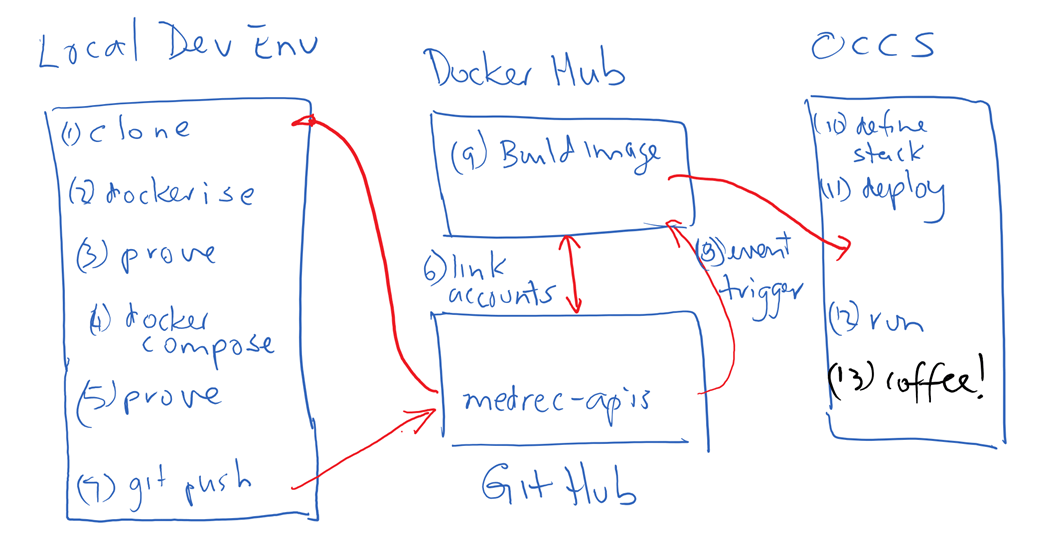
In my previous post in this series I covered linking GitHub and DockerHub and configuring the environment such that a build of a Docker image was triggered on updates to GitHub. In this final post of the series I will take you through the steps to pull the image from Docker Hub into OCCS in order to run the application. It should be noted that the image built on Docker Hub in my example is only the web tier that contains my Node.js project (APIs and SwaggerUI). The MongoDB component of my OCCS Stack is pulled directly from Docker Hub when my Stack containing the Web Tier and Database Tier services is deployed to OCCS. Continue reading “Exploring GitHub Docker Hub and OCCS Part 4”

Exploring GitHub DockerHub and OCCS Part 3

In my previous post I described how I created a stack definition including my Node.js web application and a MongoDB service using docker-compose. In this article I will describe the steps I took to link my GitHub and Docker Hub accounts in order to automatically build a docker image triggered by a git push command.

Trigger a Build of the MedRec API Docker Image on Docker Hub

Combining internet / cloud based services such as GitHub and Docker Hub allows developers to experience productivity gains without having to fund a local server to provide this capability. I wanted to explore and experience this for myself.

Link Docker Hub and Git Hub accounts

As I didn’t have a docker account for my user I pointed my browser to docker hub … https://hub.docker.com/ and clicked the SignUp option. Continue reading “Exploring GitHub DockerHub and OCCS Part 3”

Exploring GitHub, DockerHub and OCCS Part 2

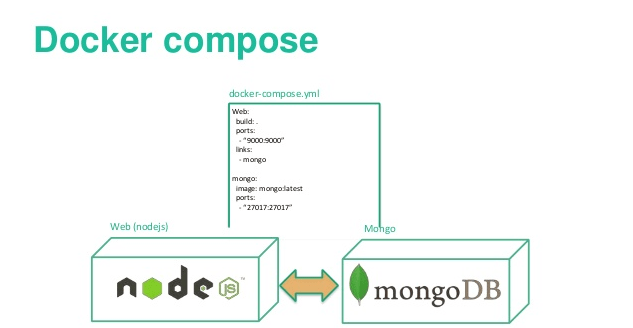
In my previous post I detailed how I Dockerised the MedRec app. In this post I will show how I added MongoDB and defined a stack using Docker-Compose.

Add MongoDB layer using Docker-Compose

According to the official docker documentation ;

“Compose is a tool for defining and running multi-container Docker applications. With Compose, you use a Compose file to configure your application’s services. Then, using a single command, you create and start all the services from your configuration. ”

A single command to create and start all the services in a configuration sounded pretty good to me. I definitely was keen on exploring docker-compose.

Add a docker-compose.yml file

Having proved that my web application runs up, I now need to address the persistence layer. The above Dockerfile contains the steps to create the required runtime platform for my node app, and installs the node application and package dependences (as specified in the package.json) file by doing the npm install. However if I tried to do a GET or a PUT my app will fail as it won’t find a MongoDB inside my container. I therefore still need a MongoDB somewhere in my environment to hold my application data. Continue reading “Exploring GitHub, DockerHub and OCCS Part 2”

Exploring GitHub Docker Hub and OCCS Part 1

In my previous post in this series I provided an Introduction describing the high level steps I planned to take.
In this post I will walk through the detailed steps to Dockerise the MedRec application.

Dockerise the MedRec APIs

Git clone the project repository

I used my Windows Surface Pro-4 with Oracle VM Virtual Box installed to host my development VM. I managed to source a VBox image that already had Ubuntu 16.04 and Docker installed so that helped get me started. In my development environment on my laptop, I created a directory under my home directory named gitprojects.
I cd into that directory.

cd gitprojects
Continue reading “Exploring GitHub Docker Hub and OCCS Part 1”

Exploring GitHub, DockerHub and OCCS – Introduction

As part of our MedRec API playpen initiative we had already developed some REST API’s using Node.js and leveraged MongoDB running on Oracle IaaS as the persistence layer. . This post describes what I did to dockerise the MedRec API application and eventually run it on the Oracle Container Cloud Service (OCCS).

The APIs have already been made available for interested parties to interact with via SwaggerUI. Of course developers could develop their own code (or any REST client) to interact with them. As a team we used a combination of the Oracle Developer Cloud Service (Git repository, Issue Tracker, Build Server etc) and also the public GitHub to provide public access to our project code. As the source code for the Node.js project containing the API’s was pushed to GitHub I simply did a clone of the Node application code in order to download and run it locally (MedRec API tutorials available here).

The application ran well enough on my local laptop which running Ubuntu 16.04, however I really wanted to be able to try to run the app and MongoDB as a Docker image/stack on my laptop. After I had the application successfully “Dockerised”, then I planned to deploy my application stack to the Oracle Container Cloud Service. I also wanted to explore the use of the GitHub / Docker Hub integration to build my image on Docker Hub, and then from within the Oracle Container Cloud Service (OCCS). With the application image available on Docker Hub, I could then pull my image from that source in order to run it up on OCCS.

A good blog can really help bring you up to speed quickly and help overcome inertia to get you started and I would like to acknowledge the help that Mauricio Payetta’s blog provided me.

In this series of blog posts I plan to retrace what I did during my self-learning. Continue reading “Exploring GitHub, DockerHub and OCCS – Introduction”

Demystifying the Oracle SOA Suite Cloud Service

Recently Carlos and I were given the opportunity to explore the capabilities of the recently released Oracle SOA Cloud Service (SOACS), and to document the steps required to get started with the service.

In this series of blog posts we have put together a record of what we did, and our key takeaways from what we learned during the process in the expectation that it may help others new to the Oracle Public Cloud and specifically the Oracle SOA Suite Cloud Service.

Continue reading “Demystifying the Oracle SOA Suite Cloud Service”