Connecting JDeveloper to an Oracle Autonomous Database SOA MDS Repository: A Troubleshooting Guide

Recently, while assisting a customer with a high-priority issue, I encountered a connection problem in my personal Oracle SOA Suite environment. As part of a replication exercise, I needed to connect my JDeveloper instance to an Oracle SOA Metadata Services (MDS) repository, which is a critical component for managing shared artifacts in a SOA environment. The unexpected error I received had no clear solution on internal or Oracle support forums, so I’m sharing the solution here to help fellow SOA developers.

My environment for this exercise was Oracle SOA Suite 12.2.1.4, backed by an Oracle Autonomous Database (ATP) 19c.

The Problem:

I was unable to establish an MDS repository connection from JDeveloper, which is a prerequisite for deploying shared SOA artifacts like x-ref, XSD, XSLT, and WSDL files. The specific error message I received was:
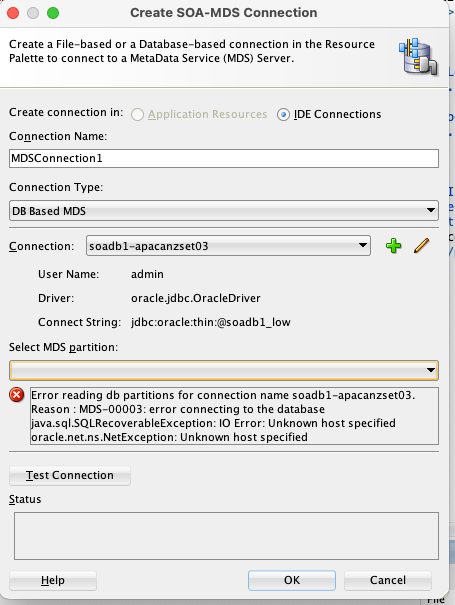
  • Error reading db partition for connection name soadb1-apacanzset03
  • Reason : MDS-00003: error connecting to the database
  • Java.sql.SQLRecoverableException: IO Error: Unknown host specified]

The Solution:

The root cause of this error lies in the secure nature of the Oracle Autonomous Database. Unlike standard databases, ATP requires a Wallet file for secure connections. The Wallet contains crucial files like tnsnames.ora, truststore.jks, and keystore.jks, which are necessary for JDBC connections.

Steps to Configure the Connection:

  1. Download the ATP Wallet: First, download the Wallet.zip file from your ATP console.
  2. Unzip the Wallet: Extract the contents of the zip file to a secure, easily accessible location.
  3. Create new folders:  create folder structure “network>>admin” folder inside wallet folder and move tnsname.ora file into this location
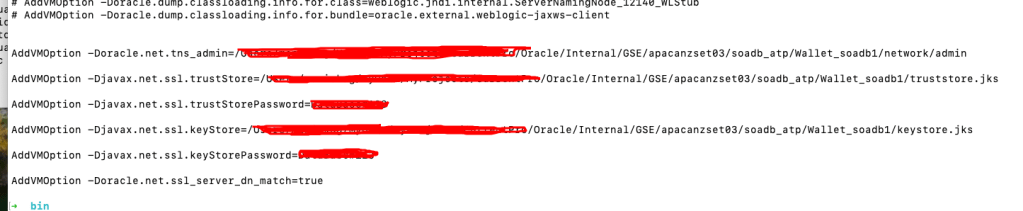
  4. Configure JDeveloper: Next, you must update the jdev.conf file, located at $Middleware_HOME/jdeveloper/jdev/bin/, by adding the following Java options. These options point JDeveloper to the security files within your unzipped Wallet.
    • AddVMOption -Doracle.net.tns_admin=<Path to unzipped Wallet folder>
    • AddVMOption -Djavax.net.ssl.trustStore=<Path to truststore.jks file>
    • AddVMOption -Djavax.net.ssl.trustStorePassword=<your wallet password>
    • AddVMOption -Djavax.net.ssl.keyStore=<Path to keystore.jks file>
    • AddVMOption -Djavax.net.ssl.keyStorePassword=<your wallet password>
    • AddVMOption -Doracle.net.ssl_server_dn_match=true
  • Restart JDeveloper: Restart JDeveloper to apply the new configuration settings.
  • Create a Database Connection: Navigate to the Database navigator, create a new connection using the <soadbname_MDS> user, and test the connection.
  • Create an MDS Connection: Finally, go to Windows > Resources > New SOA MDS Connection. Specify a name, select “DB based MDS,” choose the database connection you just created, and specify “soa-infra” as the partition. Test the connection, and it should now be successful.
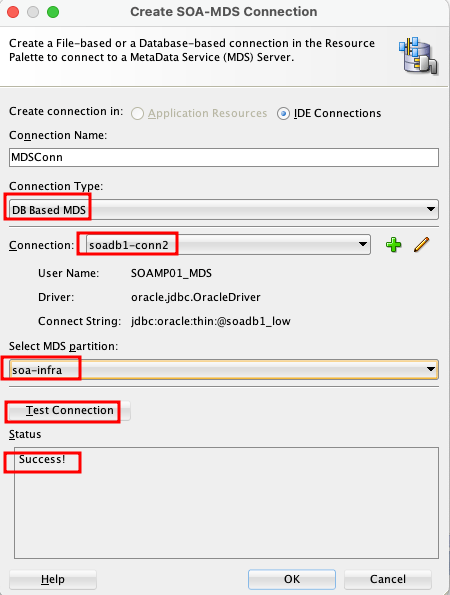
This process ensures that JDeveloper can securely authenticate and connect to your ATP-based MDS repository, allowing you to manage and deploy your design time MDS artefacts to Server side MDS artifacts.
OCI Application Performance Monitoring for PeopleSoft


The OCI Application Performance Monitoring (APM) service enables administrators to monitor and observe the PeopleSoft web applications.

It provides deep visibility into the application performance from end-user experience down through to the application server requests.

For many customers, the PeopleSoft (PSFT) Application is critical to business operations. With OCI Application Performance Monitoring (APM) service, administrators can:

  • Analyze all end user experience with accessing PeopleSoft web pages.
  • Trace transactions across various components and isolate problems to the impacting application or infrastructure tier.
  • Has ability to drill into application code.
  • Generally, APM tools cannot drill into the SQL code for the PeopleSoft application. This inability occurs is because, the SQL call is performed in the Tuxedo layer. However, OCI APM service offers a unique feature to overcome this limitation. It can perform instrumentation of outbound JOLT calls from WebLogic to Tuxedo. This helps at least understand how much time is spent in this layer.
  • Easily Capture End Username for user sessions without modifying application code
  • Search in context based on PeopleSoft attributes including:
    – Portal Name
    – Portal Object Name
    – and more

Continue reading “OCI Application Performance Monitoring for PeopleSoft”

Decisions and Business Rules in Oracle Integration (OIC) to support an Automation Process Platform

Business rules (later “decisions”) always play a crucial role in a process automation platform

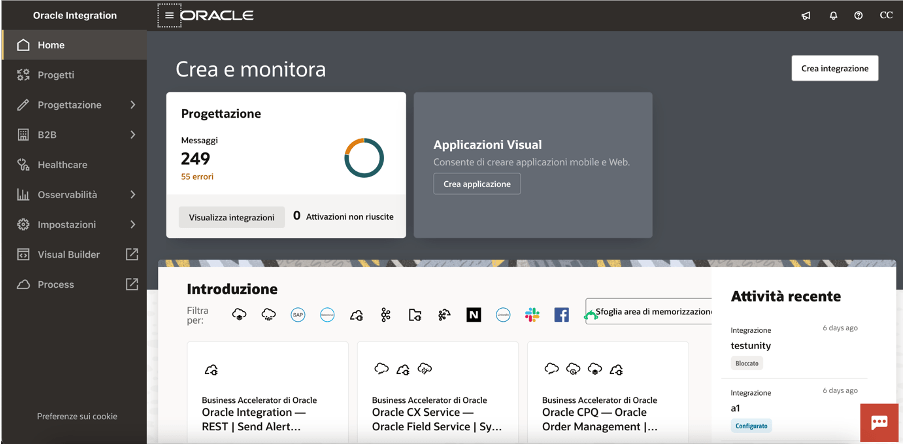
As you probably already know, Oracle Integration (OIC) is a complete business automation platform cloud based, fully Oracle managed, that enables customers to connect their applications and data, automate business processes, and innovate with AI. This is what we define a unique and complete toolkit for integrating and connecting applications and technologies

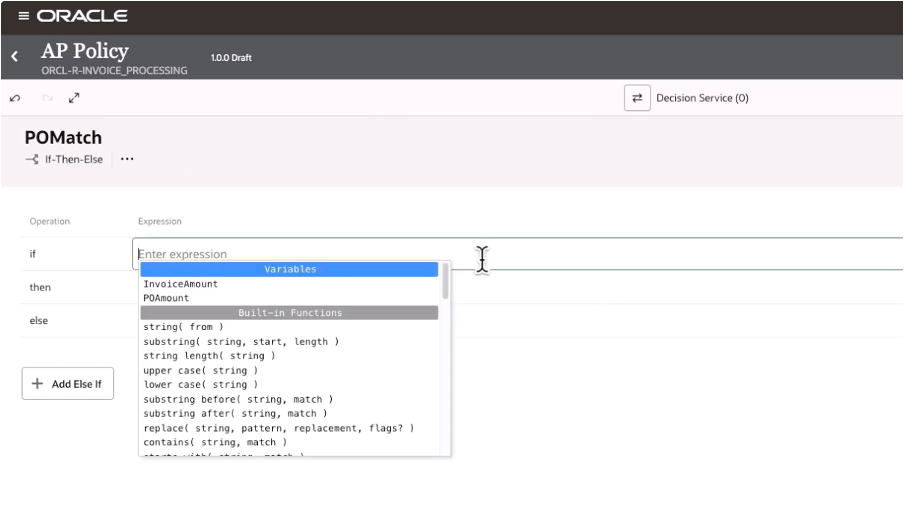
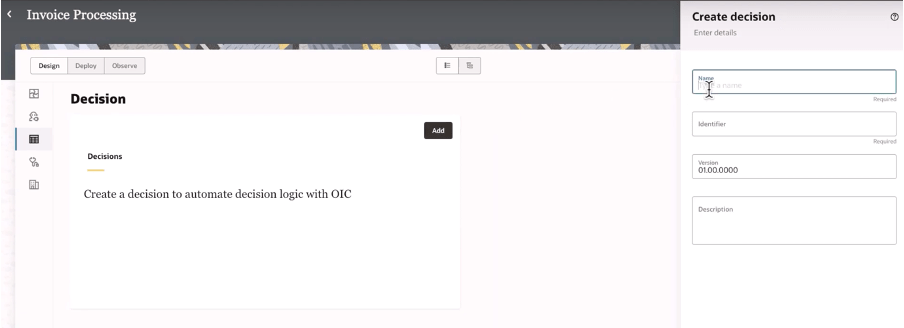
Today, as a new enhancement of this platform, we have the chance to build decision rules directly in integration projects giving you the power of the flexibility and agility in building new automation processes leveraging rules based on “if-then-else” or “decision tables” patterns

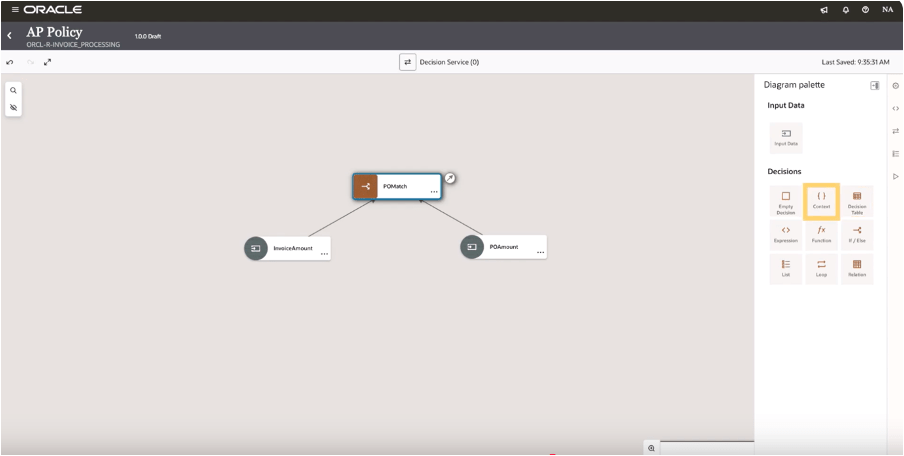
When building your integration projects in OIC, you are now able to add several components so to build your specific implementation leveraging the components you need adding to the project the functionalities like the pure integration flows with connections, robots, B2B, Healthcare and now Decisions, too

Once decisions are added to your project, you can design and later test what you have implemented to verify the correctness of the rules

And selecting the decision type you can design your logic

In this way, decisions allow you to ensure consistency in decision-making throughout the organization. Decisions ensure that the same conditions always lead to the same outcomes, reducing the risk of errors due to subjective or inconsistent judgments. This standardization now extended to all components in OIC, and it’s particularly useful when the same decisions are made across multiple processes helping also the reuse of those rules

Decisions define a clear decision points which can be automated within a process, such as determining eligibility for a loan, assessing the risk level of a transaction, or triggering approvals. Automating these rules you can reduce manual intervention, accelerating processes, and ensuring timely and accurate outcomes.

Consider that “decisions” are typically decoupled from the process logic, meaning they can be modified independently of the core workflow. This makes easier to adjust processes when business requirements change—whether due to new regulations, market conditions, or organizational changes—without needing to re-engineer the entire process. This flexibility helps the business to remain agile and responsive.

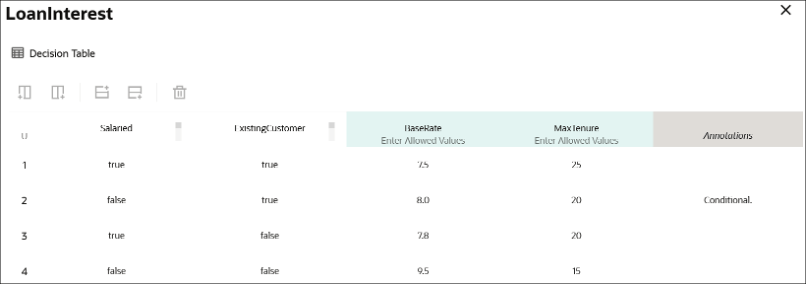
Below a sample just to consider how business rules, via a decision table, can be built leveraging a flexible and easy way to maintain the changes and using a simple and standard browser

A decision table, like that one shown before, can consist of an input expression and several input entries. It is represented as columns within a table. You can use input variables, outputs of other decisions, or built-in functions to define input expressions.

Of course, business rules (decisions) are essential for ensuring that processes are compliant with laws, regulations, and internal policies. For example, in industries such as finance, healthcare, or insurance, where compliance is critical, business rules ensure that processes adhere to the necessary legal requirements. Decisions can be updated when regulations change, ensuring ongoing compliance without the need for manual oversight.

Looking at the decisions use, we can put in evidence and summarize some advantages and especially those ones listed below.

Reusability: you can build your rules once and reuse those ones, gaining efficiency in making & maintaining them with a faster policy change approach without impacting an automation solution. Furthermore you can reuse those from within an integration flow, process workflow or any application

Efficiency: the policy maker doesn’t have to rely upon an integration specialist; he can build and maintain their own policies by themself

Fast policy change: you can change policies quickly without disrupting the areas of an automation solution that’s because you can change policy details independently from the components which use a decision

Now, stay tuned… very soon this feature will be available in GA, and not only Limited Availability, on all OIC instances

In summary:

Decisions and business rules in general enable greater flexibility, reducing operational risks, and improving both internal operations and external customer experience

References:

https://docs.oracle.com/en/cloud/paas/application-integration/

https://docs.oracle.com/en/cloud/paas/process-automation/user-process-automation/model-decisions.html

Deploying OCI APM Service for Optimal EBS Application Observability


The OCI Application Performance Monitoring (APM) service allows administrators to monitor and observe the E-Business Suite web applications.

It provides deep visibility into the application performance from end-user experience down through to the application server requests.

For many customers, the E-Business Suite (EBS) Application is critical to business operations. With OCI Application Performance Monitoring (APM) service, administrators can:

  • Analyze all end user experience with accessing EBS web and form pages.
  • Trace transactions across various components and isolate problems to the impacting application or infrastructure tier.
  • Has ability to drill into application code and SQL calls to the database
  • Easily Capture End Username for user sessions without modifying application code
  • To search in context, you can use out of box EBS attributes auto generated from traces. These attributes include:
    – EBS Function Name
    – EBS Class Package Name
    – EBS Forms Name
    – and more ….
Continue reading “Deploying OCI APM Service for Optimal EBS Application Observability”

Guide to OCI Custom Metrics and Monitoring Options

OCI gives you flexibility to create custom metrics when no out of box metrics are available. There are two options on how this can be achieved. Depending on your use case let’s take a look at which choice works for you.

RequirementsOCI Monitoring Service OCI Stack Monitoring Service
View Metrics in Monitoring Service
YesYes
Create AlarmsYesYes – Automatically, emitted to Monitoring Service once Metric Extension is enabled for target resource
Metric DimensionsYesYes
Frequency CollectionControl by client API execution, cron job, scheduler or agentYes – can be configured when creating the metric extension.
Collection can be directly executed by OS command, Script(eg. Shell, Python), SQL, JMX or HTTP (REST API) Custom Metrics can be published using OCI CLI or REST APIYes – Use Metrics Extensions
Centrally manage Custom Metrics for single or multiple resources – Enable, Clone, Export/ImportYes
Define collection based on Resource Types (eg. apache_http_server, apache_tomcat, oci_oracle_db, ebs_instance, host_linux, host_windows, miscrosoft_iis, sql_server etc…)Yes
Baseline and Anomaly detection in Metrics using ML based algorithms Yes
Perform correlation across multiple metricsYes
Apply Metric Extension lifecycle phases: Test and Validate, PublishYes
Custom Metric Collection from OCI, on-premise and/3rd party CloudYesYes
Alert against log data from OCI Logging AnalyticsYes – The Detection Rule needs to be created in OCI Logging Analytics
Custom Metric collection using Prometheus Exporter YesYes
Continue reading “Guide to OCI Custom Metrics and Monitoring Options”

Import Logs to Logging Analytics & Preserving Log Sources

In the world of cloud computing there are often multiple ways to achieve the same or similar result. In Oracle Cloud Infrastructure (OCI) logs are generated by the platform itself such as audit logs, OCI native services such as the Network Firewall Service, and custom logs from compute instances or your applications. These logs typically live in OCI logging where you can view them, or search them if required.

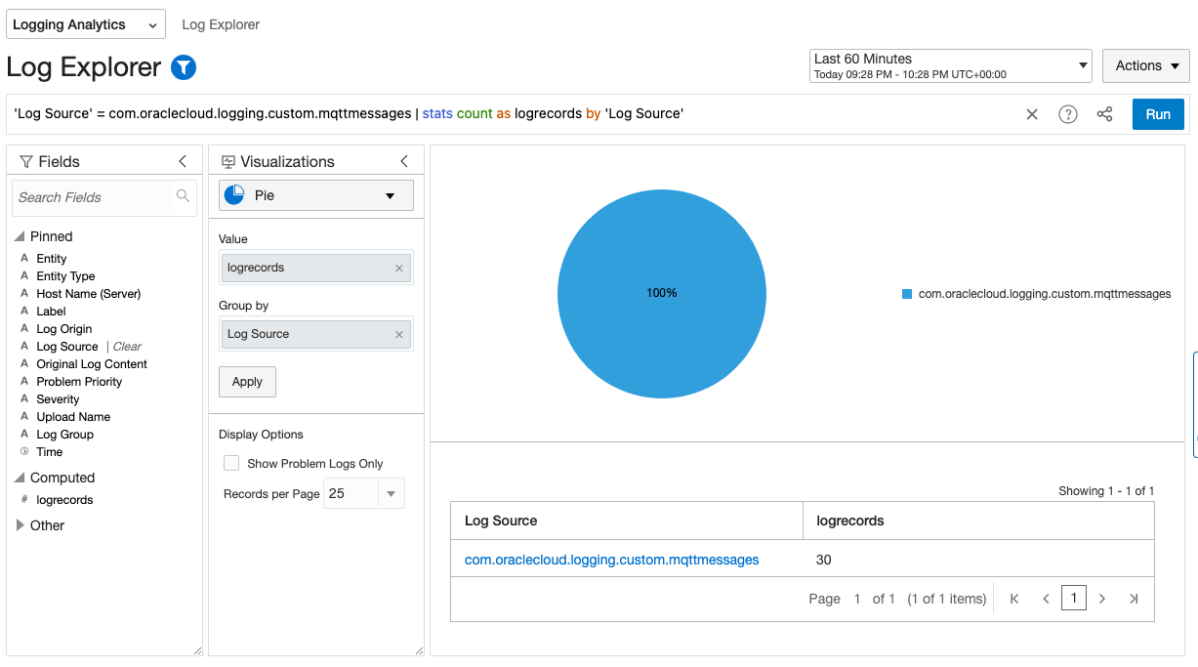
Collecting and storing logs is useful, however if you want to produce insights then you will need a way to analyse and visualise the log data. OCI Logging Analytics allows you to index, enrich, aggregate, explore, search, analyse, correlate, visualise and monitor all log data from your applications and system infrastructure.

From OCI logging there are two common ways in which logs can be ingested into Logging Analytics. The first is using a Service Connector to send logs to an Object Storage bucket, and an Object Collection Rule to then import the logs into Logging Analytics. The second option uses a Service Connector to send the logs directly to Logging Analytics. Both are valid options however require some consideration before use.

Continue reading “Import Logs to Logging Analytics & Preserving Log Sources”

Stack Monitoring for EBS

The Stack Monitoring service is a recent addition to the OCI Observability & Management family.

If you are running Oracle E-Business Suite (EBS) application today you will now be able to perform an auto discovery of all related resources in OCI Stack Monitoring. It will collect metrics specific for your EBS resources as well as ability to perform correlation across the EBS application and infrastructure stack as well as enable proactive alerting.

Components that will be auto discovered includes:

  • Concurrent Processing Node
  • Workflow Manager
  • WebLogic
  • Forms

Today, Stack Monitoring service supports EBS version 12.1 and 12.2 deployments hosted on OCI, On-Premise or Third Party Cloud (eg. AWS, Azure). 

In the example, I will show you how you can configure Stack Monitoring for EBS version 12.2.

Continue reading “Stack Monitoring for EBS”

AWR Data Warehouse Repository using Autonomous Database

In Oracle Enterprise Manager (OEM) there is the ability to host an AWR Data Warehouse which enables you consolidate all your detailed performance data of all your database and store in a central location.

This enables you to do long-term analysis trend across your AWR data to determine, performance, capacity impact on the databases in your IT estate.

In OEM 13.5, Oracle now supports the AWR Warehouse repository for Autonomous Data Warehouse.

If you don’t have the infrastructure or capacity to store AWR data on-premise, you can now send your data to the Autonomous Data Warehouse (ADW) in Oracle Cloud (OCI).

There are enormous benefits to using Autonomous Data Warehouse (ADW). One of many benefits is that you can scale up/down cpu and storage whilst the database remains online.

Continue reading “AWR Data Warehouse Repository using Autonomous Database”

Configure to completion a site-to-site VPN tunnel on OCI using the VPN Wizard

There is plenty of information out there about connecting from an on-premises network to OCI. But if you want to see a step-by step-procedure that configures to completion an actual VPN you will have a hard time finding it. And rather than writing about it, this time I will actually show it.

OCI VPN Wizard

This link will take you to the list of OCI’s verified CPE (Customer Premises Equipment) devices. If your On-Premises CPE is in this list then the VPN configuration should be very easy. In my case, the router I used is not in the list. It is a SOHO (Small Office-Home Office) type of router. For this configuration the on-premises network is my Home-Office LAN. For routers not on the list, there is an option called “other”. OCI offers a lists of supported configuration parameters for VPN connections that you can use for “other” types of routers. Here is the link to these parameter. And I explain them in the video. I hope that you find it useful:

https://tinyurl.com/OCI2HomeVPN

Enhance the security of your website with Oracle Cloud Infrastructure’s Web Application Firewall

Oracle recently introduced a Web Application Firewall (WAF) to further enhance and secure Oracle Cloud Infrastructure offerings. The Oracle Cloud Infrastructure WAF is based on Oracle Zenedge and Oracle Dyn technologies. It inspects all traffic destined to your web application origin and identifies and blocks all malicious traffic. The WAF offers the following tools, which can be used on any website, regardless of where it is being hosted:

  • Origin management
  • Bot management
  • Access control
  • Over 250 robust protection rules that include the OWASP rulesets to protect against SQL injection, cross-site scripting, HTML injection, and more

In this post, I configure a set of access control WAF policies to a website. Access control defines explicit actions for requests that meet conditions based on URI, request headers, client IP address, or countries and regions.

Continue reading “Enhance the security of your website with Oracle Cloud Infrastructure’s Web Application Firewall”