Oracle Fusion Applications are a suite of applications built on Oracle Cloud that include cloud-based applications for enterprise resource planning, enterprise performance management, supply chain management and manufacturing, human capital management, and customer experience.
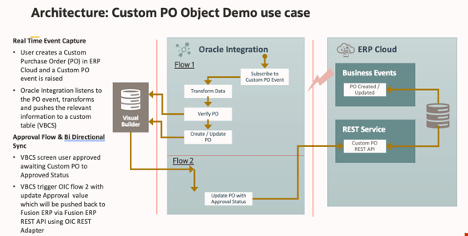
There are numerous use cases where standard object resides inside Fusion ERP needs to be extended to include more fields or completely new Custom object needs to be created.
In this blog, I will be covering how you can create a new Custom Object inside Fusion ERP and trigger transactions for that Custom object.
Oracle Visual Builder is a cloud based UX development Platform as a Service (PaaS) offering from Oracle Cloud. It provides an open-source standards-based solution to develop, collaborate on, and deploy Web and Mobile applications within Oracle Cloud.
VBCS also provide another awesome feature called Business Objects. A business object is a resource, such as an invoice or purchase order, like a database table; it has fields that hold the data for your application. Like a database table, a business object provides the structure for data used with business processes. Business objects are stored in a database.
Business Object also get exposed through REST Endpoint out-of-box, user doesn’t need to install/configure anything other than just creating a Business Object. However, those REST API are protected and need authentication when someone want to access from outside word.
In this blog, I am listing very simple steps what’s needed if developers want to expose Business Object REST API to outside world as anonymous users.
In the world of cloud computing there are often multiple ways to achieve the same or similar result. In Oracle Cloud Infrastructure (OCI) logs are generated by the platform itself such as audit logs, OCI native services such as the Network Firewall Service, and custom logs from compute instances or your applications. These logs typically live in OCI logging where you can view them, or search them if required.
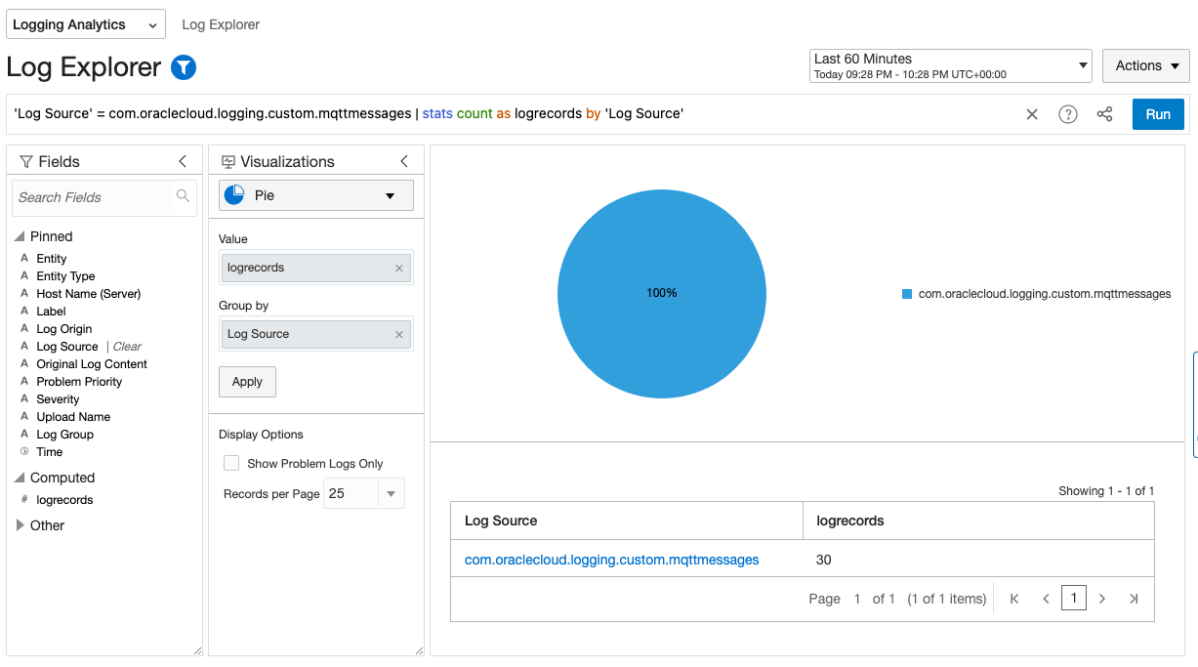
Collecting and storing logs is useful, however if you want to produce insights then you will need a way to analyse and visualise the log data. OCI Logging Analytics allows you to index, enrich, aggregate, explore, search, analyse, correlate, visualise and monitor all log data from your applications and system infrastructure.
From OCI logging there are two common ways in which logs can be ingested into Logging Analytics. The first is using a Service Connector to send logs to an Object Storage bucket, and an Object Collection Rule to then import the logs into Logging Analytics. The second option uses a Service Connector to send the logs directly to Logging Analytics. Both are valid options however require some consideration before use.
If you are running Oracle E-Business Suite (EBS) application today you will now be able to perform an auto discovery of all related resources in OCI Stack Monitoring. It will collect metrics specific for your EBS resources as well as ability to perform correlation across the EBS application and infrastructure stack as well as enable proactive alerting.
Components that will be auto discovered includes:
Concurrent Processing Node
Workflow Manager
WebLogic
Forms
Today, Stack Monitoring service supports EBS version 12.1 and 12.2 deployments hosted on OCI, On-Premise or Third Party Cloud (eg. AWS, Azure).
In the example, I will show you how you can configure Stack Monitoring for EBS version 12.2.
Oracle Cloud Agent (OCA) – This agent is deployed by default if you provision hosts via the OCI Compute Service. OCA has extensions and plugins which can be used to enable other features native to OCI Compute Services.
Management Agent (OMA) – This agent is a standalone version where you can deploy to hosts or VMs: – That do not have OCA installed on OCI eg. OCI Database Services (eg. Oracle Base VM/BM, ExaCS). – On-Premise – Third Party Cloud (AWS, Azure etc..)
…
Please see the current O&M support we have for each agent:
OCI Agent
Logging Analytics
Stack Monitoring
Database Management
Operations Insights
Target
Oracle Cloud Agent (OCA)
Yes
Yes
Yes
OCI Compute VM / BM Host
Oracle Management Agent (OMA)
Yes
Yes
Yes
Yes
Other VM Host (including on-premise and 3rd party cloud)
OMA Agent Install
In previous post, I have provided steps on how you can install the Oracle Management Agent.
OCA Agent Install
For this post, let me show you how easy it is to enable the O&M services for Oracle Cloud Agent (OCA).
HTTPS is essential as it protects the privacy of our data over the Internet. W3’s 2022 report shows nearly 80% of all websites use HTTPS as their default web protocol, up 6% on the previous year.
Getting started with HTTP/TLS is fairly straightforward. Obtain a CA signed certificate, configure it on your web servers and reverse proxy load balancers and you’re good to go. But how do you ensure your configuration stays up-to-date with current industry standards?
CyberSecurity is an arms race. As hardware and software evolves, so do the tools and techniques created to exploit them. This fierce race largely drives the innovation that we see in the industry today.
How does this relate to TLS? Since the inception of SSLv1 by Netscape in the 90’s there’s been many revisions, SSLv2, SSLv3, TLSv1.1, TLSv1.2 with the current version being TLSv1.3. TLSv1.1 was deprecated in 2021, with new versions being released approximately every 5 years. Given the rate at which exploits are discovered these release cycles will also need to keep pace.
For organisations this poses a number of interesting challenges because you can only control what TLS versions you support. Also if your website or API is public then it’s likely you have no control over the connecting client, or which TLS versions they’re able to use.
If you’re like me, then working in IT means you also assume Tech Support duties for friends, family, and those distant relatives that only seem to call when they’ve got a problem.
I just clicked on this link, and my computer is doing something weird. I think my PC has a virus, what do I do?
When it’s just a single computer, the answer is simple, contain and validate the rouge software is removed, install an AV solution, change their passwords, enable MFA, and provide some education on what to look out for next time.
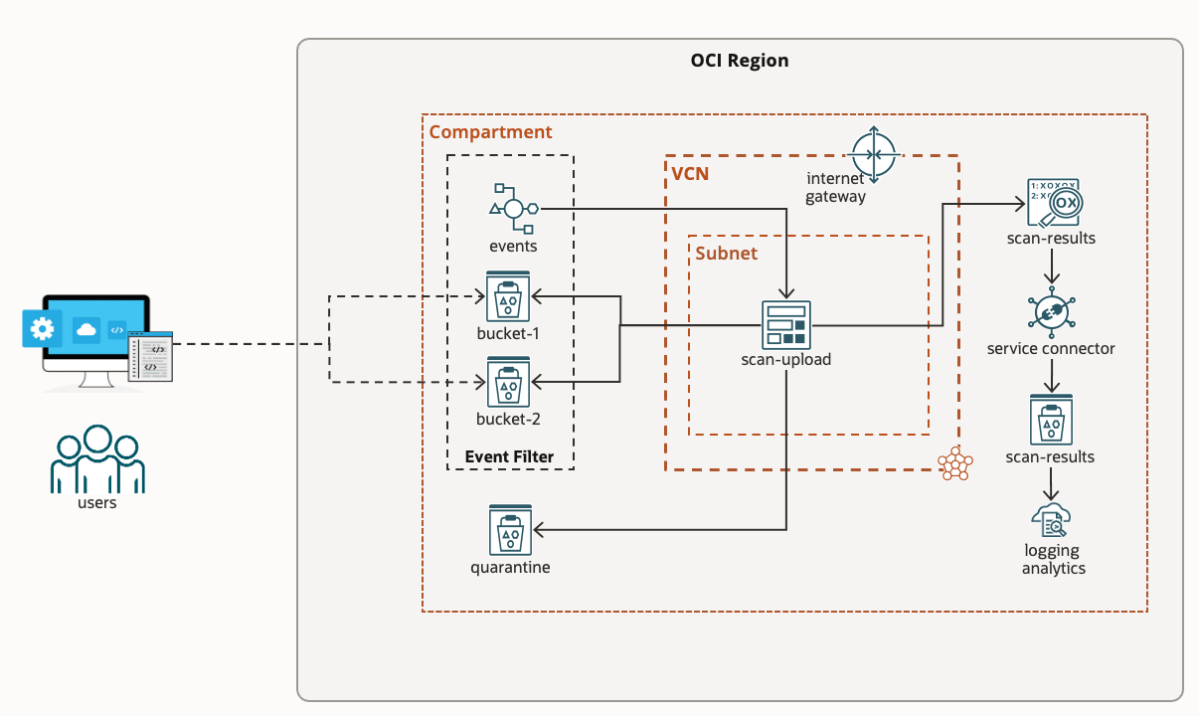
But now imagine you’re an organisation building a new application, or are moving applications to the cloud. Are you simply performing a lift-and-shift or are you planning to make use of cloud native services? Where are you going to store your data, specifically user uploaded files? Object Storage was built specifically to solve the challenges of how to store unstructured data in the cloud.
However, there is a catch. If you were previously storing files on a server file system, then it’s likely you were also running an anti-virus / anti-malware solution to identify malicious files. With Object Storage the underlying file system is transparent, so you can’t install AV, yet many compliance requirements still state “Uploaded files must be scanned for viruses and malware”.
I’m sure we can all agree, adopting a cloud strategy is awesome. The opportunities and benefits it affords are many. However cloud governance is an ongoing problem that plagues security, compliance, and management teams, which cloud vendors like Oracle are continually trying to solve.
If you’re reading this, you’ve probably been asked, or heard at least once:
Who has access to what in our environment?
Any Security / Compliance Manager
The answer should be easy and simple. However the reality is likely lots of manual time & work, spreadsheets, and endless clicking in a cloud console. If you’re doing this manually then I agree, it’s time that you could be dedicating to more important tasks.
The challenge in trying to answer these questions:
What users exist and what groups do they belong to?
What does my OCI tenancy compartment structure look like?
What policies have users explicitly created?
What permissions do users have in my tenancy?
Are there any excessive / non-compliant policies & permissions in my tenancy?
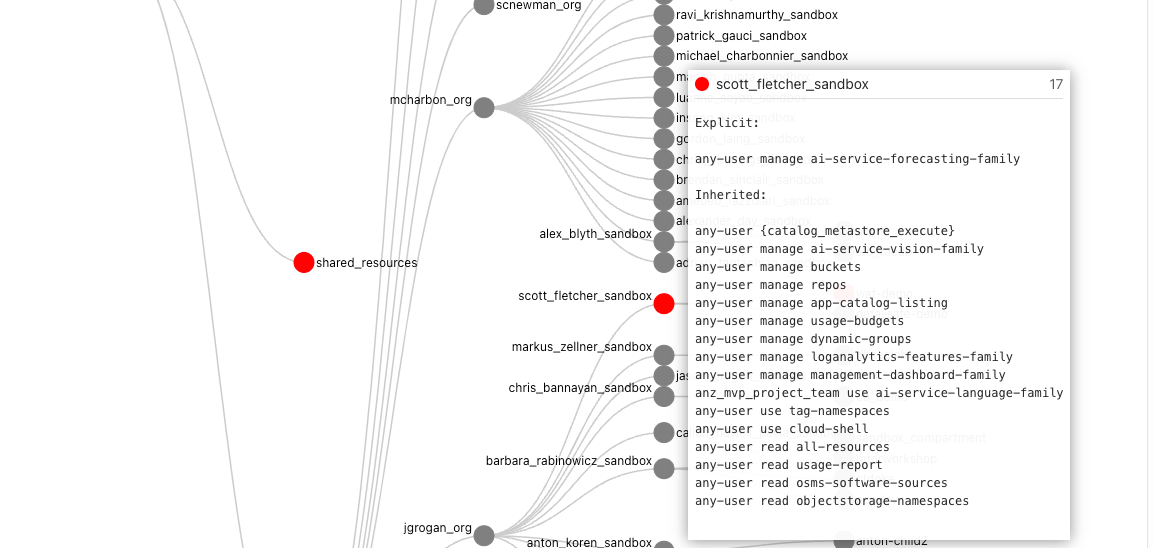
is that these complex relationships can’t be easily represented and interpreted in a table-like format. In the OCI ecosystem:
users can be federated with an Identity Provider and can belong to one or many federated, or local IAM groups,
policies can be defined for “any-user” or for a group,
policies are inherited meaning they apply to all sub-compartments from which the policies are applied.
To make things easier I’ve created a solution using Oracle tools and services to simplify the auditing of OCI tenancies and user permissions called “Peek”.
Note: From 22/05/2023 APEX is no longer required as the solution runs entirely inside the container. To run the new container for OCI with IDCS use the following command:
docker run -it --name peek --rm \
--mount type=bind,source=/Full/Path/To/.oci/,target=/root/.oci/,readonly \ -e OCI_PROFILE_NAME=<from your OCI config> \-e OCI_TENANCY_OCID=<from text file> \
-e OCI_IAM_URL=<from text file> \
-e IDCS_URL=<from text file> \
-e IDCS_CLIENT_ID=<from text file> \
-e IDCS_SECRET=<from text file> \-e TOOLTIP_LINE_PX=20 \
-p 4567:4567 \scottfletcher/oci-peek
After the docker container has started, you can access the web interface using the locally mapped port http://localhost:4567. You should see a progress window:
Once the mapping process is complete the visualisation will appear.
Depending on how long your policy statements are, you may wish to adjust TOOLTIP_LINE_PX to a number greater or smaller than 20. If your policy statements overflow the tooltip box then increase this value, or if the box is too big, then you can decrease this value.
If you haven’t run Peek before, please read on as I explain how to create the required credentials and where to obtain the values for the other environment variables. You can skip the APEX steps, as APEX will not be used.
This inspiration series is to highlight the work of others from different circumstances.
This particular team were enrolled in Business Information Systems & Analytics Capstone (BISM3208) at University of Queensland where a part of the course was a hackathon and a team of mentors from Oracle Cloud Engineering provided the problem statement and guidance throughout the semester. The problem statement focused on the Sustainable Development Goals “SDGs” with the requirement to design a digital solution using Oracle Cloud.
Introducing Mobile Apollo – one of the finalists in the hackathon.
The team consisted of: Alfred Ong (here), Jennifer Poon (here), Morwenna Fisher (here), Shin Goh (here) and Vera Han (here).
The team focused on SDG 3 – Good Health and Well-Being – To ensure healthy lives and promote well-being for all at all ages.
Over the past couple of years, we’ve posted about the OCI Arcade. You can find the original article (here) and the repository (here). As part of the revamp, many things have changed and as such we’ve spent a little bit of time to make it better. Check out some of these new additions.


 RedThunder.Blog