Setup Autonomous DB Monitoring in OMC

In this post I will show you how you can setup Autonomous DB monitoring in Oracle Management Cloud (OMC) in under 5 minutes.

STEP 1
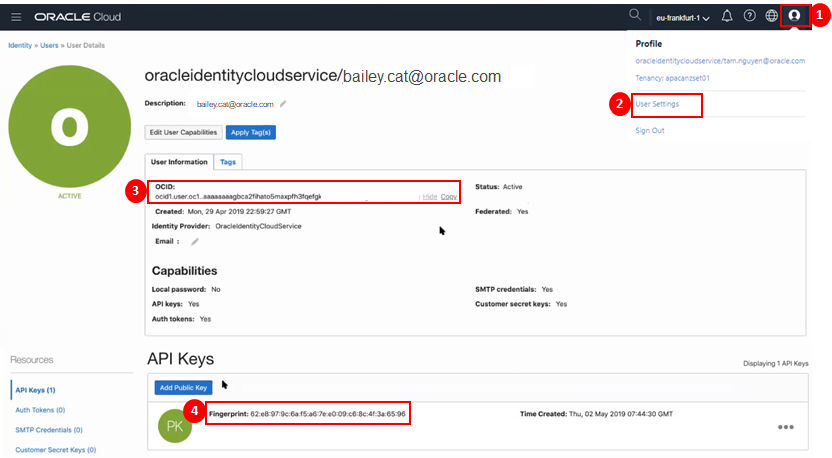
You will need to obtain your OCI User Information associated with your Autonomous Database (ADB) instances from the OCI Console.

  1. Click on the user icon in top right hand corner of OCI console.
  2. Select User Settings
  3. On the User Details page, make a copy of the User OCID
  4. In addition to this, make a copy of the API Key Fingerprint.

STEP 2
You will need to obtain your OCI Tenant Information associated with your Autonomous Database instances from the OCI Console.

  1. Navigate to Administration > Tenancy Details
  2. On the Tenancy Information page, make a Copy of the Tenancy OCID.

HINT: If OCID is hidden, you can click on Show to display entire value if you wish.

STEP 3
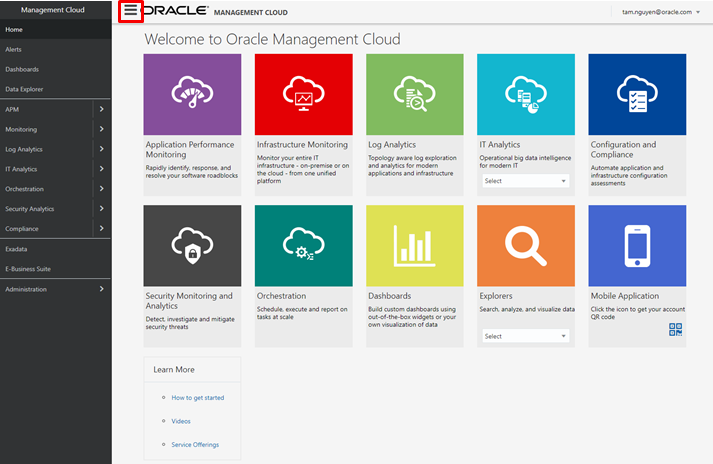
In another browser session, launch the OMC Console.

HINT: If the side menu does not appear, click on menu icon

STEP 4
From the side menu, navigate to:

  1. Select Administration
  2. Select Discovery
  3. Select Cloud Discovery Profile

STEP 5
On the Cloud Discovery Profiles Page:
Click on + Add Profile

The Add Discovery Profile Page will appear.

  1. Specify a Profile Name (eg. ADWPROFILE1)
  2. Choose Cloud Service Provider Oracle Cloud Infrastructure
  3. Click + Add
  4. Select Region (eg. Frankfurt)
  5. Select Services (eg. Autonomous Data Warehouse)
  6. Enter Credential Name (eg. ADWCRED)
  7. Enter User OCID (eg. ocid1.user.oc1.xxxxx)
  8. Enter Tenancy OCID (eg. ocid1.tenancy.oc1.xxxxx)
  9. Enter the associated Private key with user API Key
  10. Enter the Fingerprint (eg. nn:nn:nn:nn:nn:nn:nn)
  11. Click on Start Discovery

STEP 6
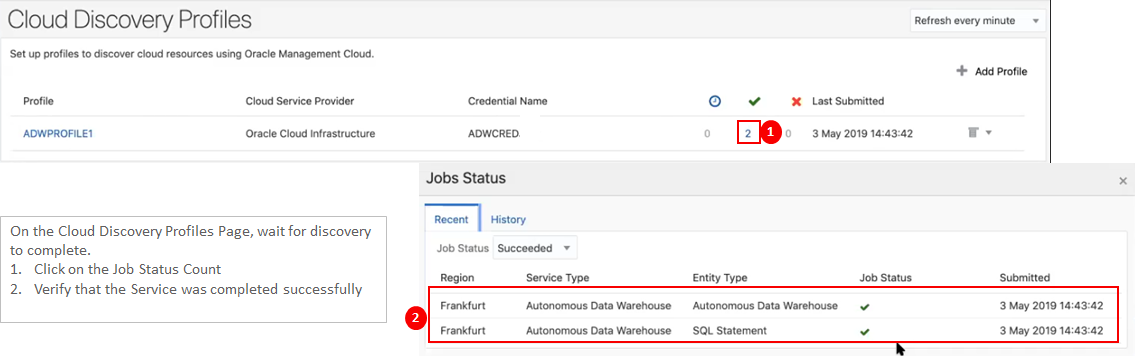
On the Cloud Discovery Profiles Page, wait for discovery to complete. 

  1. Click on the Job Status Count
  2. Verify that the Service was completed successfully

This completes the setup. Now you are ready to start monitoring and managing your Autonomous Database in OMC.  Click here here for more.

Why Would you Monitor an Autonomous Database?

You probably heard that Oracle Autonomous Database (ADB) leverages machine learning to automate with traditional infrastructure related database administration tasks such as security, backups and patching.

No matter how well designed your database infrastructure is, performance and issues relating application or external components which make up the application ecosystem can still have an impact on end user response time or availability. Continue reading “Why Would you Monitor an Autonomous Database?”

An automated approach to provisioning the Oracle Container Engine for Kubernetes

I was reflecting recently on how IT tools and productivity aids often allow us to make a mess real quickly. There is often some underlying basics that need to be considered before using the productivity tool in order to get a sustainable outcome. As the old adage goes … A fool with a tool is still a fool !

I just read a great blog posted by my colleague Ali Mukadam. He has been spending some time exploring a number of interesting technologies including the Oracle Container Engine. For those unaware, the Oracle Cloud Infrastructure Container Engine for Kubernetes (OKE) is a fully-managed, scalable, and highly available service that you can use to deploy your containerized applications to the cloud. I have played with this a little and as a technology geek I really love it.

Oracle does provides a Quick create option to help you get to function quickly, however often you will need to consider the wider IT landscape, such as where does this service fit into my overall network topology in order to assess how you want to lay out your network etc. To that end Ali has developed a toolkit to automate the provisioning of OKE on the Oracle Cloud Infrastructure.

You can check out his blog post here …. One does not simply deploy Kubernetes to the cloud .

Oracle Service Cloud to Eloqua – Bulk Opportunity Import using Service Cloud ROQL and OIC

I have already blogged two different integration pattern between Service Cloud to Eloqua.

This first integration pattern was using Standard Object e.g. Contact object, documented in this blog

The second integration pattern was using Custom Object e.g. Degree Object, documented in this blog.

Now, in this current blog, I am going to cover another integration pattern where bulk data can be imported from Service Cloud to Eloqua using Service Cloud ROQL statement.

In both my previous blogs, data was getting exchanged real time but one transaction at a time, but in this blog data will be transmitted from Service Cloud to Eloqua in bulk for Opportunity Business Object.

Continue reading “Oracle Service Cloud to Eloqua – Bulk Opportunity Import using Service Cloud ROQL and OIC”

Oracle Service Cloud to Eloqua Custom Object Replication using OIC

In my previous blog I have focused on how Standard Business Object e.g. Contact can be replicated from Service Cloud to Eloqua.

Now, in this blog focused will be, how Custom Object can be replicated from Service Cloud to Eloqua.

Continue reading “Oracle Service Cloud to Eloqua Custom Object Replication using OIC”

Oracle Service Cloud to Eloqua Contact Create/Update using OIC

Recently, I have been worked for different use-case scenarios between Service Cloud to Eloqua Integration using OIC, hence thought to publish this blog to cover all those scenarios.

This is first in series which will use standard business Contact object data replication, there will be two more blogs, one covering Custom Object replication and another one will be importing data in bulk from Service Cloud to Eloqua.

Before, I start showing the steps how Contact Business Object data can be replicate from Service Cloud to Eloqua. I need to emphasis the important of Service Cloud Adapter and Eloqua Adapter.

Continue reading “Oracle Service Cloud to Eloqua Contact Create/Update using OIC”

Media Capture using Oracle Visual Builder for Facial Recognition App

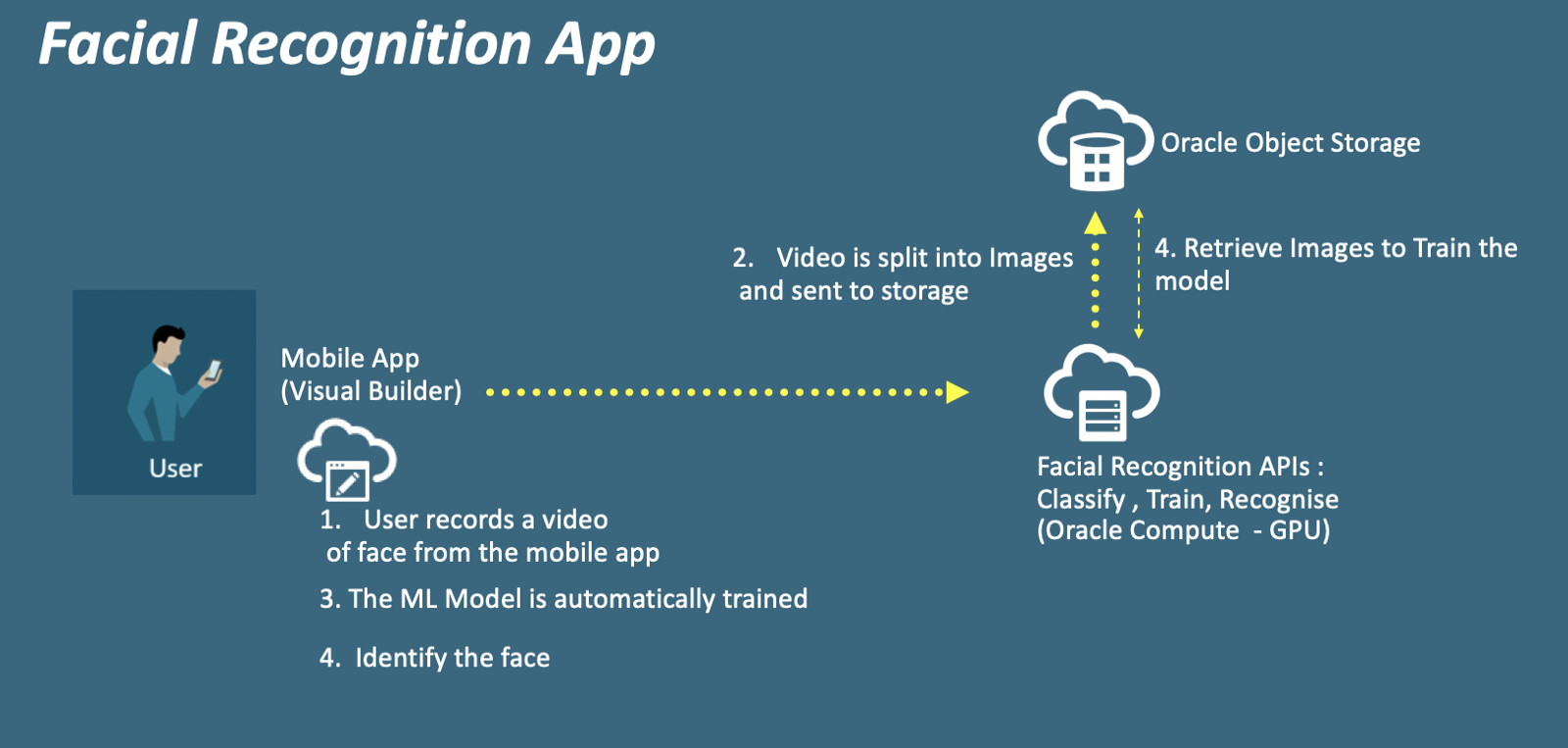
Recently I built a Facial Recognition Mobile App using Oracle Visual Builder having set up the Facial recognition APIs using Tensorflow taking some inspiration from FaceNet. As highlighted above the app does the following: record a video of your face and send it to the API that generates various images and classifies them based on the label we provide at runtime. And in turn, invoke another API that is going to train the machine learning model to update the dataset with the new images and label provided. These two APIs will build a facial recognition Database. Once I have this, I can capture the face and compare that with the dataset I have captured earlier in my Facial recognition Database to output if the face exists in our system.

Continue reading “Media Capture using Oracle Visual Builder for Facial Recognition App”

Hashed Timelock Agreements in Hyperledger Fabric

Hashed Timelock Agreements, or Contracts, have emerged as an important concept in the cryptocurrency space in order to perform transactions across ledgers – and I feel could be a valid mechanism to handle the issue of performing verifiable cross-channel transactions in Hyperledger in some use cases. The basic concept of a Hashed Timelock Agreement (HTLA) is that it allows for a conditional transaction (which I have deemed a ‘proposal’) with a cryptographic challenge which ensures it can only be completed by a pre-defined party. This can be chained through multiple intermediaries, which can enable two organisations who do not share a channel to interact, and for transactions to be confirmed across channels.

Continue reading “Hashed Timelock Agreements in Hyperledger Fabric”

Integration, Process and Visual Builder

OIC makes integration easy with ODI

We know OIC (Oracle Integration Cloud) is capable of file based integration for ERP over API.
And we do know that ODI (Oracle Database Integrator from Data Integration Platform Cloud) is capable of ingesting large file and processing it for ERP through the database layer aka ETL / ELT.

Continue reading “Integration, Process and Visual Builder”

Enter The Robots (A Different Kind)

Last week, I had the opportunity to do some work and part of the engagement there was to integrate some data. Easy right? It’s not that hard especially with the technology and standards we have these days. However, what was not apparent upfront until after some digging (ie research), an email and a phone call that there were no APIs to be found. “Ha ha ha … we’ve got you … there is no way you can do it now” So the challenge was accepted and instead of time travelling into the future to find a new way of doing things, I went totally retro. And hence the title “Enter The Robots“. I didn’t go and create new versions of robots or AI. I don’t create a new quantum computing paradigm. What I did do was classically known as screen-scraping. “ick“, I hear from the crowd. “How dare you?“, someone else yells out. But I say this honestly, if there is no other way to integrate and capture data, then I rather do it knowing that it is a last resort.

In this article, I walk through a few of the tips and tricks with what’s currently available to help out in this situation.

Continue reading “Enter The Robots (A Different Kind)”