Connecting JDeveloper to an Oracle Autonomous Database SOA MDS Repository: A Troubleshooting Guide

Recently, while assisting a customer with a high-priority issue, I encountered a connection problem in my personal Oracle SOA Suite environment. As part of a replication exercise, I needed to connect my JDeveloper instance to an Oracle SOA Metadata Services (MDS) repository, which is a critical component for managing shared artifacts in a SOA environment. The unexpected error I received had no clear solution on internal or Oracle support forums, so I’m sharing the solution here to help fellow SOA developers.

My environment for this exercise was Oracle SOA Suite 12.2.1.4, backed by an Oracle Autonomous Database (ATP) 19c.

The Problem:

I was unable to establish an MDS repository connection from JDeveloper, which is a prerequisite for deploying shared SOA artifacts like x-ref, XSD, XSLT, and WSDL files. The specific error message I received was:
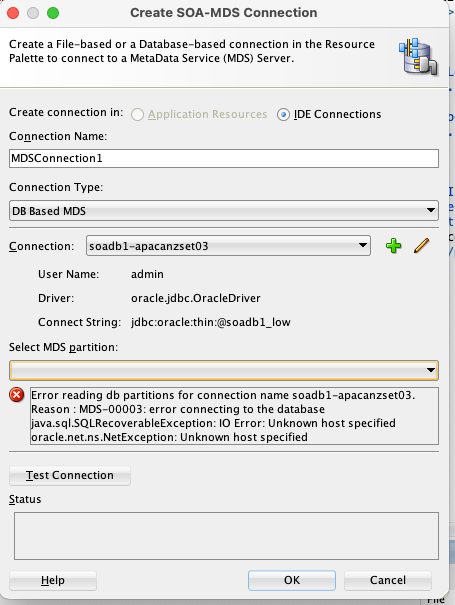
  • Error reading db partition for connection name soadb1-apacanzset03
  • Reason : MDS-00003: error connecting to the database
  • Java.sql.SQLRecoverableException: IO Error: Unknown host specified]

The Solution:

The root cause of this error lies in the secure nature of the Oracle Autonomous Database. Unlike standard databases, ATP requires a Wallet file for secure connections. The Wallet contains crucial files like tnsnames.ora, truststore.jks, and keystore.jks, which are necessary for JDBC connections.

Steps to Configure the Connection:

  1. Download the ATP Wallet: First, download the Wallet.zip file from your ATP console.
  2. Unzip the Wallet: Extract the contents of the zip file to a secure, easily accessible location.
  3. Create new folders:  create folder structure “network>>admin” folder inside wallet folder and move tnsname.ora file into this location
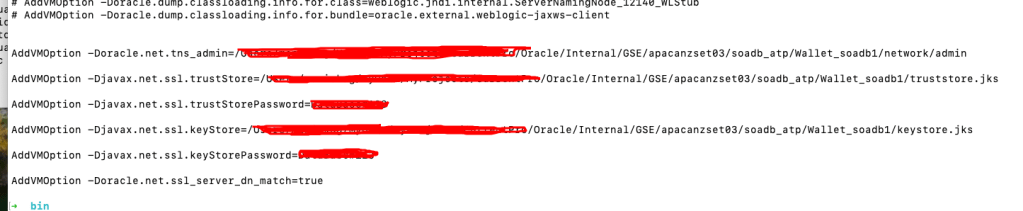
  4. Configure JDeveloper: Next, you must update the jdev.conf file, located at $Middleware_HOME/jdeveloper/jdev/bin/, by adding the following Java options. These options point JDeveloper to the security files within your unzipped Wallet.
    • AddVMOption -Doracle.net.tns_admin=<Path to unzipped Wallet folder>
    • AddVMOption -Djavax.net.ssl.trustStore=<Path to truststore.jks file>
    • AddVMOption -Djavax.net.ssl.trustStorePassword=<your wallet password>
    • AddVMOption -Djavax.net.ssl.keyStore=<Path to keystore.jks file>
    • AddVMOption -Djavax.net.ssl.keyStorePassword=<your wallet password>
    • AddVMOption -Doracle.net.ssl_server_dn_match=true
  • Restart JDeveloper: Restart JDeveloper to apply the new configuration settings.
  • Create a Database Connection: Navigate to the Database navigator, create a new connection using the <soadbname_MDS> user, and test the connection.
  • Create an MDS Connection: Finally, go to Windows > Resources > New SOA MDS Connection. Specify a name, select “DB based MDS,” choose the database connection you just created, and specify “soa-infra” as the partition. Test the connection, and it should now be successful.
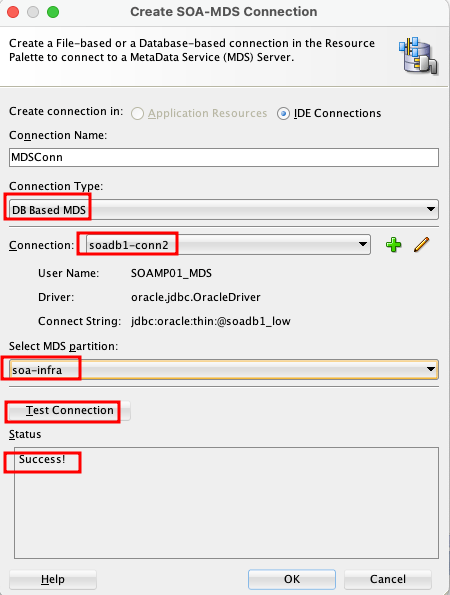
This process ensures that JDeveloper can securely authenticate and connect to your ATP-based MDS repository, allowing you to manage and deploy your design time MDS artefacts to Server side MDS artifacts.
OCI Application Performance Monitoring for PeopleSoft


The OCI Application Performance Monitoring (APM) service enables administrators to monitor and observe the PeopleSoft web applications.

It provides deep visibility into the application performance from end-user experience down through to the application server requests.

For many customers, the PeopleSoft (PSFT) Application is critical to business operations. With OCI Application Performance Monitoring (APM) service, administrators can:

  • Analyze all end user experience with accessing PeopleSoft web pages.
  • Trace transactions across various components and isolate problems to the impacting application or infrastructure tier.
  • Has ability to drill into application code.
  • Generally, APM tools cannot drill into the SQL code for the PeopleSoft application. This inability occurs is because, the SQL call is performed in the Tuxedo layer. However, OCI APM service offers a unique feature to overcome this limitation. It can perform instrumentation of outbound JOLT calls from WebLogic to Tuxedo. This helps at least understand how much time is spent in this layer.
  • Easily Capture End Username for user sessions without modifying application code
  • Search in context based on PeopleSoft attributes including:
    – Portal Name
    – Portal Object Name
    – and more

Continue reading “OCI Application Performance Monitoring for PeopleSoft”

Guide to OCI Custom Metrics and Monitoring Options

OCI gives you flexibility to create custom metrics when no out of box metrics are available. There are two options on how this can be achieved. Depending on your use case let’s take a look at which choice works for you.

RequirementsOCI Monitoring Service OCI Stack Monitoring Service
View Metrics in Monitoring Service
YesYes
Create AlarmsYesYes – Automatically, emitted to Monitoring Service once Metric Extension is enabled for target resource
Metric DimensionsYesYes
Frequency CollectionControl by client API execution, cron job, scheduler or agentYes – can be configured when creating the metric extension.
Collection can be directly executed by OS command, Script(eg. Shell, Python), SQL, JMX or HTTP (REST API) Custom Metrics can be published using OCI CLI or REST APIYes – Use Metrics Extensions
Centrally manage Custom Metrics for single or multiple resources – Enable, Clone, Export/ImportYes
Define collection based on Resource Types (eg. apache_http_server, apache_tomcat, oci_oracle_db, ebs_instance, host_linux, host_windows, miscrosoft_iis, sql_server etc…)Yes
Baseline and Anomaly detection in Metrics using ML based algorithms Yes
Perform correlation across multiple metricsYes
Apply Metric Extension lifecycle phases: Test and Validate, PublishYes
Custom Metric Collection from OCI, on-premise and/3rd party CloudYesYes
Alert against log data from OCI Logging AnalyticsYes – The Detection Rule needs to be created in OCI Logging Analytics
Custom Metric collection using Prometheus Exporter YesYes
Continue reading “Guide to OCI Custom Metrics and Monitoring Options”

Hashicorp’s cidrsubnet function

A while back I witnessed a Terraform presentation where a subnet’s IPv4 CIDR block was constructed from a parent VCN by invoking a Hashicorp function called cidrsubnet. This function is very useful because it can save time when you have multiple VCNs in your Terraform code. And it is universal, it can be used when there are several concurrent Terraform providers in the same code.

The function’s format is like this: cidrsubnet(prefix, newbits, netnum).

The prefix field is for the VCN CIDR. You can enter a variable in the prefix field. For example cidrsubnet(var.vcn_cidr, 8,1). Let’s say that the VCN CIDR is 10.0.0.0/16, then the value of var.vcn_cidr is 10.0.0.0/16. So, the function looks like this: cidersubnet(“10.0.0.0/16”,8,1).

The newbits value is the number of digits that you will be adding to the actual CIDR value. 16 + 8 = 24, so the subnet will be a /24 subnet.

The netnum value is for completing the actual subnet, and it depicts the “raw” decimal number of the binary portion of the subnet side of the CIDR, in this case is the third octet. The result for the subnet is 10.0.1.0/24.

This example illustrates it better:

cidrsubnet(“10.1.2.0/24”, 4, 15). 24+4 = 28, so the subnet will be a x.x.x.x/28 subnet.

The value in the netnum field will help us identify which of the 16 possible /28 subnets we’re creating. On a /28 subnet, in the fourth octet, the four left bits are the subnetwork bits. Convert 15 (the netnum value) to binary and you will get 1111. Place it on the subnetwork side of the fourth octet and you will get 1111|0000. The decimal value of the whole octet is 240, therefore the subnet is 10.1.2.240/28.

This is optimal, isn’t it?

Automating Security List Rule reviews in Oracle Cloud Infrastructure

If you’re running workloads in Oracle Cloud Infrastructure (OCI) then it’s likely you’ll be familiar with Virtual Cloud Network (VCN) resources such as Subnets, Route Tables, Gateways etc. These software defined components allow you to build networks in OCI for you to deploy and run your workloads.

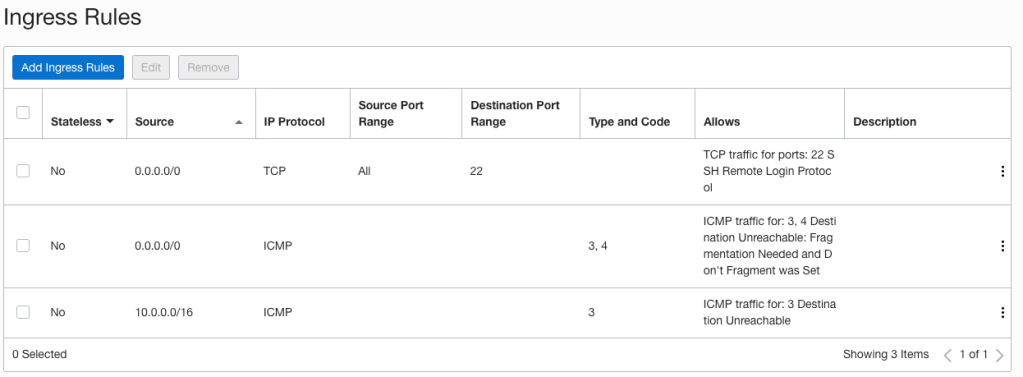
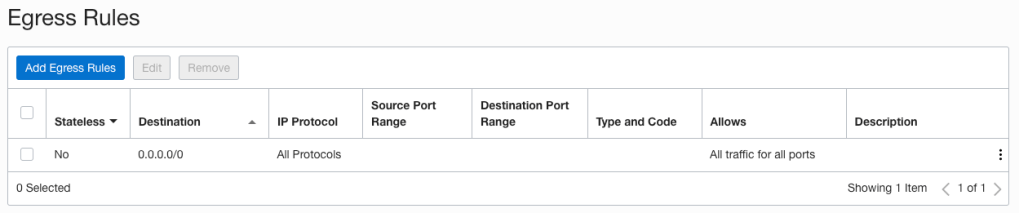
Oracle has documentation that explains VCN access and security features which include things like Security Rules, Security Zones, Local and Network Firewalls, and IAM policies. Security rules are made up of Security Lists and Network Security Groups (NSG’s) and are a foundational element of every VCN and Subnet that you create. They define what traffic is allowed in and out of your subnets and what hosts can talk to one another. When you create a subnet a Security List is automatically created with some default rules:

Default Security List Ingress Rules
Default Security List Egress Rules

When it comes to implementing network access controls, you can use Security Lists, Network Security Groups or both. They are virtual firewall features that control traffic at the packet level. I’ll be covering Network Security Group reviews in a later post as I want to focus on Security Lists, specifically how you can easily review and validate rules to ensure they align with your workload, organisational, security and compliance requirements.

Continue reading “Automating Security List Rule reviews in Oracle Cloud Infrastructure”

Import Logs to Logging Analytics & Preserving Log Sources

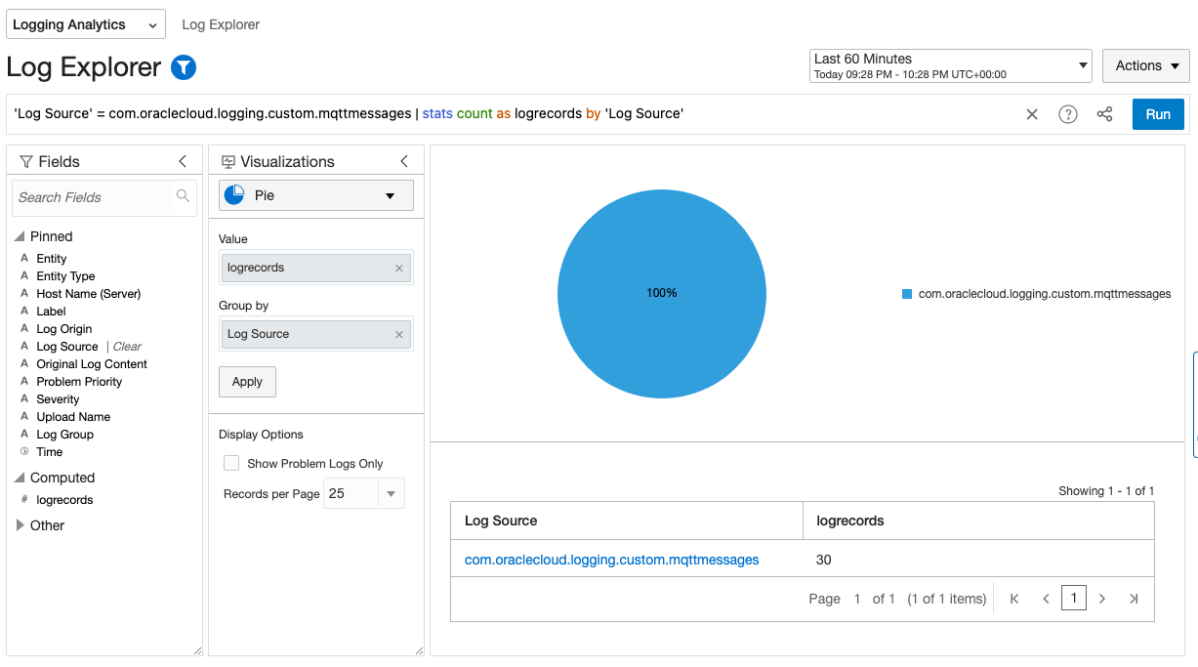
In the world of cloud computing there are often multiple ways to achieve the same or similar result. In Oracle Cloud Infrastructure (OCI) logs are generated by the platform itself such as audit logs, OCI native services such as the Network Firewall Service, and custom logs from compute instances or your applications. These logs typically live in OCI logging where you can view them, or search them if required.

Collecting and storing logs is useful, however if you want to produce insights then you will need a way to analyse and visualise the log data. OCI Logging Analytics allows you to index, enrich, aggregate, explore, search, analyse, correlate, visualise and monitor all log data from your applications and system infrastructure.

From OCI logging there are two common ways in which logs can be ingested into Logging Analytics. The first is using a Service Connector to send logs to an Object Storage bucket, and an Object Collection Rule to then import the logs into Logging Analytics. The second option uses a Service Connector to send the logs directly to Logging Analytics. Both are valid options however require some consideration before use.

Continue reading “Import Logs to Logging Analytics & Preserving Log Sources”

Stack Monitoring for EBS

The Stack Monitoring service is a recent addition to the OCI Observability & Management family.

If you are running Oracle E-Business Suite (EBS) application today you will now be able to perform an auto discovery of all related resources in OCI Stack Monitoring. It will collect metrics specific for your EBS resources as well as ability to perform correlation across the EBS application and infrastructure stack as well as enable proactive alerting.

Components that will be auto discovered includes:

  • Concurrent Processing Node
  • Workflow Manager
  • WebLogic
  • Forms

Today, Stack Monitoring service supports EBS version 12.1 and 12.2 deployments hosted on OCI, On-Premise or Third Party Cloud (eg. AWS, Azure). 

In the example, I will show you how you can configure Stack Monitoring for EBS version 12.2.

Continue reading “Stack Monitoring for EBS”

Agents for Observability & Management

To use Observability & Management (O&M) services, there is the option to deploy OCI agents depending on which service you wish to enable.

There are two types of agents that can be used.

  1. Oracle Cloud Agent (OCA) – This agent is deployed by default if you provision hosts via the OCI Compute Service. OCA has extensions and plugins which can be used to enable other features native to OCI Compute Services.
  2. Management Agent (OMA) – This agent is a standalone version where you can deploy to hosts or VMs:
    – That do not have OCA installed on OCI eg. OCI Database Services (eg. Oracle Base VM/BM, ExaCS).
    – On-Premise
    – Third Party Cloud (AWS, Azure etc..)

Please see the current O&M support we have for each agent:

OCI AgentLogging AnalyticsStack MonitoringDatabase ManagementOperations InsightsTarget
Oracle Cloud Agent (OCA)YesYes  YesOCI Compute VM / BM Host
Oracle Management Agent (OMA)YesYesYesYesOther VM Host (including on-premise and 3rd party cloud)

OMA Agent Install


In previous post, I have provided steps on how you can install the Oracle Management Agent.

OCA Agent Install

For this post, let me show you how easy it is to enable the O&M services for Oracle Cloud Agent (OCA).

Continue reading “Agents for Observability & Management”

TLS Migration – A better way

HTTPS is essential as it protects the privacy of our data over the Internet. W3’s 2022 report shows nearly 80% of all websites use HTTPS as their default web protocol, up 6% on the previous year.

Getting started with HTTP/TLS is fairly straightforward. Obtain a CA signed certificate, configure it on your web servers and reverse proxy load balancers and you’re good to go. But how do you ensure your configuration stays up-to-date with current industry standards?

CyberSecurity is an arms race. As hardware and software evolves, so do the tools and techniques created to exploit them. This fierce race largely drives the innovation that we see in the industry today.

How does this relate to TLS? Since the inception of SSLv1 by Netscape in the 90’s there’s been many revisions, SSLv2, SSLv3, TLSv1.1, TLSv1.2 with the current version being TLSv1.3. TLSv1.1 was deprecated in 2021, with new versions being released approximately every 5 years. Given the rate at which exploits are discovered these release cycles will also need to keep pace.

For organisations this poses a number of interesting challenges because you can only control what TLS versions you support. Also if your website or API is public then it’s likely you have no control over the connecting client, or which TLS versions they’re able to use.

Continue reading “TLS Migration – A better way”

AWR Data Warehouse Repository using Autonomous Database

In Oracle Enterprise Manager (OEM) there is the ability to host an AWR Data Warehouse which enables you consolidate all your detailed performance data of all your database and store in a central location.

This enables you to do long-term analysis trend across your AWR data to determine, performance, capacity impact on the databases in your IT estate.

In OEM 13.5, Oracle now supports the AWR Warehouse repository for Autonomous Data Warehouse.

If you don’t have the infrastructure or capacity to store AWR data on-premise, you can now send your data to the Autonomous Data Warehouse (ADW) in Oracle Cloud (OCI).

There are enormous benefits to using Autonomous Data Warehouse (ADW). One of many benefits is that you can scale up/down cpu and storage whilst the database remains online.

Continue reading “AWR Data Warehouse Repository using Autonomous Database”