RPA vs AI: Perspectives, Applications, and the Power of having both in Oracle Integration Cloud

I’ve had meetings with clients and colleagues who thought RPA and AI were the same thing, or at least part of the same philosophy.

In my opinion, this is only partially true and for this reason, I have decided to write this article to help clarifying where the two solutions differ.

Robotic Process Automation (RPA) and Artificial Intelligence (AI), although often mentioned together in the context of digital transformation, are two distinct technologies, each with its own characteristics and purposes. Let’s remember that RPA has been talked about since the early 2000s and was certainly created to introduce the first concepts of automation within industrial and enterprise processes.

Let’s take a closer look at these technologies.

RPA is essentially a technology focused on automating manual and repetitive activities according to predefined rules. You can think of RPA as a “digital workforce” that performs actions on software and systems just like a human operator would: it opens applications, copies and pastes data, fills in forms, sends emails, or updates databases. Its great advantage lies in the ability to speed up and make more efficient low-value processes, eliminating errors due to distraction and freeing people from monotonous tasks. However, RPA is not “intelligent” in the strict sense: it operates within very rigid parameters and cannot adapt to new situations or understand context. For example, an RPA bot can extract data from an electronic invoice, but only if the layout remains the same; unexpected changes to the format could stop the automated process.

AI, on the other hand, encompasses a set of technologies inspired by human cognitive capabilities such as learning, reasoning, language understanding, image or sound recognition, and decision-making. AI can analyze large amounts of data, identify hidden patterns, make predictions, adapt to new conditions, and learn from previous results. Therefore, it doesn’t just follow predefined instructions but is able to evolve over time, improving its accuracy and handling situations not explicitly foreseen by developers. For example, an AI system can read text written by customers, understand its meaning, and determine its sentiment (positive, neutral, negative), or it can recognize and classify objects within an image, even if those objects are arranged differently than those seen in past images.

In summary, while RPA is ideal for improving efficiency in repetitive, standardized, and structured tasks, AI comes into play where flexibility, understanding of context, predictive ability, and adaptation to unstructured data are needed. The two technologies can also be combined—for example, using RPA to manage operational workflow and data collection, and AI to add intelligence at specific points in the process, such as document classification or handling requests in natural language.

This integrated approach enables companies to get the most out of automation: RPA brings speed and efficiency, while AI introduces the ability to solve complex problems and add intelligence to business processes.

To summarize, we can recap as follows:

RPA (Robotic Process Automation):

  • Focuses on automating repetitive tasks based on fixed rules.
  • Replicates human actions on software interfaces (clicks, data entry, data extraction).
  • Does not “learn” from data: follows predefined procedures without adapting.
  • Ideal for well-structured processes such as data entry, system-to-system transfers, extracting data from structured PDFs, updating records.

AI (Artificial Intelligence):

  • Is based on machine learning, deep learning, and NLP (Natural Language Processing) algorithms.
  • Can solve complex problems, learn from data, adapt, and improve over time.
  • Manages less-structured scenarios such as image recognition, text analysis, virtual assistance, natural language interpretation, trend forecasting.

So, RPA focuses on repetitive and structured tasks, while AI focuses on complex and unstructured tasks; RPA does not learn or adapt, while AI learns from data and improves its performance to automate processes that require cognitive capabilities and not just “mechanical” functions.

The good news is that today, Oracle Integration Cloud (OIC) is a platform capable of combining Robotic Process Automation (RPA) tools and Artificial Intelligence (AI) capabilities, integrating both technologies within business processes.

This means a company can use OIC not only to automate repetitive and manual tasks through RPA—such as extracting and automatically entering data into business systems—but also to enrich these processes with intelligent components based on AI.

For example, OIC allows the incorporation of natural language analysis to better understand customer requests, supports agentic AI, orchestrate tools and actions, integrate document data extraction services through automatic recognition, or use predictive models to support more informed decisions.

All of this is orchestrated in a centralized and user-friendly environment, often without the need to write code, thanks to OIC’s visual tools and intuitive interfaces. In practice, a company can build workflows in which RPA and AI activities follow one another automatically: for example, a bot can gather data from different systems, pass it to an AI service for advanced analysis or classification, and finally archive the results in a management platform such as Oracle ERP Cloud.

The integration between RPA and AI in OIC brings tangible benefits: it speeds up processes, reduces manual errors, and introduces advanced automation capabilities that allow handling both simple activities and more complex tasks that require “intelligence,” always ensuring security, compliance, and adherence to policies.

References:

https://docs.oracle.com/en/cloud/paas/application-integration/

https://docs.oracle.com/en/cloud/paas/application-integration/robots.html
OCI Application Performance Monitoring for PeopleSoft


The OCI Application Performance Monitoring (APM) service enables administrators to monitor and observe the PeopleSoft web applications.

It provides deep visibility into the application performance from end-user experience down through to the application server requests.

For many customers, the PeopleSoft (PSFT) Application is critical to business operations. With OCI Application Performance Monitoring (APM) service, administrators can:

  • Analyze all end user experience with accessing PeopleSoft web pages.
  • Trace transactions across various components and isolate problems to the impacting application or infrastructure tier.
  • Has ability to drill into application code.
  • Generally, APM tools cannot drill into the SQL code for the PeopleSoft application. This inability occurs is because, the SQL call is performed in the Tuxedo layer. However, OCI APM service offers a unique feature to overcome this limitation. It can perform instrumentation of outbound JOLT calls from WebLogic to Tuxedo. This helps at least understand how much time is spent in this layer.
  • Easily Capture End Username for user sessions without modifying application code
  • Search in context based on PeopleSoft attributes including:
    – Portal Name
    – Portal Object Name
    – and more

Continue reading “OCI Application Performance Monitoring for PeopleSoft”

Deploying OCI APM Service for Optimal EBS Application Observability


The OCI Application Performance Monitoring (APM) service allows administrators to monitor and observe the E-Business Suite web applications.

It provides deep visibility into the application performance from end-user experience down through to the application server requests.

For many customers, the E-Business Suite (EBS) Application is critical to business operations. With OCI Application Performance Monitoring (APM) service, administrators can:

  • Analyze all end user experience with accessing EBS web and form pages.
  • Trace transactions across various components and isolate problems to the impacting application or infrastructure tier.
  • Has ability to drill into application code and SQL calls to the database
  • Easily Capture End Username for user sessions without modifying application code
  • To search in context, you can use out of box EBS attributes auto generated from traces. These attributes include:
    – EBS Function Name
    – EBS Class Package Name
    – EBS Forms Name
    – and more ….
Continue reading “Deploying OCI APM Service for Optimal EBS Application Observability”

Guide to OCI Custom Metrics and Monitoring Options

OCI gives you flexibility to create custom metrics when no out of box metrics are available. There are two options on how this can be achieved. Depending on your use case let’s take a look at which choice works for you.

RequirementsOCI Monitoring Service OCI Stack Monitoring Service
View Metrics in Monitoring Service
YesYes
Create AlarmsYesYes – Automatically, emitted to Monitoring Service once Metric Extension is enabled for target resource
Metric DimensionsYesYes
Frequency CollectionControl by client API execution, cron job, scheduler or agentYes – can be configured when creating the metric extension.
Collection can be directly executed by OS command, Script(eg. Shell, Python), SQL, JMX or HTTP (REST API) Custom Metrics can be published using OCI CLI or REST APIYes – Use Metrics Extensions
Centrally manage Custom Metrics for single or multiple resources – Enable, Clone, Export/ImportYes
Define collection based on Resource Types (eg. apache_http_server, apache_tomcat, oci_oracle_db, ebs_instance, host_linux, host_windows, miscrosoft_iis, sql_server etc…)Yes
Baseline and Anomaly detection in Metrics using ML based algorithms Yes
Perform correlation across multiple metricsYes
Apply Metric Extension lifecycle phases: Test and Validate, PublishYes
Custom Metric Collection from OCI, on-premise and/3rd party CloudYesYes
Alert against log data from OCI Logging AnalyticsYes – The Detection Rule needs to be created in OCI Logging Analytics
Custom Metric collection using Prometheus Exporter YesYes
Continue reading “Guide to OCI Custom Metrics and Monitoring Options”

Guest Blog: Five considerations for OCI IAM in IDCS-migrated tenancies

This is a guest IAM blog written by OCI Security expert Paul Toal.

Oracle Cloud Infrastructure (OCI) comes with its own, enterprise-class Identity and Access Management (IAM) service, which is used to manage users and their permissions within OCI. It can also be used for managing access to resources, applications, and services outside OCI, including on-premises. If you have been using OCI for some time, you may be familiar with Identity Cloud Service (IDCS) and how it was used to layer additional IAM capabilities over the core OCI IAM service. The capabilities from IDCS have now been merged into OCI through the introduction of OCI IAM Identity Domains, meaning IDCS no longer exists as a separate service. There is a great FAQ posted to answer many common questions about this change, including why Oracle has made the change and the benefits of this change.

Oracle has recently undergone the process of automatically migrating all existing OCI customer tenancies from IDCS to identity domains. In this article, we will examine the implications of the migration and the best practices following a tenancy IAM migration.

Continue reading “Guest Blog: Five considerations for OCI IAM in IDCS-migrated tenancies”

Take advantage of using Recipes in OCI Process Automation

Today, Oracle Process Automation with its Recipes helps organizations to reach process excellence faster. The recipes are business process solutions developed with OCI Process Automation (OPA) and available for you once you have provisioned OCI Process Automation service.

Recipes can be deployed as-is, or extended to meet requirements customer-specific.

In addition, to expediting time-to-value for new deployments, the available recipes can be used also as a sort of blueprints for organizations who want to start with new processes built on OPA.

So, just to position the recipes and when better to use them, we can try to post some questions.

  1. Are you a Developer and looking for quickly deploying new business processes?
  2. Are you a System Integrator needing to start from a pre-built asset so to be later customized meeting better your needs without reinventing the wheel?
  3. Are you looking for some samples to be used for demo purposes to test capabilities and functionalities without starting from scratch?

All these questions can find in the OPA Recipes the right answer.

Now, OPA includes the following recipes … and much more will come soon.

Every single Recipe has its own documentation to drive the implementer.

I suggest to carefully look at the system requirements before using those ones; all those recipes are intended only for guidance.

In order to run those recipes, you must perform the following configuration tasks on your Oracle Identity Cloud Service (IDCS) instance in order to successfully run the recipe.

  • Assign IDCS application roles
  • Create the required users in IDCS

After you’ve configured the roles and other resources, you can activate and run the application and test the process and some capabilities like business searches, how to escalate tasks using the native workspace or the analytics graphical view to see if the process flow is altered by manual intervention.  

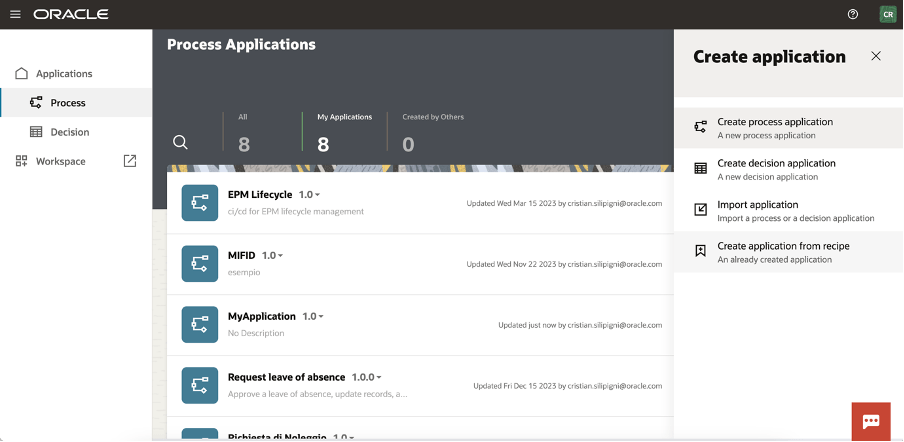
Now you can see how the “Credit Increase Request” can be imported into your own OPA instance:

Create a new process in the application process section

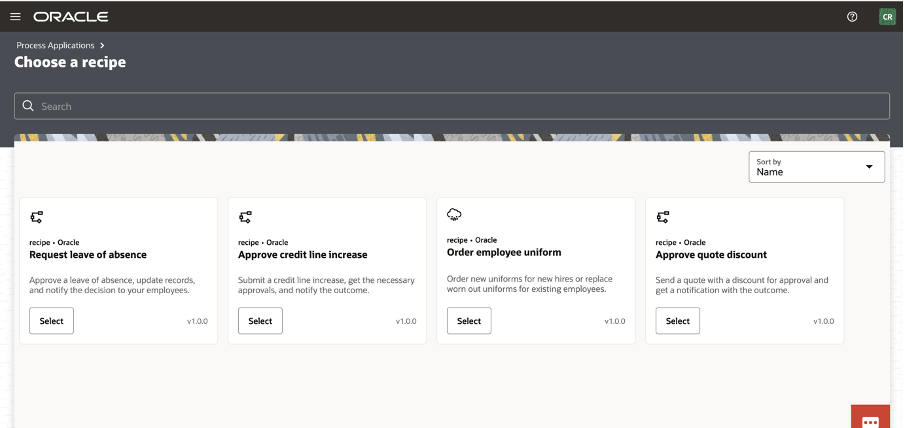
Click on the “Create Application from Recipe” action from the palette:

Select, for example, the Approve Credit Line increase

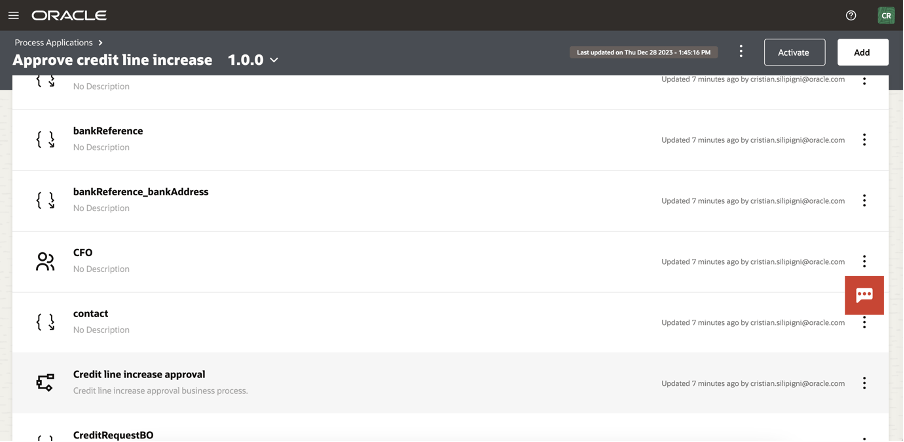
And now, you can see all the artifact imported in your application.

Selecting the “Credit Line Increase Approval” link, you can access the BPMN design of the process

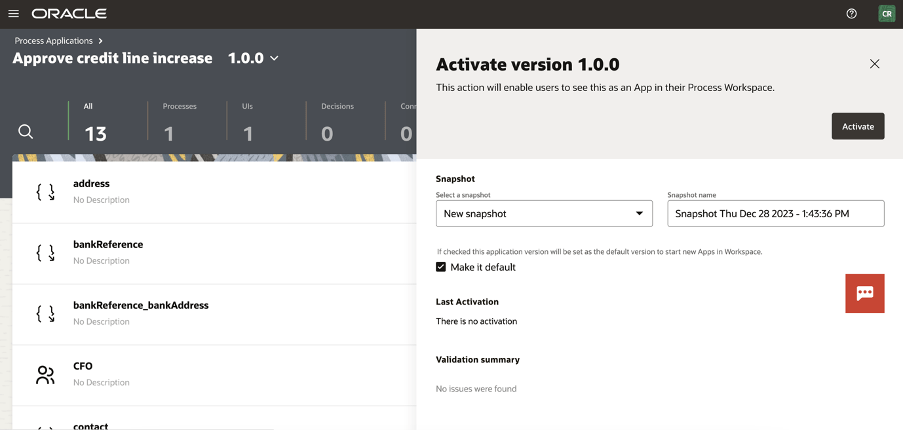
The process is now ready for you to be activated (or customized) selecting the “activate” button at the top of your page

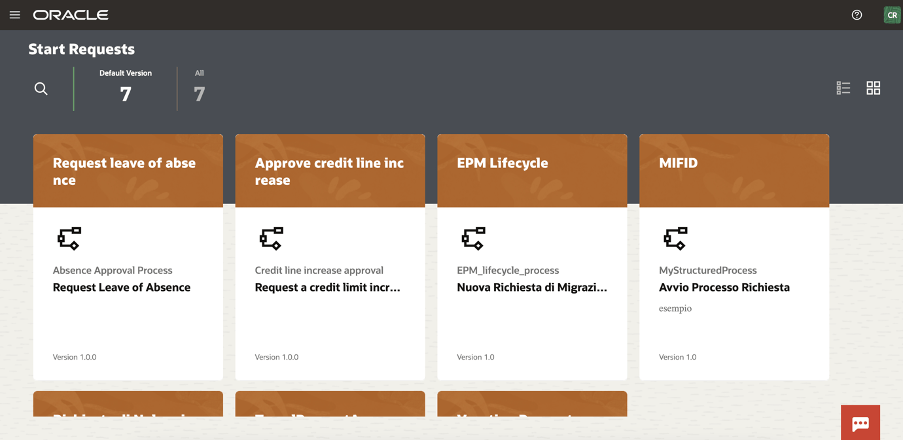
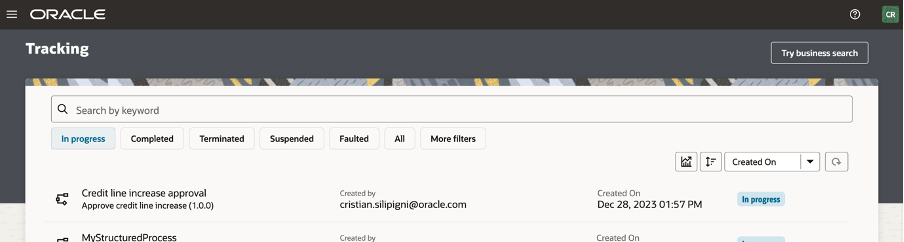
And now ready to be tested in the workspace

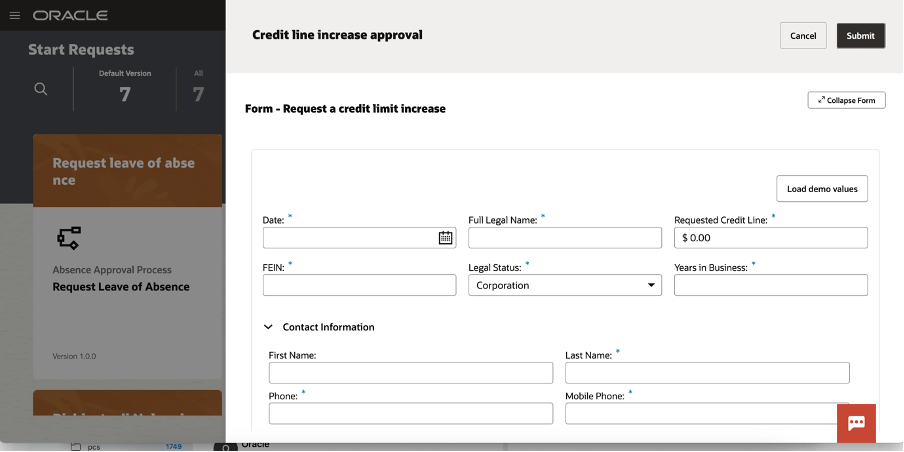
You can now start a new request and the web application will appear to you, something like that one here included:

You can load demo values to speed up the test so to quickly see the outcomes of the execution

A new item is now available to be worked by the assignee approving, rejecting, … all the actions that the human workflow will be configured for the specific user, group or application role

As we know, OPA can be used to support business processes to build “system 2 system” or “system 2 human” implementations and when the User Interface is required to interact with the running process you can also modify or extend the web UI  leveraging  the powerful features to adapt your web page, embedding basic and advanced controls so to drive the business user and simplifying his job reducing errors due to wrong data input

Try it by yourself… it’s a very good accelerator!!

Public and Additional Documentation

https://docs.oracle.com/en/cloud/paas/process-automation/recipes.html

https://www.oracle.com/it/integration/process-automation/features/

Advanced Protection : OIC generation 2 & File Server

The below public documentation will give you step by step instructions what needs to be done to protect OIC from malicious and unwanted internet traffic with OCI WAF (Oracle Cloud Infrastructure Web Application Firewall).

Configure and protect an Oracle Integration (Process) custom endpoint with OCI WAF

Well that works very well if you just have to protect OIC gen 2 from internet traffic.

Continue reading “Advanced Protection : OIC generation 2 & File Server”

Hashicorp’s cidrsubnet function

A while back I witnessed a Terraform presentation where a subnet’s IPv4 CIDR block was constructed from a parent VCN by invoking a Hashicorp function called cidrsubnet. This function is very useful because it can save time when you have multiple VCNs in your Terraform code. And it is universal, it can be used when there are several concurrent Terraform providers in the same code.

The function’s format is like this: cidrsubnet(prefix, newbits, netnum).

The prefix field is for the VCN CIDR. You can enter a variable in the prefix field. For example cidrsubnet(var.vcn_cidr, 8,1). Let’s say that the VCN CIDR is 10.0.0.0/16, then the value of var.vcn_cidr is 10.0.0.0/16. So, the function looks like this: cidersubnet(“10.0.0.0/16”,8,1).

The newbits value is the number of digits that you will be adding to the actual CIDR value. 16 + 8 = 24, so the subnet will be a /24 subnet.

The netnum value is for completing the actual subnet, and it depicts the “raw” decimal number of the binary portion of the subnet side of the CIDR, in this case is the third octet. The result for the subnet is 10.0.1.0/24.

This example illustrates it better:

cidrsubnet(“10.1.2.0/24”, 4, 15). 24+4 = 28, so the subnet will be a x.x.x.x/28 subnet.

The value in the netnum field will help us identify which of the 16 possible /28 subnets we’re creating. On a /28 subnet, in the fourth octet, the four left bits are the subnetwork bits. Convert 15 (the netnum value) to binary and you will get 1111. Place it on the subnetwork side of the fourth octet and you will get 1111|0000. The decimal value of the whole octet is 240, therefore the subnet is 10.1.2.240/28.

This is optimal, isn’t it?

Certificate expiry monitoring in Oracle Cloud Infrastructure

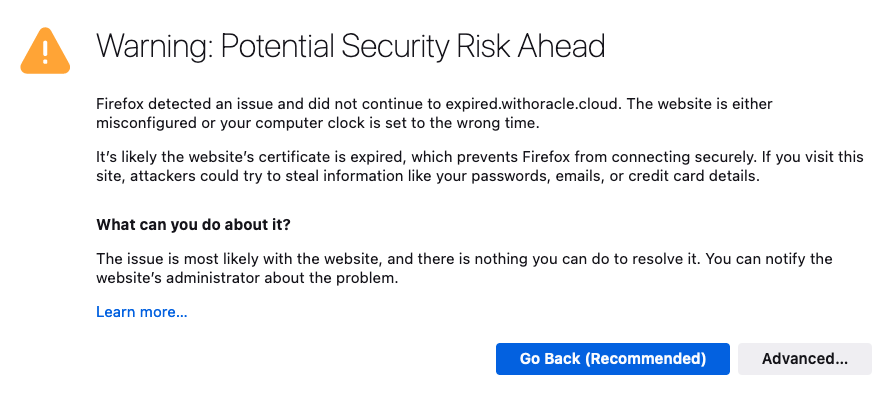
I’m sure we’ve all experienced it, either as a user, or as a system administrator. You know, that important SSL certificate everyone forgot about so didn’t renew, and now has expired?

When an SSL/TLS certificate expires it can create a number of problems, including:

  • Users’ web browsers will display warning messages, indicating that the website’s connection is not secure. This can lead to a loss of trust and deter user engagement.
  • API clients will often refuse to establish a connection if an SSL certificate is not valid potentially disrupting crucial data exchanges and integrations.
  • Search engines may flag the site as unsafe, leading to a drop in rankings and reduced organic traffic.

Also regularly encountering certificate warnings conditions users to accept future certificate errors, which makes them more likely to accept an SSL certificate warning should they be targeted in a Man In The Middle Attack.

To avoid these issues, it’s important to have enough advance warning that a certificate is going to expire so you can obtain a new one, install, and test it thoroughly.

If you’re already using Domain Validated (DV) certificates, such as those issued by Let’s Encrypt you might want to consider my automated Let’s Encryption Solution. This solution automatically handles the entire certificate lifecycle using serverless functions inside OCI. For those who prefer to bring their own certificates, these can be imported into OCI’s certificate service.

As at June 2023, certificate expiry monitoring in OCI is primarily focused on certificates associated with Load Balancers. To improve monitoring, I’ve developed a serverless solution that examines all certificates expiration dates. The solution emits logs and sends email notifications, also allowing for customisable lead time to align with your organisation’s certificate procurement process. Logs can also be forwarded to your SIEM solution if required.

Continue reading “Certificate expiry monitoring in Oracle Cloud Infrastructure”

OCI IAM Domains User Access Review

One of the recent additions to Oracle Cloud Infrastructure (OCI) is IAM Domains. New OCI tenancies are provisioned with IAM Domains and at time of writing tenancies with IDCS instances are being migrated to IAM Domains.

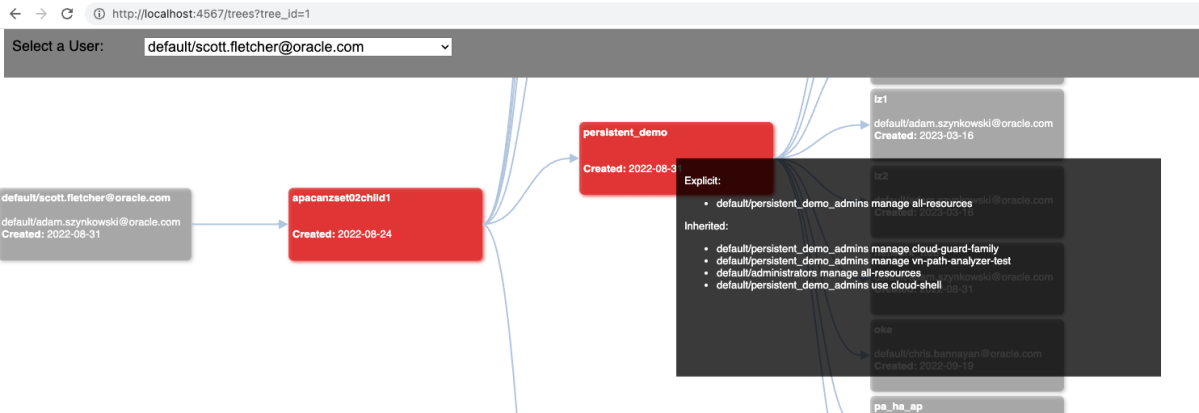
I originally created Peek to create a visual representation of effective user permissions inside an OCI tenancy to assist with performing user access reviews. Excessive permissions and IAM misconfigurations are a common issue found in cloud environments that can lead to privilege escalation and/or unauthorised access to resources and data.

At time of writing the latest release of the OCI CLI now supports interacting with IAM Domain resources and so I have created a version of Peek that works with IAM domains.

Continue reading “OCI IAM Domains User Access Review”