The Minecraft Server has been up and running for a little while now on my Oracle Cloud Infrastructure Always Free Tier. And it’s something that has become more valuable. The hours of crafting, building and mining is something that needs attention. I’ve experienced the situation when months of work has been wiped or worse hacked. It’s not a good feeling.
I’ve been using the Security Lists in Oracle Cloud Infrastructure to define specific ingress rules. What I’ve done now is make that easier.
Logs are often voluminous can be challenging to navigate through, but it can be a gold mine of valuable data to help administrators troubleshoot and identify issues or trends for operational activities.
To overcome the burden of manually eye-balling millions or (even billions) of rows in log records, bringing that data into OCI Logging Analytics(which is part of the Observability & Manageability Portfolio) will allow administrators to get quick insights, to reduce the time to isolate issues, minimising downtime and prevent impact to end users.
There are various ways you can bring telemetry and operational data into OCI Observability & Management (O&M) to proactively monitor and gain operational insights into your IT fleet.
Example of ways you can do this are:
Service Connector Hub – Route and move data from one OCI service to Another OCI Service (eg. OCI Logging to Logging Analytics)
API Call – Collect data from files stored on Object Storage or Upload Log data on demand
Agent Based – Deployment of Agent on Host
If you have targets you want to monitor on-premise or in the cloud (OCI, AWS, Azure etc…) and you have access to the VM or Compute instance (ie. you can SSH or Remote Desktop to the host), then an Agent based method will allow you to collect and bring that data into unified platform in O&M.
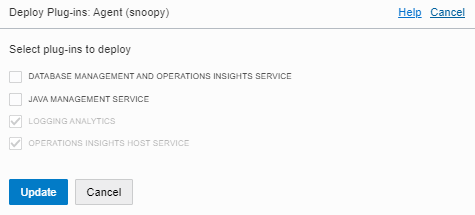
In this example we will show how you can deploy Agent based method (on Linux OS) so you can leverage the O&M services including:
Logging Analytics
DB Management
Operations Insights
Java Management Service
1 – NETWORK COMMUNICATION (For External Targets to OCI)
We recommend using OCI FastConnect or IPSEC VPN
Communication Destination to OCI Tenancy – HTTPS (443)
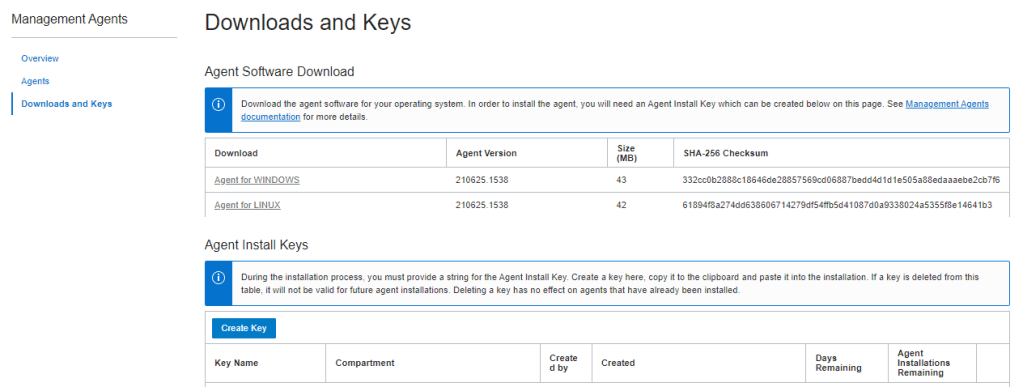
3. Review Key and Download Key to File (eg. oci-reg-key.txt)
NOTE: Your Key File will be in the format of <Key Name>.txt. Copy it to your target host.
4. Download Agent by clicking on the Agent for your OS (eg. Agent for LINUX) and copy to your target host
4 – INSTALL AGENT
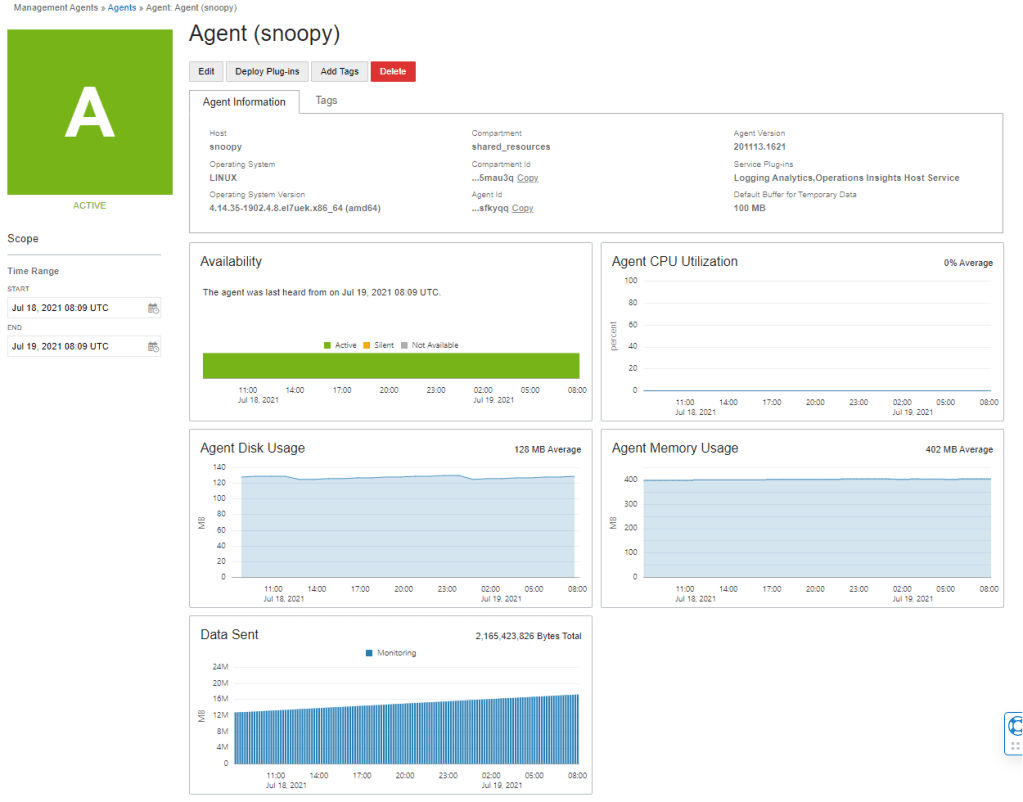
1. Login to the host and locate the downloaded agent file oracle.mgmt_agent.rpm
$ sudo rpm -ivh oracle.mgmt_agent.<version>.Linux-x86_64.rpm
Preparing...                          ################################# [100%]
Checking pre-requisites
        Checking if any previous agent service exists
        Checking if OS has systemd or initd
        Checking available disk space for agent install
        Checking if /opt/oracle/mgmt_agent directory exists
        Checking if 'mgmt_agent' user exists
        Checking Java version
                JAVA_HOME is not set or not readable to root
                Trying default path /usr/bin/java
                Java version: 1.8.0_271 found at /usr/bin/java
Updating / installing...
   1:oracle.mgmt_agent-201113.1621-1  ################################# [100%]

Executing install
        Unpacking software zip
        Copying files to destination dir (/opt/oracle/mgmt_agent)
        Initializing software from template
        Creating 'mgmt_agent' daemon
        Agent Install Logs: /opt/oracle/mgmt_agent/installer-logs/installer.log.0

        Setup agent using input response file (run as any user with 'sudo' privileges)
        Usage:
                sudo /opt/oracle/mgmt_agent/agent_inst/bin/setup.sh opts=[FULL_PATH_TO_INPUT.RSP]

Agent install successful
This is my 14th #DaysOfArm article that tracks some of the experiences that I’ve had so far. And just to recap from the first post (here) on June 12 2021.
It’s been just over 2 weeks since the launch of Ampere Arm deployed in Oracle Cloud Infrastructure (OCI). Check this article out to learn more (here). And it’s been about one week since I started looking into the new architecture and deployment, since I started provisioning the VM.Standard.A1.Flex Compute Shape on OCI and since I started migrating a specific application that has many different variations to it to test it all out.
This is my next learning where I’ve deployed successfully openrouteservice – an open-source routing / direction API all deployed on an 4 OCPU with 24 GB of RAM in an Always Free Tier tenancy.
This is my 13th #DaysOfArm article that tracks some of the experiences that I’ve had so far. And just to recap from the first post (here) on June 12 2021.
It’s been just over 2 weeks since the launch of Ampere Arm deployed in Oracle Cloud Infrastructure (OCI). Check this article out to learn more (here). And it’s been about one week since I started looking into the new architecture and deployment, since I started provisioning the VM.Standard.A1.Flex Compute Shape on OCI and since I started migrating a specific application that has many different variations to it to test it all out.
This is my next learning is another retrospective with the OCI Arcade deployment the full stack is now being deployed on 1 OCPU with 6 GB of RAM in an Always Free Tier tenancy.
This is my 12th #DaysOfArm article that tracks some of the experiences that I’ve had so far. And just to recap from the first post (here) on June 12 2021.
It’s been just over 2 weeks since the launch of Ampere Arm deployed in Oracle Cloud Infrastructure (OCI). Check this article out to learn more (here). And it’s been about one week since I started looking into the new architecture and deployment, since I started provisioning the VM.Standard.A1.Flex Compute Shape on OCI and since I started migrating a specific application that has many different variations to it to test it all out.
This is my next learning where I’ve deployed successfully Pelias – an open-source geocode API all deployed on an 4 OCPU with 24 GB of RAM in an Always Free Tier tenancy.
(Update – 11th Oct 2021 – there’s been some changes made as this is a working document … as some of the packages have changed as well as additional fixes to make it easier …)
(Update – 28th Dec 2022 – I’ve refreshed the instructions for this blog post to match what is happening with Pelias as there’s been some cool changes to support arm64).
This is my 11th #DaysOfArm article that tracks some of the experiences that I’ve had so far. And just to recap from the first post (here) on June 12 2021.
It’s been just over 2 weeks since the launch of Ampere Arm deployed in Oracle Cloud Infrastructure (OCI). Check this article out to learn more (here). And it’s been about one week since I started looking into the new architecture and deployment, since I started provisioning the VM.Standard.A1.Flex Compute Shape on OCI and since I started migrating a specific application that has many different variations to it to test it all out.
This is my next learning which I focuses on Arm’s availability in our cloud.
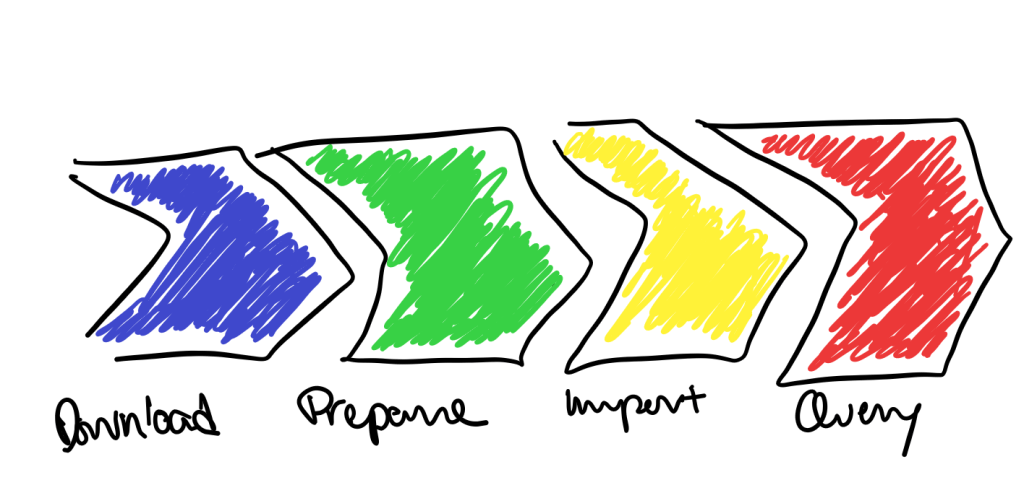
With the work that I’ve been doing with Open Street Map (here), I’ve been provisioning Pelias (here) – an open-source implementation of geocoding. This architecture is not small (consisting of 10+ docker images, and potentially 100+GB of raw geo data) especially if you are looking to geocode the whole world. The workload (or pipeline) had 4 main stages – download, prepare, import and query.
Download – to get the raw data sources
Prepare – to get the raw data into a format that can be easily imported
Import – to import the data into the elastic search (which is the backend)
Query – to accept geocode queries
Each of these stages have different performance characteristics and required different resources. The main thing that I’m looking at here is the use of compute. The need for compute during the prepare and import stages is significantly different from the download and query stages. I’m also not confidently in terms of when or how much I need.
And this is why I configured a burstable instance.
Here’s a couple of things to know …
There is a baseline utilisation OCPU. Consider this as a the minimum compute you want. For my scenario, it was primarily how much compute that I needed for the download and query stages.
There is full utilisation OCPU. Where this is can be 2x or 8x the baseline utilisation. (in the terms of the documentation – the baseline utilisation can be either 12.5% or 50% of the full utilisation OCPU). For my scenario, it was primarily the prepare and import stages that needed the additional compute.
The increased capacity is based upon the CPU utilisation metrics to determine whether to burst.
The average CPU utilisation for the month needs to up to the baseline utilisation OCPU.
Burstable Instances billing is known. It doesn’t come with Bill Shock.
You can find out more about Oracle Cloud Infrastructure burstable instances (here). If you want to try this out yourself or work on your own application, sign-up (here) for the free Oracle Cloud Trial. I’d be interested to hear your experiences and learn from others as well. Leave a comment or contact me at jason.lowe@oracle.com if you want to collaborate.
Recently, Oracle rolled out the OCI Bastions service, which is designed to simplify the process of accessing instances which do not have a public IP address. They are really easy to use, with simple commands to allow access to these internal hosts… if you are using a Unix shell. Unfortunately I suffer from being quite wedded to various tools, and as a Windows user, I tend to use PuTTY to access hosts via SSH, so this blog post will detail both the OCI Bastion service in a little more detail, as well as how I continued to resist changing my old habits, and set up connections using the OCI Bastion service using a number of components of the PuTTY suite of tools.
This is my tenth #DaysOfArm article that tracks some of the experiences that I’ve had so far. And just to recap from the first post (here) on June 12 2021.
It’s been just over 2 weeks since the launch of Ampere Arm deployed in Oracle Cloud Infrastructure (OCI). Check this article out to learn more (here). And it’s been about one week since I started looking into the new architecture and deployment, since I started provisioning the VM.Standard.A1.Flex Compute Shape on OCI and since I started migrating a specific application that has many different variations to it to test it all out.
This is my next learning which I focuses on something deeper into the hardware stack – vectors.






 RedThunder.Blog