Connect Dockerised Instant Client to Autonomous Data Warehouse

With all the recent exciting releases of Oracle Autonomous PaaS Services, I wanted to explore some of the client connectivity options to work against the Oracle Autonomous Data Warehouse (ADW).
In my cloud subscription I provisioned an instance of ADW which took less than two minutes from start to finish – terrific, now I am ready to leverage the functionality. If you want to know the steps to provision an ADW instance check out this blog post – https://redthunder.blog/2018/07/02/teaching-how-to-get-started-with-oracle-autonomous-data-warehouse-cloud-service/

Obviously an empty data warehouse isn’t particularly useful so one of the first things I wanted to do was to connect a SQL client to the ADW instance so that I can load some data. Initially I used Oracle SQLDeveloper to load data into my ADW instance. I had staged my Excel data files into an Oracle Cloud Object Storage container and then referenced them in my SQL code as External Tables. Carlos has already blogged the steps required for this in https://redthunder.blog/2018/07/02/teaching-how-to-get-started-with-oracle-autonomous-data-warehouse-cloud-service/ . If you follow the steps you will quickly get your ADW instance populated with your data. In fact for the demo scenario my ADW instance was now populated with some data (approx. 1 Million rows of Sales data and associated related dimensions (Product, Customers etc).

My next step (and the subject of this blog post) was to use the Oracle Instant Client in order to query the loaded data. Of course I could easily have viewed the data inside SQLDeveloper but I wanted to try some other approaches. Often in Proof of Concepts there is a need to quickly spin up a tool to create, retrieve, update and delete data. Anyone who has used the Oracle Database would be familiar with the SQL*Plus client which is included as part of the Oracle Instant Client. For those who are not familiar with Oracle Instant client, the Oracle website describes it as follows,

“Free, light-weight, and easily installed Oracle Database tools, libraries and SDKs for building and connecting applications to an Oracle Database instance. Oracle Instant Client enables applications to connect to a local or remote Oracle Database for development and production deployment. The Instant Client libraries provide the necessary network connectivity, as well as basic and high end data features, to make full use of Oracle Database. It underlies the Oracle APIs of popular languages and environments including Node.js, Python and PHP, as well as providing access for OCI, OCCI, JDBC, ODBC and Pro*C applications. Tools included in Instant Client, such as SQL*Plus and Oracle Data Pump, provide quick and convenient data access.”

I used a Vagrant-Box / VirtualBox to avoid having to install development tools such as the Oracle Instant Client directly on my laptop operating system. I found an existing vagrant box that provided me with an Oracle Linux base that also included Docker. This vagrant-box image allowed me to quickly spin up a base environment which in turn allowed me to focus on steps to run the Oracle Instant Client inside a Docker container inside the Virtual Box environment (sounds like a cheesecake recipe – lots of layers). The Dockerfile I used was based on the Oracle Instant Client forked from the official Oracle DockerImages project with some modifications for specifics around connecting to an Oracle Data Warehouse Instance. Continue reading “Connect Dockerised Instant Client to Autonomous Data Warehouse”

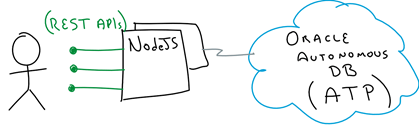
Teaching How to get started with Autonomous Database for OLTP

We all know that data is massively valuable to businesses, whether it is to support daily business transactional activities (Online Transaction Processing – OLTP), or to help business with planning, problem solving and decision making (Online Analytical Processing – OLAP). Either way, businesses heavily rely on both ways to support their most important strategies and activities.

Until recently, companies had to heavily invest in provisioning, securing, patching and driving either way of Online Data processing mechanisms. In most cases, even with Cloud adoption, companies still had to rely on their own skills to make sure that their databases were properly patched, secured, tuned and managed.

However, today there is another option with the recent announcements that Oracle have made around Autonomous Databases for both OLAP and OLTP data processing. What this means, is that Oracle has taken automation to a totally new level with the assistance of Machine Learning. The idea is that the DB itself is self-sufficient with a full set of automated activities that range from patching, securing, optimising, etc. This will reduce not only the effort to run data workloads, but removing completely human errors, creating the opportunity to not only keep the lights on, but to focus on crucial business activities around innovation and differentiation.

Continue reading “Teaching How to get started with Autonomous Database for OLTP”

Active Directory Delegated Authentication in Oracle Identity Cloud Service

AD Delegated Authentication is a way to synchronise user passwords between an on-premises Microsoft Active Directory enterprise directory structure and Oracle Identity Cloud Service (IDCS). Users can use their AD passwords to sign in to IDCS to access resources and applications protected by Oracle IDCS. We will use Office365 as one of the target applications. Oracle IDCS can provision user into Office365 and keep users synchronised.

The following diagram 1 depicts the scenario:

diagram1

Diagram 1: Logical architecture of scenario

Continue reading “Active Directory Delegated Authentication in Oracle Identity Cloud Service”

Circuit Breaker in Service Mesh – Istio/Envoy

This Lab, logically follows previous steps required to provision and curate a Kubernetes cluster. Please review them before proceeding. If you are in doubt, feel free to contact me directly via https://www.linkedin.com/in/citurria/

Testing BookInfo app with Circuit Breaker based policy

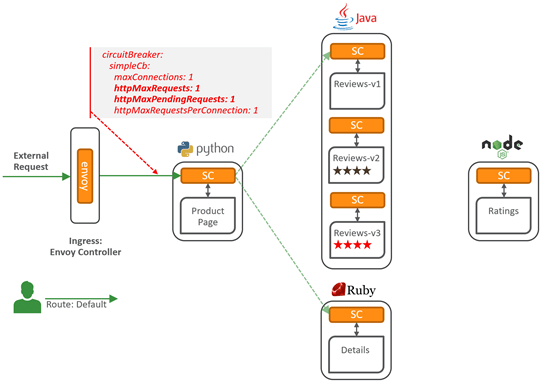
The third and last test in the Service Mesh, is using a Circuit Breaker based pattern. It further protects our microservices in case of certain conditions occur, such as preventing that an unexpected number of requests overflow and affect the microservices in the service mesh.

We might decide to throttle or simply reject new incoming requests when a number of current incoming http requests reaches certain threshold.

For demonstration purposes, we are going to set rules to allow a maximum of 1 request at a time. If more than 1 request comes in, we will prevent it from entering the mesh.

Continue reading “Circuit Breaker in Service Mesh – Istio/Envoy”

Policy Enforcement in Service Mesh – Istio / Envoy

This Lab, logically follows previous steps required to provision and curate a Kubernetes cluster. Please review them before proceeding. If you are in doubt, feel free to contact me directly via https://www.linkedin.com/in/citurria/

Testing BookInfo app with a single review version

First let’s test the BookInfo app with a single review version.

Continue reading “Policy Enforcement in Service Mesh – Istio / Envoy”

Service Mesh 101 – Getting familiar with Istio and Envoy

This Lab, logically follows previous steps required to provision and curate a Kubernetes cluster. Please review them before proceeding. If you are in doubt, feel free to contact me directly via https://www.linkedin.com/in/citurria/

Introducing Service Mesh

Continue reading “Service Mesh 101 – Getting familiar with Istio and Envoy”

Cloud Native App Dev Series…

Welcome to the Cloud Native App Dev Series. We built and constantly maintain this space to help others get up to speed with Cloud Native App Dev technologies and discover the power of Autonomous Cloud Services.


  • Kubernetes:
    • Containers 101: Learn how to containerise and ship your applications to Kubernetes using Docker
    • Kubernetes 101: Get familiar with Kubernetes architecture and components.
    • Kubernetes Dashboard: Deep dive into the Kubernetes dashboard components and concepts.
    • Provision Kubernetes: Learn how to install Kubernetes locally or in the Cloud.
    • Microservices Deployments 101: Learn how to deploy your Microservices into Kubernetes.
    • Cheeses App – Self-Healing and Scalability: Discover how simple it is to run and scale your microservices in Kubernetes.
    • Socks-shop Polyglot App: Play with a polyglot-based microservices application in Kubernetes.
    • (Work in progress…) Roll out your Microservices: Learn how to roll out and roll over your Applications in Kubernetes
    • (Work in progress…) Operators and Service Broker: Learn how to consume other Cloud Services as native Kubernetes workloads.


  • Serverless:
    • (Work in progress…) Serverless 101: Get up to speed with Serverless.


  • Service Mesh (Istio and Envoy):
    • Service Mesh 101: Get familiar with Service Mesh, using technologies like Istio and Envoy.
    • Policy Enforcement: Learn how to enforce simple routing policies in Service Mesh.
    • Circuit Breaker – Network-Latency based routing. Learn how to enforce more complex Service Mesh routing policies, based on network latency.


  • PaaS:
    • Build Modern Web development: Use Autonomous Visual Builder to construct modern Web UIs in minutes
    • Autonomous Data Warehouse 101: Learn how to provision Autonomous Data Warehouse in minutes. Load millions of records in seconds and visually analyse the data.
    • (Work in progress…) Running Visualization on Autonomous Data Warehouse: Learn how to connect Data Visualizer to Autonomous Data Warehouse.
    • Chatbot Development: Learn how to build chatbots in the Cloud.
    • (Work in progress…) Blockchain 101: Get familiar with Blockchain concepts and use cases.


Congratulations!!! You have enough to start building your own Cloud Native Applications.

We will keep publishing interesting topics, so you better stay tuned! If you have suggestions for new topics, please contact me directly via https://www.linkedin.com/in/citurria/

Thanks for your time.

*Special thanks to Cameron Senese for being a great mentor and a Cloud warrior, helping us demystify the exciting world of Kubernetes and Microservices… As we keep demystifying technologies and patterns, we are going to keep adding interesting topics, so you better stay tuned!


Socks-shop Polyglot App in Kubernetes…

This Lab, logically follows previous steps required to provision and curate a Kubernetes cluster. Please review them before proceeding. If you are in doubt, feel free to contact me directly via https://www.linkedin.com/in/citurria/

In this Lab, we will show how to manage a more complex Microservices-based application based on an E-Commerce Socks-shop App (also see here). Similarly, as with the Simpler Cheeses App, we are going to use Weave Scope to gather real-time insight into this more complex application.

This is an e-commerce application that sells socks on web. However, we chose this application because it is not any different to any modern Application. That is, it is based on multiple microservices, where each one use different technologies as programming languages/frameworks, as well as persistent back stores or databases.

That is:


For more information, see: Weave-socks multiple technologies
(and github).

Continue reading “Socks-shop Polyglot App in Kubernetes…”

Cheeses App – Self-Healing and Scalability in Kubernetes…

This Lab, logically follows previous steps required to provision and curate a Kubernetes cluster. Please review them before proceeding. If you are in doubt, feel free to contact me directly via https://www.linkedin.com/in/citurria/

In this Lab, we will show how to deploy microservices-based Applications into Kubernetes cluster. Then we are going to use an Open Source framework called Weave Scope, to gather in real-time runtime insight into it. We will finish by learning a few tricks to easily manage your microservices.

The Application that we are going to deploy is based on “Cheeses“. It is made of 3 microservices (3 types of cheeses) that when invoked via an API, they simply return their own name (i.e. cheddar, stilton, or wensleydale).

Continue reading “Cheeses App – Self-Healing and Scalability in Kubernetes…”

Kubernetes Dashboard Deep Dive…

In this blog, you will get familiar with the Kubernetes Cluster UI Dashboard and with the various components that are pre-deployed in your sandbox environment.

Kubernetes Dashboard UI is a web-based interface that lets you visually see all the different components of the Kubernetes cluster, as well as to deploy and manage Applications via Containers running on Pods. It also provides ability to overview the health of the various components and troubleshoot your various components specifications.

The Kubernetes Dashboard UI comes with a vertical menu. Let’s review the main sections in this menu:

Continue reading “Kubernetes Dashboard Deep Dive…”