RPA vs AI: Perspectives, Applications, and the Power of having both in Oracle Integration Cloud

I’ve had meetings with clients and colleagues who thought RPA and AI were the same thing, or at least part of the same philosophy.

In my opinion, this is only partially true and for this reason, I have decided to write this article to help clarifying where the two solutions differ.

Robotic Process Automation (RPA) and Artificial Intelligence (AI), although often mentioned together in the context of digital transformation, are two distinct technologies, each with its own characteristics and purposes. Let’s remember that RPA has been talked about since the early 2000s and was certainly created to introduce the first concepts of automation within industrial and enterprise processes.

Let’s take a closer look at these technologies.

RPA is essentially a technology focused on automating manual and repetitive activities according to predefined rules. You can think of RPA as a “digital workforce” that performs actions on software and systems just like a human operator would: it opens applications, copies and pastes data, fills in forms, sends emails, or updates databases. Its great advantage lies in the ability to speed up and make more efficient low-value processes, eliminating errors due to distraction and freeing people from monotonous tasks. However, RPA is not “intelligent” in the strict sense: it operates within very rigid parameters and cannot adapt to new situations or understand context. For example, an RPA bot can extract data from an electronic invoice, but only if the layout remains the same; unexpected changes to the format could stop the automated process.

AI, on the other hand, encompasses a set of technologies inspired by human cognitive capabilities such as learning, reasoning, language understanding, image or sound recognition, and decision-making. AI can analyze large amounts of data, identify hidden patterns, make predictions, adapt to new conditions, and learn from previous results. Therefore, it doesn’t just follow predefined instructions but is able to evolve over time, improving its accuracy and handling situations not explicitly foreseen by developers. For example, an AI system can read text written by customers, understand its meaning, and determine its sentiment (positive, neutral, negative), or it can recognize and classify objects within an image, even if those objects are arranged differently than those seen in past images.

In summary, while RPA is ideal for improving efficiency in repetitive, standardized, and structured tasks, AI comes into play where flexibility, understanding of context, predictive ability, and adaptation to unstructured data are needed. The two technologies can also be combined—for example, using RPA to manage operational workflow and data collection, and AI to add intelligence at specific points in the process, such as document classification or handling requests in natural language.

This integrated approach enables companies to get the most out of automation: RPA brings speed and efficiency, while AI introduces the ability to solve complex problems and add intelligence to business processes.

To summarize, we can recap as follows:

RPA (Robotic Process Automation):

  • Focuses on automating repetitive tasks based on fixed rules.
  • Replicates human actions on software interfaces (clicks, data entry, data extraction).
  • Does not “learn” from data: follows predefined procedures without adapting.
  • Ideal for well-structured processes such as data entry, system-to-system transfers, extracting data from structured PDFs, updating records.

AI (Artificial Intelligence):

  • Is based on machine learning, deep learning, and NLP (Natural Language Processing) algorithms.
  • Can solve complex problems, learn from data, adapt, and improve over time.
  • Manages less-structured scenarios such as image recognition, text analysis, virtual assistance, natural language interpretation, trend forecasting.

So, RPA focuses on repetitive and structured tasks, while AI focuses on complex and unstructured tasks; RPA does not learn or adapt, while AI learns from data and improves its performance to automate processes that require cognitive capabilities and not just “mechanical” functions.

The good news is that today, Oracle Integration Cloud (OIC) is a platform capable of combining Robotic Process Automation (RPA) tools and Artificial Intelligence (AI) capabilities, integrating both technologies within business processes.

This means a company can use OIC not only to automate repetitive and manual tasks through RPA—such as extracting and automatically entering data into business systems—but also to enrich these processes with intelligent components based on AI.

For example, OIC allows the incorporation of natural language analysis to better understand customer requests, supports agentic AI, orchestrate tools and actions, integrate document data extraction services through automatic recognition, or use predictive models to support more informed decisions.

All of this is orchestrated in a centralized and user-friendly environment, often without the need to write code, thanks to OIC’s visual tools and intuitive interfaces. In practice, a company can build workflows in which RPA and AI activities follow one another automatically: for example, a bot can gather data from different systems, pass it to an AI service for advanced analysis or classification, and finally archive the results in a management platform such as Oracle ERP Cloud.

The integration between RPA and AI in OIC brings tangible benefits: it speeds up processes, reduces manual errors, and introduces advanced automation capabilities that allow handling both simple activities and more complex tasks that require “intelligence,” always ensuring security, compliance, and adherence to policies.

References:

https://docs.oracle.com/en/cloud/paas/application-integration/

https://docs.oracle.com/en/cloud/paas/application-integration/robots.html

Oracle Integration & AI: Accelerating OIC Development Phases

In the evolving digital era, Oracle is embedding AI deeply into its Integration platform to streamline, automate, and enhance the development process. Rather than seeing AI as an add-on, Oracle’s strategy ties together infrastructure, development tools, and application integration so that teams can build faster and smarter.

Oracle’s AI-Innovation in Integration can be declined in 2 ways.

  1. How the AI can be a value add for OIC developers
  2. What OIC can offer in the Agentic AI area to simplify and accelerate AI adotpion in enteprise projects

In this article, I’m focused on the first point and I will try to explain how developers can take advantage of such AI features.

What coming from Oracle AI World event , recently occurred in Las Vegas, gave us the opportunity to be aware of:

  • Embedded AI capabilities: Oracle Integration includes embedded AI that helps with creating integrations (supported by using natural language), defining schedules, writing documentation about integration components, generating queries (e.g., FHIR, ATP), and resolving errors in B2B .
  • Connection with OCI AI Services and OpenAI: The platform allows use of Oracle Cloud Infrastructure (OCI) AI Services or OpenAI large language models in integrations. That means processes can use text/image processing, content generation, analysis, etc., directly as part of integration workflows.
  • “Use AI to Create an Integration”: A concrete feature allows a user via a natural-language prompt (in a chat interface) to ask Oracle AI to build the skeleton of an integration. The system determines which “nodes” (trigger/invoke), adapters, and connections are needed, builds a draft and lets the developer accept or modify it.
Here are key ways AI supports or accelerates development in Oracle Integration:

Phase of Development  Traditional ChallengesHow Oracle’s AI Helps
Requirement Spec / Planningdefining what systems need to interact; understanding triggers; mapping workflowsUse natural language to describe needed integration; AI proposes flow, nodes, connections. Reduces time in planning and help you to build the skeleton of your rintegration flows
Design / Prototypingdeciding adapters, interfaces; drafting initial workflowsAI suggests adapters, trigger/invoke components; creates skeleton flows that devs can edit. Speeds prototyping
Implementation (Coding / Configuration)manual building of integration flows; error handling; repetitive tasksAI can assist in resolving errors; suggest corrections; provide diagnostics
Deployment / Maintenancemaintaining integrations as systems change; resilience; monitoringAI helps with scheduling, modifying flows; possibly assisting in content or error handling maintenance. ”

Having said that, what’s the benefit coming from AI adoption in development?

I share with you some steps where the conjunction between AI and OIC is for sure a very good help

  • Faster development cycles — less time spent on repetitive or boilerplate tasks.
  • Lower barrier to entry — using natural language turns non-expert users or less technical team members into potential contributors.
  • More consistency — AI can enforce patterns, use standard connections, reduce errors.
  • Scaling & productivity — teams can do more, focus on higher-value logic rather than plumbing.

In my opinion, at the same time, it’s helpful is to get the most out of Oracle’s Integration + AI strategy, Organizations should:

  1. Define clear prompts and use cases — specify systems, conditions, failure handling when using natural language with AI to build integrations.
  2. Review and validate AI’s generated flows thoroughly, especially for critical business logic.
  3. Invest in governance — keep track of which integration pieces were AI-generated, maintain documentation, versioning.
  4. Train teams on AI usage: how to write prompts, how to troubleshoot AI suggestions.
  5. Monitor performance and cost — AI services (especially LLMs) bring compute and data costs; ensure ROI.

I hope this content helps the community something like a sort of brainstorming and at the same time it helped me to point out some aspects

Conclusion

Oracle’s strategy of embedding AI into its Integration platform represents a significant shift in how enterprise software can be developed. By providing tools that allow parts of the development workflow — planning, design, implementation — to be partly automated or assisted, Oracle is helping developers move faster, reduce errors, and focus on more strategic problems.

The future path will require careful balancing of innovation with oversight, but for companies willing to adopt and adapt, the promise is strong: more agile, intelligent, and automated integration development.

Stay tuned … the future is now and several other news are already in plans!

OCI Process Automation and Oracle Artificial Intelligence in Action

It’s very interesting feature what recently delivered with OCI Process Automation.
It’s possible now to upload in your workflow a document such a passport, driver license, … documents from where it’s possible to automatically extract data.

No more manual procedures but everything managed by the solution to automate business processes.

This is a meaningful improvement of the OCI offering highlighting synergies and native integration among the big number of OCI services available in each OCI region of the world.

Artificial Intelligence is today the most relevant technology from which we can take advantage in simplifying our lifestyle, reducing time with bureaucracy, and getting a benefit from other several new services before unimaginable.

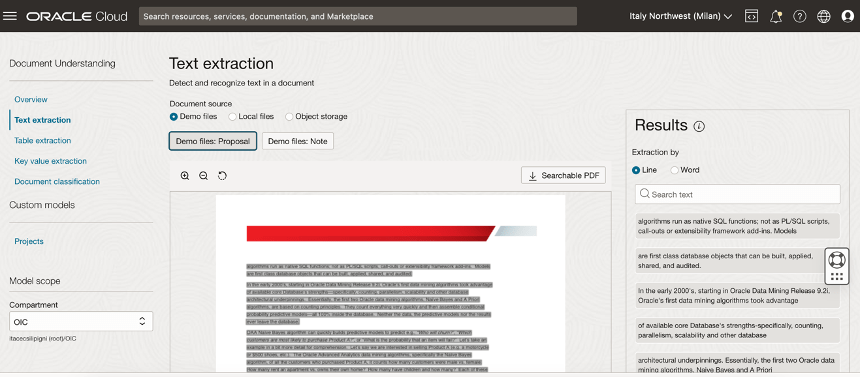
Oracle Cloud Infrastructure (OCI) Document Understanding, what natively integrated in Oracle Process Automation, is an Oracle AI service that enables developers to extract text, tables, and other key data from document files through APIs and command line interface tools. With OCI Document Understanding, you can automate tedious business processing tasks with prebuilt AI models and customize document extraction to fit your industry-specific needs.

You can easily identity this service navigating the OCI Console in the Analytics & AI section.  

With this service, you can upload documents to detect and classify text and objects in them. You can process individual files or batches of documents using the ProcessorJob API endpoint.

The following pre-trained models are supported and offering support for different pre-trained model like:

  • Optical Character Recognition (OCR)
  • Text extraction
  • Key-value extraction
  • Table extraction
  • Document classification
  • Optical Character Recognition (OCR) PDF

In your daily life, how many times you need to show your passport, your driver license, or your health insurance card to start a new request?

Some examples are:

  • Renting a car
  • Accessing the hospital to do triage
  • Medical checkup in healthcare
  • Hotel check-in

This is the reason why today Oracle can offer this added value in his Cloud offering… to simplify your daily activity, to make your life better.

A simple process, as I said before, can be that one about the “Car Rental”. Trying to imagine a human workflow behind, we can think about a BPMN process used to manage every step where for example an approval is required.

We can also imagine, not necessarily a process behind but simply the need to upload some info or data which need to be sent to other applications or database so that OPA can be used to easily configure a webpage from where it’s possible to upload data into an Oracle Database using its REST adapter or leveraging the DB adapter included in Oracle Integration Cloud Enterprise Edition (which includes OCI Process Automation).

I have tried to imagine a “Car Rental” process designing a step by step process for example when a long term rental is requested and its acceptance needs to be approved

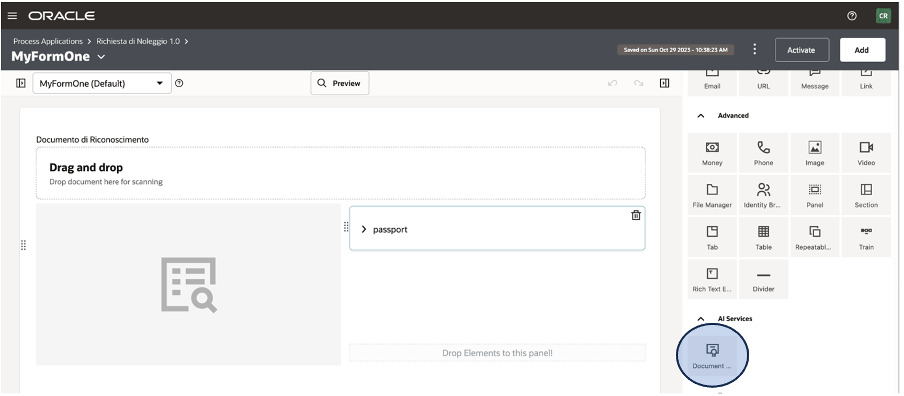
As you can see below, when you design your WebForm from OCI OPA Console you can find on the right side, included in the activities section, the new icon about the AI Document Understanding.

This icon can be dragged & dropped into your canvas to model the web UI as you prefer and need.

It’s a pre-built integration, so you don’t need to think about REST invocation or similar. Everything is pre-configured for you and then you can easily use it without coding or similar stuff.

Once the process is implemented (here a quick overview how to do it), you can enable this one for production purposes

The operator can use the web UI to start a new request, clicking on the pre-defined process and/or including the new application in a web portal or into the Oracle SaaS springboard in according to the specific process.

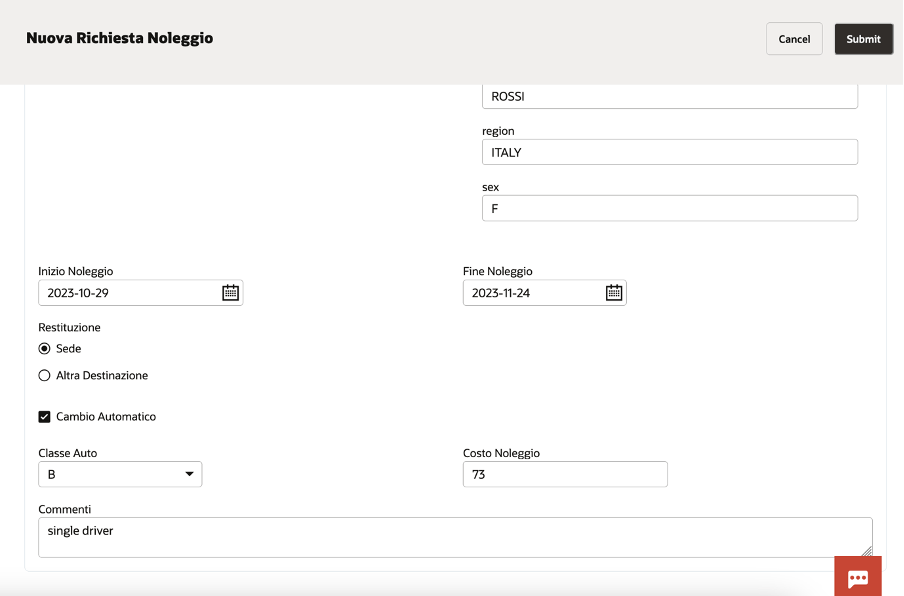
Once the operator has identified the right process, clicking on the “Nuova Richiesta di Noleggio”, the webform appears to accept the required info.

If, AI Document understanding, has been properly configured, the end user can upload the image of the passport, or other provided documentation, so to start the automatic data acquisition

In a while, you can see how automatically all personal data appear on the right side of the page, filling the right field.

You can, of course, add other info to enrich the information required … something like below included. The web UI is highly customizable, and you can build your own web page as the business requires.

In this way, the desk operator can scan your documents and with a simple click, uploading the image, it’s possible to collect all the required information without huge effort taking advantage of:

  • Less time for data entry
  • Less errors for manual activities (i.e. reading passport and typing them)
  • Better and quicker customer experience

I encourage you to test it by yourself to personally understand how much it’s easy to do it. A very low effort to improve processes introducing in your business innovation, efficiency, and automation.

Helpful resources:

https://docs.oracle.com/en/cloud/paas/process-automation/

https://docs.oracle.com/en/cloud/paas/process-automation/user-process-automation/implement-intelligent-document-processing-forms.html#GUID-1C3EF754-8BAC-410E-B915-5A63F3EA786C

https://docs.oracle.com/en-us/iaas/Content/document-understanding/using/pretrained_doc_document_class.htm

https://blogs.oracle.com/integration/post/intelligent-document-processing-in-oci-process-automation

Advanced Protection : OIC generation 2 & File Server

The below public documentation will give you step by step instructions what needs to be done to protect OIC from malicious and unwanted internet traffic with OCI WAF (Oracle Cloud Infrastructure Web Application Firewall).

Configure and protect an Oracle Integration (Process) custom endpoint with OCI WAF

Well that works very well if you just have to protect OIC gen 2 from internet traffic.

Continue reading “Advanced Protection : OIC generation 2 & File Server”

Secure your OIC Integration using OAuth Security Policy

Security is the key aspect in any implementation, specially when it comes to publish your API/Integration to external consumer outside of your organization.

Oracle Integration Cloud has capability to design an Integration which could be shared across internal/external Organisation. In this scenario security is paramount to protect that endpoint which will be published through OIC. By default, if your OIC Integration has REST Endpoint with Trigger role, it’s offering Basic Authentication Or OAuth 2.0 Or both Security policy.

With Invoke role there are many other flavours of OAuth grant type which I won’t be covering in this blog. I am more focused on this blog for OAuth 2.0 for OIC Rest Adapter for trigger role only.

Continue reading “Secure your OIC Integration using OAuth Security Policy”

Token Based Authentication (TBA) Policy configuration for Oracle Integration Cloud NetSuite Adapter !!!

I have been recently engaged in one assignment where I was expected to make connectivity with NetSuite to create Customer inside NetSuite. However, condition was to connect NetSuite using “Token based Authentication” only. That was Customer’s key requirement to establish secure connectivity to NetSuite.

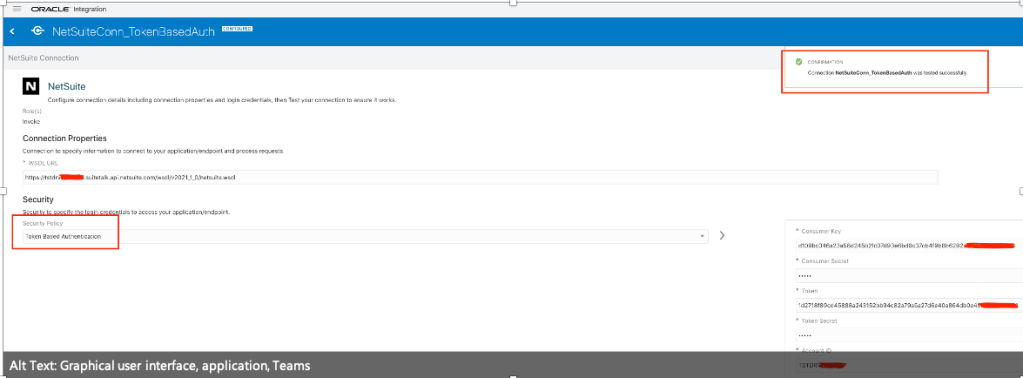
Token based authentication needs many input parameters such as WSLD URL, Consumer Key, Consumer Secret, Token, Token Secret and Account ID.

I had to spent bit of time to work-out how to get all above parameters values and in this blog I just want to share that learning.

There is already NetSuite Connector Documentation available which describe the instructions about Token Based Authentication. This blog is just expanding that document with some additional info and screenshots.

So, let’s get started-

Prerequisite

Before you establish connectivity from OIC to NetSuite using Token Based Policy there are certain prerequisite which you need to accomplish as listed below-

Enable Client/Server SuiteScript, REST/SOAP Suite Talk and Token based Authentication

To connect to Oracle NetSuite, you must have registered with Oracle NetSuite and enabled key features (such as SOAP and REST web services) on your Oracle NetSuite instance.

1. Visit http://www.netsuite.com to register with Oracle NetSuite. Ensure that you obtain an account with administrator privileges.

2. Enable connection-related features on your Oracle NetSuite instance.

a. On your NetSuite home page, select Setup, then Company, and then Enable Features.

b. Click the SuiteCloud subtab.

c. In the SuiteScript section, check the following boxes:

i. CLIENT SUITESCRIPT. Click I Agree on the SuiteCloud Terms of Service page.

ii. SERVER SUITESCRIPT. Click I Agree on the SuiteCloud Terms of Service page.

d. In the SuiteTalk section, check the following boxes:

i. SOAP WEB SERVICES. Click I Agree on the SuiteCloud Terms of Service page.

ii. REST WEB SERVICES. Click I Agree on the SuiteCloud Terms of Service page.

e. In the Manage Authentication section, check the TOKEN-BASED AUTHENTICATION box. Click I Agree on the SuiteCloud Terms of Service page.

You must enable the TBA feature if you want to use the TBA authentication policy to connect to Oracle NetSuite from external applications.

f. Click Save.

Create an Integration Role with Token-Based Authentication (TBA) Permissions

Create a new role and assign TBA permissions along with other necessary permissions (specific to your integration) to it. You’ll assign the Oracle Integration user account—which you’ll subsequently create—to this role.

Note:

As a best practice, avoid using the Administrator and Full Access roles/users in Oracle NetSuite connections that use the TBA security policy.

To create a new role:

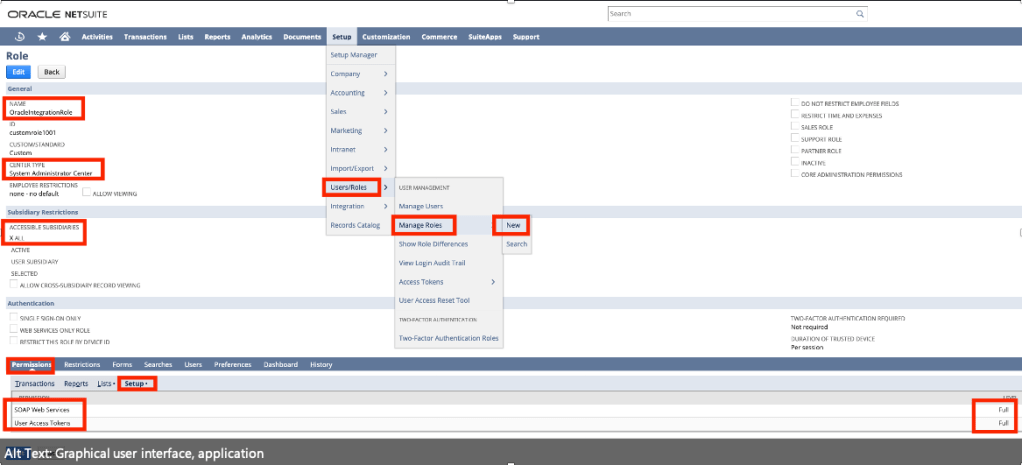
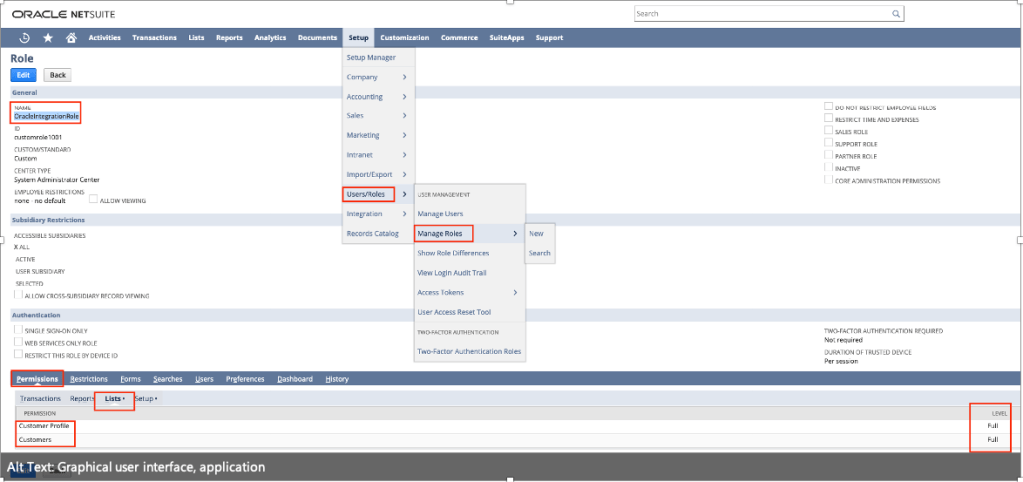
1. On the NetSuite home page, select Setup, then User/Roles, then Manage Roles, and then New.

2. On the Role page:

a. Enter a name for the role, for example, Oracle Integration Role.

b. In the CENTER TYPE drop-down field, select System Administrator Center.

c. In the Subsidiary Restrictions section, select All. For information on subsidiary restrictions, see Restricting Role Access to Subsidiaries.

d. On the Permissions tab, To provide TBA permissions to the new role, you must add the User Access Token permission to the role with full access. This permission is present on the Setup subtab under the Permissions tab.

You can add other permissions to the role depending on the tasks you want to allow the users assigned this role to perform. For any custom role, you must specifically add the SOAP web services permission with the Full level. See Assigning the SOAP Web Services Permission to a Role.

e. After you’ve added all the necessary permissions, click Save to create the new role.

Create a User Account for Oracle Integration

Create a user account for Oracle Integration and assign this account to the Token Base Authentication role “OracleIntegrationRole” you created previously. You’ll use the credentials associated with this user account to connect to NetSuite from Oracle Integration.

follow the procedure provided here:

1. On the NetSuite home page, select Lists, then Employees, then Employees, and then New.

2. On the Employee page:

a. In the NAME fields, enter a first name and last name for the user, for example, Integration User05.

b. In the EMAIL field, enter a valid email address.

c. In the SUBSIDIARY drop-down field, select a subsidiary of your choice.

d. Scroll down and click the Access tab to perform additional configurations.

i. Select the GIVE ACCESS and MANUALLY ASSIGN OR CHANGE PASSWORD check boxes.

ii. In the PASSWORD field, enter a password for the user account.

iii. Re-enter the password in the CONFIRM PASSWORD field.

iv. To assign this user to the “OracleIntegrationRole“ TBA role created previously:

• With the Roles subtab selected, select the TBA role from the ROLE drop-down field; for example, Oracle “OracleIntegrationRole”.

• Click Add.

e. Click Save to create the new user record.

Create an Integration Record for Oracle Integration

Before you can create and assign API tokens (for TBA) to a user account, you must create an integration record for the application that will use this user account to access NetSuite.

Create an integration record for the Oracle Integration application.

1. On the NetSuite home page, select Setup, then Integration, then Manage Integrations, and then New.

2. On the Integration page:

Enter a name for the integration record, for example, “ExtIntegrationApp”

a. Optionally, enter a description for the record.

b. Leave the Enabled option selected in the STATE drop-down field.

c. On the Authentication tab:

i. Leave the TOKEN-BASED AUTHENTICATION check box selected.

ii. Deselect the TBA: AUTHORIZATION FLOW and AUTHORIZATION CODE GRANT check boxes.

d. Click Save.

The confirmation page displays the client credentials for this integration record or application.

Create an Access Token for the User Account

Create and assign an access token to the Oracle Integration user account.

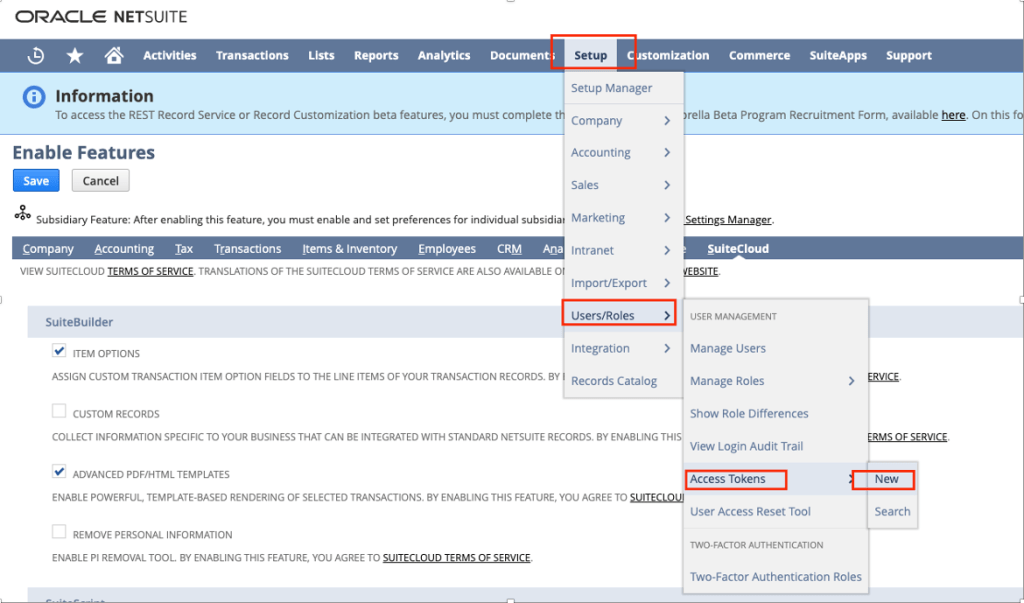
1. On the NetSuite home page, select Setup, then User/Roles, then Access Tokens, and then New.

Note: “Access Tokens” page was not appearing before, only when I executed “Enable Client/Server SuiteScript, REST/SOAP Suite Talk and Token based Authentication” section as per this document then only “Access Token” page appears.

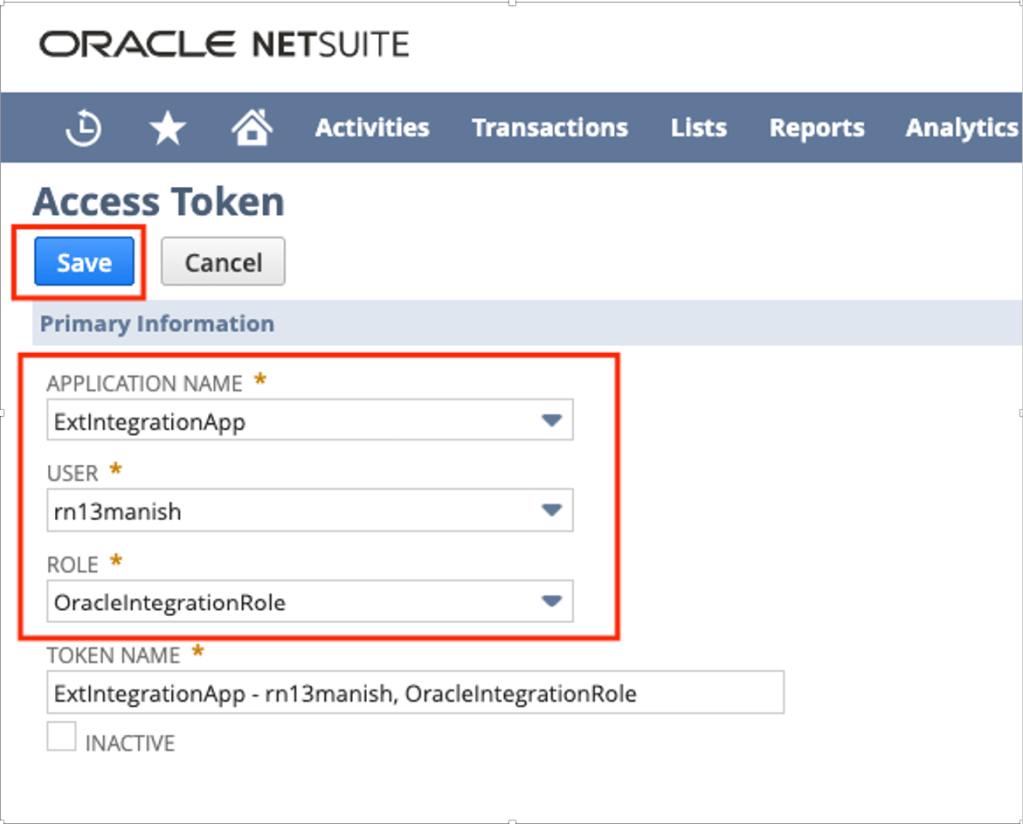
2. On the Access Token page:

a. In the APPLICATION NAME field, select the integration record created previously e.g. “ExtIntegrationApp”

b. In the USER field, select already existed Oracle Integration’s user account e.g. “rn13manish”

c. In the ROLE field, select the appropriate Token Base Authentication role e.g. “OracleIntegrationRole”

d. Leave the TOKEN NAME field unchanged.

e. Click Save.

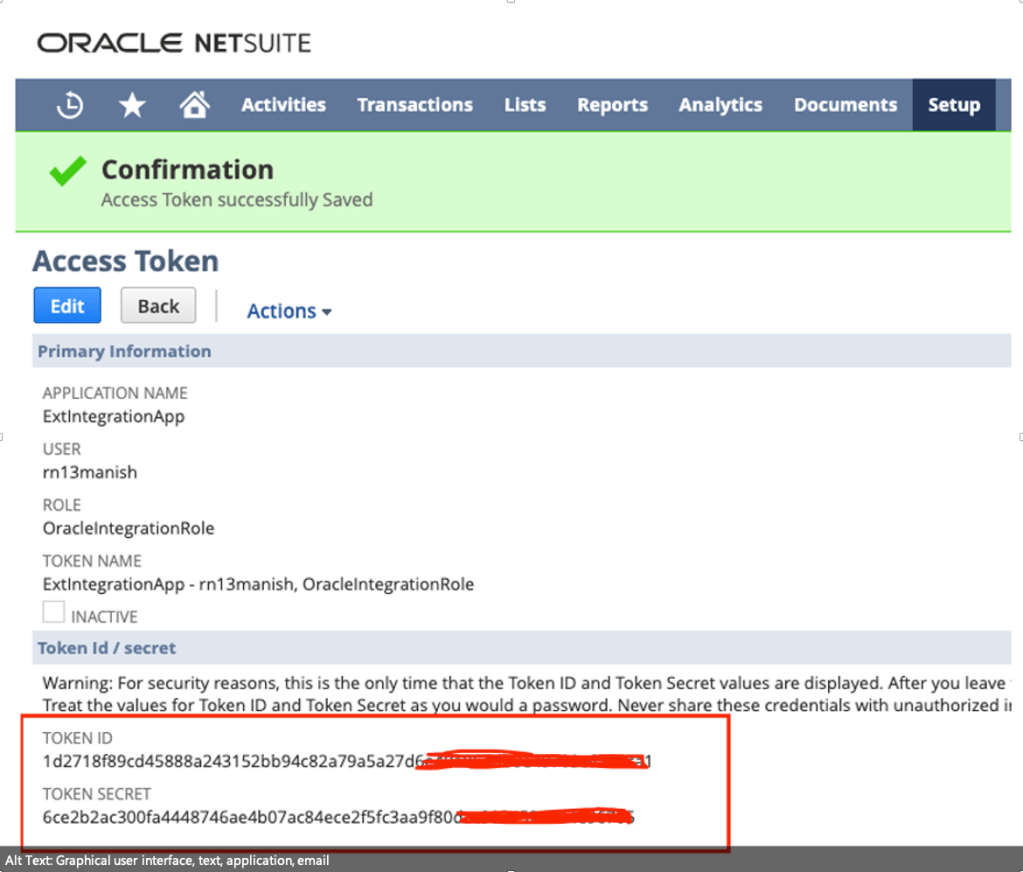
The confirmation page displays the token values for the user account.

3. Note down the Token ID and Token Secret values. You’ll use these credentials to connect to NetSuite from Oracle Integration.

Make a Note of the NetSuite Account ID

Along with other credentials, you’ll require the NetSuite Account ID to connect to NetSuite from Oracle Integration.

To view your account ID:

1. On the NetSuite home page, select Setup, then Integration, and then SOAP Web Services Preferences.

2. Note down the Account ID displayed at the top of the page.

3. Click Cancel to exit the page.

Assemble the Oracle NetSuite WSDL URL

You need to draft the NetSuite WSLD using below technique –

Sample URL

https:///wsdl//netsuite.wsdl.

https:///wsdl//netsuite.wsdl.

So, In above URL you need to replace two things 1) Your NetSuite Instance URL and NetSuite Application Version.

To get those value follow the below steps.

NetSuite Instance URL

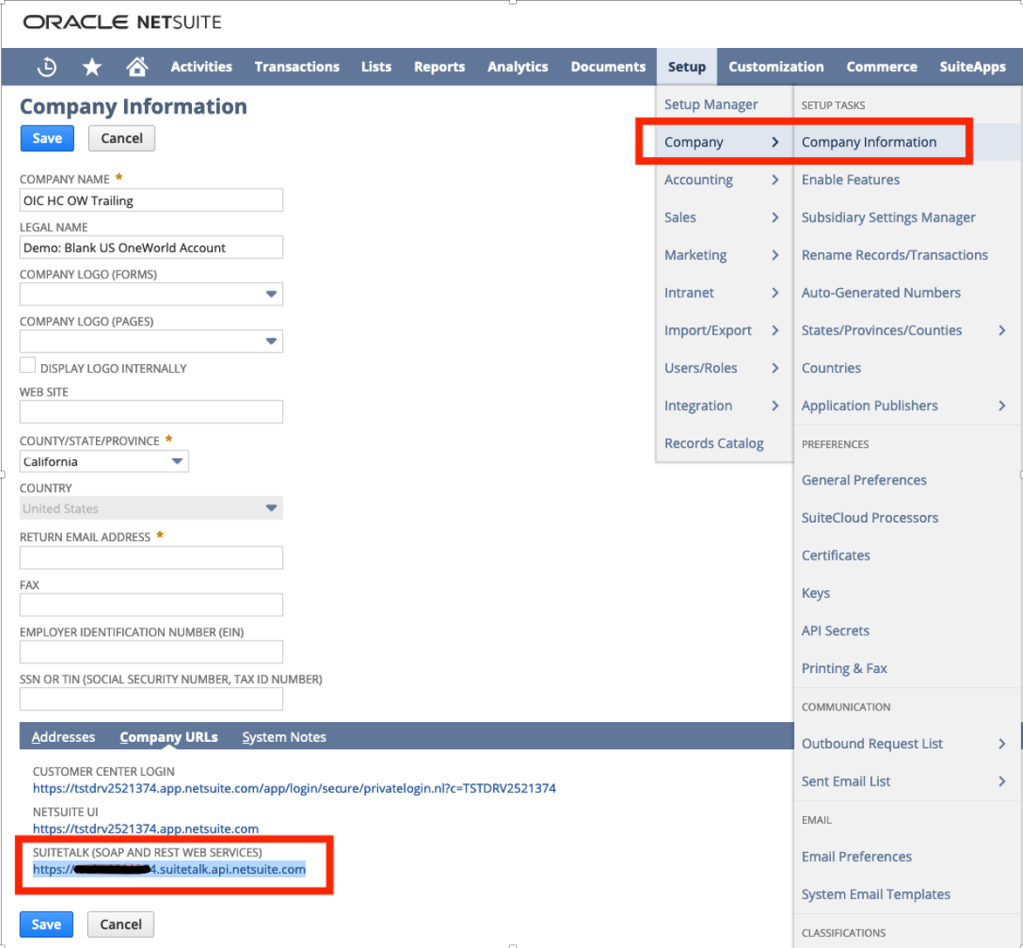
Navigate to Setup >> Company >> Company Information >> Get Suite Talk URL

e.g. https://tstdrvxxxxxxx.suitetalk.api.netsuite.com

Get NetSuite Version –

Login to NetSuite Instance and bottom of home page you can see version –

e.g., 2021.2, now you need to convert this to this v2021_2_0

Final URL –

Now you just replace above two values in final URL –

https:///wsdl//netsuite.wsdl.

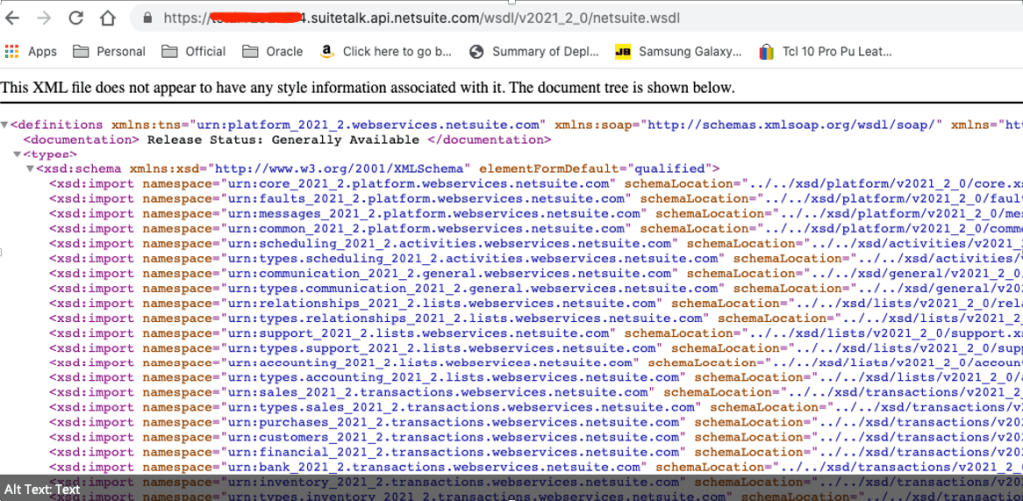
https://tstdrvxxxxxx.suitetalk.api.netsuite.com/wsdl/v2021_2_0/netsuite.wsdl

Once you WSDL are ready, make sure you test in browser and it should open –

OIC Connection to NetSuite Using Token Based Authentication

Once all parameters values such as WSLD URL, Consumer Key, Consumer Secret, Token, Token Secret and Account ID are ready then make connection to NetSuite using NetSuite Adapter from OIC Home Page >> Integration >> Connection

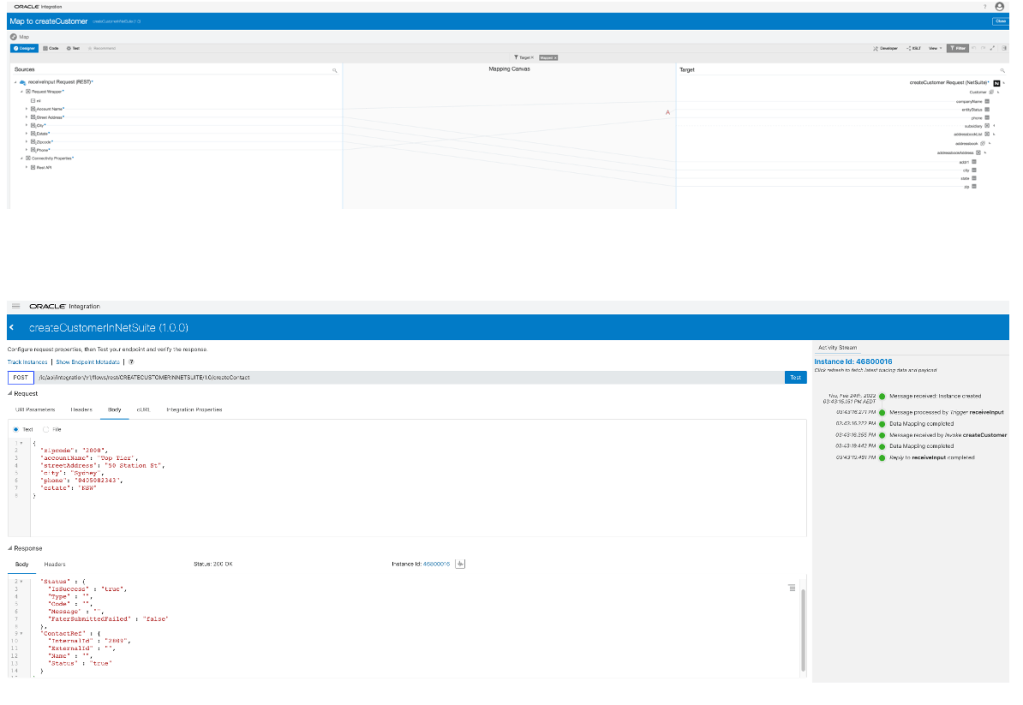
Once connection is established, you can perform any CRUD operation for any business object as per your option available. In my case I did create Customer inside NetSuite by posting a JSON payload via REST Adapter to NetSuite Adapter.

Note: The role what you using to communicate to NetSuite e.g. in my case it was “OracleIntegrationRole” must have given permission to particular business object such as “Customers”, otherwise your integration will be keep failing and will give below error message –

{

“Status” : {

“IsSuccess” : “true”,

“Type” : “ERROR”,

“Code” : “INSUFFICIENT_PERMISSION”,

“Message” : “Permission Violation: You need the ‘Lists -> Customers’ permission to access this page. Please contact your account administrator.”,

“FaterSubmittedFailed” : “”

},

“ContactRef” : {

“InternalId” : “”,

“ExternalId” : “”,

“Name” : “”,

“Status” : “false”

}

}

In order to fix above error. Make sure you give “Customer” and “Customer Profile” permission to “OracleIntegrationRole” role.

Here is my OIC Integration.

Here is my mapping.

Note:

There could be some mandatory field for the object what you trying to create inside NetSuite, so first try creating object directly using NetSuite frontend with minimal fields which will give you idea what are the mandatory fields needed for that object.

Once above JSON got posted and I got success reply, you can further login into NetSuite to validate whether that particular Customer got created or not. In my case its absolutely got created.

Happy Blogging 🙂

CI/CD working with EiPaaS Oracle Integration (OIC)

Everyone is aware of the continuous integration and continuous development relevance which is nowadays the mantra of DevOps practices.

Oracle Integration is obviously part of the end2end lifecycle development being involved for connecting legacy applications usually deployed on-premise and SaaS applications often provided by Oracle Cloud or hosted on other Cloud providers.

It doesn’t matter where the applications are, where the integration is; the continuous delivery of new integration processes and versions need to be included in a smart and automated tool able to reduce the gap between the different developer teams.

Developers, who have the ownership to build new services and IT Operators, who have the task of deploying new code versions to the different environments, need to converge on one single tool to simplify complex procedures that can be simply considered as two sides of the same coin.

The common need is to keep all environments aligned with the latest implementations, possibly having everything monitored and tracked to grant audit activities in terms of compliance; this is a must when the project is starting to become critical and relevant at the enterprise level.

Oracle Integration (OIC), as you know, includes Visual Builder Cloud Service which allows open-source standards-based integration to develop, collaborate on, and deploy applications within Oracle Cloud.

Just for this, it’s easy to use Visual Builder Studio, the built-in tool, that allows developers to manage the software life cycle automating the development.

Oracle VB Studio natively supports Oracle Integration artifacts, so we can leverage this one to easily promote our integration flows from an environment to another one moving for example our integration projects from development to test environment once you we completed the new implementation and of course ready to test it.

That’s the right path to be used for promoting projects from Test to Production or from Production to a DR environment, this one probably running on a different OCI Region.

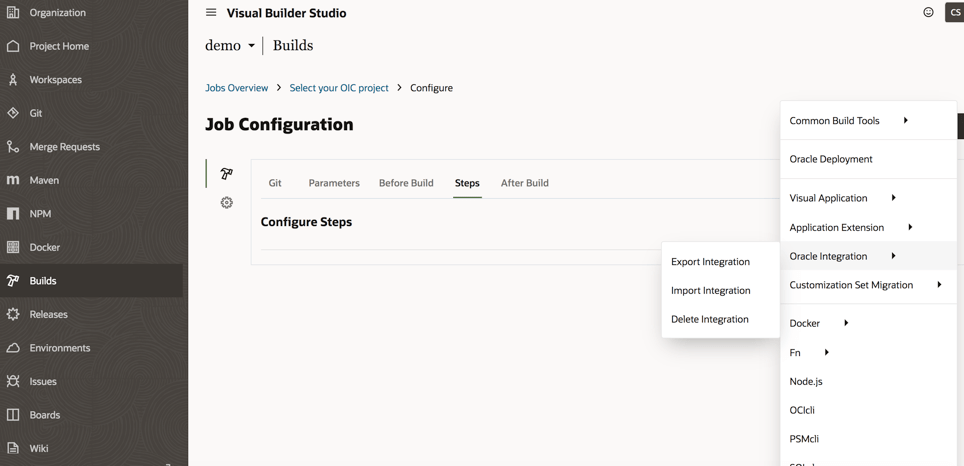
Working with the current implementation you can:

  • Export integration flows
  • Import integration flows
  • Delete integration flows

As shown below in the picture, the options we have working with Oracle Visual Builder Studio and OIC

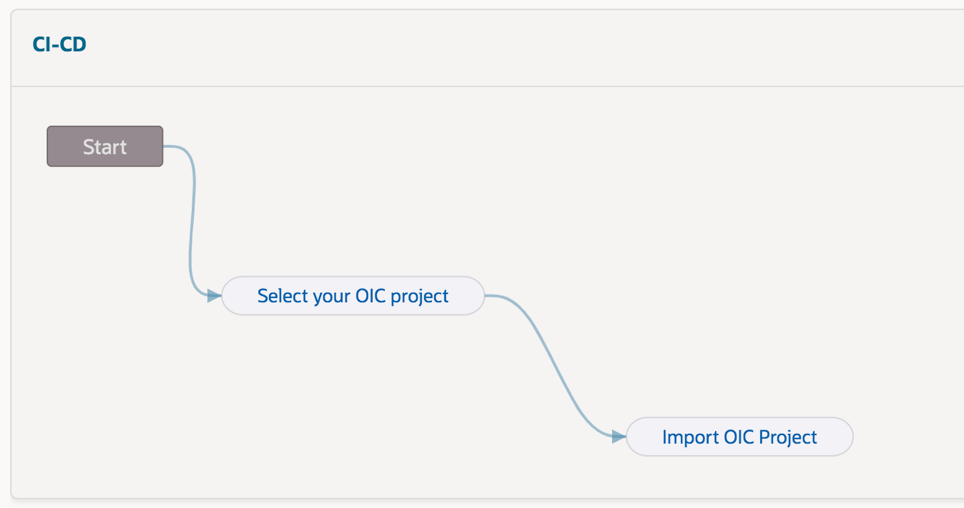
Herewith an example of pipeline that you can easily configure to automate the Export / Import procedure and defining in cascade all steps (“jobs”) to define the required actions, of course this one below just for demo purposes. This procedure will be later explained step-by-step just in case you want to reproduce this one for your own purposes

In order to export our assets from the development environment, for example, it’s enough to configure our source and target environments about the OIC instances

How to configure our OIC environments?

This is a straightforward operation working with VB Studio, as shown below:

We can create all connections we need to configure properly the tool

Once we have configured our instances, we need to build our “pipeline” so to automate the procedure when needed

Each pipeline can include all “jobs” we need (in the previous screenshot we have used two different jobs “select your OIC project” and “import OIC project”) so to build the right chain among the different available “jobs”

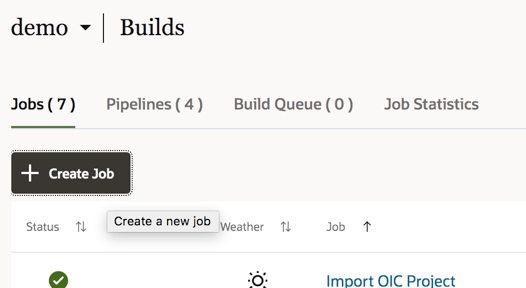
To create a job, select the Build link from the left panel of the Visual Builder studio and then we can create a new job

Each job has some options and parameters to be configured as below the screenshot shows:

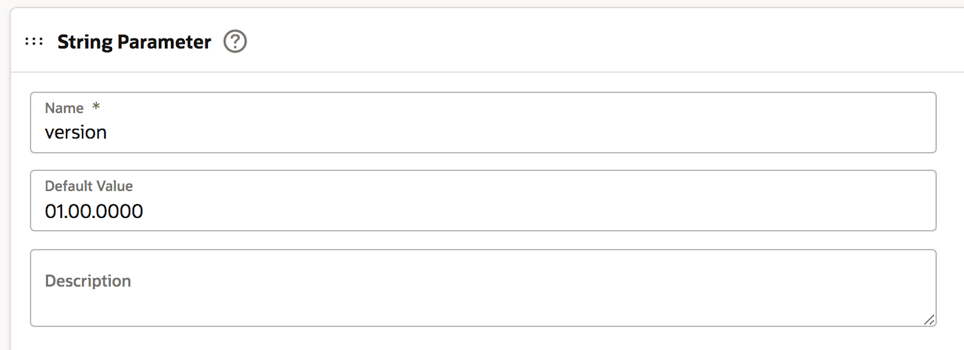
Select the “Parameters” tab to configure the string parameter:

The “Default Value” is the value of the integration flow version on our OIC instance to be selected and moved to the new instance. Of course, this value can be changed when we run the build so to properly set the right integration flow version

Now it’s time to select the “Steps” tab to identify the OIC instance from where we want to export our integration flow

If needed, we can also include the asserter recording just flagging the box. In this case we are moving (exporting / importing) the integration flow named “ECHO” and working with its *.iar file once we have exported this one.

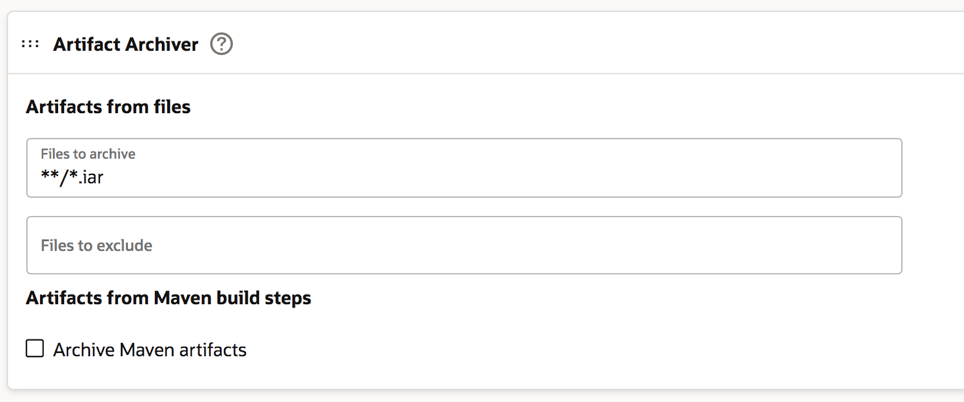
Now you can click the “After Build” tab to configure it as below described. The *.iar extension is the default extension of the integration flow when you decide to download it.

Click save and that’s all. Our first job is properly configured now.

To proceed we are now ready to configure the second job (“import OIC project”).

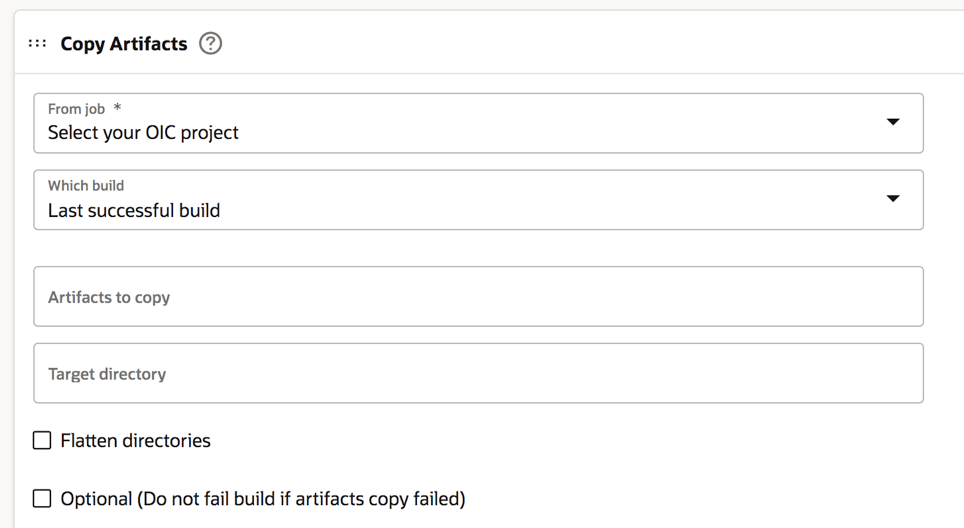
In this case, the first step to be accomplished is the configuration of the “Before Build” tab as below shown and adding a “Copy Artifacts” option

And now, as we did with the first job, we can properly configure the OIC instance target, in our sample, but in this case for the import action.

We can also check the box about the “activate integration” option so that our integration flow will be imported and started just to have this one ready to be invoked by applications

Also, in this case, we can now save our configuration.

Once these operations have been completed, we are ready to test our pipeline selecting the start button on the right side of the web page and below shown

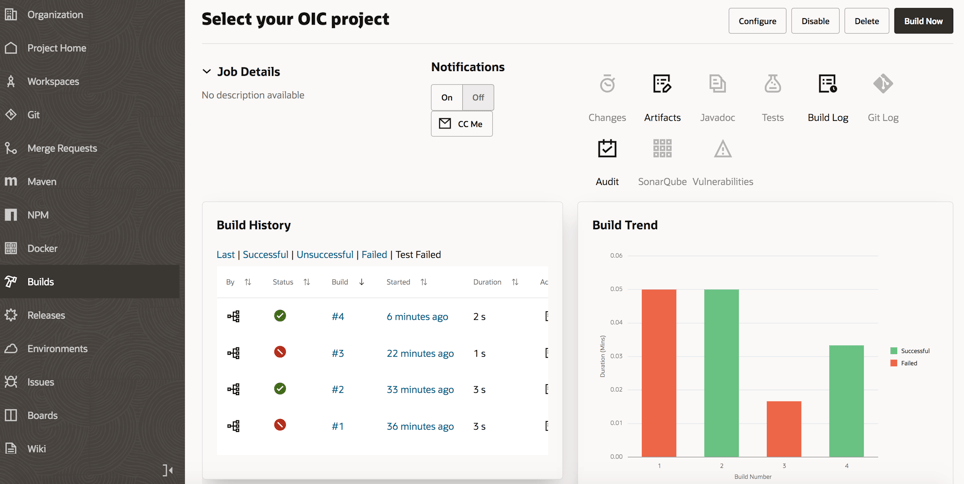
If the execution of our “build” is properly configured, we can see the “green flag” of our jobs once we run it

Furthermore, we can drill down the execution to look at the log information just in case something wrong having also the chance to download the file including the log for further analysis or if we need to share this one with other people or applications.

From the Visual Builder Studio “Home page” we can also get information about statistics and previous executions so to track the activities managed on the different resources we have

This is for sure the best way to properly manage our environments and the best approach to have under control the lifecycle of our projects and their deployment.

For further information, look at the really interesting content already published here:

Oracle Blog

https://blogs.oracle.com/vbcs/post/cicd-for-oracle-integrations-with-visual-builder-studio

https://blogs.oracle.com/integration/post/cicd-implementation-for-oic

Oracle Documentation:

https://docs.oracle.com/en/cloud/paas/visual-builder/visualbuilder-manage-development-process/build-your-applications.html

OIC Log Management with VB Studio, OCI Bucket and OCI Logging Analytics

Sadly log file identifier icsdiagnosticlog has been deprecated from late November 2020. icsflowlog, icsauditlog are still available so you should be able to apply the same pattern used in this blog to manage your OIC instance log file.

I would like to show how OIC log management can be achieved with OCI Object Storage (I’ll call it bucket) and OCI Logging Analytics, Visual Builder Studio (used to be Developer Cloud, I’ll call it VB Studio).

Interestingly I’m not going to use OIC to download log files, either to ingest log data from OCI Object Storage.  VB Studio will be my tool to do sourcing log files and feeding it to bucket – I’ll be taking advantage of unix shell and oct-cli from VB Studio. Then OCI Logging Analytics will ingest log data from bucket based on cloud event.

Continue reading “OIC Log Management with VB Studio, OCI Bucket and OCI Logging Analytics”

Triggering an OIC integration via OCI Events – the Notifications Service Approach

Do you want to trigger an Oracle Integration Cloud (OIC) integration as soon as a file is uploaded to OCI Object Storage?

This event driven approach allows you to respond to state changes in Oracle Cloud Infrastructure (OCI) in real-time, removing the need to poll Object Storage buckets on a predefined schedule. In a two-part blog series, I will explore how you can achieve this event-driven pattern with OIC. As the name suggests this blog will capture the Notifications Service Approach, while part 2 will provide a guide to using OCI Functions to achieve the same outcome.

Continue reading “Triggering an OIC integration via OCI Events – the Notifications Service Approach”

Invoking Oracle PaaS service APIs protected by OAuth

Oracle PaaS services are typically protected by Identity Cloud Service (IDCS), which provides unified access management for the Oracle Cloud. This protection extends to their exposed APIs, which usually require you to present a valid access token as part of your invocation. Unfortunately, the documentation for a number of the services tends to assume that the reader has an in-depth knowledge of OAuth concepts, and IDCS operations.

Typically my blog posts are around specific proof of concept things I have been working on, or go in-depth into more advanced IDCS concepts, but I have realised (mostly because people kept asking me…) that many developers using these services don’t have a strong practical understanding of OAuth, and struggle to interpret the documentation around the authentication requirements for the services. This blog post is designed to provide a step by step explanation of what is required from an IDCS perspective, as well as an explanation of the techniques to obtain a an access token to use the service APIs.

A non-exhaustive list of PaaS services for which these instructions are applicable:

  • Oracle Integration Cloud
  • Oracle Blockchain Platform
  • Oracle API Platform Cloud Service
  • Oracle Mobile Hub
  • Oracle Digital Assistant
Continue reading “Invoking Oracle PaaS service APIs protected by OAuth”