Teaching How to use Oracle Load Balancer as a Service (LBaaS) to front end your APIs

In this blog, I am going to show you how to configure Oracle Load Balancer as a Service (LBaaS) to proxy/redirect traffic into multiple APIs. For the sake of this example, I am going to point to running APIs hosted on my Oracle API Gateway, as well as running on a 3rd party Cloud provider. However, you can use Oracle LBaaS to proxy traffic to any HTTP or HTTPS endpoint(s).

In this example, I am going to consume an existing API that I built some time ago that when invoked returns a random joke. In order to test it in high availability mode, I am also going to configure yet another “jokes” API that will serve as a redundant backend endpoint/API.

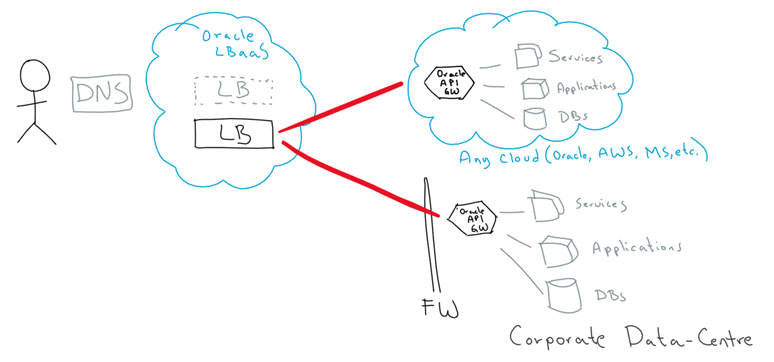
This is the high-level view of how Oracle LBaaS can easily enable multiple proxy/redirections to backend APIs hosted across various places:

Continue reading “Teaching How to use Oracle Load Balancer as a Service (LBaaS) to front end your APIs”

Policy Based Multi Factor Authentication

In my previous article, Securing Applications with Multi Factor Authentication I discussed how to roll out basic MFA. While this is great if your requirements are very straightforward, there are times when you’ll need a more sophisticated approach. One of the most common examples that I get asked about is how to challenge users for Multi Factor Authentication only when they are connecting remotely from home or when traveling.

In this article I use an example where the business requirement is to enforce MFA for people in the Customer Relations department who are accessing protected applications when they are not on the corporate network. I’ll explain how to configure policies and rules that allow users connected to the corporate network to login with just their User ID and Password, while users connected remotely will need to use Multi Factor Authentication to access protected applications.

Continue reading “Policy Based Multi Factor Authentication”

Teaching How to use Oracle PaaS Service Manager (PSM) CLI to Provision Oracle PaaS environments

In this blog, I am going to get you started with Oracle PaaS Service Manager (PSM) CLI – A great tool to manage anything API-enabled on any Oracle PaaS Service or Stack. For example, provisioning, scaling, patching, backup, restore, start, stop, etc.

It has the concept of Stack (multiple PaaS services), what means that you can very easily provision and manage full Stacks, such as Oracle Integration Cloud (OIC), that combines multiple PaaS solutions underneath, e.g. ICS, PCS, VBCS, DBCS, etc.

For this, we are going to use a pre-cooked Vagrant Box/VM that I prepared for you, so that you don’t have to worry about installing software, but moving as quickly as possible to the meat and potatoes.

This is a graphical view of what we are going to do:

Continue reading “Teaching How to use Oracle PaaS Service Manager (PSM) CLI to Provision Oracle PaaS environments”

Teaching How to push your code into multiple Remote Git repositories

Very quickly Git has become one of the most common ways to maintain and manage source code. It is easy to use, fast, reliable and most modern CI/CD tooling support it. GitHub also makes it easy to anyone who wants to share code, to do it in a free or very inexpensive way. Many companies however, also look for ways in which they can maintain their own private repositories as an enterprise-grade solution, like Developer Cloud Service (DevCS), the one Oracle gives for free with any IaaS or PaaS service.

In this blog I am going to show you how to push your code into any number of remote Git repositories. For example, you can have your private repository in DevCS and choose to also publish them into another GitHub remote repository (public or private) in GitHub.

This is the high-level idea:

  1. Let’s create a new Git repo in DevCS
  2. Let’s create a repo in GitHub
  3. Let’s clone DevCS repo locally on my laptop
  4. Let’s push the code to DevCS Git repo
  5. Let’s push the code to GitHub repo.

Continue reading “Teaching How to push your code into multiple Remote Git repositories”

Securing Applications with Multi Factor Authentication

These days, passwords online are not strong enough by themselves to protect applications. Scandals about password breaches seem to happen on a regular basis. This is where Multi Factor Authentication (MFA) greatly reduces the risks associated with protecting information online. Multi Factor Authentication combines something you know (e.g. your password) with something you have (e.g. your smartphone). MFA can be used with SMS or a Mobile App on an iPhone, an Andriod phone or a Windows Phone. Using MFA on a smartphone significantly reduces the costs associated with older and more traditional MFA technologies like physical tokens because of the cost of delivery and administrative overheads.

Oracle Identity Cloud Service allows you to deliver Multi Factor Authentication quickly and easily. In this article I’ll walk through the steps necessary to enable Multi Factor Authentication using Oracle Identity Cloud Service(IDCS). Once MFA is enabled you’ll be able to use MFA with any application protected by your instance of Oracle IDCS. In my example, I’ll use the Oracle Mobile Authenticator App on an iPhone to protect applications as well as the User Self Service Console in IDCS.

Continue reading “Securing Applications with Multi Factor Authentication”

Teaching How to use Terraform to Manage Oracle Cloud Infrastructure as Code

Infrastructure as Code is becoming very popular. It allows you to describe a complete blueprint of a datacentre using a high-level configuration syntax, that can be versioned and script-automated. This brings huge improvements in the efficiency and reliability of provisioning and retiring environments.

Terraform is a tool that helps automate such environment provisioning. It lets you define in a descriptor file, all the characteristics of a target environment. Then, it lets you fully manage its life-cycle, including provisioning, configuration, state compliance, scalability, auditability, retirement, etc.

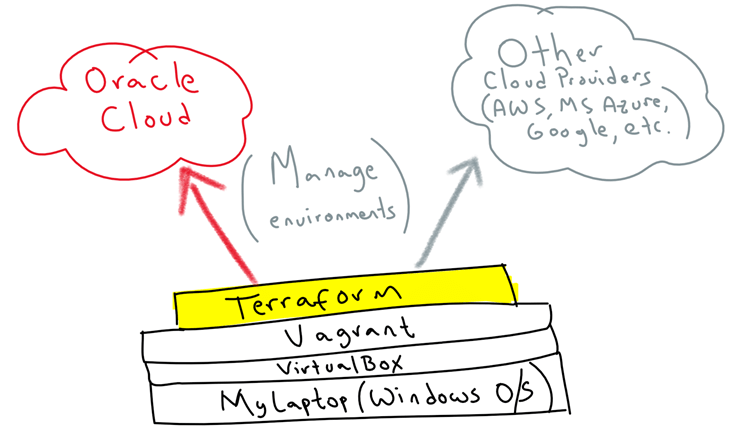
Terraform can seamlessly work with major cloud vendors, including Oracle, AWS, MS Azure, Google, etc. In this blog, I am going to show you how simple it is to use it to automate the provisioning of Oracle Cloud Infrastructure from your own laptop/PC. For this, we are going to use Vagrant on top of VirtualBox to virtualise a Linux environment to then run Terraform on top, so that it doesn’t matter what OS you use, you can quickly get started.

This is the high-level idea:

Continue reading “Teaching How to use Terraform to Manage Oracle Cloud Infrastructure as Code”

Teaching how to use Vagrant to simplify building local Dev and Test environments

The adoption of Cloud and modern software automation, provisioning and delivery techniques, are also requiring a much faster way to simplify the creation and disposal of Dev and Test environments. A typical lifespan of a Dev environment can go from minutes to just a few days and that’s it, we don’t need it anymore.

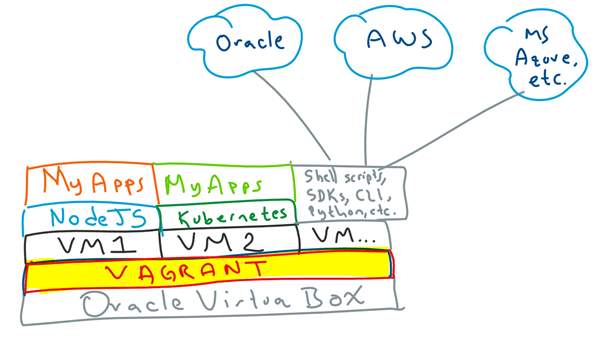
Regardless of whether you use a Windows, Apple or Linux based PC/laptop, virtualisation of environments via Virtual Machines, help with this problem, besides it leaves your host OS clean. Vagrant takes VMs to the next level, by offering a very simple, lightweight and elegant solution to simplify such Virtual Machine life-cycle management, easy way to bootstrap your software/libraries requirements and sharing files across your host and guest machines.

In this blog I am going to show you how to get started with Vagrant. You will find it a very useful to quickly create and destroy virtual environments that help you develop and test your applications, demystify a particular topic, connecting to cloud providers, run scripts, etc.

For example, typical scenarios I use Vagrant for include: Dev and Test my NodeJS Applications, deploy and test my Applications on Kubernetes, run shell scripts, SDKs, use CLIs to interact with Cloud providers e.g. Oracle, AWS, Azure, Google, etc. All of this from my personal laptop, without worrying about side effects, i.e. if I break it, I can simply dispose the VM and start fresh.

I can assure you that once you give it a go, you will find it hard to live without it. So, let’s wait no more…

Continue reading “Teaching how to use Vagrant to simplify building local Dev and Test environments”

Teaching how Oracle Integration Cloud (OIC) simplifies Application Integration, Process Automation and API Management

In this blog I am going to show you three new capabilities introduced in Oracle Integration Cloud (OIC) that massively simplify the enablement of Application integration with extensions to Business Process Automation workflows and finally how to expose all of that as secured APIs via the Oracle API Gateway.

These three new capabilities are:

  1. Call your Process Cloud Service (PCS) workflows from an Integration Cloud Service (ICS) orchestration.
  2. Call your ICS integrations from a PCS business process.
  3. Expose your ICS integrations as APIs into the Oracle API Gateway

Our scenario is simple, it is an incident management extension, that requires some human intervention to manage service requests.

To be specific, let’s assume the following components:

  • We need to extend Oracle Service Cloud out-of-the box incident Management functionality with a custom business process automation. For this, Oracle Integration Cloud Service (ICS) will seamlessly listen/subscribe to events in Oracle Service Cloud and when a new Service Requests gets created, it will pass it on into Oracle Process Cloud Service (PCS) to manage the Human interventions.
  • PCS starts a new workflow and it redirects the various tasks to the appropriate task owners for approvals/rejections.
  • As the PCS workflow runs across the various human interventions, PCS keeps updating the Service Request status into Service Cloud (via ICS) to determine whether it is invalid and needs to be rectified or it is in progress until completion.
  • Finally, if we determine that this Incident Management extension workflow could become a reusable asset among other use cases, we can simply go to the ICS integration that triggers the PCS workflow and expose it as an API to be deployed and run into the Oracle API Gateway.

This is a high-level view:

Continue reading “Teaching how Oracle Integration Cloud (OIC) simplifies Application Integration, Process Automation and API Management”

Teaching How to Recover Errored Instances with Oracle Integration Cloud

Building Enterprise integrations in the Cloud with iPaaS brings many benefits, including among others: simplicity, agility and scalability. However, these benefits should not be taxed by having a weak core, not able to properly manage common enterprise requirements, such as error management. I’ve been a bit disappointed with how most iPaaS vendors handle runtime exceptions of integration flows. A typical example of this, is not being able to support dehydration for asynchronous flows (i.e. dehydration is crucial to supporting long-running instances by saving their memory state into a database, until a correlation invocation, a.k.a call-back, wakes it up to continue with the flow). This causes that when an error occurs, recovery has to start from the beginning of the integration flow that failed.

In these situations, we would have to either design an integration to be fully idempotent and stateless across all its partner links (service invocations), which is not always possible. Another way to do it is by manually handling the recovery of errored scenarios, this is to avoid state inconsistency across the previous service invocations in the orchestration, prior to the error… But then if we have to manually handle compensation, what about iPaaS being easier?

Luckily, Oracle Integration Cloud maintains simplicity at the front end and a mature and strong integration core at the backend. It acknowledges when an orchestration is asynchronous, so that dehydration points (a.k.a. break points) are enforced along the way across service invocations or long-term actions (e.g. waits), enabling with this long-term running instances avoiding to timeout, but to stay in memory (and DB back store) until all activities and external call-backs in the orchestration flow complete.

In this blog, I am going to show you how to recover errored instanced with Oracle Integration Cloud. For this, I am going to build a flow that demonstrates how errored instances recovery occurs from the latest dehydration point, allowing you to simplify complex orchestrations without having to compensate manually.

Continue reading “Teaching How to Recover Errored Instances with Oracle Integration Cloud”

Teaching How to Design and Secure an API with Oracle API Platform

This blog is the second part of an end-to-end exercise that starts explaining the steps to clone a GitHub repository that contains an agnostic Medical Records application, built by us in NodeJS and which exposes REST API endpoints via a Swagger API-descriptor running locally on Swagger UI (all included as part of the repository). The previous part of this 2-blogs series also explains the steps required to run the MedRec NodeJS application on Docker containers either locally or in the Oracle Public Cloud. For more information about this first part, go here.

Moving to this second part, we are going to cover the following steps:

  1. Create an Apiary account used to Design APIs (API First approach) and create a new API Project using the existing MedRec Swagger API-definition.
  2. We are going to spend a little bit of time playing with Apiary to feel comfortable in areas such as:
    1. Validating API definitions
    2. Testing API endpoints
    3. Switching across out-of-the-box Mock Servers and real Production MedRec service end-points.
  3. Login to Oracle API Platform and configure an API, this includes:
    1. Enforcing Security and other policies.
    2. Deploy API and securing access level to on-premise and Cloud-based API Gateways.
    3. Publishing APIs into the API Developers Portal.
    4. Linking API to Apiary Swagger API-definition living document.
  4. Login to API Developers Portal (API Catalog)
    1. Register a New Application
    2. Understanding the role of API Keys
    3. Reviewing MedRec API Documentation
    4. Registering to consume MedRec APIs
    5. Testing APIs.
  5. Understand API Analytics, consumption, metrics and monitoring dashboards.

Continue reading “Teaching How to Design and Secure an API with Oracle API Platform”