There is nothing like experience. Having been there and having done that is the best benefit that one can offer to those who require our services, the knowhow. Cloud, specifically Infrastructure as a Service (IaaS), is a skill that is in high demand. One way to validate the gained experience is via a certification from your IaaS provider of choice. You are reading this blog post on Red Thunder, which means that Oracle Cloud Infrastructure (OCI) is your vendor of choice!
A certification is also a great way to start gaining experience, and the good news is that there is no better time for earning OCI certifications than today because for the rest of 2021 you can pursuit and earn OCI certifications for free!!! Not only can you secure a free 30 day trial on OCI (including always free resources), but also you can study all the OCI learning material free of charge. Oracle and Oracle University have released all the learning material that serves as a guide to OCI certifications, in addition to free OCI training, OCI certification testing is also free until 31 December, 2021
These are the some of the OCI certifications that you can pursuit and earn free of charge:
Summarizing, the learning material from Oracle University is free of charge, the certification testing is also free until 31 December, 2021. You can subscribe to a free 30 day Oracle Cloud Infrastructure trial, which you can use for doing OCI labs, and you can keep the always free resources for life; resources such as Compute, Virtual Cloud Network, Autonomous Database, Network Load Balancer, among others. Therefore, whether you are new to OCI or already have hands-on experience today is the best time for pursuing your OCI certification.
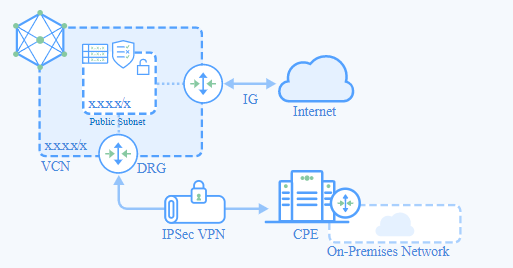
In today’s world, the norm for videos is that they should be short in length, even if they are instructional videos. They cite the short attention span of the targeted audience…. And I do agree to some extent. However, in tech there are many occasions that require a longer length so they can properly address all the details of the topic at hand. Back in March 2021, I recorded myself for the purpose of demonstrating how to configure to completion an Inter-Cloud VPN connection using the Oracle Cloud Infrastructure (OCI) native IPSec VPN tunnel against a Customer Premises Equipment (CPE) with LibreSwan on an Amazon Web Services (AWS) Elastic Cloud Compute (EC2) instance. The video is nearly 30 minutes long! Only the truly committed will follow along, which is the intention.
I used official OCI documentation as a basis. Basically I explain every single step on this document while I perform them on both OCI and AWS consoles.
Even though in the video I present myself as an Oracle employee, which I proudly am, the video and this post are NOT official Oracle documents. Any opinion is my own and only my own.
I hope that you find this step-by-step video helpful. This is the link to it:
P.S. The reason why I am using a non-RFC1918 CIDR prefix is because I am strictly following the steps in the guide.
Logs are often voluminous can be challenging to navigate through, but it can be a gold mine of valuable data to help administrators troubleshoot and identify issues or trends for operational activities.
To overcome the burden of manually eye-balling millions or (even billions) of rows in log records, bringing that data into OCI Logging Analytics(which is part of the Observability & Manageability Portfolio) will allow administrators to get quick insights, to reduce the time to isolate issues, minimising downtime and prevent impact to end users.
There are various ways you can bring telemetry and operational data into OCI Observability & Management (O&M) to proactively monitor and gain operational insights into your IT fleet.
Example of ways you can do this are:
Service Connector Hub – Route and move data from one OCI service to Another OCI Service (eg. OCI Logging to Logging Analytics)
API Call – Collect data from files stored on Object Storage or Upload Log data on demand
Agent Based – Deployment of Agent on Host
If you have targets you want to monitor on-premise or in the cloud (OCI, AWS, Azure etc…) and you have access to the VM or Compute instance (ie. you can SSH or Remote Desktop to the host), then an Agent based method will allow you to collect and bring that data into unified platform in O&M.
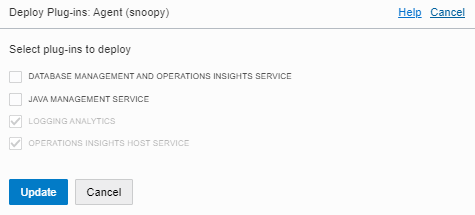
In this example we will show how you can deploy Agent based method (on Linux OS) so you can leverage the O&M services including:
Logging Analytics
DB Management
Operations Insights
Java Management Service
1 – NETWORK COMMUNICATION (For External Targets to OCI)
We recommend using OCI FastConnect or IPSEC VPN
Communication Destination to OCI Tenancy – HTTPS (443)
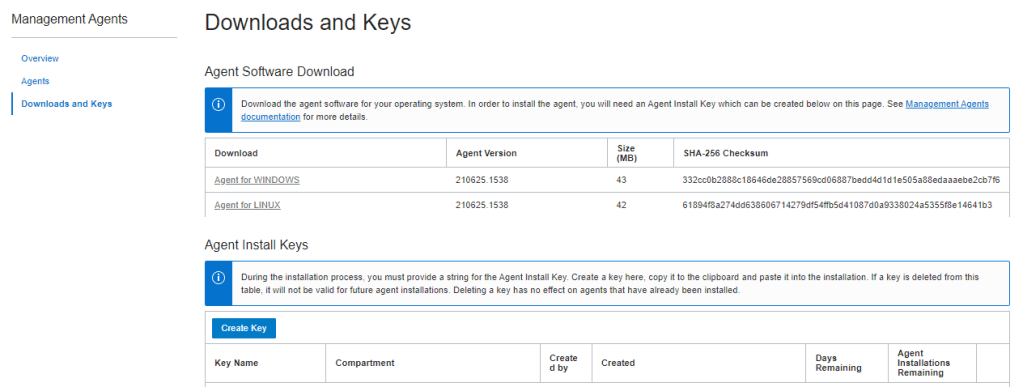
3. Review Key and Download Key to File (eg. oci-reg-key.txt)
NOTE: Your Key File will be in the format of <Key Name>.txt. Copy it to your target host.
4. Download Agent by clicking on the Agent for your OS (eg. Agent for LINUX) and copy to your target host
4 – INSTALL AGENT
1. Login to the host and locate the downloaded agent file oracle.mgmt_agent.rpm
$ sudo rpm -ivh oracle.mgmt_agent.<version>.Linux-x86_64.rpm
Preparing...                          ################################# [100%]
Checking pre-requisites
        Checking if any previous agent service exists
        Checking if OS has systemd or initd
        Checking available disk space for agent install
        Checking if /opt/oracle/mgmt_agent directory exists
        Checking if 'mgmt_agent' user exists
        Checking Java version
                JAVA_HOME is not set or not readable to root
                Trying default path /usr/bin/java
                Java version: 1.8.0_271 found at /usr/bin/java
Updating / installing...
   1:oracle.mgmt_agent-201113.1621-1  ################################# [100%]

Executing install
        Unpacking software zip
        Copying files to destination dir (/opt/oracle/mgmt_agent)
        Initializing software from template
        Creating 'mgmt_agent' daemon
        Agent Install Logs: /opt/oracle/mgmt_agent/installer-logs/installer.log.0

        Setup agent using input response file (run as any user with 'sudo' privileges)
        Usage:
                sudo /opt/oracle/mgmt_agent/agent_inst/bin/setup.sh opts=[FULL_PATH_TO_INPUT.RSP]

Agent install successful
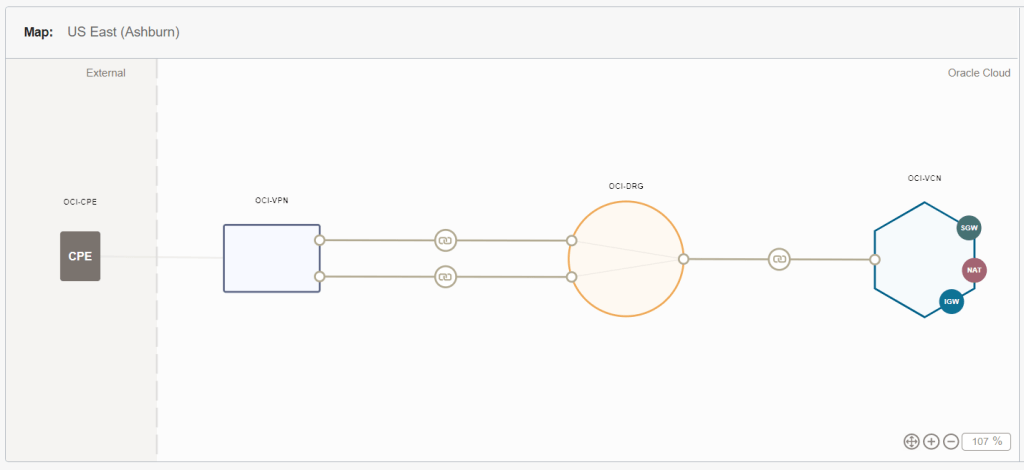
There is plenty of information out there about connecting from an on-premises network to OCI. But if you want to see a step-by step-procedure that configures to completion an actual VPN you will have a hard time finding it. And rather than writing about it, this time I will actually show it.
OCI VPN Wizard
This link will take you to the list of OCI’s verified CPE (Customer Premises Equipment) devices. If your On-Premises CPE is in this list then the VPN configuration should be very easy. In my case, the router I used is not in the list. It is a SOHO (Small Office-Home Office) type of router. For this configuration the on-premises network is my Home-Office LAN. For routers not on the list, there is an option called “other”. OCI offers a lists of supported configuration parameters for VPN connections that you can use for “other” types of routers. Here is the link to these parameter. And I explain them in the video. I hope that you find it useful:
Do you want to trigger an Oracle Integration Cloud (OIC) integration as soon as a file is uploaded to OCI Object Storage?
This event driven approach allows you to respond to state changes in Oracle Cloud Infrastructure (OCI) in real-time, removing the need to poll Object Storage buckets on a predefined schedule. In a two-part blog series, I will explore how you can achieve this event-driven pattern with OIC. As the name suggests this blog will capture the Notifications Service Approach, while part 2 will provide a guide to using OCI Functions to achieve the same outcome.
Oracle Integration Cloud (OIC) is Oracle’s next generation modern Integration solution Platform as a Service (PaaS) offering. The core purpose of this product to integrate various SaaS and On-prem systems real time. In addition to Integration capability, it also provides Process Automation and Visual Builder Capability. Details docs are available here.
OIC has concept of Adapters. There are huge range of adapters available and documented here.
One of the Adapter REST Adapter been used to expose an Integration to outside world for consumption. In order word, it’s an entry point for most of Integrations what we developed using OIC. It also gets used to invoke any external REST based endpoint.
REST Adapter support Basic Auth and various flavour of OAuth as security mechanism to protect the Integration access.
However, not all OAuth flavour supported for Trigger Role (Used as Entry point of Integration) vs Invoke Role (Used for invoking third party REST endpoint).
REST APIs exposed using the REST Adapter (Trigger Role) are protected using Basic Authentication and OAuth token-based authentication.
REST API consumed using the REST Adapter (Invoke Role) Support HTTP Basic Authentication, OAuth Client Credentials (two-legged flow), OAuth Resource Owner Password Credentials (two-legged flow), OAuth Authorization Code Credentials (three-legged flow), OAuth Custom Three Legged Flow, OAuth Custom Two Legged Flow, OAuth 1.0a One Legged Authentication, Amazon Web Services (AWS) Signature Version 4, and Oracle Cloud Infrastructure (OCI) Signature Version 1. There is also support for consuming APIs that are unprotected.
Now, majority of Customers chose Basic AUTH while publishing an Integration because it’s very simply to implement but has limitation because the user password gets expired in every 3 month which result changing all Integrations configuration again in 3 month of time. We can very well avoid this problem by Implementing OAuth token which never gets expired.
Oracle has official document for setting up Service Account without expiry but it’s quite difficult to follow instructions from that document. Hence, I thought to publish more user friendly instructions to achieve the same outcome.
In this blog, I will be covering how we can invoke an Integration exposed using REST Adapter (Trigger role) using OAuth token which doesn’t get expired.
The first part of this series explored how to setup a connection between Oracle Integration Cloud (OIC) and OCI Object Storage, and how to use Object Storage as a location to write files as part of an integration.
In this blog I will show you how to use Oracle Integration Cloud to consume objects from OCI Object Storage, including listing, reading and deleting those objects. To do this I have prepared an integration which showcases a common integration pattern; consuming a staged file in order to load data into an enterprise system. In this case, the integration will load financial data from Object Storage into Oracle’s ERP Cloud application. Specifically, this integration will:
List Account Payable (AP) Invoice files available on OCI Object Storage
For each source file that it finds in the cloud bucket, it will:
Read & transform the file to the format required by Oracle ERP Cloud
Upload the transformed file to ERP Cloud and trigger the required Import jobs in the application
Delete the now processed file from the OCI Object Storage bucket
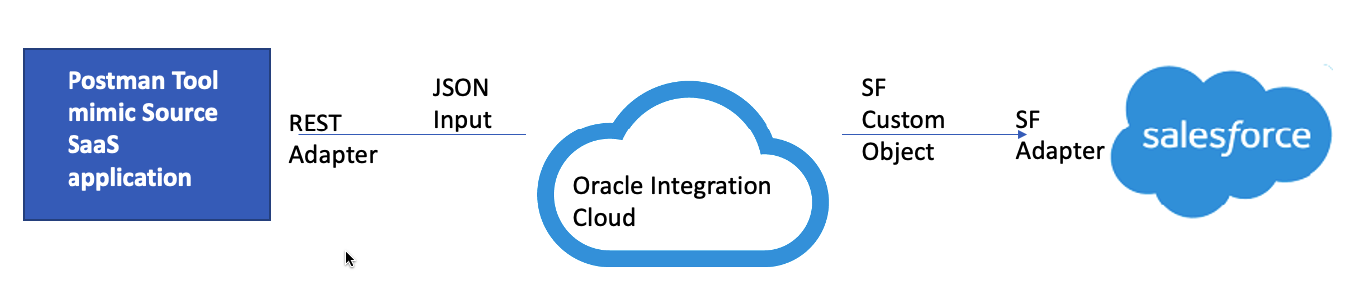
Customisation is essential part of any SaaS implementation to capture unique business needs. In Salesforce SaaS application also, there could be several use-cases where user might need to create a new Custom Object or add custom fields into existing Standard Object such as Contact, Account and Organisation etc. In this blog I will be showing how can we add Custom Object e.g. CochOrder which can have multiple Custom Fields e.g. Order Number, Shipping Cost, Source Region, Target Region and Total Amount etc. and can update that Custom Object fields using Oracle Integration Cloud (OIC) Salesforce adapter. I must recommend you to read my other blog which I have wrote to cover adding Custom Fields to existing Standard Object such as Contact, Account and Organisation etc. Most of the steps is going to same as previous blogs, so I am not going to repeat them here, instead will be only focusing only new changes related to Custom Objects.
Before, I go into deep drive, just want to highlight the core objective of this blog to show Salesforce configuration and OIC Salesforce adapter configuration, I am assuming reader has already basis understanding of OIC product features such as Connection, Integration, mapping and deployment.
My colleague had already covered Salesforce Inbound and Outbound integration using Oracle Integration Cloud Salesforce Adapter. So, I might not be repeating few steps which already been covered in this blog as well. if you doing Salesforce Integration first time, then its recommended to review these blogs before you proceed to read this blog.
So let’s do deep dive now. Below are the high levels flow and steps which needs to be performed to achieve desired result.
Over the past few years, in everything from personal photo storage to enterprise development there has been an incredible uptake of cloud storage buckets which provide a simple, low-cost mechanism for storing unstructured data. For much longer than that, there has been a need to consume, stage and produce unstructured data in enterprise integration scenarios. File servers accessible via protocols such as FTP/SFTP, etc. are commonly used to meet the staging requirements of traditional file-based integration use cases.
The practice of using an FTP/SFTP server alongside Oracle’s cloud integration platform – Oracle Integration Cloud (henceforth, OIC), is nothing new and is well documented.
In a series of upcoming blogs, I will explore how we can use Oracle’s cloud storage buckets (Oracle Cloud Infrastructure – Object Storage) instead of a traditional FTP server in cloud-based integrations. In this initial blog I will focus on:
Connecting to Object Storage with Oracle Integration Cloud
Writing Files to Object Storage with Oracle Integration Cloud





 RedThunder.Blog