OCI Application Performance Monitoring for PeopleSoft


The OCI Application Performance Monitoring (APM) service enables administrators to monitor and observe the PeopleSoft web applications.

It provides deep visibility into the application performance from end-user experience down through to the application server requests.

For many customers, the PeopleSoft (PSFT) Application is critical to business operations. With OCI Application Performance Monitoring (APM) service, administrators can:

  • Analyze all end user experience with accessing PeopleSoft web pages.
  • Trace transactions across various components and isolate problems to the impacting application or infrastructure tier.
  • Has ability to drill into application code.
  • Generally, APM tools cannot drill into the SQL code for the PeopleSoft application. This inability occurs is because, the SQL call is performed in the Tuxedo layer. However, OCI APM service offers a unique feature to overcome this limitation. It can perform instrumentation of outbound JOLT calls from WebLogic to Tuxedo. This helps at least understand how much time is spent in this layer.
  • Easily Capture End Username for user sessions without modifying application code
  • Search in context based on PeopleSoft attributes including:
    – Portal Name
    – Portal Object Name
    – and more
Continue reading “OCI Application Performance Monitoring for PeopleSoft”

Deploying OCI APM Service for Optimal EBS Application Observability


The OCI Application Performance Monitoring (APM) service allows administrators to monitor and observe the E-Business Suite web applications.

It provides deep visibility into the application performance from end-user experience down through to the application server requests.

For many customers, the E-Business Suite (EBS) Application is critical to business operations. With OCI Application Performance Monitoring (APM) service, administrators can:

  • Analyze all end user experience with accessing EBS web and form pages.
  • Trace transactions across various components and isolate problems to the impacting application or infrastructure tier.
  • Has ability to drill into application code and SQL calls to the database
  • Easily Capture End Username for user sessions without modifying application code
  • To search in context, you can use out of box EBS attributes auto generated from traces. These attributes include:
    – EBS Function Name
    – EBS Class Package Name
    – EBS Forms Name
    – and more ….
Continue reading “Deploying OCI APM Service for Optimal EBS Application Observability”

How To Capture Client IP in OCI Application Performance Monitoring

The Oracle Cloud Application Performance Monitoring (APM) service collects end user trace sessions for Real User Monitoring (RUM). By default the client IP is not captured for the end user session. For some customers, default Geolocation info (eg. Country, Region, City) may be sufficient for end user monitoring. However, for those who want to collect Client IP information as well, to enable this setting please see the following example.

Enable Client IP Collection for End User Session

For every End User Session, we want to capture the Client IP address location.

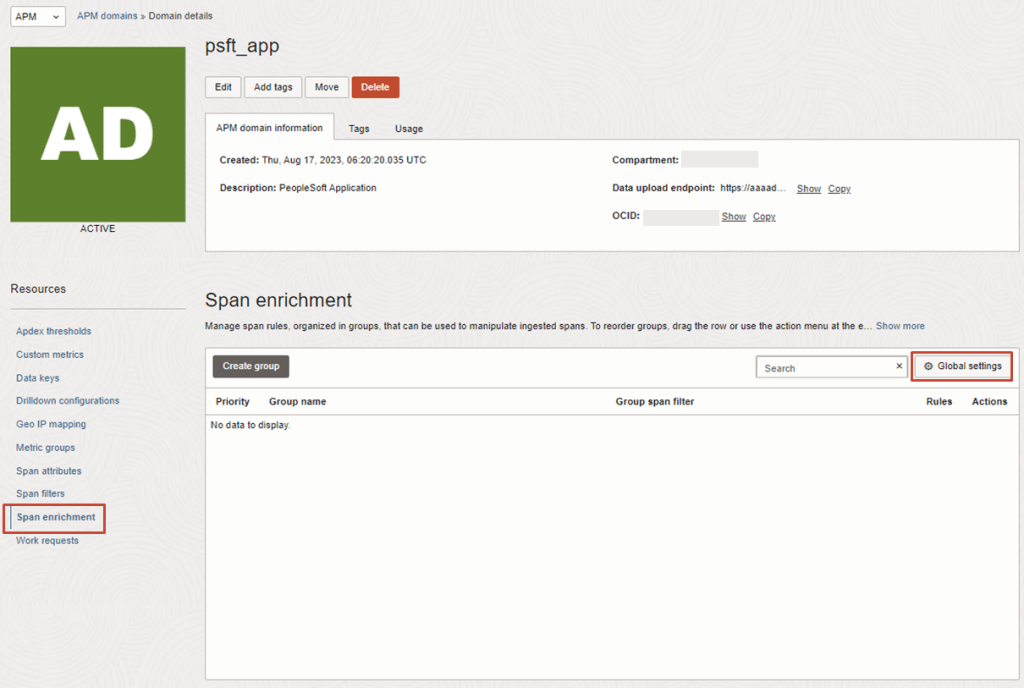
1. To do this, in the OCI Console, navigate to the OCI APM Service

OBSERVABILITY & MANAGEMENT > APPLICATION PERFORMANCE MONITORING > ADMINISTRATION

2. Then navigate to:
APM DOMAINS > [Select APM Domain eg. psft_app] > Span Enrichment > Global Settings

Continue reading “How To Capture Client IP in OCI Application Performance Monitoring”

Guide to OCI Custom Metrics and Monitoring Options

OCI gives you flexibility to create custom metrics when no out of box metrics are available. There are two options on how this can be achieved. Depending on your use case let’s take a look at which choice works for you.

RequirementsOCI Monitoring Service OCI Stack Monitoring Service
View Metrics in Monitoring Service
YesYes
Create AlarmsYesYes – Automatically, emitted to Monitoring Service once Metric Extension is enabled for target resource
Metric DimensionsYesYes
Frequency CollectionControl by client API execution, cron job, scheduler or agentYes – can be configured when creating the metric extension.
Collection can be directly executed by OS command, Script(eg. Shell, Python), SQL, JMX or HTTP (REST API) Custom Metrics can be published using OCI CLI or REST APIYes – Use Metrics Extensions
Centrally manage Custom Metrics for single or multiple resources – Enable, Clone, Export/ImportYes
Define collection based on Resource Types (eg. apache_http_server, apache_tomcat, oci_oracle_db, ebs_instance, host_linux, host_windows, miscrosoft_iis, sql_server etc…)Yes
Baseline and Anomaly detection in Metrics using ML based algorithms Yes
Perform correlation across multiple metricsYes
Apply Metric Extension lifecycle phases: Test and Validate, PublishYes
Custom Metric Collection from OCI, on-premise and/3rd party CloudYesYes
Alert against log data from OCI Logging AnalyticsYes – The Detection Rule needs to be created in OCI Logging Analytics
Custom Metric collection using Prometheus Exporter YesYes
Continue reading “Guide to OCI Custom Metrics and Monitoring Options”

Guest Blog: Five considerations for OCI IAM in IDCS-migrated tenancies

This is a guest IAM blog written by OCI Security expert Paul Toal.

Oracle Cloud Infrastructure (OCI) comes with its own, enterprise-class Identity and Access Management (IAM) service, which is used to manage users and their permissions within OCI. It can also be used for managing access to resources, applications, and services outside OCI, including on-premises. If you have been using OCI for some time, you may be familiar with Identity Cloud Service (IDCS) and how it was used to layer additional IAM capabilities over the core OCI IAM service. The capabilities from IDCS have now been merged into OCI through the introduction of OCI IAM Identity Domains, meaning IDCS no longer exists as a separate service. There is a great FAQ posted to answer many common questions about this change, including why Oracle has made the change and the benefits of this change.

Oracle has recently undergone the process of automatically migrating all existing OCI customer tenancies from IDCS to identity domains. In this article, we will examine the implications of the migration and the best practices following a tenancy IAM migration.

Continue reading “Guest Blog: Five considerations for OCI IAM in IDCS-migrated tenancies”

Certificate expiry monitoring in Oracle Cloud Infrastructure

I’m sure we’ve all experienced it, either as a user, or as a system administrator. You know, that important SSL certificate everyone forgot about so didn’t renew, and now has expired?

When an SSL/TLS certificate expires it can create a number of problems, including:

  • Users’ web browsers will display warning messages, indicating that the website’s connection is not secure. This can lead to a loss of trust and deter user engagement.
  • API clients will often refuse to establish a connection if an SSL certificate is not valid potentially disrupting crucial data exchanges and integrations.
  • Search engines may flag the site as unsafe, leading to a drop in rankings and reduced organic traffic.

Also regularly encountering certificate warnings conditions users to accept future certificate errors, which makes them more likely to accept an SSL certificate warning should they be targeted in a Man In The Middle Attack.

To avoid these issues, it’s important to have enough advance warning that a certificate is going to expire so you can obtain a new one, install, and test it thoroughly.

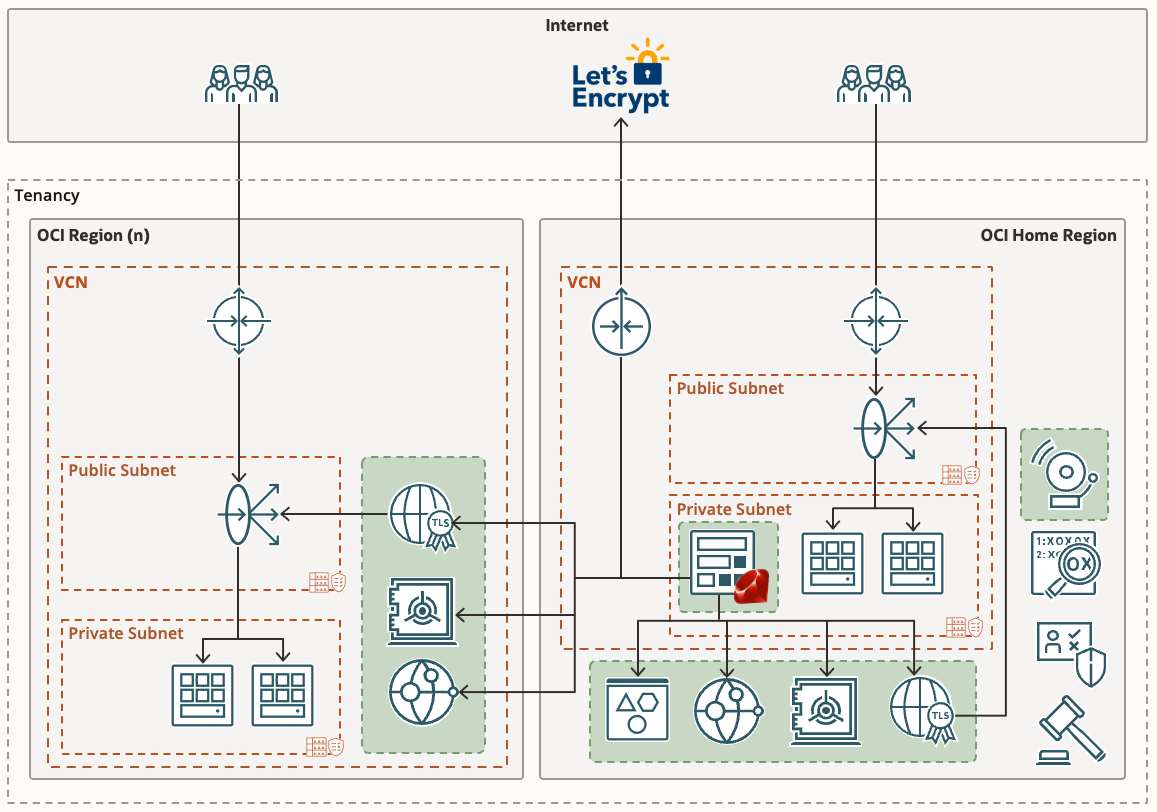
If you’re already using Domain Validated (DV) certificates, such as those issued by Let’s Encrypt you might want to consider my automated Let’s Encryption Solution. This solution automatically handles the entire certificate lifecycle using serverless functions inside OCI. For those who prefer to bring their own certificates, these can be imported into OCI’s certificate service.

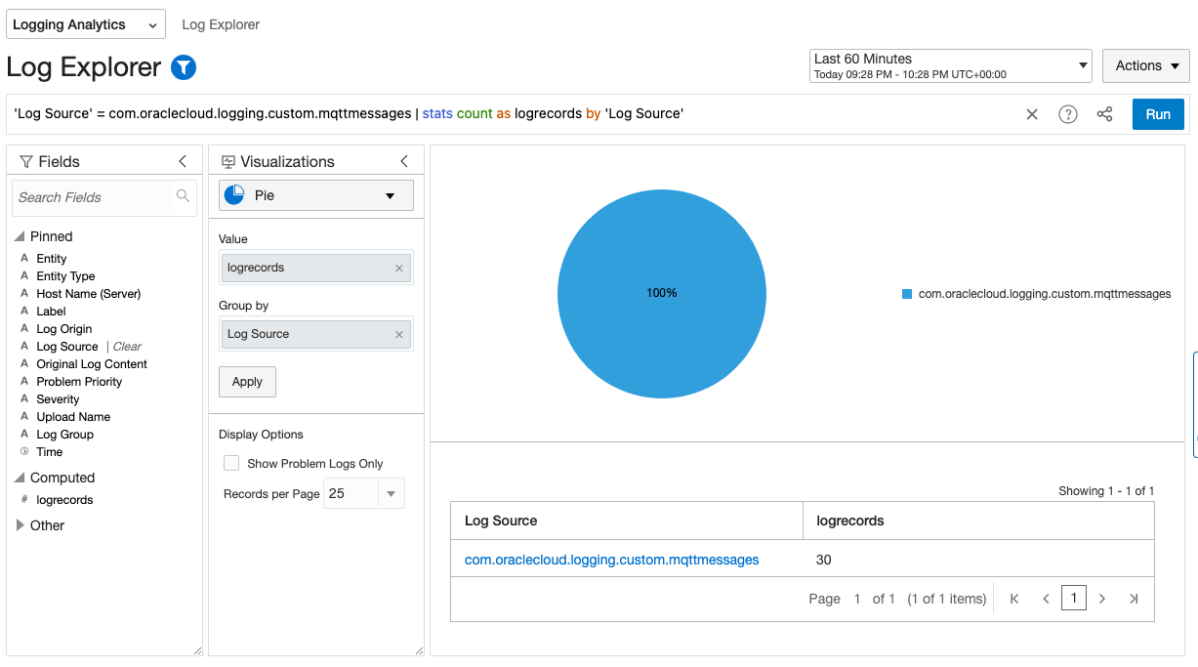
As at June 2023, certificate expiry monitoring in OCI is primarily focused on certificates associated with Load Balancers. To improve monitoring, I’ve developed a serverless solution that examines all certificates expiration dates. The solution emits logs and sends email notifications, also allowing for customisable lead time to align with your organisation’s certificate procurement process. Logs can also be forwarded to your SIEM solution if required.

Continue reading “Certificate expiry monitoring in Oracle Cloud Infrastructure”

Managing multiple Let’s Encrypt certificates with Oracle Cloud Infrastructure

In my previous post I explained how you can use Let’s Encrypt and Oracle Cloud Infrastructure (OCI) serverless functions to obtain a publicly signed SSL certificate, and automatically manage its renewal lifecycle. The solution works as expected; I have a Let’s Encrypt certificate for my website automatically renewing 30 days before expiry. If you haven’t read my previous post I’d recommend taking a look before following the setup outlined below as it covers how the solution works, and some prerequisites.

Having multiple workloads running in various OCI regions I started thinking about a more elegant way to provision certificates across multiple regions. Certificates stored in the certificate service are only available to resources in the same region and would have required a function to be deployed in each region, and for each SSL certificate required.

I’ve since updated the solution to address this requirement. It is now possible to provision certificates across multiple OCI regions using a single OCI Function application. I’ve also taken the opportunity to implement other features such as:

  • Loading a list of certificates you want to manage from a JSON file stored in Object Storage.
  • Adding support for wildcard SSL certificates.
  • Adding support for Subject Alternative Names (SAN) in addition to the CN name.
  • Adding support for the use of DNS zones and Vaults that reside in different regions to the OCI Function.

Adding support to specify which vault, and region to use for a given certificate ensures that workloads with strict cryptographic key material requirements can still benefit from this solution.

If you’ve already followed the instructions from my previous post, the solution will continue to work as described. The only limitation being that it’ll only work for a single certificate. By following the steps below you can easily upgrade to issuing multiple certificates. If you haven’t set anything up yet that’s also fine as I’ll be covering the full install again here.

Continue reading “Managing multiple Let’s Encrypt certificates with Oracle Cloud Infrastructure”

Let’s Encrypt serverless automation with Oracle Cloud Infrastructure

Let’s Encrypt made its debut back in late 2015. It is a free Certificate Authority provided by the Internet Security Research Group. The goal was to support the adoption of SSL / TLS to ensure the privacy of information sent over the public Internet. Let’s Encrypt is now serving over 2.5M certificates per day.

If you’re reading this it’s likely you’ve had to deal with SSL certificates before. It’s also likely some of you will have investigated an outage, only to find that an SSL certificate expired somewhere that no one knew about. Certificate discovery, management, and renewal can be time consuming and not much fun.

Cloud providers have made this job easier with the introduction of certificate services that are able to issue public Domain Validation (DV) certificates. Oracle Cloud Infrastructure (OCI) currently allows you to create private Certificate Authorities (CA’s), private Certificates, and private Certificate Authority bundles. Private certificate resources are used to secure communication across a private network, where certificates can be installed and trusted to enable secure communication.

But what about publicly signed certs for users connecting over the Internet? Using a private OCI certificate will result in a “certificate not trusted” error in your web browser; this is where Let’s Encrypt comes in. I’m going to show you how to run a completely automated serverless Let’s Encrypt solution in your OCI tenancy to install and automatically renew certificates that show as trusted in your web browser.

Continue reading “Let’s Encrypt serverless automation with Oracle Cloud Infrastructure”

Import Logs to Logging Analytics & Preserving Log Sources

In the world of cloud computing there are often multiple ways to achieve the same or similar result. In Oracle Cloud Infrastructure (OCI) logs are generated by the platform itself such as audit logs, OCI native services such as the Network Firewall Service, and custom logs from compute instances or your applications. These logs typically live in OCI logging where you can view them, or search them if required.

Collecting and storing logs is useful, however if you want to produce insights then you will need a way to analyse and visualise the log data. OCI Logging Analytics allows you to index, enrich, aggregate, explore, search, analyse, correlate, visualise and monitor all log data from your applications and system infrastructure.

From OCI logging there are two common ways in which logs can be ingested into Logging Analytics. The first is using a Service Connector to send logs to an Object Storage bucket, and an Object Collection Rule to then import the logs into Logging Analytics. The second option uses a Service Connector to send the logs directly to Logging Analytics. Both are valid options however require some consideration before use.

Continue reading “Import Logs to Logging Analytics & Preserving Log Sources”

Stack Monitoring for EBS

The Stack Monitoring service is a recent addition to the OCI Observability & Management family.

If you are running Oracle E-Business Suite (EBS) application today you will now be able to perform an auto discovery of all related resources in OCI Stack Monitoring. It will collect metrics specific for your EBS resources as well as ability to perform correlation across the EBS application and infrastructure stack as well as enable proactive alerting.

Components that will be auto discovered includes:

  • Concurrent Processing Node
  • Workflow Manager
  • WebLogic
  • Forms

Today, Stack Monitoring service supports EBS version 12.1 and 12.2 deployments hosted on OCI, On-Premise or Third Party Cloud (eg. AWS, Azure). 

In the example, I will show you how you can configure Stack Monitoring for EBS version 12.2.

Continue reading “Stack Monitoring for EBS”