Teaching How to Recover Errored Instances with Oracle Integration Cloud

Building Enterprise integrations in the Cloud with iPaaS brings many benefits, including among others: simplicity, agility and scalability. However, these benefits should not be taxed by having a weak core, not able to properly manage common enterprise requirements, such as error management. I’ve been a bit disappointed with how most iPaaS vendors handle runtime exceptions of integration flows. A typical example of this, is not being able to support dehydration for asynchronous flows (i.e. dehydration is crucial to supporting long-running instances by saving their memory state into a database, until a correlation invocation, a.k.a call-back, wakes it up to continue with the flow). This causes that when an error occurs, recovery has to start from the beginning of the integration flow that failed.

In these situations, we would have to either design an integration to be fully idempotent and stateless across all its partner links (service invocations), which is not always possible. Another way to do it is by manually handling the recovery of errored scenarios, this is to avoid state inconsistency across the previous service invocations in the orchestration, prior to the error… But then if we have to manually handle compensation, what about iPaaS being easier?

Luckily, Oracle Integration Cloud maintains simplicity at the front end and a mature and strong integration core at the backend. It acknowledges when an orchestration is asynchronous, so that dehydration points (a.k.a. break points) are enforced along the way across service invocations or long-term actions (e.g. waits), enabling with this long-term running instances avoiding to timeout, but to stay in memory (and DB back store) until all activities and external call-backs in the orchestration flow complete.

In this blog, I am going to show you how to recover errored instanced with Oracle Integration Cloud. For this, I am going to build a flow that demonstrates how errored instances recovery occurs from the latest dehydration point, allowing you to simplify complex orchestrations without having to compensate manually.

Continue reading “Teaching How to Recover Errored Instances with Oracle Integration Cloud”

Teaching How to Design and Secure an API with Oracle API Platform

This blog is the second part of an end-to-end exercise that starts explaining the steps to clone a GitHub repository that contains an agnostic Medical Records application, built by us in NodeJS and which exposes REST API endpoints via a Swagger API-descriptor running locally on Swagger UI (all included as part of the repository). The previous part of this 2-blogs series also explains the steps required to run the MedRec NodeJS application on Docker containers either locally or in the Oracle Public Cloud. For more information about this first part, go here.

Moving to this second part, we are going to cover the following steps:

  1. Create an Apiary account used to Design APIs (API First approach) and create a new API Project using the existing MedRec Swagger API-definition.
  2. We are going to spend a little bit of time playing with Apiary to feel comfortable in areas such as:
    1. Validating API definitions
    2. Testing API endpoints
    3. Switching across out-of-the-box Mock Servers and real Production MedRec service end-points.
  3. Login to Oracle API Platform and configure an API, this includes:
    1. Enforcing Security and other policies.
    2. Deploy API and securing access level to on-premise and Cloud-based API Gateways.
    3. Publishing APIs into the API Developers Portal.
    4. Linking API to Apiary Swagger API-definition living document.
  4. Login to API Developers Portal (API Catalog)
    1. Register a New Application
    2. Understanding the role of API Keys
    3. Reviewing MedRec API Documentation
    4. Registering to consume MedRec APIs
    5. Testing APIs.
  5. Understand API Analytics, consumption, metrics and monitoring dashboards.

Continue reading “Teaching How to Design and Secure an API with Oracle API Platform”

Teaching best practices to Design, Build, Secure and Monitor APIs

In this blog, I want to share my experience after having created many APIs using different approaches and technologies. I am going to encapsulate a simple process that will help you construct APIs, starting from scratch with an idea or requirement and move it all along to a happy consumption.

The best part of APIs is that they are microservices enablers, which implies that they are not technology prescriptive, so in this blog you will see that your APIs can be implemented using any technology or programming language.

I decided to use “Jokes” as the vehicle to explain the APIs construction best practices, mainly because jokes are a simple concept that anyone can relate to, but also because I want you to feel compelled to consume these APIs and by doing so, get a laugh or two.

My original idea with jokes is to:

  1. Get a random joke.
  2. Translate the joke to any language.
  3. Share the original or the translated joke with a friend via SMS.

This is the high-level view of how our end solution will look like:

Continue reading “Teaching best practices to Design, Build, Secure and Monitor APIs”

Teaching How to simplify building NodeJS APIs with Loopback Framework

In this blog, I am going to show you how to get started with the Loopback framework to easily auto-build REST APIs in NodeJS and persistence layer in a variety of options, including relational and non-relational databases e.g. In-memory DB, MongoDB, MySQL, Cassandra, Oracle, etc.

In terms of API design and development, Loopback allows you to work “top-down” or “bottom-up”. I am going to cover both approaches in this blog.

First, we are going to create an API model definition in place, as we are building the REST APIs, this exercise will give us a Swagger-based API definition. Alternatively, we are going to start from an existing Swagger definition and use it to implement NodeJS REST APIs pointing to a persistence layer of choice (in-memory DB, MongoDB, MySQL, DB2, Oracle, etc.). I personally prefer the “API First/Top Down” approach, as it gives me the option to properly design and test my APIs first and then, simply move to implementation phase, but this ultimately depends on situations, preferences and requirements.

Continue reading “Teaching How to simplify building NodeJS APIs with Loopback Framework”

Teaching How to use Nginx to frontend your backend services with Trusted CA certificates on HTTPS

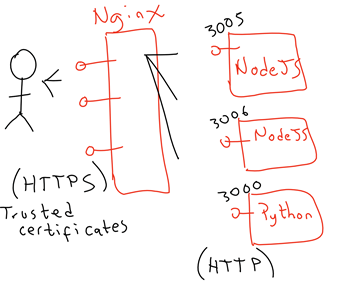
Now days with the adoption of Serverless architectures, microservices are becoming a great way to breakdown problem into smaller pieces. One situation that is common to find, is multiple backend services running on technologies like NodeJS, Python, Go, etc. that need to be accessible via HTTPS. It is possible to enable these internal microservices directly with SSL over HTTPS, but a cleaner approach is to use a reverse proxy that front ends these microservices and provides a single HTTPS access channel, allowing a simple internal routing.

In this blog, I am showing how simple it is to create this front end with Nginx and leveraging “Let’s encrypt” to generate trusted certificates attached to it, with strong security policies, so that our website can score an A+ on cryptographic SSL tests conducted by third party organizations.

Continue reading “Teaching How to use Nginx to frontend your backend services with Trusted CA certificates on HTTPS”

Teaching how to integrate Twitter with Integration Cloud Service

This blog shows you how to use the Twitter ICS Connector that comes out of the box in Oracle Integration Cloud Service.

Obtain your Twitter Connector in ICS

In order to create a Twitter Connector you need to first go to Twitter developers portal and create an access token. For this:

  • Login to the Twitter Developer portal at https://dev.twitter.com/
  • ON the top right, click on My apps and follow the link to log in (sign up if you don’t have an account yet).

Continue reading “Teaching how to integrate Twitter with Integration Cloud Service”

Teaching How to Use Alexa to Take Off your Drone using NodeJS

Recently I was in Auckland, New Zealand running an Integration in Action workshop and I used Alexa to trigger some of my APIs, including some NodeJS APIs that I built to take off a drone. Some people found this interesting and asked me to write this blog to explain in detail how it works… So, here it is, I hope you find it useful.

There are multiple ways in which you can make Alexa to call your own APIs. Perhaps the most versatile way is by adding a new skill (see: blog 1, 2). However I found an even easier way to do so, and in order to achieve the MVP approach I have been attempting to practice in my day-to-day life, I took this simpler option, which is simulating a Phillips Hue HA bridge. By doing  so, Alexa detects a new Home Automation (HA) device in “her” network range and accepts voice commands to easily “turn it on” or “turn it off” which you can then leverage to call your own APIs.

Continue reading “Teaching How to Use Alexa to Take Off your Drone using NodeJS”

Teaching how to integrate Salesforce and Sales Cloud with Oracle Integration Cloud Service

In this blog, I am going to show you how to integrate Salesforce and Sales Cloud with Oracle Integration Cloud Service (ICS). I am going to cover in detail how to configure ICS to subscribe for events to Salesforce and synchronise both SaaS applications without having to poll any of the endpoints. Salesforce is going to notify ICS when a specific event occurs, such as when Contacts who belong to a specific Account are added or edited.

This blog is a sequel of a previous blog, where I explain how to integrate Sales Cloud using ICS. If you haven’t reviewed it yet, I invite you to do so. Here is the link

Since this guide extends the Sales Cloud integration blog, I assume that you have created a simple CRUD set of REST APIs that interact with Sales Cloud Contacts. We will simply reuse these REST APIs to integrate into Sales Cloud. However, instead of the REST enabled API to CRUD Contacts into Sales Cloud, we could have decided to use an ICS “Invoke-based” Sales Cloud connector and achieve the same.

Continue reading “Teaching how to integrate Salesforce and Sales Cloud with Oracle Integration Cloud Service”

Teaching how to DevOps automate the provisioning of external APIs using Oracle API Platform and Developer Cloud Service

Modern Integrations require touching lots of different APIs coming from multiple “systems”. These “systems” can be big enterprise backend applications, such as: E-Business Suite, SAP, JDE, Siebel, etc. As well as modern SaaS Applications, such as: Service Cloud, ERP Cloud, Salesforce, Netsuite, Workday, etc. These “systems” can also be other smaller or custom applications running either on premise or in the cloud exposing either SOAP or REST services.

Rarely any of these “systems” can provide solid abilities to remotely expose APIs in a way that are tailored for a specific business case. Commonly, to achieve this, we need a separate integration layer that orchestrates APIs from multiple “systems” and easily obtain the desired business outcome, in a way that they are also reusable APIs to be utilise in other business scenarios. Furthermore, in order to properly apply security measures and effectively protect these APIs and safely expose them to external consumers (potentially in the public Internet), normally we need to use an API Gateway (see this blog to learn how).

Also, in previous blogs, John Graves showed us how to automate the creation and deployment of existing “internal Integration APIs” and expose them as secured external APIs using Oracle API Platform. (See ICS to API Platform and Oracle Service Bus to API Platform).

If we take the same automation concept, we can then apply it in a DevOps scenario, where we want to achieve the following:

Continue reading “Teaching how to DevOps automate the provisioning of external APIs using Oracle API Platform and Developer Cloud Service”

Teaching how to secure access to on-premise Applications with Oracle API Platform

In this blog, I am going to show you how to use the API gateway from the Oracle API Platform, to secure the access to backend Applications. These internal applications might already be exposing REST APIs, but given these are internal APIs, being exposed by backend applications themselves, we simply don’t want to directly expose them into the public Internet.

There are many reasons for this, for example, the backend application might not have the right ability to fully secure its APIs for external use, nor to have the right ability to control access authorisation, throttle requests, apply different policies, validate custom headers, apply API-KEYs, run analytics, etc. Normally only an API Gateway can do all these different things.

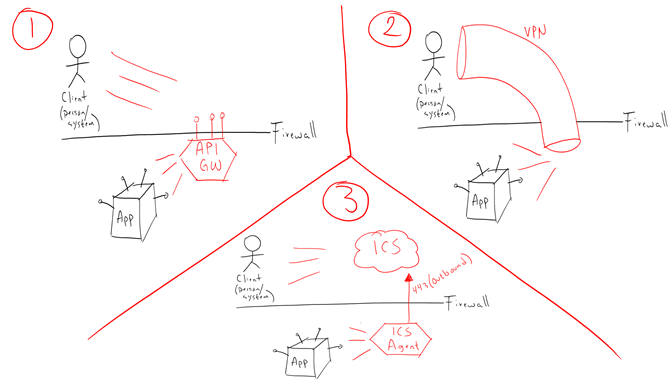
I can think of the 3 most common ways to securely get access to backend applications behind a corporate firewall.

  1. Using secured APIs exposed externally
  2. Connecting through a secured VPN tunnel
  3. Using a messaging pattern, like with the Oracle Integration Cloud Service Agents deployed locally and then gathering access externally via Integration Cloud Service console or APIs

In this blog, we are going to explore option number 1.

Continue reading “Teaching how to secure access to on-premise Applications with Oracle API Platform”