Oracle Integration & AI: Accelerating OIC Development Phases

In the evolving digital era, Oracle is embedding AI deeply into its Integration platform to streamline, automate, and enhance the development process. Rather than seeing AI as an add-on, Oracle’s strategy ties together infrastructure, development tools, and application integration so that teams can build faster and smarter.

Oracle’s AI-Innovation in Integration can be declined in 2 ways.

  1. How the AI can be a value add for OIC developers
  2. What OIC can offer in the Agentic AI area to simplify and accelerate AI adotpion in enteprise projects

In this article, I’m focused on the first point and I will try to explain how developers can take advantage of such AI features.

What coming from Oracle AI World event , recently occurred in Las Vegas, gave us the opportunity to be aware of:

  • Embedded AI capabilities: Oracle Integration includes embedded AI that helps with creating integrations (supported by using natural language), defining schedules, writing documentation about integration components, generating queries (e.g., FHIR, ATP), and resolving errors in B2B .
  • Connection with OCI AI Services and OpenAI: The platform allows use of Oracle Cloud Infrastructure (OCI) AI Services or OpenAI large language models in integrations. That means processes can use text/image processing, content generation, analysis, etc., directly as part of integration workflows.
  • “Use AI to Create an Integration”: A concrete feature allows a user via a natural-language prompt (in a chat interface) to ask Oracle AI to build the skeleton of an integration. The system determines which “nodes” (trigger/invoke), adapters, and connections are needed, builds a draft and lets the developer accept or modify it.

Here are key ways AI supports or accelerates development in Oracle Integration:

Phase of Development  Traditional ChallengesHow Oracle’s AI Helps
Requirement Spec / Planningdefining what systems need to interact; understanding triggers; mapping workflowsUse natural language to describe needed integration; AI proposes flow, nodes, connections. Reduces time in planning and help you to build the skeleton of your rintegration flows
Design / Prototypingdeciding adapters, interfaces; drafting initial workflowsAI suggests adapters, trigger/invoke components; creates skeleton flows that devs can edit. Speeds prototyping
Implementation (Coding / Configuration)manual building of integration flows; error handling; repetitive tasksAI can assist in resolving errors; suggest corrections; provide diagnostics
Deployment / Maintenancemaintaining integrations as systems change; resilience; monitoringAI helps with scheduling, modifying flows; possibly assisting in content or error handling maintenance. ”

Having said that, what’s the benefit coming from AI adoption in development?

I share with you some steps where the conjunction between AI and OIC is for sure a very good help

  • Faster development cycles — less time spent on repetitive or boilerplate tasks.
  • Lower barrier to entry — using natural language turns non-expert users or less technical team members into potential contributors.
  • More consistency — AI can enforce patterns, use standard connections, reduce errors.
  • Scaling & productivity — teams can do more, focus on higher-value logic rather than plumbing.

In my opinion, at the same time, it’s helpful is to get the most out of Oracle’s Integration + AI strategy, Organizations should:

  1. Define clear prompts and use cases — specify systems, conditions, failure handling when using natural language with AI to build integrations.
  2. Review and validate AI’s generated flows thoroughly, especially for critical business logic.
  3. Invest in governance — keep track of which integration pieces were AI-generated, maintain documentation, versioning.
  4. Train teams on AI usage: how to write prompts, how to troubleshoot AI suggestions.
  5. Monitor performance and cost — AI services (especially LLMs) bring compute and data costs; ensure ROI.

I hope this content helps the community something like a sort of brainstorming and at the same time it helped me to point out some aspects

Conclusion

Oracle’s strategy of embedding AI into its Integration platform represents a significant shift in how enterprise software can be developed. By providing tools that allow parts of the development workflow — planning, design, implementation — to be partly automated or assisted, Oracle is helping developers move faster, reduce errors, and focus on more strategic problems.

The future path will require careful balancing of innovation with oversight, but for companies willing to adopt and adapt, the promise is strong: more agile, intelligent, and automated integration development.

Stay tuned … the future is now and several other news are already in plans!

OCI Process Automation and Oracle Artificial Intelligence in Action

It’s very interesting feature what recently delivered with OCI Process Automation.

It’s possible now to upload in your workflow a document such a passport, driver license, … documents from where it’s possible to automatically extract data.

No more manual procedures but everything managed by the solution to automate business processes.

This is a meaningful improvement of the OCI offering highlighting synergies and native integration among the big number of OCI services available in each OCI region of the world.

Artificial Intelligence is today the most relevant technology from which we can take advantage in simplifying our lifestyle, reducing time with bureaucracy, and getting a benefit from other several new services before unimaginable.

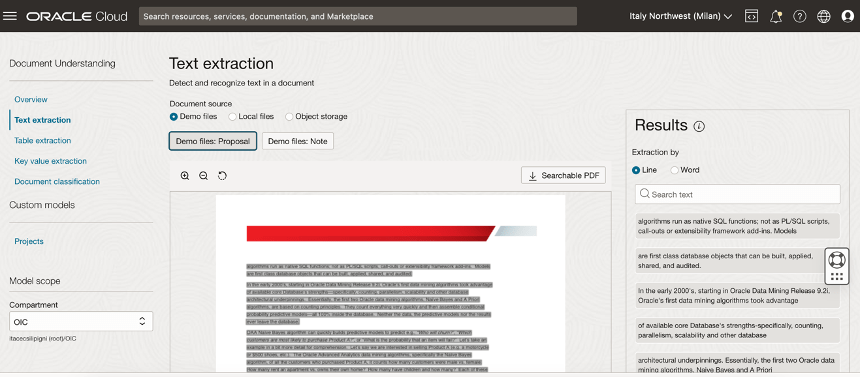
Oracle Cloud Infrastructure (OCI) Document Understanding, what natively integrated in Oracle Process Automation, is an Oracle AI service that enables developers to extract text, tables, and other key data from document files through APIs and command line interface tools. With OCI Document Understanding, you can automate tedious business processing tasks with prebuilt AI models and customize document extraction to fit your industry-specific needs.

You can easily identity this service navigating the OCI Console in the Analytics & AI section.  

With this service, you can upload documents to detect and classify text and objects in them. You can process individual files or batches of documents using the ProcessorJob API endpoint.

The following pre-trained models are supported and offering support for different pre-trained model like:

  • Optical Character Recognition (OCR)
  • Text extraction
  • Key-value extraction
  • Table extraction
  • Document classification
  • Optical Character Recognition (OCR) PDF

In your daily life, how many times you need to show your passport, your driver license, or your health insurance card to start a new request?

Some examples are:

  • Renting a car
  • Accessing the hospital to do triage
  • Medical checkup in healthcare
  • Hotel check-in

This is the reason why today Oracle can offer this added value in his Cloud offering… to simplify your daily activity, to make your life better.

A simple process, as I said before, can be that one about the “Car Rental”. Trying to imagine a human workflow behind, we can think about a BPMN process used to manage every step where for example an approval is required.

We can also imagine, not necessarily a process behind but simply the need to upload some info or data which need to be sent to other applications or database so that OPA can be used to easily configure a webpage from where it’s possible to upload data into an Oracle Database using its REST adapter or leveraging the DB adapter included in Oracle Integration Cloud Enterprise Edition (which includes OCI Process Automation).

I have tried to imagine a “Car Rental” process designing a step by step process for example when a long term rental is requested and its acceptance needs to be approved

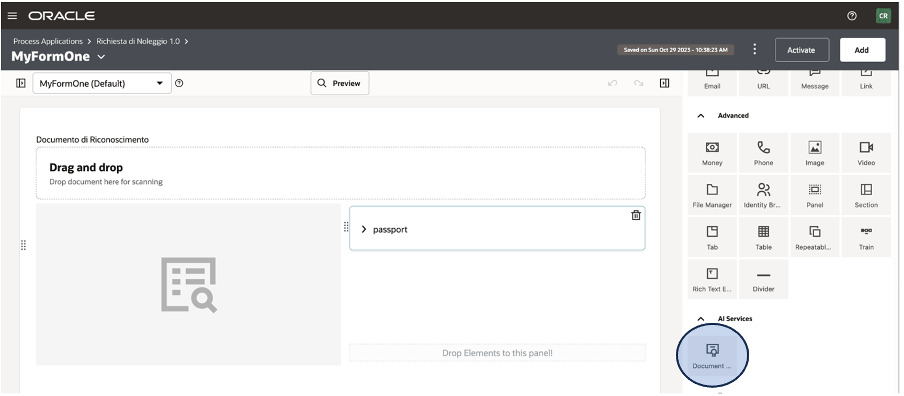
As you can see below, when you design your WebForm from OCI OPA Console you can find on the right side, included in the activities section, the new icon about the AI Document Understanding.

This icon can be dragged & dropped into your canvas to model the web UI as you prefer and need.

It’s a pre-built integration, so you don’t need to think about REST invocation or similar. Everything is pre-configured for you and then you can easily use it without coding or similar stuff.

Once the process is implemented (here a quick overview how to do it), you can enable this one for production purposes

The operator can use the web UI to start a new request, clicking on the pre-defined process and/or including the new application in a web portal or into the Oracle SaaS springboard in according to the specific process.

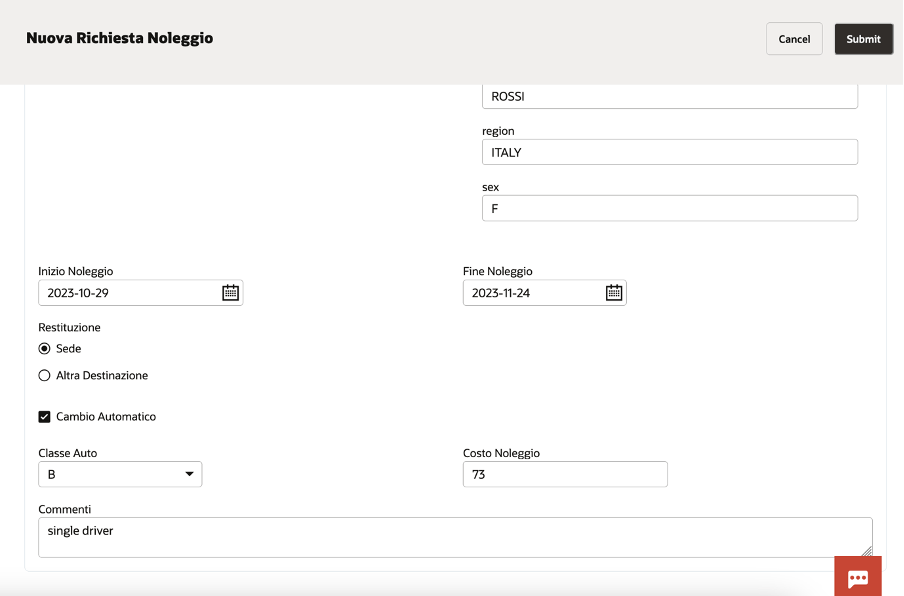
Once the operator has identified the right process, clicking on the “Nuova Richiesta di Noleggio”, the webform appears to accept the required info.

If, AI Document understanding, has been properly configured, the end user can upload the image of the passport, or other provided documentation, so to start the automatic data acquisition

In a while, you can see how automatically all personal data appear on the right side of the page, filling the right field.

You can, of course, add other info to enrich the information required … something like below included. The web UI is highly customizable, and you can build your own web page as the business requires.

In this way, the desk operator can scan your documents and with a simple click, uploading the image, it’s possible to collect all the required information without huge effort taking advantage of:

  • Less time for data entry
  • Less errors for manual activities (i.e. reading passport and typing them)
  • Better and quicker customer experience

I encourage you to test it by yourself to personally understand how much it’s easy to do it. A very low effort to improve processes introducing in your business innovation, efficiency, and automation.

Helpful resources:

https://docs.oracle.com/en/cloud/paas/process-automation/

https://docs.oracle.com/en/cloud/paas/process-automation/user-process-automation/implement-intelligent-document-processing-forms.html#GUID-1C3EF754-8BAC-410E-B915-5A63F3EA786C

https://docs.oracle.com/en-us/iaas/Content/document-understanding/using/pretrained_doc_document_class.htm

https://blogs.oracle.com/integration/post/intelligent-document-processing-in-oci-process-automation

Access OIC REST based Integrations using an OAuth Client (No Password Expiry For Basic Auth User Anymore) !!!

Oracle Integration Cloud (OIC) is Oracle’s next generation modern Integration solution Platform as a Service (PaaS) offering. The core purpose of this product to integrate various SaaS and On-prem systems real time. In addition to Integration capability, it also provides Process Automation and Visual Builder Capability. Details docs are available here.

OIC has concept of Adapters. There are huge range of adapters available and documented here.

One of the Adapter REST Adapter been used to expose an Integration to outside world for consumption. In order word, it’s an entry point for most of Integrations what we developed using OIC. It also gets used to invoke any external REST based endpoint.

REST Adapter support Basic Auth and various flavour of OAuth as security mechanism to protect the Integration access.

However, not all OAuth flavour supported for Trigger Role (Used as Entry point of Integration) vs Invoke Role (Used for invoking third party REST endpoint).

REST APIs exposed using the REST Adapter (Trigger Role) are protected using Basic Authentication and OAuth token-based authentication.

REST API consumed using the REST Adapter (Invoke Role) Support HTTP Basic Authentication, OAuth Client Credentials (two-legged flow), OAuth Resource Owner Password Credentials (two-legged flow), OAuth Authorization Code Credentials (three-legged flow), OAuth Custom Three Legged Flow, OAuth Custom Two Legged Flow, OAuth 1.0a One Legged Authentication, Amazon Web Services (AWS) Signature Version 4, and Oracle Cloud Infrastructure (OCI) Signature Version 1. There is also support for consuming APIs that are unprotected.

Now, majority of Customers chose Basic AUTH while publishing an Integration because it’s very simply to implement but has limitation because the user password gets expired in every 3 month which result changing all Integrations configuration again in 3 month of time.  We can very well avoid this problem by Implementing OAuth token which never gets expired.

Oracle has official document for setting up Service Account without expiry but it’s quite difficult to follow instructions from that document. Hence, I thought to publish more user friendly instructions  to achieve the same outcome.

In this blog, I will be covering how we can invoke an Integration exposed using REST Adapter (Trigger role) using OAuth token which doesn’t get expired.

Continue reading “Access OIC REST based Integrations using an OAuth Client (No Password Expiry For Basic Auth User Anymore) !!!”

Manage Custom Fields in NetSuite using Oracle Integration Cloud NetSuite Adapter

Customization is essential part of any SaaS implementation to capture unique business needs. In NetSuite SaaS application also, there could be several use-cases where user might need to create a new Custom Object or add custom fields into existing Standard Object such as Contact, Account and Organization etc. In this blog I will be showing how can we add Custom fields e.g. Degree name and Passing Year etc. into existing NetSuite Contact object and can update the same field using Oracle Integration Cloud (OIC) NetSuite adapter.

Please Note: NetSuite Adapter handles the Custom fields in very different way in compare to other adapters. Due to NetSuite API limitation, OIC Adapters not able to discovers Custom fields created in NetSuite which could be concern to many Customers. However, Oracle NetSuite Integration Adapter provide a way to specify manually all those Custom fields using InternalId and ScriptId and assign associated values coming from Source System to those fields and that’s the core objective of writing this blog to show to reader how we can manually add and assign values to NetSuite Custom fields using OIC NetSuite Adapter. 

The use case scenarios –

0

Below are the high level steps user need to perform to achieve outcome.

  • NetSuite – Create Custom Entity fields in NetSuite for Contact object
  • OIC – Create NetSuite Adapter connection as Target System
  • OIC – Create REST Connection as Source System
  • OIC- Workout Request Response Payload for REST Adapter Input
  • OIC – Create Integration, do mapping and Activate Integration
  • OIC – Test Integration using POSTMAN
  • NetSuite – Verify Contact object details

Continue reading “Manage Custom Fields in NetSuite using Oracle Integration Cloud NetSuite Adapter”