This is my 15th #DaysOfArm article that tracks some of the experiences that I’ve had so far. It’s been a little while since I’ve worked on this series however saying that … much of what I’ve been doing didn’t seem different from any other type of environment.
And just to recap from the first post (here) on June 12 2021.
It’s been just over 2 weeks since the launch of Ampere Arm deployed in Oracle Cloud Infrastructure (OCI). Check this article out to learn more (here). And it’s been about one week since I started looking into the new architecture and deployment, since I started provisioning the VM.Standard.A1.Flex Compute Shape on OCI and since I started migrating a specific application that has many different variations to it to test it all out.
This is my next learning where I looked into Let’s Encrypt to create a set of free certificates for Oracle Cloud Infrastructure A1.Flex VM Instances.
In this blog post I will explore how we can extend the native capabilities of Oracle Integration (OIC) with Oracle Functions to process Excel files.
Although OIC can handle a number of file formats natively, .xlsx or .xls files need a bit of extra love.
The inspiration for this blog comes of the back of several customer enquiries into this subject.
The simple solution for most customers is to convert the Excel file formats to CSV and subsequently process them with OIC. I will use this approach here too but with a little bit of help from other OCI services such as Oracle Functions, an API Gateway and Object Storage.
I had a meeting the other day with an Oracle Partner and the discussion was about serverless solutions and Oracle Functions was introduced. And the natural question to ask was, “What is your preferred language?”.
They answered, “Mostly PHP. We also use C#”.
I had to think a little. And navigating to the fnproject.io (the open-source project that Oracle Functions is based upon), it was clear that C# was supported. Here’s a quick tour through that experience.
fnproject.io supported languages – golang, Java, javascript, python, ruby and C#.
A couple of quick points:
I didn’t need to install ASP.Net anywhere.
I’m not bound by Windows as the host operating system.
And if ASP.Net is your language of choice, you can also check out Deploy highly available ASP.Net applications on Oracle Cloud Infrastructure in the Oracle Architecture Center (here).
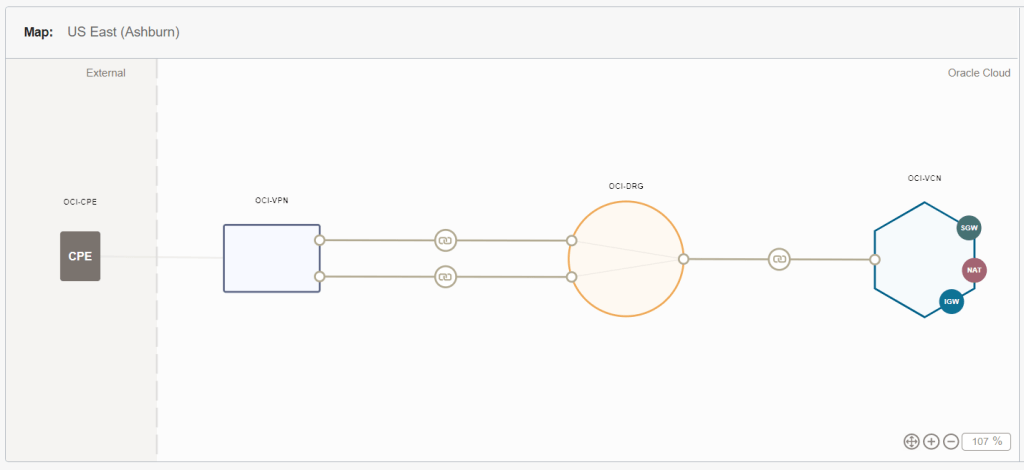
In today’s world, the norm for videos is that they should be short in length, even if they are instructional videos. They cite the short attention span of the targeted audience…. And I do agree to some extent. However, in tech there are many occasions that require a longer length so they can properly address all the details of the topic at hand. Back in March 2021, I recorded myself for the purpose of demonstrating how to configure to completion an Inter-Cloud VPN connection using the Oracle Cloud Infrastructure (OCI) native IPSec VPN tunnel against a Customer Premises Equipment (CPE) with LibreSwan on an Amazon Web Services (AWS) Elastic Cloud Compute (EC2) instance. The video is nearly 30 minutes long! Only the truly committed will follow along, which is the intention.
I used official OCI documentation as a basis. Basically I explain every single step on this document while I perform them on both OCI and AWS consoles.
Even though in the video I present myself as an Oracle employee, which I proudly am, the video and this post are NOT official Oracle documents. Any opinion is my own and only my own.
I hope that you find this step-by-step video helpful. This is the link to it:
P.S. The reason why I am using a non-RFC1918 CIDR prefix is because I am strictly following the steps in the guide.
The OCI Observability & Management (O&M) platform gives you the ability to also manage your Oracle Database targets that reside on-premise or hosted on an external platform to OCI.
In order to deploy this, please ensure you have met the prerequisites:
As each project comes along, there’s something new to add to the OCI Arcade. It started off with the game and Autonomous Database. And then grew into including Kafka, Docker Swarm, Serverless with the FN Project, Terraform, OAuth, Ansible, In-Memory Data Grid with Coherence-CE and more recently with Arm. This time round we’ve adding in a Customer Relationship Management (CRM) solution. Why? Up to now, users has been a simple identifier to denote the scores and the events in the game. Nothing more; nothing less. By adding in a CRM into the mix, we’ve opening up the understanding about our contacts and customers providing a richer experience for those coming to the arcade. And ultimately, from a space where we are build, experiment and try something out – adding user profiles opens up endless possibilities. Check out the rest of this about how it’s changed and some of the things we needed to do to make this happen.
In the previous post, I did some work in managing Security Lists to protect the Minecraft Server. To read about that, head (here). Another method of connecting to the Minecraft Server is through a Bastion Host. As part of Oracle Cloud Infrastructure, it is free to create a session through the Bastion Service (service limits do apply). Here’s a brief encounter of getting this up and going.
The Minecraft Server has been up and running for a little while now on my Oracle Cloud Infrastructure Always Free Tier. And it’s something that has become more valuable. The hours of crafting, building and mining is something that needs attention. I’ve experienced the situation when months of work has been wiped or worse hacked. It’s not a good feeling.
I’ve been using the Security Lists in Oracle Cloud Infrastructure to define specific ingress rules. What I’ve done now is make that easier.
Logs are often voluminous can be challenging to navigate through, but it can be a gold mine of valuable data to help administrators troubleshoot and identify issues or trends for operational activities.
To overcome the burden of manually eye-balling millions or (even billions) of rows in log records, bringing that data into OCI Logging Analytics(which is part of the Observability & Manageability Portfolio) will allow administrators to get quick insights, to reduce the time to isolate issues, minimising downtime and prevent impact to end users.
There are various ways you can bring telemetry and operational data into OCI Observability & Management (O&M) to proactively monitor and gain operational insights into your IT fleet.
Example of ways you can do this are:
Service Connector Hub – Route and move data from one OCI service to Another OCI Service (eg. OCI Logging to Logging Analytics)
API Call – Collect data from files stored on Object Storage or Upload Log data on demand
Agent Based – Deployment of Agent on Host
If you have targets you want to monitor on-premise or in the cloud (OCI, AWS, Azure etc…) and you have access to the VM or Compute instance (ie. you can SSH or Remote Desktop to the host), then an Agent based method will allow you to collect and bring that data into unified platform in O&M.
In this example we will show how you can deploy Agent based method (on Linux OS) so you can leverage the O&M services including:
Logging Analytics
DB Management
Operations Insights
Java Management Service
1 – NETWORK COMMUNICATION (For External Targets to OCI)
We recommend using OCI FastConnect or IPSEC VPN
Communication Destination to OCI Tenancy – HTTPS (443)
3. Review Key and Download Key to File (eg. oci-reg-key.txt)
NOTE: Your Key File will be in the format of <Key Name>.txt. Copy it to your target host.
4. Download Agent by clicking on the Agent for your OS (eg. Agent for LINUX) and copy to your target host
4 – INSTALL AGENT
1. Login to the host and locate the downloaded agent file oracle.mgmt_agent.rpm
$ sudo rpm -ivh oracle.mgmt_agent.<version>.Linux-x86_64.rpm
Preparing... ################################# [100%]
Checking pre-requisites
Checking if any previous agent service exists
Checking if OS has systemd or initd
Checking available disk space for agent install
Checking if /opt/oracle/mgmt_agent directory exists
Checking if 'mgmt_agent' user exists
Checking Java version
JAVA_HOME is not set or not readable to root
Trying default path /usr/bin/java
Java version: 1.8.0_271 found at /usr/bin/java
Updating / installing...
1:oracle.mgmt_agent-201113.1621-1 ################################# [100%]
Executing install
Unpacking software zip
Copying files to destination dir (/opt/oracle/mgmt_agent)
Initializing software from template
Creating 'mgmt_agent' daemon
Agent Install Logs: /opt/oracle/mgmt_agent/installer-logs/installer.log.0
Setup agent using input response file (run as any user with 'sudo' privileges)
Usage:
sudo /opt/oracle/mgmt_agent/agent_inst/bin/setup.sh opts=[FULL_PATH_TO_INPUT.RSP]
Agent install successful