
Continuing from the previous post which dealt with the core concepts around performing authentication and authorisation in a distributed environment, this post expands upon those concepts, looking at additional factors for authorisation decisions, including supplementary information, authentication challenges and risk assessment. While basic authentication and authorisation requirements can be met through the use of JWTs and OAuth, this post shifts to tackling bespoke requirements, outlining potential services which could provide capabilities above and beyond what is captured in those standards.
Exploring GitHub Docker Hub and OCCS Part 4
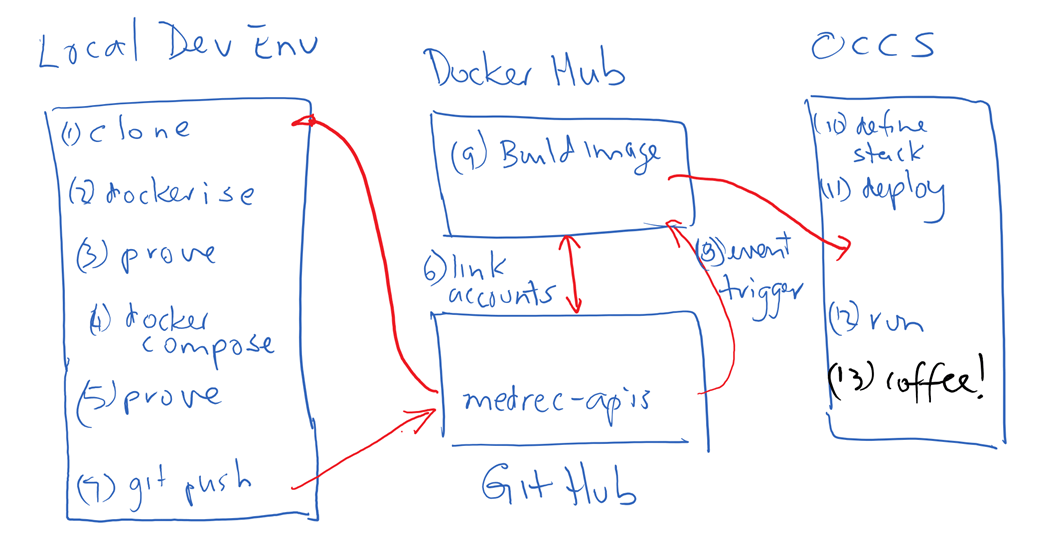
In my previous post in this series I covered linking GitHub and DockerHub and configuring the environment such that a build of a Docker image was triggered on updates to GitHub. In this final post of the series I will take you through the steps to pull the image from Docker Hub into OCCS in order to run the application. It should be noted that the image built on Docker Hub in my example is only the web tier that contains my Node.js project (APIs and SwaggerUI). The MongoDB component of my OCCS Stack is pulled directly from Docker Hub when my Stack containing the Web Tier and Database Tier services is deployed to OCCS. Continue reading “Exploring GitHub Docker Hub and OCCS Part 4”
Access Management and Micro-services – Part 2: Authentication and Authorisation
In the previous post in this series we examined at a high-level how responsibilities for authentication and authorisation are distributed in a micro-services architecture. In this post, the strategies and technologies that underpin the implementation of authentication and authorisation will be explored further, with the core access management services providing authentication services, which support individual services performing authorisation. This discussion is actually split across two posts, as authentication and authorisation are core parts of the access management services, and require extensive discussion, with this post focusing upon the core capabilities, and the following post focussing upon more advanced authentication and authorisation requirements.
Continue reading “Access Management and Micro-services – Part 2: Authentication and Authorisation”
Access Management and Micro-services – Part 1: Overview
An ongoing trend, as organisations increasingly adopt cloud-native development approaches, is from centralised services, to widely distributed services. This shift requires a rethink about how access management is delivered, in terms of aligning with this model in development practice, as well as accommodating the radical effect that this has on deployment architecture. I have previously alluded to this shift as being from ‘perimeter-based access management’ to ‘centralised access management’, and how this is able to accommodate the increasing adoption of distributed infrastructure and services.
I initially began writing a post which would explore this concept in more detail, though it quickly grew beyond what could be easily captured within a single post. As a result, in order to give the topic justice, I will break this into a number of posts, beginning, in this post, by exploring what Access Management even looks like in this sort of architecture, then going into more detail about strategies for implementing a micro-services approach to access management.
Continue reading “Access Management and Micro-services – Part 1: Overview”
Exploring GitHub DockerHub and OCCS Part 3

In my previous post I described how I created a stack definition including my Node.js web application and a MongoDB service using docker-compose. In this article I will describe the steps I took to link my GitHub and Docker Hub accounts in order to automatically build a docker image triggered by a git push command.
Trigger a Build of the MedRec API Docker Image on Docker Hub
Combining internet / cloud based services such as GitHub and Docker Hub allows developers to experience productivity gains without having to fund a local server to provide this capability. I wanted to explore and experience this for myself.
Link Docker Hub and Git Hub accounts
As I didn’t have a docker account for my user I pointed my browser to docker hub … https://hub.docker.com/ and clicked the SignUp option. Continue reading “Exploring GitHub DockerHub and OCCS Part 3”
Exploring GitHub, DockerHub and OCCS Part 2
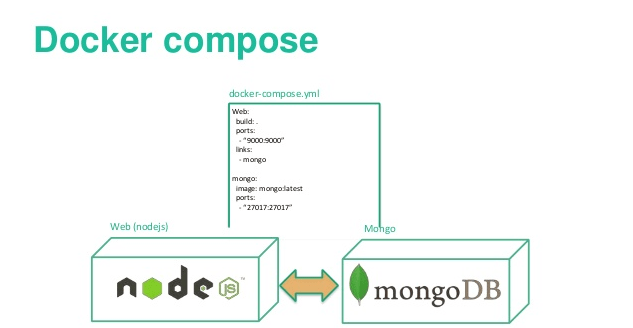
In my previous post I detailed how I Dockerised the MedRec app. In this post I will show how I added MongoDB and defined a stack using Docker-Compose.
Add MongoDB layer using Docker-Compose
According to the official docker documentation ;
“Compose is a tool for defining and running multi-container Docker applications. With Compose, you use a Compose file to configure your application’s services. Then, using a single command, you create and start all the services from your configuration. ”
A single command to create and start all the services in a configuration sounded pretty good to me. I definitely was keen on exploring docker-compose.
Add a docker-compose.yml file
Having proved that my web application runs up, I now need to address the persistence layer. The above Dockerfile contains the steps to create the required runtime platform for my node app, and installs the node application and package dependences (as specified in the package.json) file by doing the npm install. However if I tried to do a GET or a PUT my app will fail as it won’t find a MongoDB inside my container. I therefore still need a MongoDB somewhere in my environment to hold my application data. Continue reading “Exploring GitHub, DockerHub and OCCS Part 2”
Exploring GitHub Docker Hub and OCCS Part 1
In my previous post in this series I provided an Introduction describing the high level steps I planned to take.
In this post I will walk through the detailed steps to Dockerise the MedRec application.
Dockerise the MedRec APIs
Git clone the project repository
I used my Windows Surface Pro-4 with Oracle VM Virtual Box installed to host my development VM. I managed to source a VBox image that already had Ubuntu 16.04 and Docker installed so that helped get me started. In my development environment on my laptop, I created a directory under my home directory named gitprojects.
I cd into that directory.
cd gitprojects
Continue reading “Exploring GitHub Docker Hub and OCCS Part 1”
Exploring GitHub, DockerHub and OCCS – Introduction
As part of our MedRec API playpen initiative we had already developed some REST API’s using Node.js and leveraged MongoDB running on Oracle IaaS as the persistence layer. . This post describes what I did to dockerise the MedRec API application and eventually run it on the Oracle Container Cloud Service (OCCS).
The APIs have already been made available for interested parties to interact with via SwaggerUI. Of course developers could develop their own code (or any REST client) to interact with them. As a team we used a combination of the Oracle Developer Cloud Service (Git repository, Issue Tracker, Build Server etc) and also the public GitHub to provide public access to our project code. As the source code for the Node.js project containing the API’s was pushed to GitHub I simply did a clone of the Node application code in order to download and run it locally (MedRec API tutorials available here).
The application ran well enough on my local laptop which running Ubuntu 16.04, however I really wanted to be able to try to run the app and MongoDB as a Docker image/stack on my laptop. After I had the application successfully “Dockerised”, then I planned to deploy my application stack to the Oracle Container Cloud Service. I also wanted to explore the use of the GitHub / Docker Hub integration to build my image on Docker Hub, and then from within the Oracle Container Cloud Service (OCCS). With the application image available on Docker Hub, I could then pull my image from that source in order to run it up on OCCS.
A good blog can really help bring you up to speed quickly and help overcome inertia to get you started and I would like to acknowledge the help that Mauricio Payetta’s blog provided me.
In this series of blog posts I plan to retrace what I did during my self-learning. Continue reading “Exploring GitHub, DockerHub and OCCS – Introduction”
Teaching How to simplify building NodeJS APIs with Loopback Framework
In this blog, I am going to show you how to get started with the Loopback framework to easily auto-build REST APIs in NodeJS and persistence layer in a variety of options, including relational and non-relational databases e.g. In-memory DB, MongoDB, MySQL, Cassandra, Oracle, etc.
In terms of API design and development, Loopback allows you to work “top-down” or “bottom-up”. I am going to cover both approaches in this blog.
First, we are going to create an API model definition in place, as we are building the REST APIs, this exercise will give us a Swagger-based API definition. Alternatively, we are going to start from an existing Swagger definition and use it to implement NodeJS REST APIs pointing to a persistence layer of choice (in-memory DB, MongoDB, MySQL, DB2, Oracle, etc.). I personally prefer the “API First/Top Down” approach, as it gives me the option to properly design and test my APIs first and then, simply move to implementation phase, but this ultimately depends on situations, preferences and requirements.
Continue reading “Teaching How to simplify building NodeJS APIs with Loopback Framework”
Entities and Intents: crawling through Natural Language Processing
“I’m afraid that the following syllogism may be used by some in the future.
Turing believes machines think
Turing lies with men
Therefore machines do not think
Yours in distress,
Alan”
(Alan Turing)
The journey started five months ago when I went to Bangkok to attend the Intelligence Chatbots Masters Training run by Oracle Product Management. Since then, I’ve been lucky enough to dive deeper into the world of Natural Language Processing. While I think it’ll take me a while to transition from crawling into walking through this fascinating world I’m happy to start sharing my findings.
This blog is about Entities and Intents which are the key building blocks for Natural Language Processing.
Continue reading “Entities and Intents: crawling through Natural Language Processing”
 RedThunder.Blog