Oracle API Platform Gateway Log files Summary

Is Troubleshooting Important for you ? I hope, the answer is Yes. If that’s the case for you then first thing we need to know where to look for the detailed error message when something going wrong e.g. Gateway server not pooling API configuration from Management tier, while Invoking API end user getting “Internal Server Error”, “Resource not found” etc etc. There could be many types of error but often its hard to find out root cause of exact error.

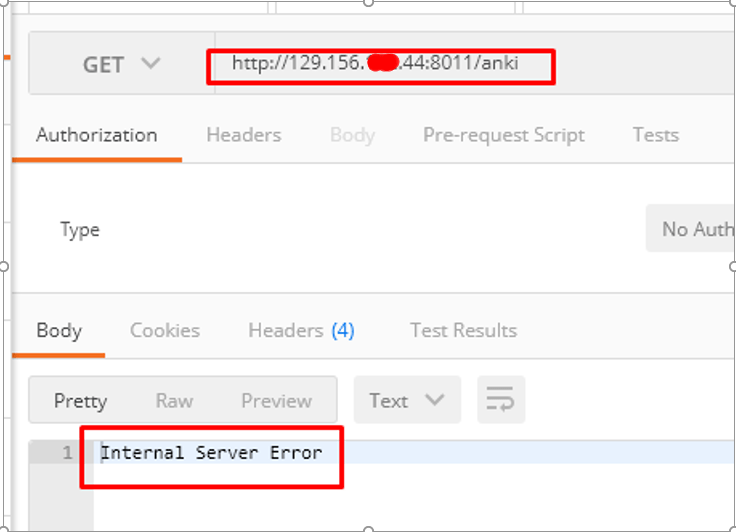
Recently, I have created an API which was further calling and HTTPS endpoint. While, invoking that API I was getting error “Internal server error”, However, there was nowhere I could easily locate the details error about this problem. I had looked Managed server.log, ManagedServer.out, APICS EDR file and many other files but couldn’t find useful error message related to my error. Later, I found one log file “default.log” which helped me to get root cause of my error. Hence, I decided to compile a list of all logs files, their location and bit of description, so that next time when I hit the some issue, it could be much easier for me to find out root cause by looking relevant log file. This blogs definitely helps to reader as well if they got stuck with API Gateway Error.

Note: The path given in my explanation could be different than your environment but I hope you can very well workout your environment path after looking my sample PATH which I have mentioned in this blog. My base location of installation was “/u01/apics”, the rest PATH should be same in your environment.

Also, before enabling debug/trace severity make sure it’s impact on file size because some of the files start getting thousand of lines of logs once you enabled the debug/trace log severity.

So, here is my comprehensive logs files list, their location and bit of description which you won’t find in Oracle APICS documentation.

Continue reading “Oracle API Platform Gateway Log files Summary”

Create and Delete Users in Weblogic using WLST Script

In one of my recent Event engagement, I was expected to provision 50+ users in Weblogic. Creating users in Weblogic is not cumbersome process, it’s fairly easy. However, when you need to do in bulk it can take hours.

So, I just came up with simple WLST script which take an configuration file as input which contains all the server credentials required to make connectivity and list of users, description and group name etc and create and delete users in Weblogic.

Note: I have tested this script in Weblogic 12.2.1.2 but it should work in all Weblogic version as long as the beans which I have used inside python not been change in particular Weblogic Version.

Creating Users

createUserMultiGrp.properties

This is configuration file which keep server credentials and all users name along with description, group and password.

Continue reading “Create and Delete Users in Weblogic using WLST Script”

Configure Letsencrypt SSL Certificate in Weblogic 12c

Who doesn’t like the security. This is one of critical element of our IT Infrastructure. Recently I was doing one POC and got requirement to setup a valid SSL certificate in Weblogic. However, since it was just an POC we were not having any valid SSL certificate issued by some Certificate Authority. Later, I came across for one website called https://letsencrypt.org/ . Let’s Encrypt is a free, automated, and open certificate authority (CA). they give people the digital certificates they need in order to enable HTTPS (SSL/TLS) for websites, and its free, yes you heard correctly It’s FREE !!!. You don’t need to pay them at all. So if you need a valid SSL certificate for your POC or even for Production environment you can get one from them. Although their certificate comes with 3 month validity, so while using for Production environment user need to keep renewing with them with simple automated process.

In this blog we will be learning how we can generate letsencrypt SSL certificate, what’s prerequisite to get the certificate and setup that certificate in Weblogic server to enable SSL communication.

So, Lets move on. We will be doing below stuff in sequence –

  1. Get a registered domain name (This required while generating SSL Cert)
  2. Install Certbot ACME Tool and Apache HTTP Server
  3. Generate Letsencrypt SSL Certificate
  4. Configure Letsencrypt SSL in Weblogic Identity Store


Continue reading “Configure Letsencrypt SSL Certificate in Weblogic 12c”

Learn how Containers and Kubernetes fit together – Live Workshop

Need to understand how Containers, Kubernetes and the Cloud-Native Landscape fit together?

Organisations are excited about the cloud-native approach as it helps provide parity between development and production environments, adoption of the DevOps framework, and enables software developers to build great products faster.

This new paradigm in application delivery has brought with it much new jargon and tooling – “Containers”, “Docker”, “Kubernetes”, “Container Orchestration”, and “Microservices” are fast becoming the new norm.

Save time and get up to speed on the business value and technical know-how of these contemporary, cloud-native concepts and tools, including:

  • CNCF Landscape
  • Containers
  • Docker
  • Kubernetes
  • Microservices

Continue reading “Learn how Containers and Kubernetes fit together – Live Workshop”

Setup Order Management Notifications in Oracle SCM Cloud

I’ve recently been working on a Chatbot demo that can submit orders for souvenirs through Facebook Messenger and updates the Oracle SCM Cloud. We demoed this in Cloud World Sydney and the idea was to be able to have the attendee make an order through Messenger, then receive a QR code to claim their souvenir at the demo booth, where we show that their request had flowed into SCM.

Now the only problem is our environment automatically generates an email notification where the order is submitted. We needed to turn it off otherwise the user would receive 2 emails.

Continue reading “Setup Order Management Notifications in Oracle SCM Cloud”

Embed Process Automation into Oracle Service Cloud – Part 1

In this blog, we showcase the abilities of Oracle Integration Cloud – Process to be embedded in SaaS applications. This is useful when you need to straddle workflows across systems or when users you need to conduct an approval are outside your organisation. OIC Process is extremely powerful for application extensions, providing capabilities to deliver embeddable UIs for Forms and Task Lists as HTML5 files that can be inserted in ANY application, Oracle, non-Oracle and even on-prem. We are using Oracle Service Cloud to showcase this. Service Cloud is a Service Request SaaS CRM, typically utilized by Contact Centres. Since only Contact Centre users have access to Service Cloud, what if you need information from another department, such as Field Services/Billing or even another organisation?

Continue reading “Embed Process Automation into Oracle Service Cloud – Part 1”

Teaching How to Get started with Kubernetes deploying a Hello World App

In a previous blog, I explained how to provision a new Kubernetes environment locally on physical or virtual machines, as well as remotely in the Oracle Public Cloud. In this workshop, I am going to show how to get started by deploying and running a Hello World NodeJS application into it.

There are a few moving parts involved in this exercise:

  • Using an Ubuntu Vagrant box, I’ll ask you to git clone a “Hello World NodeJS App”. It will come with its Dockerfile to be easily imaged/containerised.
  • Then, you will Docker build your app and push the image into Docker Hub.
  • Finally, I’ll ask you to go into your Kubernetes cluster, git clone a repo with a sample Pod definition and run it on your Kubernetes cluster.

Continue reading “Teaching How to Get started with Kubernetes deploying a Hello World App”

Teaching How to quickly provision a Dev Kubernetes Environment locally or in Oracle Cloud

This time last year, people were excited talking about technologies such as Mesos or Docker Swarm to orchestrate their Docker containers. Now days (April 2018) almost everybody is talking about Kubernetes instead. This proves how quickly technology is moving, but also it shows that Kubernetes has been endorsed and backed up by the Cloud Giants, including AWS, Oracle, Azure, (obviously Google), etc.

At this point, I don’t see Kubernetes going anywhere in the coming years. On the contrary, I strongly believe that it is going to become the default way to dockerise environments, especially now that it is becoming a PaaS offering with different cloud providers, e.g. Oracle Containers. This is giving the extra push to easily operate in enterprise mission critical solutions, having the backup of a big Cloud Vendor.

Continue reading “Teaching How to quickly provision a Dev Kubernetes Environment locally or in Oracle Cloud”

Disabling Hostname Validation in Nashorn Javascript

So, the other day I found myself having to connect to a server with self-signed SSL certificates while writing Nashorn Javascript. The precise details of how I found myself in this situation are pretty unimportant (I was re-writing an ant build script which had to obtain a build parameter by querying a running instance of a server in dev…), but the problem was suitably esoteric that I couldn’t find a code snippet with a quick search, while probably not being so esoteric that I am the only one who will ever need this, and hence, this post.

Continue reading “Disabling Hostname Validation in Nashorn Javascript”

Creating Custom Policies for Oracle API Platform Cloud Service

Much has been written on RedThunder.blog about the Oracle API Platform Cloud Service. In this blog, I am going to get into the advanced topic of Custom Policies. You would start exploring this area when the built-in policies do not cover your use case. The power and ease of implementing Custom Policies, I believe, is a killer value proposition of this platform.

Before we proceed, it would helpful to understand the backend technology of what the API Platform is built on. API Platform built-on the heritage of the sturdy and scalable WebLogic server.

There are 3 components:

  • Management Portal – Used to create and manage APIs. This is an application hosted in WebLogic server, utilising WebLogic for clustering and scaling. Oracle hosts and manages this in our Public Cloud and automates the whole installation process, so you just have a make a few clicks to provision it. The Management Portal is the brains of the API Platform, registering Gateways and deploying and publishing APIs to the Gateways and Developer Portal. You can access all its functions through REST API.
  • Gateway Node – Holds the run-time of the API. This is based on the Oracle Communications Service Gatekeeper (OCSG) from our telco-grade suite of products. Built-on WebLogic, the Gateway Nodes can be installed on any platform on-premise or in the Cloud (e.g. Amazon, Azure, Oracle). It is packaged as a zip file downloaded from the Management Portal itself. Once installed, the Gateway calls home to the Management Server to register itself. It pulls APIs and the policies associated with it from the Cloud once they are deployed. Gateways forms a logical cluster for HA purposes, so you deploy once and the APIs propagate to all the nodes in the cluster.

The Gateway Install zip also hosts the necessary code nuggets for customisation.

  • Developer Portal – Used for developers to review documentation and subscribe to APIs. Also an application, this is by default hosted in the same WebLogic Server as the Management Portal. If you wish to run another Developer Portal, let’s say on-premise or customise it, you can extract the Developer Portal war from the Gateway Server install zip and host it in another WebLogic server.

Now coming to Custom Policies, they are essentially Java-code packaged as war files. The Gateway Install zip holds the code nuggets necessary to generate a Policy Stub. It also holds the necessary libraries aka Policy SDK (matching the version of the Gateway server) to compile against.

Continue reading “Creating Custom Policies for Oracle API Platform Cloud Service”