This blog is showcasing very specific use case related to NetSuite Custom Field retrieval and how we accomplish that using Oracle Integration Cloud NetSuite Adapter.
In this example we will be retrieving custom fields values e.g. birthDt from NetSuite by passing specific Customer Id. It may sound very easy but it was bit complex to deal with because the way how NetSuite was responding Custom Fields values using NetSuite Adapter.
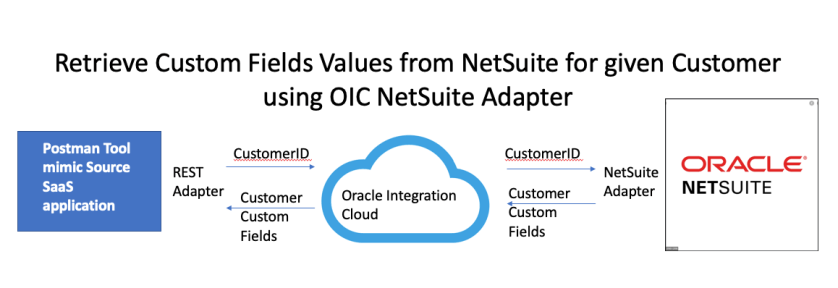
Here is the use-case diagram –
In my previous blog I have already shown all the configuration which needs to be done to connect to NetSuite using Oracle Integration Cloud NetSuite Adapter and deal with NetSuite Custom fields. Hence, this blog will just focus on specific mapping challenges which I have faced initially during implementation.
Customization is essential part of any SaaS implementation to capture unique business needs. In NetSuite SaaS application also, there could be several use-cases where user might need to create a new Custom Object or add custom fields into existing Standard Object such as Contact, Account and Organization etc. In this blog I will be showing how can we add Custom fields e.g. Degree name and Passing Year etc. into existing NetSuite Contact object and can update the same field using Oracle Integration Cloud (OIC) NetSuite adapter.
Please Note:NetSuite Adapter handles the Custom fields in very different way in compare to other adapters. Due to NetSuite API limitation, OIC Adapters not able to discovers Custom fields created in NetSuite which could be concern to many Customers. However, Oracle NetSuite Integration Adapter provide a way to specify manually all those Custom fields using InternalId and ScriptId and assign associated values coming from Source System to those fields and that’s the core objective of writing this blog to show to reader how we can manually add and assign values to NetSuite Custom fields using OIC NetSuite Adapter.
The use case scenarios –
Below are the high level steps user need to perform to achieve outcome.
NetSuite – Create Custom Entity fields in NetSuite for Contact object
OIC – Create NetSuite Adapter connection as Target System
OIC – Create REST Connection as Source System
OIC- Workout Request Response Payload for REST Adapter Input
OIC – Create Integration, do mapping and Activate Integration
Sometimes it is necessary to monitor specific processes that are not in the provided OMC processes list and this is where CUSTOM METRIC come into the scene.
In this short post I will show how to create a CUSTOM METRIC and ALERT RULE to manage it.
So the challenge of the day:
Monitor custom windows / linux process and if it stops giving
signs of life alert to the support group.
Customisation is essential part of any SaaS implementation to capture unique business needs. In Salesforce SaaS application also, there could be several use-cases where user might need to create a new Custom Object or add custom fields into existing Standard Object such as Contact, Account and Organisation etc. In this blog I will be showing how can we add Custom fields e.g. Degree name, Passing Year etc. into existing Salesforce Contact object and can update the same field using Oracle Integration Cloud (OIC) Salesforce adapter. I will write another separate blog later where I can show how a completely new Custom Object can be created in Salesforce and updated through Oracle Integration Salesforce Adapter.
Before, I go into deep drive, just want to highlight the core objective of this blog to show Salesforce configuration and OIC Salesforce adapter configuration, I am assuming reader has already basis understanding of OIC product features such as Connection, Integration, mapping and deployment.
My colleague had already covered Salesforce Inbound and Outbound integration using Oracle Integration Cloud Salesforce Adapter. So, I might not be repeating few steps which already been covered in this blog. if you doing Salesforce Integration first time, then its recommended to review these blogs as well.
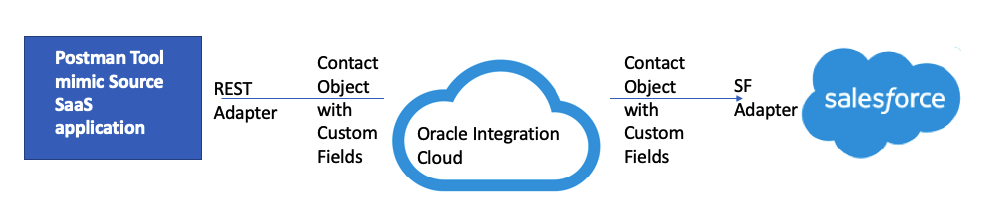
So let’s do deep dive now. Below are the high levels flow and steps which needs to be performed to achieve desired result.
Create custom fields e.g. Degree Name and Passing year into Salesforce existing Contact Object
Create/Update Salesforce Connection in OIC
Create REST Adapter in OIC
Create Integration which maps Contact Object Custom Fields from REST Adapter to Salesforce
I just came across this great article by Ali Mukadam to autoscale OCI instances based on Instance Configuration, Instance Pools and defining auto-scale policies. Finally, using Kubernetes (OKE) to generate load.
You probably heard that Oracle Autonomous Database (ADB) leverages machine learning to automate with traditional infrastructure related database administration tasks such as security, backups and patching.
No matter how well designed your database infrastructure is, performance and issues relating application or external components which make up the application ecosystem can still have an impact on end user response time or availability. Continue reading “Why Would you Monitor an Autonomous Database?”
I was reflecting recently on how IT tools and productivity aids often allow us to make a mess real quickly. There is often some underlying basics that need to be considered before using the productivity tool in order to get a sustainable outcome. As the old adage goes … A fool with a tool is still a fool !
I just read a great blog posted by my colleague Ali Mukadam. He has been spending some time exploring a number of interesting technologies including the Oracle Container Engine. For those unaware, the Oracle Cloud Infrastructure Container Engine for Kubernetes (OKE) is a fully-managed, scalable, and highly available service that you can use to deploy your containerized applications to the cloud. I have played with this a little and as a technology geek I really love it.
Oracle does provides a Quick create option to help you get to function quickly, however often you will need to consider the wider IT landscape, such as where does this service fit into my overall network topology in order to assess how you want to lay out your network etc. To that end Ali has developed a toolkit to automate the provisioning of OKE on the Oracle Cloud Infrastructure.
I have already blogged two different integration pattern between Service Cloud to Eloqua.
This first integration pattern was using Standard Object e.g. Contact object, documented in this blog
The second integration pattern was using Custom Object e.g. Degree Object, documented in this blog.
Now, in this current blog, I am going to cover another integration pattern where bulk data can be imported from Service Cloud to Eloqua using Service Cloud ROQL statement.
In both my previous blogs, data was getting exchanged real time but one transaction at a time, but in this blog data will be transmitted from Service Cloud to Eloqua in bulk for Opportunity Business Object.