R.I.P. “WebLogic Blue Console”: Welcoming the Next Generation of Open-Source Remote Management

In December 2024, Oracle reached a major milestone with the release of Fusion Middleware (FMW) 14.1.2. This release brings critical updates to the entire stack, including WebLogic Server, Coherence, Oracle Identity & Access Management, SOA Suite, BPM, Data Integrator (ODI), WebCenter, and Forms & Reports.

Since WebLogic serves as the foundational runtime for most of these products, its evolution is central to the modern middleware ecosystem. Perhaps the most significant change in this release is the decommissioning of the traditional “Blue” WebLogic Admin Console in favor of the new, open-source WebLogic Remote Console (WRC).

Why the Change?

The classic WebLogic console served us well for over 15 years, but its legacy framework became difficult to modernize and support in cloud-native environments. The new WebLogic Remote Console is a complete reimagining of the management interface. Built on the Electron.js framework, it is lightweight, fast, and modern.

As an open-source project, the source code is publicly available on GitHub, allowing the community to fork the repository, contribute improvements, and stay updated with frequent releases.

Key Benefits of the WebLogic Remote Console (WRC)

The transition from the “Blue Console” to WRC isn’t just a UI facelift; it offers several architectural advantages:

  • Multi-Domain Management: Unlike the old console (one domain per browser tab), WRC allows you to connect to and manage multiple WebLogic domains—running anywhere—from a single interface [04:13].
  • Performance & Flexibility: WRC operates as a standalone client (Desktop or Browser-based) that communicates with servers via REST APIs [05:03]. This makes it significantly faster and more responsive than the old server-side rendered console [14:20].
  • Lightweight Footprint: By removing the console files from the server side, the WebLogic binary size is reduced by approximately 500 MB, which is a massive win for Docker and Kubernetes deployments [04:36].
  • Modern Troubleshooting: Features like direct Thread Dumps and integrated log viewing are built into the UI, eliminating the need to jump into the server command line for basic diagnostics [09:34].
  • Improved Security: Because the console doesn’t need to run on the production server, you reduce the attack surface of your middleware environment.

Getting Started

Whether you prefer a Desktop application for your Mac/Windows/Linux machine or a centralized browser-based deployment, WRC gives you the flexibility to choose. The project is well-documented with a comprehensive FAQ to help you navigate the transition.

Watch the Webinar

I recently hosted a webinar that dives deep into the features of the WebLogic Remote Console, including a live demo of application deployment and monitoring.

If you are planning an upgrade to 14.1.2 (14c), adopting this console is a must. Watch this 17-minute recording to get up to speed:

Manage WebLogic Anywhere: The Modern Remote Console

(In this video, I cover everything from connecting to multiple domains [07:09] to performing real-time application deployments [12:44] and monitoring JVM health [09:26].)

**Manage WebLogic Anywhere: The Modern Remote Console**

Oracle Integration Cloud (OIC) and MCP Protocol: Benefits and Feasibility in ERP, CRM, EPM and HCM scenarios

Introduction

For several months now, Oracle Integration Cloud (OIC) has provided native support for the MCP protocol through an embedded MCP server. This enhancement represents a relevant step toward simplifying the development and exposure of AI applications, making easier the integration of intelligent tools and services into business processes .

Why MCP Helps in OIC

1. Standardization and Interoperability

MCP (Model Context Protocol) provides an open and structured standard that facilitates communication between applications and services, reducing integration costs and the risk of errors caused by proprietary formats.

2. Simplicity and Speed of Integration

With MCP embedded in OIC, new AI tools can be exposed as MCP services without the need for additional gateways, enabling rapid integration with existing systems.

3. Security and Governance

OIC provides centralized authentication, authorization, and logging capabilities, ensuring traceability and security even when implementing new AI services via MCP.

4. Scalability and Orchestrated Management

OIC enables dynamic management and scaling of MCP server instances in the cloud, adapting to growing enterprise volumes and requirements.

5. Open to the AI Ecosystem

Exposing AI tools via MCP makes it possible to easily integrate both Oracle services and third-party solutions, offering maximum flexibility in building digital processes.

The embedded MCP support in OIC enables a new integration paradigm for AI applications, simplifying governance, improving security, and accelerating time-to-value for innovative solutions across key enterprise domains such as HCM, CRM, EPM and ERP.

With MCP, OIC becomes:

  • a dynamic catalog of enterprise capabilities exposed as AI-ready tools,
  • an abstraction layer between LLMs and application complexity,
  • a single control point for security, auditing, and governance of AI actions.

Why Exposing Tools via MCP Helps

This is the foundmental approach to decouple AI from Enterprise Systems

Without MCP:

  • the LLM must understand APIs, payloads, authentication, and versioning;
  • tight coupling and high maintenance costs result.

With MCP:

  • the LLM invokes functional intents (“create employee,” “retrieve order,” “update opportunity”);
  • OIC manages:
    • transformations,
    • validations,
    • orchestrations,
    • error handling.

In this way OIC integration flows and processes become reusable tools and don’t need to be rewritten for each AI agent or model. And we don’t need to forget that LLM never accesses ERP, HCM, or CRM systems directly.

3. Why MCP in OIC Is Particularly Effective

OIC has characteristics that make it an ideal MCP server:

OIC CapabilityMCP Benefit
SaaS Adapters (HCM, ERP, CRM)MCP tools already connected to core systems
Integration monitoringTelemetry on AI actions
Lookups & PackagesSemantically versioned tools
B2B Trading Partner ManagementAI acting on external flows
Visual Flow & Process AutomationTools executing complex processes

In practice, MCP makes what OIC already does in a well AI-consumable approach.

One of the most frequent questions which usually I need to answer is:
“Do you have use cases which contextualize the use of an MCP server in OIC compared to other approaches?”

This is the reason why I decided to write this article, attempting to highlight some hints that may help to position OIC also as an MCP server.

When we refer to MCP tools, in this scenario we are essentially identifying integration flows built in OIC which implement specific actions, which an AI agent — together with an LLM model (ChatGPT, Gemini, Grok, etc.) — will invoke to implement a specific use case.

Below some use cases and samples for each domain pillar

Application Examples Across Enterprise Domains

HCM – AI HR Assistant

Scenario
A conversational HR assistant supporting HR Business Partners and employees.

MCP Tools Exposed by OIC

  • getEmployeeProfile
  • createNewHire
  • submitLeaveRequest
  • getPayrollSummary
  • openHRServiceRequest

Flow

  1. The user asks:
    “Hire a new backend developer in Milan starting October 1st.”
  2. The LLM:
    1. interprets the intent
    2. invokes createNewHire via MCP.
  3. OIC:
    1. validates data,
    1. enriches it using lookups (job code, legal entity),
    1. orchestrates Oracle HCM Cloud.
  4. Result:
    1. the hire is created,
    1. workflow tasks are triggered,
    1. confirmation is returned to the AI agent.

What is the value add?

  • End-to-end automation,
  • reduced errors,
  • full HR control over what the AI is allowed to do.

CRM – AI Sales / Service Copilot

Scenario
A copilot for sales and customer service.

MCP Tools

  • getCustomer360
  • createOpportunity
  • updateOpportunityStage
  • createServiceRequest
  • checkOrderStatus

Example

Scneario
“Create a €250k opportunity for customer ACME based on the last order.”

  • The AI:
    • calls getCustomer360,
    • then createOpportunity.
  • OIC:
    • retrieves data from CRM and ERP,
    • normalizes it,
    • applies commercial rules.

What is the added value?

  • AI acting on real and enterprise data,
  • complete cross-application context,
  • no direct exposure of CRM systems.

EPM – AI Financial Planning & Analysis Performance Assistant

Scenario
“Simulate a 5% increase in personnel costs and tell me the impact on EBITDA.”

MCP Tools

  • runRollingForecast
  • createScenarioSimulation
  • getActualVsBudget
  • submitForecastForApproval

And here what is the value add?

  • AI acting like a controller,
  • protection of official versions,
  • fundamental integration with ERP and HCM.

ERP – AI Finance & Operations Agent

Scenario
An assistant for operations and finance.

MCP Tools

  • createPurchaseOrder
  • approveInvoice
  • getBudgetAvailability
  • retrieveSupplierData

Example
“Create a purchase order for 50 laptops if the IT budget allows it.”

  • The LLM:
    • calls getBudgetAvailability,
    • if positive, invokes createPurchaseOrder.
    • OIC:
      • manages approvals,enforces compliance controls,
    • posts transactions to Oracle ERP Cloud.

What is the value add?

  • Actionable AI, not just descriptive,
  • compliance with internal control rules,
  • complete audit trail.

Strategic Value Summary

In summary, the strategic value achieved by combining OIC with MCP is meaningful and complements existing capabilities, enabling organizations to achieve:

  • truly operational AI… not just informational but actionable
  • immediate reuse of existing integrations by exposing them through the MCP standard protocol (you can do it at project level in OIC)
  • decoupling between AI models and core systems,
  • enterprise governance of AI actions,
  • future scalability (new models, new agents, same tools).

References:

WebLogic Server 15.1.1 is GA!

It has happened,- Oracle is pleased to announce the release of Oracle WebLogic Server and Coherence Version 15.1.1.

The main difference from WebLogic 14.1.2 is that the new version 15.1.1 implements updated support for Jakarta EE 9.1!

Why it happened?

Historical background:

Jakarta EE, formerly known as Java EE (and initially J2EE), is a set of specifications that extends Java SE for enterprise-level application development.

While Oracle previously owned and managed Java EE, the project was transferred to the Eclipse Foundation in 2017 and subsequently renamed to Jakarta EE to avoid trademark issues with the “Java” brand, which remains under Oracle’s ownership.

Key points regarding Jakarta EE and Oracle Java EE:

Ownership and Evolution: Once Oracle transferred Java EE to the Eclipse Foundation, leading to the rebranding as Jakarta EE. This shift aimed to foster a more open and community-driven development model for enterprise Java specifications.

Namespace Change: As part of the transition, the “javax” namespace used in Oracle Java EE was changed to “jakarta” in Jakarta EE to resolve trademark conflicts.

This requires code migration when moving from older Java EE versions to Jakarta EE. Simply put, application libraries and application servers must be consistent: either both must use “javax” or both must use “jakarta”.

Finally, “jakarta” package namespaces, can now be seamlessly deployed to WebLogic Server and Coherence 15.1.1!

Full information is here: www.blogs.oracle.com/weblogicserver/post/announcing-oracle-weblogic-server-and-coherence-1511

Connecting JDeveloper to an Oracle Autonomous Database SOA MDS Repository: A Troubleshooting Guide

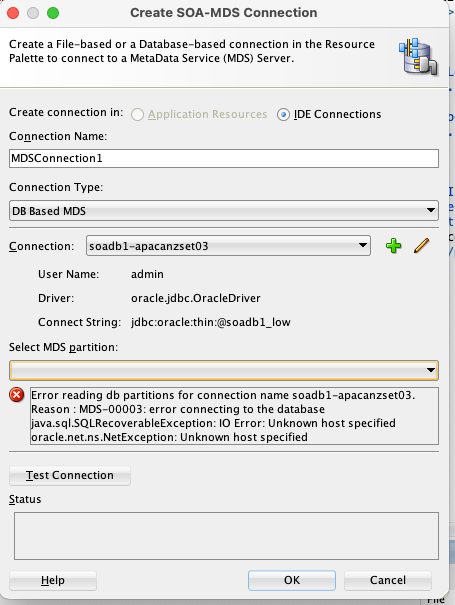
Recently, while assisting a customer with a high-priority issue, I encountered a connection problem in my personal Oracle SOA Suite environment. As part of a replication exercise, I needed to connect my JDeveloper instance to an Oracle SOA Metadata Services (MDS) repository, which is a critical component for managing shared artifacts in a SOA environment. The unexpected error I received had no clear solution on internal or Oracle support forums, so I’m sharing the solution here to help fellow SOA developers.

My environment for this exercise was Oracle SOA Suite 12.2.1.4, backed by an Oracle Autonomous Database (ATP) 19c.

The Problem:

I was unable to establish an MDS repository connection from JDeveloper, which is a prerequisite for deploying shared SOA artifacts like x-ref, XSD, XSLT, and WSDL files. The specific error message I received was:

  • Error reading db partition for connection name soadb1-apacanzset03
  • Reason : MDS-00003: error connecting to the database
  • Java.sql.SQLRecoverableException: IO Error: Unknown host specified]

The Solution:

The root cause of this error lies in the secure nature of the Oracle Autonomous Database. Unlike standard databases, ATP requires a Wallet file for secure connections. The Wallet contains crucial files like tnsnames.ora, truststore.jks, and keystore.jks, which are necessary for JDBC connections.

Steps to Configure the Connection:

  1. Download the ATP Wallet: First, download the Wallet.zip file from your ATP console.
  2. Unzip the Wallet: Extract the contents of the zip file to a secure, easily accessible location.
  3. Create new folders:  create folder structure “network>>admin” folder inside wallet folder and move tnsname.ora file into this location
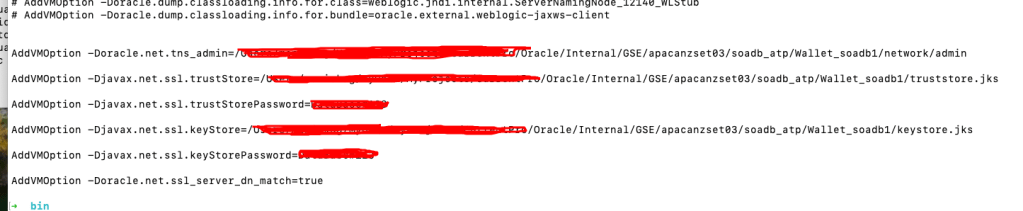
  4. Configure JDeveloper: Next, you must update the jdev.conf file, located at $Middleware_HOME/jdeveloper/jdev/bin/, by adding the following Java options. These options point JDeveloper to the security files within your unzipped Wallet.
    • AddVMOption -Doracle.net.tns_admin=<Path to unzipped Wallet folder>
    • AddVMOption -Djavax.net.ssl.trustStore=<Path to truststore.jks file>
    • AddVMOption -Djavax.net.ssl.trustStorePassword=<your wallet password>
    • AddVMOption -Djavax.net.ssl.keyStore=<Path to keystore.jks file>
    • AddVMOption -Djavax.net.ssl.keyStorePassword=<your wallet password>
    • AddVMOption -Doracle.net.ssl_server_dn_match=true
  • Restart JDeveloper: Restart JDeveloper to apply the new configuration settings.
  • Create a Database Connection: Navigate to the Database navigator, create a new connection using the <soadbname_MDS> user, and test the connection.
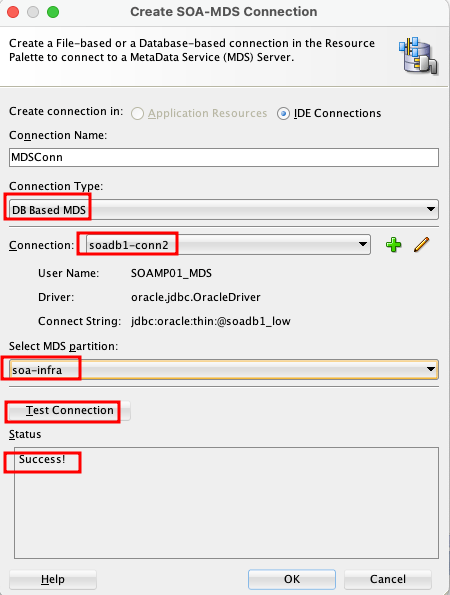
  • Create an MDS Connection: Finally, go to Windows > Resources > New SOA MDS Connection. Specify a name, select “DB based MDS,” choose the database connection you just created, and specify “soa-infra” as the partition. Test the connection, and it should now be successful.

This process ensures that JDeveloper can securely authenticate and connect to your ATP-based MDS repository, allowing you to manage and deploy your design time MDS artefacts to Server side MDS artifacts.

OCI Application Performance Monitoring for PeopleSoft


The OCI Application Performance Monitoring (APM) service enables administrators to monitor and observe the PeopleSoft web applications.

It provides deep visibility into the application performance from end-user experience down through to the application server requests.

For many customers, the PeopleSoft (PSFT) Application is critical to business operations. With OCI Application Performance Monitoring (APM) service, administrators can:

  • Analyze all end user experience with accessing PeopleSoft web pages.
  • Trace transactions across various components and isolate problems to the impacting application or infrastructure tier.
  • Has ability to drill into application code.
  • Generally, APM tools cannot drill into the SQL code for the PeopleSoft application. This inability occurs is because, the SQL call is performed in the Tuxedo layer. However, OCI APM service offers a unique feature to overcome this limitation. It can perform instrumentation of outbound JOLT calls from WebLogic to Tuxedo. This helps at least understand how much time is spent in this layer.
  • Easily Capture End Username for user sessions without modifying application code
  • Search in context based on PeopleSoft attributes including:
    – Portal Name
    – Portal Object Name
    – and more

Continue reading “OCI Application Performance Monitoring for PeopleSoft”

Decisions and Business Rules in Oracle Integration (OIC) to support an Automation Process Platform

Business rules (later “decisions”) always play a crucial role in a process automation platform

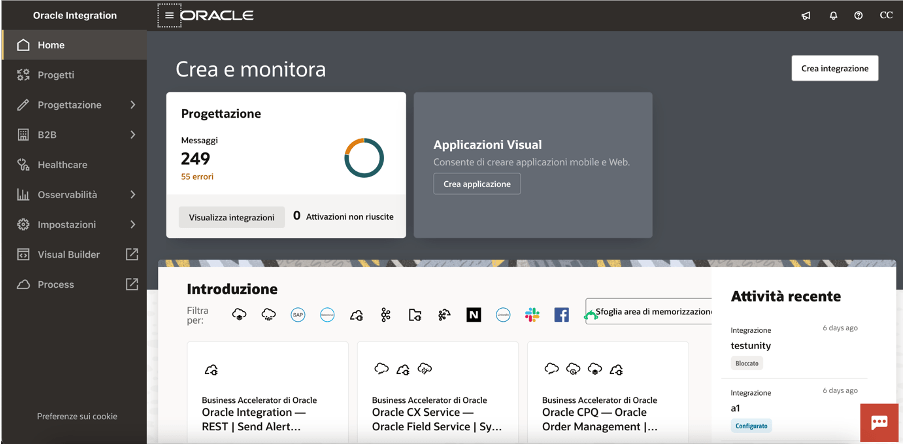
As you probably already know, Oracle Integration (OIC) is a complete business automation platform cloud based, fully Oracle managed, that enables customers to connect their applications and data, automate business processes, and innovate with AI. This is what we define a unique and complete toolkit for integrating and connecting applications and technologies

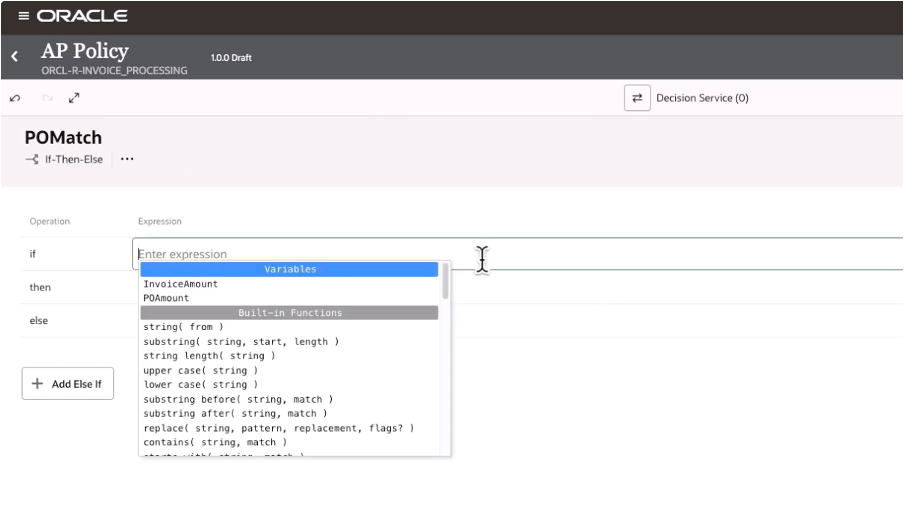
Today, as a new enhancement of this platform, we have the chance to build decision rules directly in integration projects giving you the power of the flexibility and agility in building new automation processes leveraging rules based on “if-then-else” or “decision tables” patterns

When building your integration projects in OIC, you are now able to add several components so to build your specific implementation leveraging the components you need adding to the project the functionalities like the pure integration flows with connections, robots, B2B, Healthcare and now Decisions, too

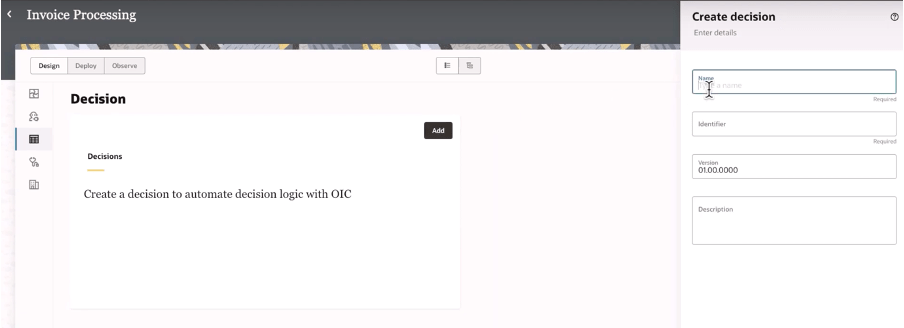
Once decisions are added to your project, you can design and later test what you have implemented to verify the correctness of the rules

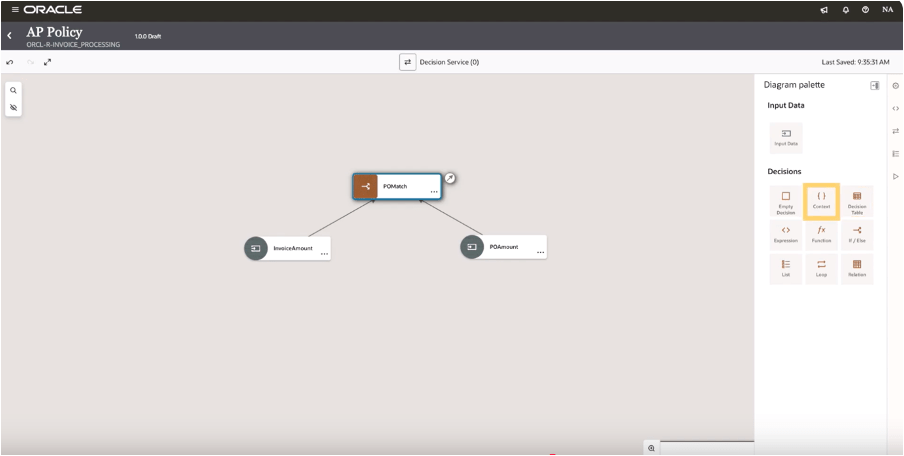
And selecting the decision type you can design your logic

In this way, decisions allow you to ensure consistency in decision-making throughout the organization. Decisions ensure that the same conditions always lead to the same outcomes, reducing the risk of errors due to subjective or inconsistent judgments. This standardization now extended to all components in OIC, and it’s particularly useful when the same decisions are made across multiple processes helping also the reuse of those rules

Decisions define a clear decision points which can be automated within a process, such as determining eligibility for a loan, assessing the risk level of a transaction, or triggering approvals. Automating these rules you can reduce manual intervention, accelerating processes, and ensuring timely and accurate outcomes.

Consider that “decisions” are typically decoupled from the process logic, meaning they can be modified independently of the core workflow. This makes easier to adjust processes when business requirements change—whether due to new regulations, market conditions, or organizational changes—without needing to re-engineer the entire process. This flexibility helps the business to remain agile and responsive.

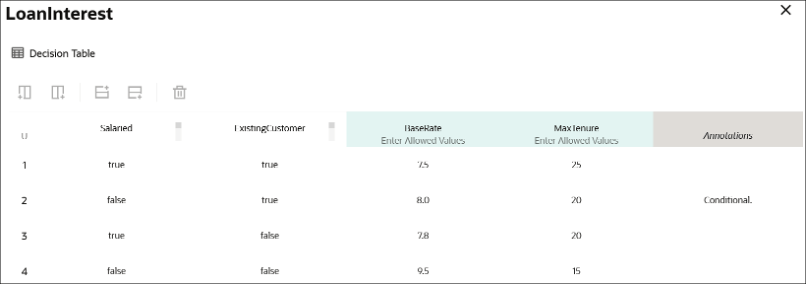
Below a sample just to consider how business rules, via a decision table, can be built leveraging a flexible and easy way to maintain the changes and using a simple and standard browser

A decision table, like that one shown before, can consist of an input expression and several input entries. It is represented as columns within a table. You can use input variables, outputs of other decisions, or built-in functions to define input expressions.

Of course, business rules (decisions) are essential for ensuring that processes are compliant with laws, regulations, and internal policies. For example, in industries such as finance, healthcare, or insurance, where compliance is critical, business rules ensure that processes adhere to the necessary legal requirements. Decisions can be updated when regulations change, ensuring ongoing compliance without the need for manual oversight.

Looking at the decisions use, we can put in evidence and summarize some advantages and especially those ones listed below.

Reusability: you can build your rules once and reuse those ones, gaining efficiency in making & maintaining them with a faster policy change approach without impacting an automation solution. Furthermore you can reuse those from within an integration flow, process workflow or any application

Efficiency: the policy maker doesn’t have to rely upon an integration specialist; he can build and maintain their own policies by themself

Fast policy change: you can change policies quickly without disrupting the areas of an automation solution that’s because you can change policy details independently from the components which use a decision

Now, stay tuned… very soon this feature will be available in GA, and not only Limited Availability, on all OIC instances

In summary:

Decisions and business rules in general enable greater flexibility, reducing operational risks, and improving both internal operations and external customer experience

References:

https://docs.oracle.com/en/cloud/paas/application-integration/

https://docs.oracle.com/en/cloud/paas/process-automation/user-process-automation/model-decisions.html

Oracle Integration (OIC) with Publish and Subscribe Pattern: How to Manage Events

One of the most interesting news of the current year is the capability introduced In OIC Gen3 few months ago. I’m talking about the chance we have today to manage events through Oracle Integration.

As we know, often projects require to decouple who can produce messages from who can consume those ones. This approach probably simplifies the integration approach making the applications independent from each other so that any change can be applied, for example, deleting/adding one or more subscribers, without impacting the implementation.

Of course, the decoupling can be built using external messaging queue solutions, something like OCI Streaming Service for which OIC can provide a native adapter or reusing what already used by the customer, for example a Kafka queue, quite common in real use cases.

The first approach probably enables the chance to provide an Oracle Cloud based solution built on top of OCI services delivering in this way an end2end solution based completely on OCI.

The second approach grants the customer to extend and innovate their own applications reusing what already in production adding with Oracle Cloud the most innovative technologies leveraging AI services, Autonomous Database, Oracle SaaS and much more.

At the same time, as explained at the beginning, it’s possible to manage such use cases directly from OIC itself without leveraging other components, or solutions. Everything is managed internally without extra effort in terms of resources or other software to be managed.

What required is to work with “Pub/Sub” pattern… something about the configuration of some actions from the OIC console.

So, to complete the case we need mainly to:

  1. Create the Event type,
  2. Create the Publisher,
  3. Create the Subscriber

1.Create the event type

Starting from scratch we need to configure the event type.

OIC suggests a mockup as a payload just to provide you an example, but you can modify that one to adapt the format to your need in JSON format or eventually you can provide your own XML SCHEMA

2.Create the Publisher

Once defined the message type, it’s required to configure the publisher entity. To do it, you need to set up a new integration flow using one of the available patterns.

To define the Publisher, in my case I have created an integration flow with “Application” style, to include the Publish action from the palette which at runtime will push the message to the embedded event management system included in OIC. As you can see below:

After dragging the activity, you can see something like this:

In the “Publish” action it’s required to configure the Events type … exactly what we have defined during the step 1. In my case, the Event “NewAlarm” is what previously defined.

If you don’t have any Subscriber yet, when the publisher fires a new event, this one is retained for you in OIC keeping this one until when a new subscriber consumes that message as below shown:

3.Create the Subscriber

The last mile to be covered is about the subscriber. Now we can create a new integration flow for consuming Events as below shown:

Dragging this activity into your canvas, it’s possible to configure the Subscriber for the interested Event; in my case the “NewAlarm” event previously configured.

Now you are ready to run your sample just to see how it works.

Monitoring is fundamental to govern and check if everything works fine and above all as expected. Below some screenshots from the OIC console which shows the different levels of monitoring provided natively by the platform

It’s not a demanding activity; quickly you can do it by yourself… to understand how pub/sub pattern works on Oracle Integration

Documentation:

https://docs.oracle.com/en/cloud/paas/application-integration/integrations-user/create-integrations-publish-and-subscribe-events.html#GUID-EEF34575-1B8C-491A-9C22-0A8498DEEB02

Oracle Cloud Infrastructure 2024 Certified Networking Professional – Beta

The newest certification from Oracle Cloud Infrastructure is the OCI 2024 Certified Networking Professional. It is still in beta mode and will be with this status until 15 October 2023; returning as a Generally Available certification early in December of this year. If you are interested in taking this certification, visit the Oracle University learning path for it.

Oracle Cloud Infrastructure 2024 Certified Networking Professional certification is for Cloud professionals that have at least two years of general experience with OCI, or other IaaS cloud providers and are already familiar with general Networking concepts. An Oracle Cloud Infrastructure 2024 Certified Networking Professional has demonstrated the hands-on experience and knowledge required to plan, design, implement, and operate networking solutions on OCI. The abilities validated by this certification include:

• Plan and Design OCI Networking and Connectivity Solutions

• Design for Hybrid and Multicloud Networking Architectures

• Implement, and Operate Secure OCI Networking and Connectivity Solutions

• Migrate workloads to OCI

• Troubleshoot OCI Networking and Connectivity issues.

Happy testing!

VBCS Fixed Credentials Configuration for backend API Service Connection!!!

Recently, I have been come across scenario where one of my Customer, building a VBCS application which needs a combobox to be populated with all IDCS Users name as approver. Customer builds the solution but was having issue with existing solution. Problem was when One user e.g. Sys Admin User ID (Administrator role) login using his credentials, he can see combobox populated with IDCS users name. However, when another business user when they login they can’t see combobox fetching IDCS User list. Obliviously, its permission issue. Sys Admin being part of IDCS Admin group has all privilege but other users in his tenancy are not, hence problem was coming.

Now, VBCS has two mechanisms for Identity propagation. Please read this section for more info.  a) login user identity gets propagated to invoke REST API as part of service connection b) Developer can use fixed credentials to invoke backend REST API using service connection.

Continue reading “VBCS Fixed Credentials Configuration for backend API Service Connection!!!”

Secure your OIC Integration using OAuth Security Policy

Security is the key aspect in any implementation, specially when it comes to publish your API/Integration to external consumer outside of your organization.

Oracle Integration Cloud has capability to design an Integration which could be shared across internal/external Organisation. In this scenario security is paramount to protect that endpoint which will be published through OIC. By default, if your OIC Integration has REST Endpoint with Trigger role, it’s offering Basic Authentication Or OAuth 2.0 Or both Security policy.

With Invoke role there are many other flavours of OAuth grant type which I won’t be covering in this blog. I am more focused on this blog for OAuth 2.0 for OIC Rest Adapter for trigger role only.

Continue reading “Secure your OIC Integration using OAuth Security Policy”