I’m sure we can all agree, adopting a cloud strategy is awesome. The opportunities and benefits it affords are many. However cloud governance is an ongoing problem that plagues security, compliance, and management teams, which cloud vendors like Oracle are continually trying to solve.
If you’re reading this, you’ve probably been asked, or heard at least once:
Who has access to what in our environment?
Any Security / Compliance Manager
The answer should be easy and simple. However the reality is likely lots of manual time & work, spreadsheets, and endless clicking in a cloud console. If you’re doing this manually then I agree, it’s time that you could be dedicating to more important tasks.
The challenge in trying to answer these questions:
What users exist and what groups do they belong to?
What does my OCI tenancy compartment structure look like?
What policies have users explicitly created?
What permissions do users have in my tenancy?
Are there any excessive / non-compliant policies & permissions in my tenancy?
is that these complex relationships can’t be easily represented and interpreted in a table-like format. In the OCI ecosystem:
users can be federated with an Identity Provider and can belong to one or many federated, or local IAM groups,
policies can be defined for “any-user” or for a group,
policies are inherited meaning they apply to all sub-compartments from which the policies are applied.
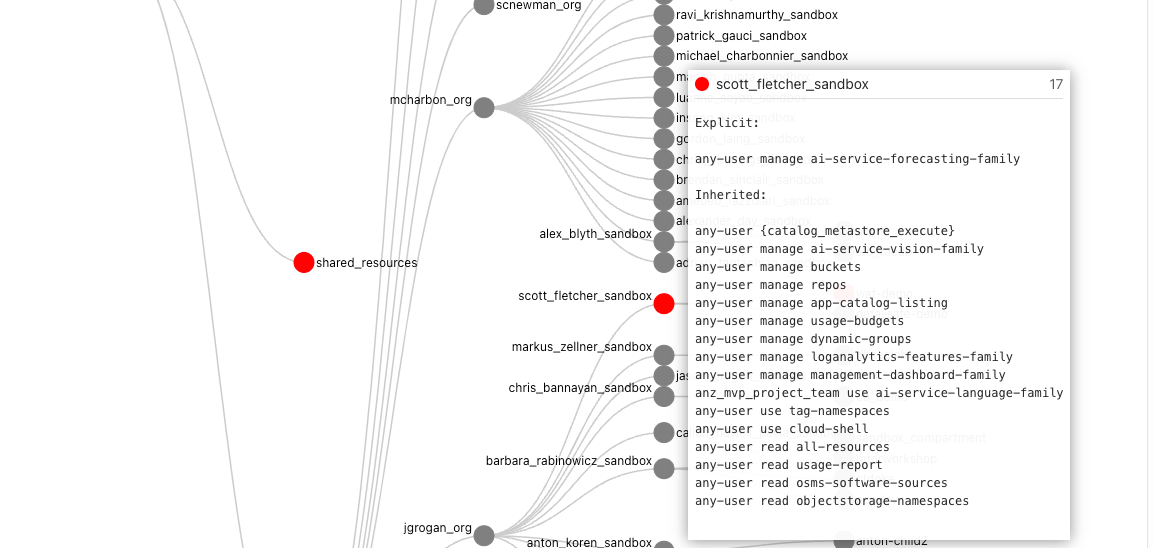
To make things easier I’ve created a solution using Oracle tools and services to simplify the auditing of OCI tenancies and user permissions called “Peek”.
Note: From 22/05/2023 APEX is no longer required as the solution runs entirely inside the container. To run the new container for OCI with IDCS use the following command:
docker run -it --name peek --rm \
--mount type=bind,source=/Full/Path/To/.oci/,target=/root/.oci/,readonly \ -e OCI_PROFILE_NAME=<from your OCI config> \-e OCI_TENANCY_OCID=<from text file> \
-e OCI_IAM_URL=<from text file> \
-e IDCS_URL=<from text file> \
-e IDCS_CLIENT_ID=<from text file> \
-e IDCS_SECRET=<from text file> \-e TOOLTIP_LINE_PX=20 \
-p 4567:4567 \scottfletcher/oci-peek
After the docker container has started, you can access the web interface using the locally mapped port http://localhost:4567. You should see a progress window:
Once the mapping process is complete the visualisation will appear.
Depending on how long your policy statements are, you may wish to adjust TOOLTIP_LINE_PX to a number greater or smaller than 20. If your policy statements overflow the tooltip box then increase this value, or if the box is too big, then you can decrease this value.
If you haven’t run Peek before, please read on as I explain how to create the required credentials and where to obtain the values for the other environment variables. You can skip the APEX steps, as APEX will not be used.
Over the past couple of years, we’ve posted about the OCI Arcade. You can find the original article (here) and the repository (here). As part of the revamp, many things have changed and as such we’ve spent a little bit of time to make it better. Check out some of these new additions.
Update: There is now an even better way to do this, with first-class support from the OCI Resource Scheduler – just set it to ‘Start’ your Function, and it will be invoked based upon the configured schedule.
Functions in Oracle Cloud Infrastructure are great. As a serverless execution environment with pre-built logging, metrics, etc. it allows developers to simply focus on their code and not worry about all of the supporting infrastructure, while still providing a lot of flexibility through the use of container primitives. As great as Functions are, they are reactive, they can only be invoked and can’t natively be configured to be executed in a spontaneous or scheduled manner. Often this won’t matter, as Functions will be invoked directly or indirectly by users, or in response to events, but sometimes you simply need a bit of code to run periodically.
(With more to come with the winners being announced)
On Friday 18 March 03:00 PST | 06:00 EST | 10:00 GMT | 15:30 IST | 21:00 AEDT, Hackmakers will announce the winners of the #FormulaAI Hackathon 2022. It will be an exciting moment to conclude the event. Stay tuned at https://www.formulaaihack.com/ to watch the public live stream.
It’s been an immense learning experience for many people (including myself). Here’s a snapshot of some of those learnings when I look back in review. Please note that the content below does not contain any spoilers about winners and solutions delivered.
Everyone is aware of the continuous integration and continuous development relevance which is nowadays the mantra of DevOps practices.
Oracle Integration is obviously part of the end2end lifecycle development being involved for connecting legacy applications usually deployed on-premise and SaaS applications often provided by Oracle Cloud or hosted on other Cloud providers.
It doesn’t matter where the applications are, where the integration is; the continuous delivery of new integration processes and versions need to be included in a smart and automated tool able to reduce the gap between the different developer teams.
Developers, who have the ownership to build new services and IT Operators, who have the task of deploying new code versions to the different environments, need to converge on one single tool to simplify complex procedures that can be simply considered as two sides of the same coin.
The common need is to keep all environments aligned with the latest implementations, possibly having everything monitored and tracked to grant audit activities in terms of compliance; this is a must when the project is starting to become critical and relevant at the enterprise level.
Oracle Integration (OIC), as you know, includes Visual Builder Cloud Service which allows open-source standards-based integration to develop, collaborate on, and deploy applications within Oracle Cloud.
Just for this, it’s easy to use Visual Builder Studio, the built-in tool, that allows developers to manage the software life cycle automating the development.
Oracle VB Studio natively supports Oracle Integration artifacts, so we can leverage this one to easily promote our integration flows from an environment to another one moving for example our integration projects from development to test environment once you we completed the new implementation and of course ready to test it.
That’s the right path to be used for promoting projects from Test to Production or from Production to a DR environment, this one probably running on a different OCI Region.
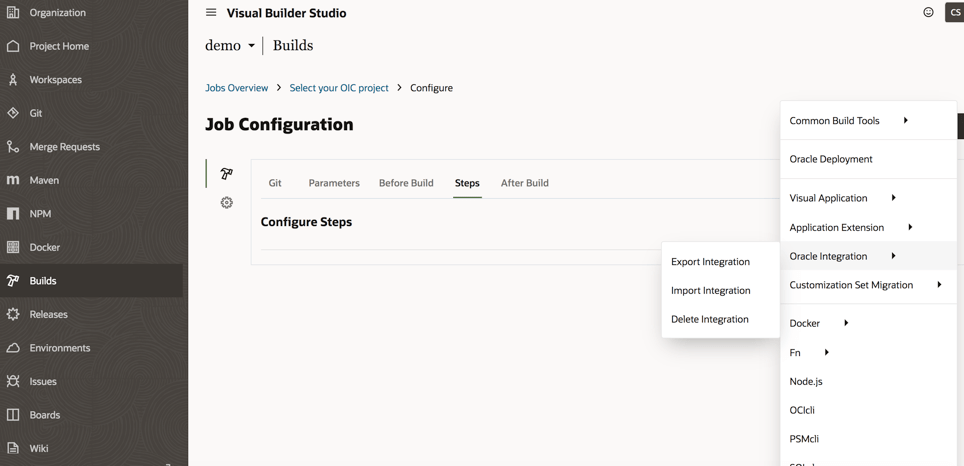
Working with the current implementation you can:
Export integration flows
Import integration flows
Delete integration flows
As shown below in the picture, the options we have working with Oracle Visual Builder Studio and OIC
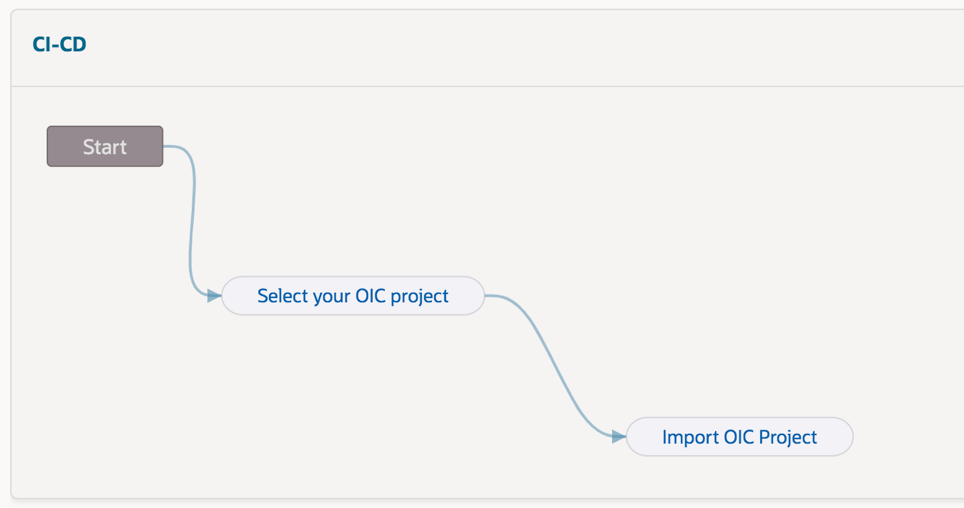
Herewith an example of pipeline that you can easily configure to automate the Export / Import procedure and defining in cascade all steps (“jobs”) to define the required actions, of course this one below just for demo purposes. This procedure will be later explained step-by-step just in case you want to reproduce this one for your own purposes
In order to export our assets from the development environment, for example, it’s enough to configure our source and target environments about the OIC instances
How to configure our OIC environments?
This is a straightforward operation working with VB Studio, as shown below:
We can create all connections we need to configure properly the tool
Once we have configured our instances, we need to build our “pipeline” so to automate the procedure when needed
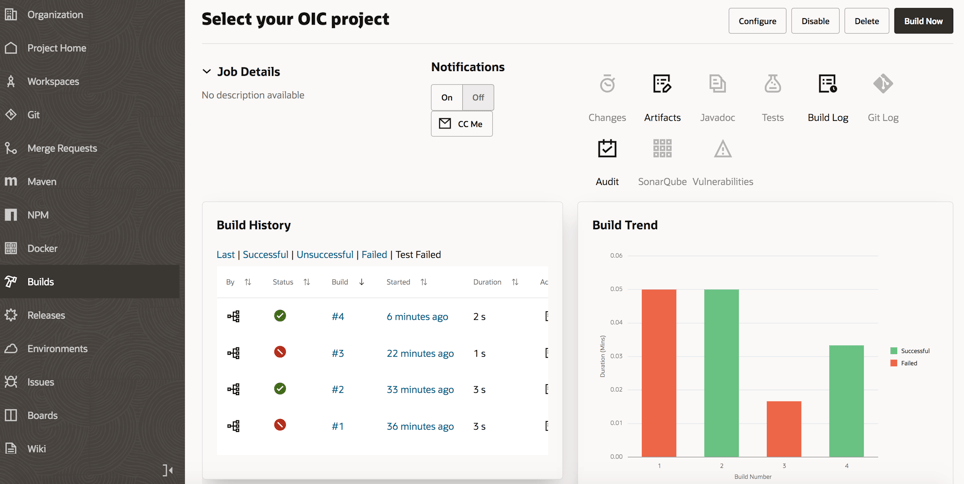
Each pipeline can include all “jobs” we need (in the previous screenshot we have used two different jobs “select your OIC project” and “import OIC project”) so to build the right chain among the different available “jobs”
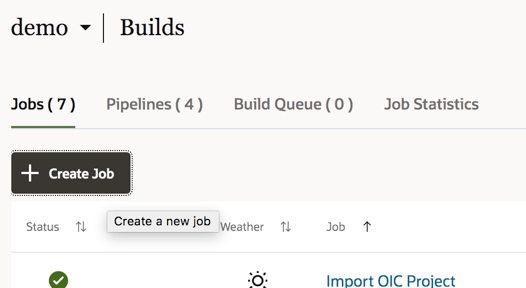
To create a job, select the Build link from the left panel of the Visual Builder studio and then we can create a new job
Each job has some options and parameters to be configured as below the screenshot shows:
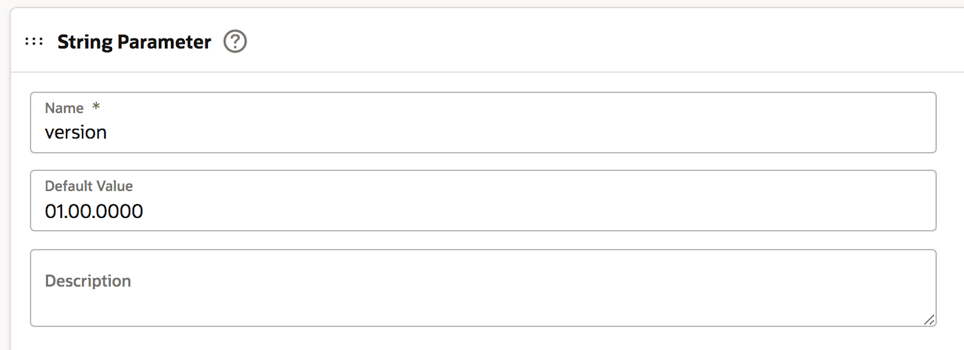
Select the “Parameters” tab to configure the string parameter:
The “Default Value” is the value of the integration flow version on our OIC instance to be selected and moved to the new instance. Of course, this value can be changed when we run the build so to properly set the right integration flow version
Now it’s time to select the “Steps” tab to identify the OIC instance from where we want to export our integration flow
If needed, we can also include the asserter recording just flagging the box. In this case we are moving (exporting / importing) the integration flow named “ECHO” and working with its *.iar file once we have exported this one.
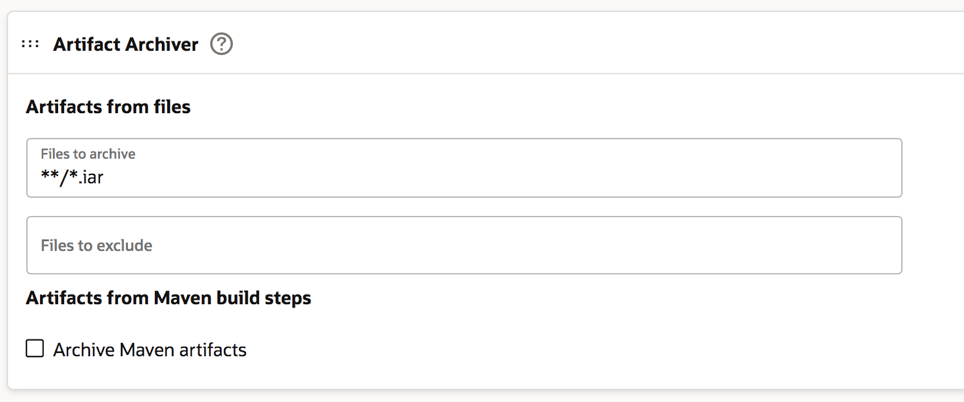
Now you can click the “After Build” tab to configure it as below described. The *.iar extension is the default extension of the integration flow when you decide to download it.
Click save and that’s all. Our first job is properly configured now.
To proceed we are now ready to configure the second job (“import OIC project”).
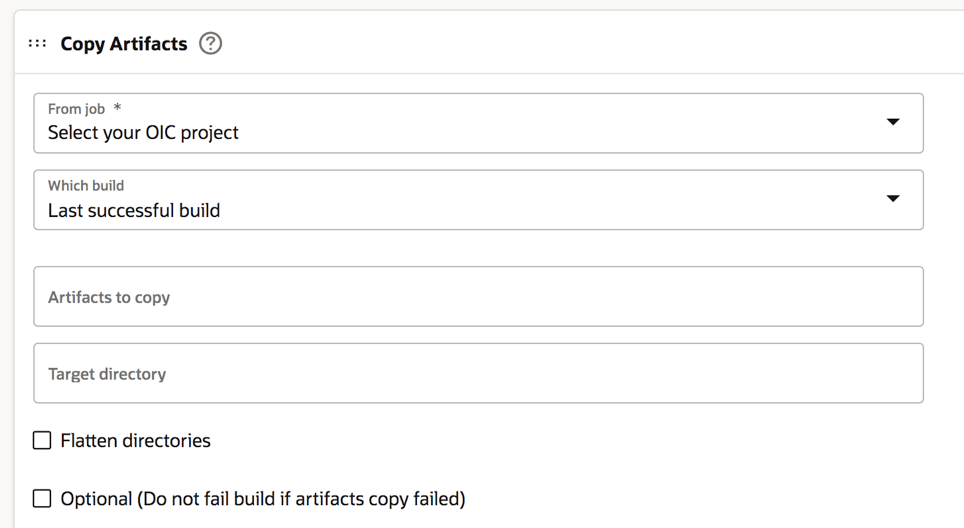
In this case, the first step to be accomplished is the configuration of the “Before Build” tab as below shown and adding a “Copy Artifacts” option
And now, as we did with the first job, we can properly configure the OIC instance target, in our sample, but in this case for the import action.
We can also check the box about the “activate integration” option so that our integration flow will be imported and started just to have this one ready to be invoked by applications
Also, in this case, we can now save our configuration.
Once these operations have been completed, we are ready to test our pipeline selecting the start button on the right side of the web page and below shown
If the execution of our “build” is properly configured, we can see the “green flag” of our jobs once we run it
Furthermore, we can drill down the execution to look at the log information just in case something wrong having also the chance to download the file including the log for further analysis or if we need to share this one with other people or applications.
From the Visual Builder Studio “Home page” we can also get information about statistics and previous executions so to track the activities managed on the different resources we have
This is for sure the best way to properly manage our environments and the best approach to have under control the lifecycle of our projects and their deployment.
For further information, look at the really interesting content already published here:
This is my 15th #DaysOfArm article that tracks some of the experiences that I’ve had so far. It’s been a little while since I’ve worked on this series however saying that … much of what I’ve been doing didn’t seem different from any other type of environment.
And just to recap from the first post (here) on June 12 2021.
It’s been just over 2 weeks since the launch of Ampere Arm deployed in Oracle Cloud Infrastructure (OCI). Check this article out to learn more (here). And it’s been about one week since I started looking into the new architecture and deployment, since I started provisioning the VM.Standard.A1.Flex Compute Shape on OCI and since I started migrating a specific application that has many different variations to it to test it all out.
This is my next learning where I looked into Let’s Encrypt to create a set of free certificates for Oracle Cloud Infrastructure A1.Flex VM Instances.
I had a meeting the other day with an Oracle Partner and the discussion was about serverless solutions and Oracle Functions was introduced. And the natural question to ask was, “What is your preferred language?”.
They answered, “Mostly PHP. We also use C#”.
I had to think a little. And navigating to the fnproject.io (the open-source project that Oracle Functions is based upon), it was clear that C# was supported. Here’s a quick tour through that experience.
fnproject.io supported languages – golang, Java, javascript, python, ruby and C#.
A couple of quick points:
I didn’t need to install ASP.Net anywhere.
I’m not bound by Windows as the host operating system.
And if ASP.Net is your language of choice, you can also check out Deploy highly available ASP.Net applications on Oracle Cloud Infrastructure in the Oracle Architecture Center (here).
The OCI Observability & Management (O&M) platform gives you the ability to also manage your Oracle Database targets that reside on-premise or hosted on an external platform to OCI.
In order to deploy this, please ensure you have met the prerequisites:
In the previous post, I did some work in managing Security Lists to protect the Minecraft Server. To read about that, head (here). Another method of connecting to the Minecraft Server is through a Bastion Host. As part of Oracle Cloud Infrastructure, it is free to create a session through the Bastion Service (service limits do apply). Here’s a brief encounter of getting this up and going.
The Minecraft Server has been up and running for a little while now on my Oracle Cloud Infrastructure Always Free Tier. And it’s something that has become more valuable. The hours of crafting, building and mining is something that needs attention. I’ve experienced the situation when months of work has been wiped or worse hacked. It’s not a good feeling.
I’ve been using the Security Lists in Oracle Cloud Infrastructure to define specific ingress rules. What I’ve done now is make that easier.






 RedThunder.Blog