Simple Polling: a basic Polling Web App built using Oracle Visual Builder CS Visual Applications

Polls. Surveys. Live Voting. It’s all about gathering live responses in any venue: conferences, concerts, classrooms etc.. There’s a proliferation of tools (including online tools) to create and conduct polls: “Download the mobile app today and be ready for your next interactive class or event tomorrow“.

For those who don’t know the difference between a poll and a survey a poll is used to ask one simple question while a survey is generally used to ask a wide range of multiple questions. …  How tedious are those questions?

If the point is obtain information do we want to bother our attendees with 10 questions (that they are not likely to answer) or do we want to ask 1 small, simple and quick question?  Well, being an attendee myself I think polls are way more powerful and effective than surveys so I thought a simple responsive Polling Web App was a good excuse to put my hands on Visual Builder and get familiar with the Visual Applications. This post assumes you’re familiar with Visual Builder Cloud Service – if you’re not reading Carlos’ latest post Teaching How to Get Started with Oracle Visual Builder 2.0 is certainly a good idea. Continue reading “Simple Polling: a basic Polling Web App built using Oracle Visual Builder CS Visual Applications”

Oracle API Platform Gateway Log files Summary

Is Troubleshooting Important for you ? I hope, the answer is Yes. If that’s the case for you then first thing we need to know where to look for the detailed error message when something going wrong e.g. Gateway server not pooling API configuration from Management tier, while Invoking API end user getting “Internal Server Error”, “Resource not found” etc etc. There could be many types of error but often its hard to find out root cause of exact error.

Recently, I have created an API which was further calling and HTTPS endpoint. While, invoking that API I was getting error “Internal server error”, However, there was nowhere I could easily locate the details error about this problem. I had looked Managed server.log, ManagedServer.out, APICS EDR file and many other files but couldn’t find useful error message related to my error. Later, I found one log file “default.log” which helped me to get root cause of my error. Hence, I decided to compile a list of all logs files, their location and bit of description, so that next time when I hit the some issue, it could be much easier for me to find out root cause by looking relevant log file. This blogs definitely helps to reader as well if they got stuck with API Gateway Error.

Note: The path given in my explanation could be different than your environment but I hope you can very well workout your environment path after looking my sample PATH which I have mentioned in this blog. My base location of installation was “/u01/apics”, the rest PATH should be same in your environment.

Also, before enabling debug/trace severity make sure it’s impact on file size because some of the files start getting thousand of lines of logs once you enabled the debug/trace log severity.

So, here is my comprehensive logs files list, their location and bit of description which you won’t find in Oracle APICS documentation.

Continue reading “Oracle API Platform Gateway Log files Summary”

Configure Letsencrypt SSL Certificate in Weblogic 12c

Who doesn’t like the security. This is one of critical element of our IT Infrastructure. Recently I was doing one POC and got requirement to setup a valid SSL certificate in Weblogic. However, since it was just an POC we were not having any valid SSL certificate issued by some Certificate Authority. Later, I came across for one website called https://letsencrypt.org/ . Let’s Encrypt is a free, automated, and open certificate authority (CA). they give people the digital certificates they need in order to enable HTTPS (SSL/TLS) for websites, and its free, yes you heard correctly It’s FREE !!!. You don’t need to pay them at all. So if you need a valid SSL certificate for your POC or even for Production environment you can get one from them. Although their certificate comes with 3 month validity, so while using for Production environment user need to keep renewing with them with simple automated process.

In this blog we will be learning how we can generate letsencrypt SSL certificate, what’s prerequisite to get the certificate and setup that certificate in Weblogic server to enable SSL communication.

So, Lets move on. We will be doing below stuff in sequence –

  1. Get a registered domain name (This required while generating SSL Cert)
  2. Install Certbot ACME Tool and Apache HTTP Server
  3. Generate Letsencrypt SSL Certificate
  4. Configure Letsencrypt SSL in Weblogic Identity Store


Continue reading “Configure Letsencrypt SSL Certificate in Weblogic 12c”

Oracle Cloud Security is Openly Social

Oracle Identity Cloud Service (IDCS) protects Oracle IaaS, PaaS, SaaS and On-Premises applications. Oracle IDCS provides federated single-sign on experience to its clients. It follows open standards such as SAML 2.0, OAuth 2.0 and OpenID Connect 1.0. In the federation model, Oracle IDCS can either act as an Identity Provider (IdP) or a Service Provider (SP) or both.

Oracle IDCS has a built-in feature that provides multiple social identity providers such as Google, Facebook, LinkedIn and Twitter. It uses underlying OAuth 2.0 protocol to interact with the Social Identity providers. This article presents how to configure IDCS to allow for Social Logins. Let me explain this concept with the sequence diagram below:

Continue reading “Oracle Cloud Security is Openly Social”

ORACLE INFORMATION SECURITY – Where It Begins, Where It Ends

Background and Introduction

Targeted cyber intrusions remain the biggest threat to government ICT systems. Since opening in early 2010, the Australian Cyber Security Centre (ACSC) has detected and responded to thousands of these intrusions. These attacks are dealing with the Zero-Day exploits, DoS, DDoS, SQL Injections, Phishing, Ransomware, Large XML payloads and many other innovative attacks on IT systems.

You should never assume that your information is of little or no value. Adversaries are not just looking for classified information. A lot of activity observed by the ACSC has an economic focus, looking for information about Australia’s business dealings, its intellectual property, its scientific data and the government’s intentions.

The advent of cloud has challenged the traditional Security Operations Centres because users are outside the traditional network boundaries and they are using channels such as Mobile and Social. Modern IT Security attacks therefore become unpredictable. They are not carried out by humans but mobile devices or IoT Botnets. These attacks are adaptive in nature that remain dormant for some time waiting for an event to happen. These Advanced Persistent Threats (APT) in the Kill Chain process are inevitable and unpredictable.

Challenges faced by Cyber Security Operations Centre

Modern security attacks are not hard to plan against because many enterprises today have a traditional Security Operations Centre (SOC). There are many challenges that traditional Cyber Security Operations Centres (CSOCs) are facing in today’s world. There are too many monitoring tools and data but no real insight. A traditional SOC is built upon traditional security infrastructure deployed within the corporate network, and was originally designed to protect applications and users on the network. Following are the issues that are faced by traditional Security Operations Centre:

Too many silos

A traditional SOC purviews the corporate network, not your applications and data residing in the cloud. Analysts say that on an average, most enterprises today have applications on about 6 different cloud service providers. In the Identity Management space, I’m sure all of you are adapting to meet the needs of both on premises applications as well as modern cloud apps. What use is a SOC that looks inward to your own network, and provides no protection for your data residing on that many cloud service providers?

Too much data

Previous generations of management tools expect that human intelligence will draw conclusions out of the data, but human operators are already overwhelmed with the velocity and volume of alerts and data coming their way, and so they get tired and miss things. Your SOC analysts struggle with too many alerts, generated from a disparate bunch of security products deployed alongside each other. The classic Target breach that happened a couple of years ago could have been detected promptly, if only the alerts could have been acted upon in a timely manner, instead of being lost in a sea of other less-important alerts.

Too little actionable insight

Other tools have attempted to apply more advanced analytical techniques, but have only done so to subsets of the data because it’s too compute-intensive to do it across the board, so human operators are still required to stitch together information out the data silos.

Shortage of good Cyber Security resources

Your SOC operations complains of a constant shortage of resources. Skilled cybersecurity professionals are a sought-after resource, and with good reason. That is because most of the processes in a traditional SOC are manual, requiring human intervention to triage and act upon issues. Very little is automated.

I’m sure many of you can relate to the problem of shortage of resources as well, since staffing modern Identity Management operations, especially across on-premises legacy applications and modern cloud applications, is a challenge too in today’s market.

Users are the new perimeter

Traditional SOCs are based on a static “prevent-and-defend” philosophy, designed to keep the bad guys out of the network. They do not adapt contextually to the prospect of an attacker getting onto your network.

In the Identity Management space, I’m sure most of you can relate to the need for contextual application access control policies. Many Identity Management vendors provide such capabilities today – of detecting and alerting when user activity appears suspicious. For example, when a user who typically logs in during US business hours from a fixed location in the US, is suddenly detected to login from a new browser, a new location, and in the late hours of the night US time.

TOP 4 ASD Recommended Mitigation ICT Strategies

The threat is real, but there are things every organisation can do to significantly reduce the risk of a cyber intrusion. In 2009, based on our analysis of these intrusions, the Australian Signals Directorate (ASD) produced Strategies to Mitigate Targeted Cyber Intrusions – a document that lists a variety of ways to protect an organisation’s ICT systems. At least 85% of the intrusions that ASD respond involve adversaries using unsophisticated techniques that would have been mitigated by implementing the Top 4 mitigation strategies as a package.  According to ASD Information Security Manual and Information Security Advice, the Top 4 mitigation strategies are:

Application Whitelisting

This when implemented correctly ‘Application Whitelisting’ makes it harder for an adversary to compromise an organisation’s ICT system. This allows only specifically authorised applications to run on a system. This is better than Blacklisting an application. This is because only known vulnerabilities can be blocked. Since hackers are getting innovative they will find a new way to overcome this hurdle. This is the reason Application Whitelisting is preferred.

Patching Systems

A software patch is a small piece of software designed to fix problems or update a computer program. Patching an organisation’s system encompasses both the second and third mitigation strategies. It is important to patch both your operating system and applications within a two-day timeframe for serious vulnerabilities. Once a vulnerability in an operating system or application is made public you can expect malware to be developed by adversaries within 48 hours. In some cases, malware has been developed to take advantage of a publicly-disclosed vulnerability within eight hours.

There is often a perception that by patching a system without rigorous testing, something is likely to break on the system. In most of cases, patching will not affect the function of an organisation’s ICT system. Balancing the risk between taking weeks to test patches and patching serious vulnerabilities within a two-day timeframe can be the difference between a compromised and a protected system.

Restricting Administrative Privileges

When an adversary targets a system, they will primarily look for user accounts with administrative privileges. Administrators are targeted because they have a high level of access to the organisation’s ICT system. If an adversary gains access to a user account with administrative privileges they can access any data the administrator can access – which generally means everything. Minimising administrative privileges makes it more difficult for the adversary to spread or hide their existence on a system.

Administrative privileges should be tightly controlled. It is important that only staff and contractors that need administrative privileges have them. In these cases, separate accounts with administrative privileges should be created which do not have access to the internet. This reduces the likelihood of malware infecting the administrator as they should not be web browsing or checking emails while using their privileged account. It is also important that once the staff is finished with their administrator privileges they are removed from those privileges.

Creating a Defence-In-Depth System

As a package, these mitigation strategies are highly effective in helping achieve a defence-in-depth ICT system. The combination of all four strategies, correctly implemented, will help protect an organisation from low to moderately sophisticated intrusion attempts. Put simply, they will make it significantly more difficult for an adversary to get malicious code to run on your ICT system, or continue to run undetected. This is because the Top 4 strategies enable multiple lines of defence against cyber intrusions.

Of course, implementing the other strategies will provide additional protection for ICT system. Several strategies have an overall security rating of ‘excellent’ which means that they are the most effective measures to protect ICT systems. However, an organisation should also conduct a risk assessment and implement other mitigation strategies as required to protect its ICT system.

Concept of Identity Security Operations Centre (Predict – Prevent – Detect – Respond)

IT threats are multi-vector. The ability to correlate anomalous events from the network, applications and user behaviours is key in early detection and containment. Identity is now the bridge between user, application and network controls. It is the identity context brought together with technologies such as machine learning, big data and advanced analytics that allows a security professional to centralise and normalise user activities. Therefore, Identity SOC must protect users, applications, APIs, content and data as well as workloads.

The Identity SOC utilises optimised dashboards and risk console for security professionals that is bringing in feeds from throughout the environment such as following:

  • Security Tools including firewalls, Intrusion Detection System, Intrusion Prevention System, Web Proxies, Virtual Private Networks, Data Loss Prevention Systems, Web Application Firewalls and Vulnerability Assessment scanners
  • Applications and Workloads whether on-premises or in the cloud
  • Infrastructure such as IaaS, PaaS, middleware, database, web servers, enterprise mobility management, hypervisors and hosts
  • Networking tools such as routers, switches, DNS, DHCP and load balancers

Identity SOC includes automated orchestration and incident response management. Bi-directional integrations allow it to be self-healing enabling different departments to work together through organised playbooks and processes.

Introducing Oracle Information Security Portfolio

Oracle is making a big investment in the world’s first Identity SOC. With new security cloud services that integrate several new technologies into a homogeneous set of services. The integrated technologies include Security Incident and Event Management (SIEM), User & Entity Behaviour Analytics (UEBA), Identity Management (IDM), API Platform Cloud Service (APICS) and Cloud Access Security Broker (CASB). Each of these new services will integrate with the rest of security fabric, but when joined together they offer the full benefit of an identity SOC with bi-directional controls and actionable intelligence.

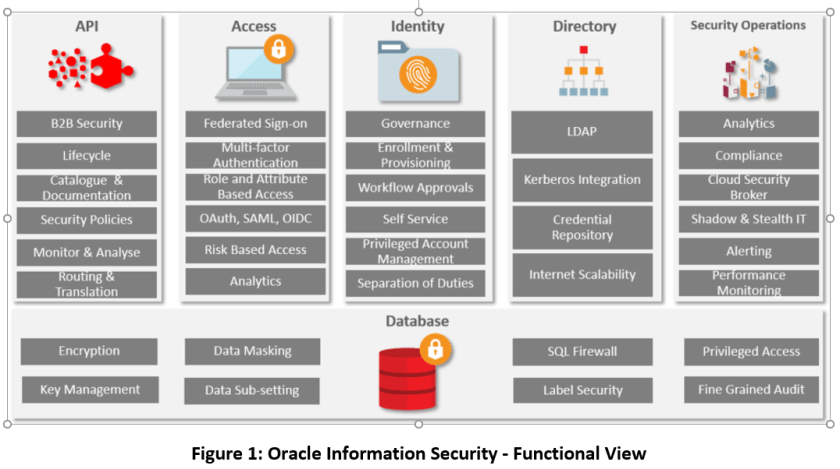
Oracle offers a comprehensive information security portfolio.  It provides Information Security for browser based web applications, mobile application and business-to-business applications and systems. Oracle Information Security provides defence in depth by having rich Database Security functions and services. The following diagram depicts the functional aspect of Oracle Information Security:

Oracle Info Sec Functional

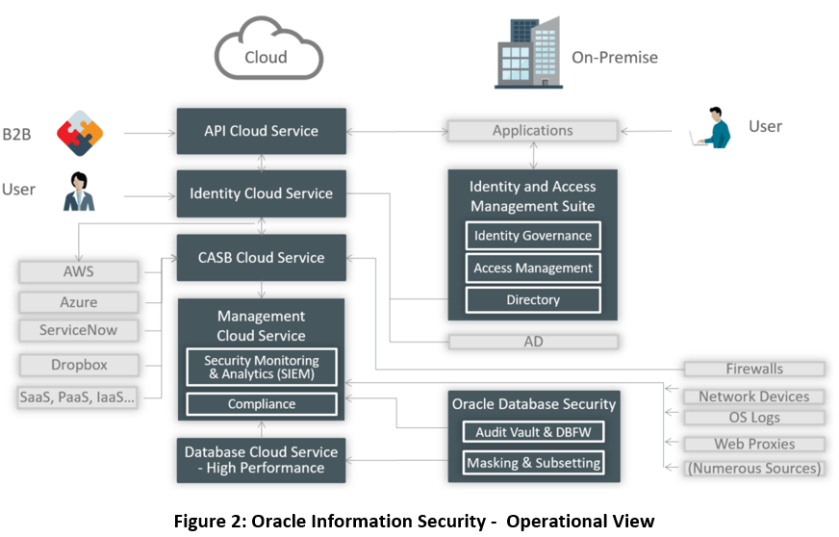
Oracle Information Security is a complete end-to-end IT Security portfolio from Cloud to On-Premises to Hybrid Cloud Information Security. The following diagram depicts the operational aspect of Oracle Information Security:

Oracle Info Sec Operational

The following sections briefly describe the Oracle Information Security portfolio from the functional viewpoint. Oracle information security portfolio can be divided into Oracle Cloud Security, Oracle Hybrid Security and Oracle On-Premises Security.

Oracle Cloud Security – Oracle Cloud Infrastructure (Classic)

Oracle Cloud Security offers the most complete identity and security solution for providing secure access and monitoring of hybrid cloud environment and addressing all IT governance and compliance requirements. Oracle Cloud Security delivers an identity Security Operations Centre (SOC) providing actionable intelligence and bi-directional control through a combined offering of Security Information and Event Management (SIEM), User Entity Behaviour Analytics (UEBA), Cloud Access Security Broker (CASB) and Oracle Identity Cloud Service (IDCS).

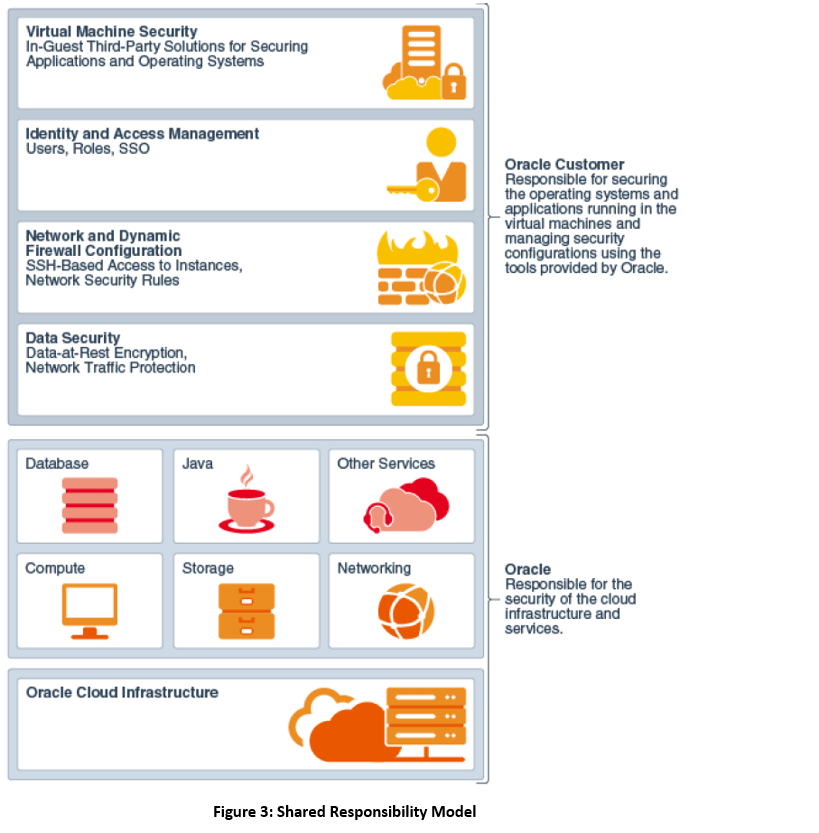
Oracle Cloud Security follows a shared responsibility model. The figure below depicts the same:

Shared Responsibility Model

The following presents the brief overview of each of the Oracle Cloud Security Service:

Oracle Identity Cloud Service

Modern cloud applications require modern identity and access management (IAM) architectures. There is a need for IAM solutions offered as identity cloud services (IDaaS). As enterprises use more software applications as services (SaaS), platform as a service (PaaS) and infrastructure as a service (IaaS), they must provision users and oversee the rights that are assigned to them, quickly and easily.

Oracle Identity Cloud Service (IDCS) is Oracle’s next-generation IDaaS platform built on modern cloud principles using open identity standards to address these challenges. This platform delivers innovative and fully integrated IAM capabilities through a multi-tenant cloud that can be leveraged by other cloud-based services.

Oracle Cloud Access Security Broker

Oracle Cloud Access Security Broker (CASB) is the service that gives visibility and insight into both enterprise’ entire cloud stack and deep information about the cloud services that are getting utilised by the enterprise within security controls.

Oracle CASB is the service that is used for the following:

  • Threat Detection: Identify existing threats to your cloud footprint by leveraging real-time threat intelligence feeds and machine learning techniques to establish security baselines and to learn behaviour patterns
  • Predictive Analysis: Stay a step ahead of threats with patent-pending modelling techniques that evaluate risks across hundreds of threat vectors to provide you with a concise summary of potential threats
  • Automated Incident Response: Keep enterprises secure by automating responses to threats with forensics, incident management, orchestration and remediation through native capabilities as well as integration with existing technologies
  • Security Configuration Management: Eliminate labour intensive, error prone manual processes and manages security configurations within cloud applications by asserting configurations as well as continuously enforcing them

Oracle Management Cloud

Oracle Management Cloud (OMC) is a suite of next-generation integrated monitoring, management, and analytics cloud services that leverage machine learning and big data techniques against the full breadth of the operational data set. OMC’s Unified Platform helps customers improve IT stability, prevent application outages, increase DevOps agility and harden security across their entire application and infrastructure portfolio.

Following sections discuss the aspects of OMC that are related to IT Security:

Oracle Log Analytics

Oracle Log Analytics Cloud Service monitors, aggregates, indexes, and analyses all log data from your applications and infrastructure – enabling users to search, explore, and correlate this data to troubleshoot problems faster, derive operational insight, and make better decisions.

Security Monitoring and Analytics Cloud Service

Oracle Security Monitoring and Analytics (SMA) Cloud Service enables rapid detection, investigation and remediation of the broadest range of security threats across on-premises and cloud IT assets. Security Monitoring and Analytics provides integrated SIEM and UEBA capabilities built on machine learning, user session awareness, and up-to-date threat intelligence context.

Configuration and Compliance Cloud Service

Oracle Configuration and Compliance Service enables the IT and Business Compliance function to assess, score and remediate violations using industry standard benchmarks in addition to your own custom rules. The Oracle Configuration and Compliance Service can assess both on premise and cloud infrastructure.

 Oracle API Platform Cloud Service

Oracle API Management solution supports agile and secure API development and makes it easy to keep an eye on KPIs covering every aspect of the API lifecycle. True hybrid API deployment – in the Cloud or on-premises – means that API solution is modern and adaptable, all while employing the most up-to-date security protocols. It provides the virtualisation layer and protects APIs against DDoS, SQL injection and XML attacks etc.

Oracle Hybrid Cloud Security

Oracle Information Security provides state-of-the-art Hybrid Cloud security. It is a well-known fact that Organisations are not going to migrate to the cloud overnight. Therefore, organisations need an information security solution for a hybrid cloud. Oracle Information Security offers the following for the hybrid cloud:

AD Integration

Oracle Identity Cloud Service provides tools for a seamless integration with Microsoft Active Directory (AD) platform:

  • Bridge: The bridge continuously reconciles AD users and groups to Oracle Identity Cloud Service. No need to propagate entries manually.
  • Federated SSO with ADFS: The SAML integration provides SSO between Active Directory Federation Services (ADFS) users and Oracle Identity Cloud Service.

With AD platform fully integrated to Oracle Identity Cloud Service, AD users in the cloud are kept in sync without any management effort.

OIM Integration

Oracle Hybrid Security provides OIM Cloud Connector through which the users get provisioned into Oracle Identity Cloud service in an automated fashion

IdP Federation

Oracle Identity Cloud Service can federate with other Identity Providers IdP. This is done through open standards such as SAML, OpenID Connect and OAuth open standard protocols. Oracle IDCS can be federated with Social Identities such as Google, Facebook, Twitter and LinkedIn.

OAM Integration

Oracle Identity Cloud Service and Oracle Access Manager on-premises component can be integrated as Service Provider and Identity Provider and vice versa. They both talk SAML 2 protocols through which a trust can be established between the two.

On-Premises Information Security

Oracle Identity Management provides a unified, integrated security platform designed to manage user lifecycle and provide secure access across the enterprise resources, both within and beyond the firewall and into the cloud. The Oracle Identity Management platform provides scalability with an industry-leading suite of solutions for identity governance, access management and directory services.

Oracle Identity Governance

Oracle Identity Governance is a solution that provides self-service, compliance, reconciliation, provisioning and password management services for applications residing on-premise or on the Cloud. Oracle Identity Governance and Administration is placed in the leaders quadrant in Gartner Magic Quadrant that can be reached on the following URI:

https://www.gartner.com/doc/reprints?id=1-4POUQXH&ct=180126&st=sb

Oracle Access Management

Oracle Access Management provides an enterprise-level security platform, delivers risk-aware end-to-end user authentication, single sign-on, and authorization protection. The Oracle Access Management enables enterprises to secure access and seamlessly integrate social identities with application. Oracle Access Management is placed in the leaders quadrant in Gartner Magic Quadrant that can be reached on the following URI:

https://www.gartner.com/doc/reprints?id=1-42A5TO6&ct=170607&st=sb

Oracle Directory Services

Oracle Directory Services provides a comprehensive directory solution with storage, proxy, synchronization and virtualization capabilities. With this unifying approach, it provides the services required for both enterprise and carrier-grade environments, including scalability to billions of entries, easy installation, elastic deployments, enterprise manageability, and effective monitoring.

Oracle Database Security – Defence-in-Depth

Oracle Database provides a rich set of security features to manage user accounts, authentication, privileges, application security, encryption, network traffic, and auditing.

Oracle Advanced Security

Oracle Advanced Security comprises of two features: Transparent Data Encryption and Oracle Data Redaction. The following defines these features:

  • Transparent Data Encryption: Transparent Data Encryption (TDE) enables you to encrypt data so that only an authorized recipient can read it
  • Data Redaction: Oracle Data Redaction enables you to redact (mask) column data using several redaction types. Following presents different redaction types:
    • Full redaction. You redact all the contents of the column data. The redacted value that is returned to the querying user depends on the data type of the column. For example, columns of the NUMBER data type are redacted with a zero (0) and character data types are redacted with a blank space.
    • Partial redaction. You redact a portion of the column data. For example, you can redact most of a Social Security number with asterisks (*), except for the last 4 digits.
    • Regular expressions. You can use regular expressions in both full and partial redaction. This enables you to redact data based on a search pattern for the data. For example, you can use regular expressions to redact specific phone numbers or email addresses in your data.
    • Random redaction. The redacted data presented to the querying user appears as randomly generated values each time it is displayed, depending on the data type of the column.
    • No redaction. This option enables you to test the internal operation of your redaction policies, with no effect on the results of queries against tables with policies defined on them. You can use this option to test the redaction policy definitions before applying them to a production environment.

Oracle Key Vault

Oracle Key Vault enables customers to easily deploy encryption and other security solutions by offering robust, central management of encryption keys, Oracle Wallets, Java KeyStores, and credential files.

Oracle Key Vault enables customers to quickly deploy encryption and other security solutions by centrally managing encryption keys, Oracle Wallets, Java KeyStores, and credential files. It is optimized for managing Oracle Advanced Security Transparent Data Encryption (TDE) master keys. The full-stack, security-hardened software appliance uses Oracle Linux and Oracle Database technology for security, availability, and scalability.

Oracle Database Vault

Oracle Database Vault implements powerful security controls within Oracle Database.  These unique security controls restrict access to application data by privileged database users, reducing the risk of insider and outside threats and addressing common compliance requirements.

Oracle Database Vault security controls help organizations address compliance with data privacy laws and standards such as the EU General Data Protection Regulation (GDPR), the Payment Card Industry Data Security Standard, and numerous other regulations that require strong internal controls on access, disclosure, or modifications to sensitive information.

Oracle Audit Vault and Database Firewall

Oracle Audit Vault and Database Firewall (AVDF) provides a sophisticated next-generation SQL grammar analysis engine that inspects SQL statements going to the database and determines with high accuracy whether to allow, log, alert, substitute, or block the SQL. Oracle AVDF supports white list, black list, and exception list based polices. A white list is simply the set of approved SQL statements that the database firewall expects to see. These can be learned over time or developed in a test environment. A black list includes SQL statements from specific users, IP addresses, or specific types that are not permitted for the database. Exception list-based policies provide additional deployment flexibility to override the white list or black list policies. Policies can be enforced based upon attributes, including SQL category, time of day, application, user, and IP address. This flexibility, combined with highly accurate SQL grammar analysis, enables organizations to minimize false alerts, and only collect data that is important. Database Firewall events are logged to the Audit Vault Server enabling reports to span information observed on the network alongside audit data.

Oracle Data masking and Subsetting

Oracle Data Masking and Subsetting helps improve security, accelerate compliance, and reduce IT costs by sanitizing copies of production data for testing, development, and other activities and by easily discarding unnecessary data.

Oracle Label Security

Oracle Label Security uses row level data classifications to enforce access controls restricting users to only the data they can access. It enables organizations to control their operational and storage costs by enabling data with various levels of sensitivity to co-mingle within the same database. Oracle Label Security also provides a cost-efficient way to address regulatory requirements for managing access to data on a need to know basis.

What if in the middle of the conversation the user changes mind?

Bots that can survive human contact

User: "Wats PaaS?"

Bot: "Oracle Cloud Platform has the most comprehensive suite of PaaS 
solutions to help you increase business agility and drive innovation in 
the cloud. The most popular are Integration Cloud, Mobile & Chatbots and 
Blockchain"

User: "Oops! I meant SaaS"

Bot: "Oracle Cloud Platform has the most comprehensive suite of [....]

User: "Sure... See you later"

I believe machines are very good at doing repeatable and predictable tasks. Humans by nature are everything but predictable. This is why it takes a lot of work to build a Bot that can survive human contact….

This post is a deep technical dive into sub-intents, System components and how we combine them to build a dialog flow that attempts to maintain a conversation even when the user “goes off script”.

Continue reading “What if in the middle of the conversation the user changes mind?”

Securing Applications with Multi Factor Authentication

These days, passwords online are not strong enough by themselves to protect applications. Scandals about password breaches seem to happen on a regular basis. This is where Multi Factor Authentication (MFA) greatly reduces the risks associated with protecting information online. Multi Factor Authentication combines something you know (e.g. your password) with something you have (e.g. your smartphone). MFA can be used with SMS or a Mobile App on an iPhone, an Andriod phone or a Windows Phone. Using MFA on a smartphone significantly reduces the costs associated with older and more traditional MFA technologies like physical tokens because of the cost of delivery and administrative overheads.

Oracle Identity Cloud Service allows you to deliver Multi Factor Authentication quickly and easily. In this article I’ll walk through the steps necessary to enable Multi Factor Authentication using Oracle Identity Cloud Service(IDCS). Once MFA is enabled you’ll be able to use MFA with any application protected by your instance of Oracle IDCS. In my example, I’ll use the Oracle Mobile Authenticator App on an iPhone to protect applications as well as the User Self Service Console in IDCS.

Continue reading “Securing Applications with Multi Factor Authentication”

Automate the Docker Build for a Microservices app and deploy to the Oracle Container Cloud Service

In a previous series of blog posts titled Exploring Github DockerHub and OCCS
I walked through how to setup your development environment, install Docker, create a git project, link Docker Hub and GitHub accounts, trigger a build of a docker image on Docker Hub and then deploy and run the docker image using the Oracle Container Cloud Service.

In this blog I wanted to do something similar but this time focus on a more simplified process so that a less technical user could follow the steps without the need for a development environment. The way I have structured this post mans that you can follow every step using a web browser. I have attempted to focus more on consuming the dockerised application that a developer has already built. For the purpose of this exercise I am using the example Medical Records application that some of you may be familiar with from some of my previous blog posts. For those not familiar with the application, it consists of a Node.js web application that interacts with a MongoDB database. The web application surfaces a number of REST APIs (eg Get / POST Patient , GET / POST Physician, GET/POST Observations etc), and uses Swagger UI so that the REST APIs can be quickly interacted with by the end user.

If you want to follow the steps in this blog post you will need a login for GitHub and Docker Hub and also a subscription or trial account for the Oracle Cloud in order to use the Oracle Container Service Classic (OCCS).

For those unfamiliar with what Oracle currently offers in the container space, Oracle have brought two offerings to market:

Container Service Classic provides an easy and quick way to create an enterprise-grade container infrastructure. It delivers comprehensive tooling to compose, deploy, orchestrate, and manage Docker container-based applications on Oracle Cloud Infrastructure for Dev, Dev/Test, DevOps, and Cloud Native use cases. The second container offering is Oracle’s Container Native Platform is designed for DevOps teams to build, deploy, and operate container-based microservices and serverless applications using open source tools. It is an end-to-end container lifecycle management suite, including a managed Kubernetes service for creating and managing clusters, a private registry for storing and sharing container images, and a fully integrated CI/CD service to automate and manage deployments, all powered by enterprise-grade cloud Infrastructure.

For my walk through below the focus is on consumption of the Docker Image using the first generation OCCS offering and I hope to blog around a similar exercise using the Oracle Container Native Platform.

It is assumed that an OCCS service instance has already been provisioned. Previous blog posts document the steps required to Provision an OCCS Service Instance and also Using the Oracle Container Cloud Service . Of course, always check the product documentation to validate that the steps recorded are still current.

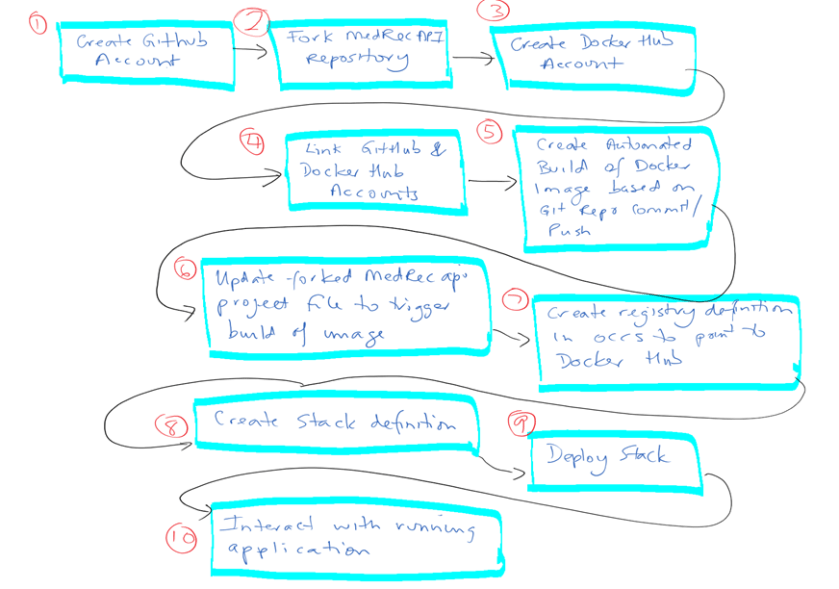
The flow of the ten steps in the diagram below cover the approach I took. Please note that most of the steps are a one-off activity and the productivity.
Create GitHub account.

GitHub is a very popular hosted software source control service. As there is an existing git project for the ankimedrec-apis application you will take a copy of this existing project and add into your project library. If you don’t already have a GitHub account then sign up. Navigate in your browser to https://github.com .
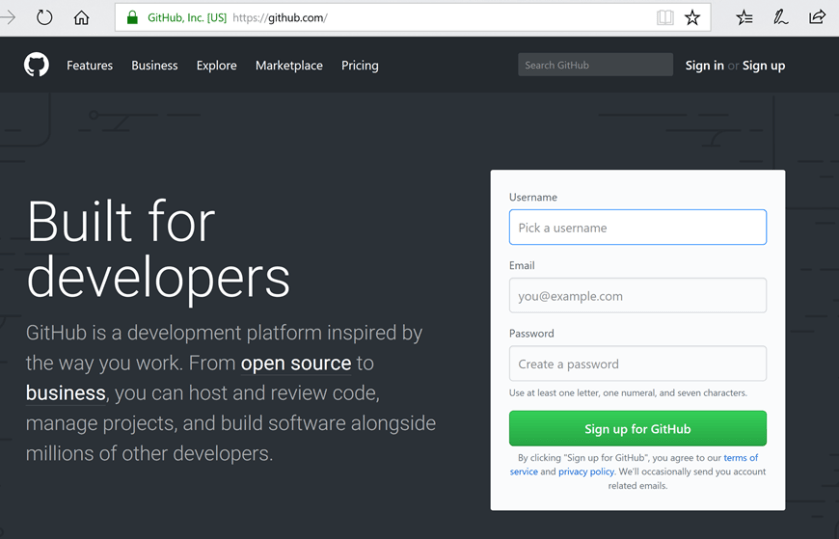
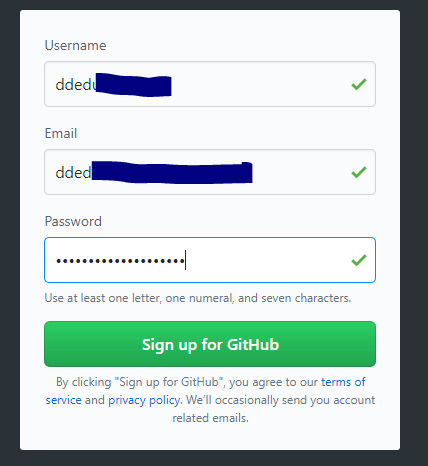
Simply fill in the required mandatory details and press Sign Up for GitHub.
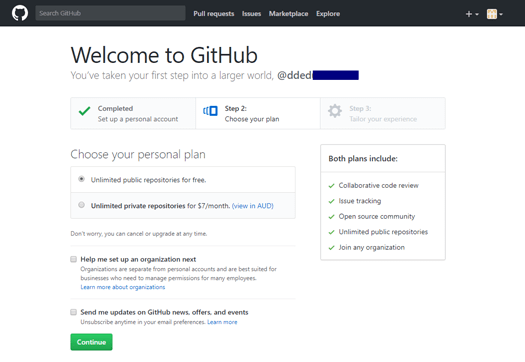
I chose the “Unlimited public repositories for free” option and pressed the Continue button.
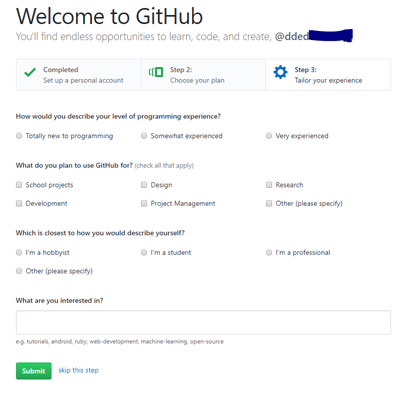
You can then press the Submit button to submit your request for a GitHub account.
Click the “Start a project” button.
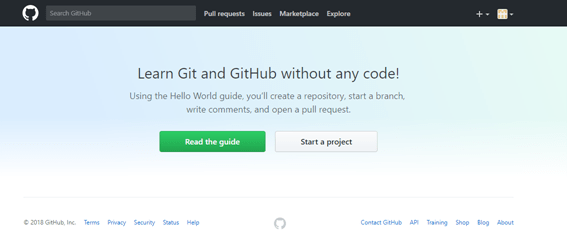
Before you can continue you should see that a further step is required in which you will need to validate the email address associated with your GitHub Account Sign Up.
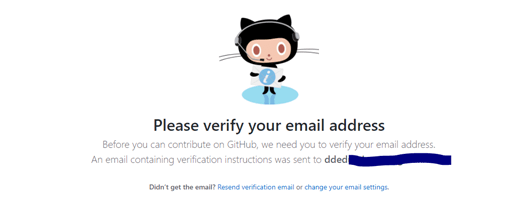
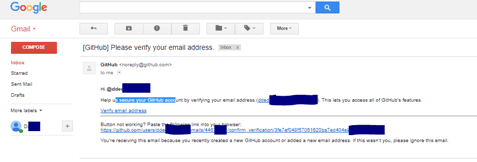
Login to your email account and click the verify link in the email you received from GitHub.
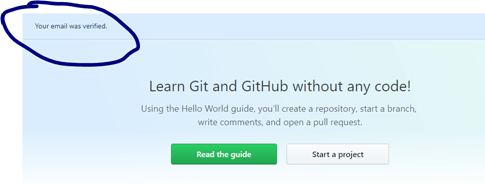
In your browser session for GitHub account creation, you should see that “Your email was verified”.
With your GitHub account setup and your email verified, you will now create a new repository. Enter a name for your first Git repository eg myfirstproject , enter an optional description. Choose Public, and check the box to initialize the repository with a README file.
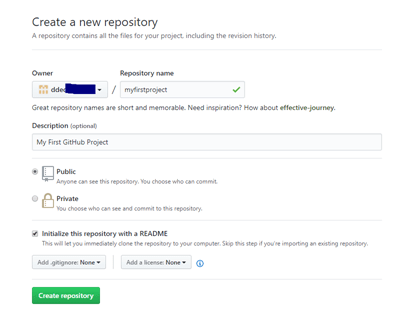
Click the green Create Repository button.

Soon afterwards you will see that a Git repository will be created under your login (eg jsmith001/myfirstproject).
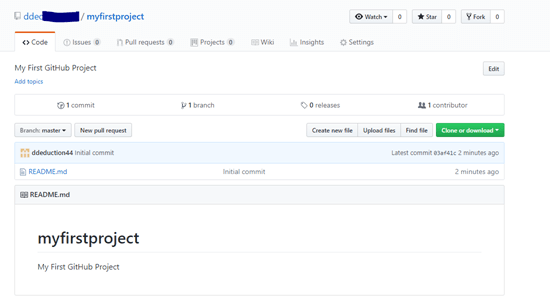
Note that your repository has only a single README.md file. Files will extension of ‘.md’ are MarkDown files. According to Wikipedia , Markdown is a lightweight markup language with plain text formatting syntax. It is designed so that it can be converted to HTML and many other formats using a tool by the same name. Markdown is often used to format readme files, for writing messages in online discussion forums, and to create rich text using a plain text editor.

Obviously you can now upload other files to your first Git repository but for the remaining steps in this ‘How-To’ document you will focus on creating a fork of the ankimedrec-apis repository that contains the MedRec application project files. According to a GitHub Help article – A fork is a copy of a repository. Forking a repository allows you to freely experiment with changes without affecting the original project. Most commonly, forks are used to either propose changes to someone else’s project or to use someone else’s project as a starting point for your own idea.

Fork the solutionsnanz/ankimedrec-apis repository

To create a fork of the ankimedrec-apis repository owned by the user solutionsanz you will need to do the following.
While you are still logged into github.com, point your browser to https://github.com/solutionsanz . You should now be able to see all the public Git repositories owned by the user solutionsanz .

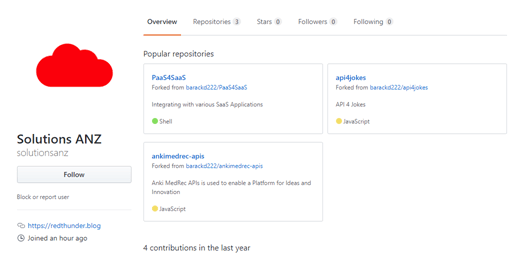
Next, click on the link ankimedrec-apis .
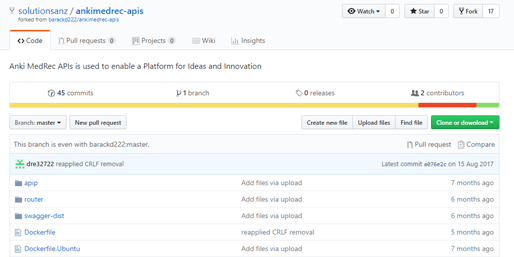
Click the fork button in the top right of the screen. This will start the copy of the repository from solutionsanz to your Github account which will take less than a minute.
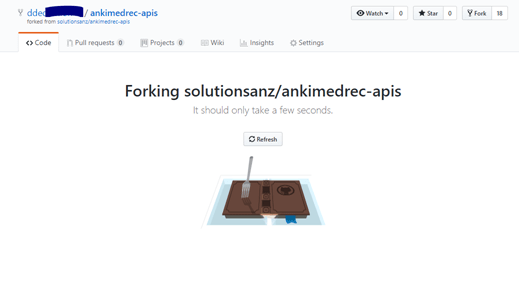
After about a minute you should now see that a forked copy of the ankimedrec-apis project has been created in your GitHub account.
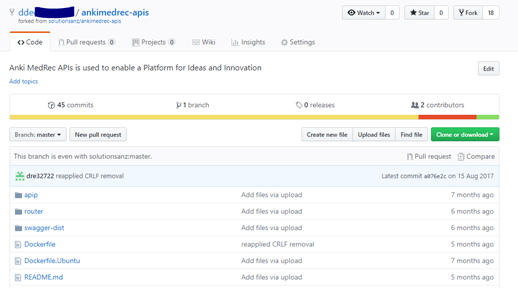
Ok so far so good, you should now have a GitHub account, and have forked the ankimedrec-apis project into your GitHub account. You can see that there are a number of files in the project.

Click the Dockerfile to view the steps that a very kind developer has defined in order to containerize the Node.js application. Also note the occs-stack.yml file which contains the docker compose / stack definition of the web application and the mongoDB which you will use later in this tutorial to define a stack within OCCS.

Create Docker Hub Account

While GitHub provides a place to store and manage source code for your projects, Docker Hub is a place used to build, store and retrieve docker images.
To create a docker hub account for your user, simply point your browser to docker hub … https://hub.docker.com/ , fill in the details under ‘New To Docker?’ , verify that you are not a robot and click the Sign Up option.
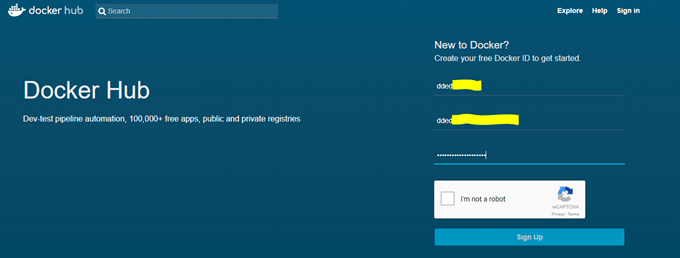
You should get a message directing you to your email account for verification.

Login to the email account associated with your Docker Hub signup and confirm your email address.

Once you have confirmed your email address, you should be ready to login to Docker Hub.

Simply use the Sign-in option on the Docker Hub site, and enter your credentials.
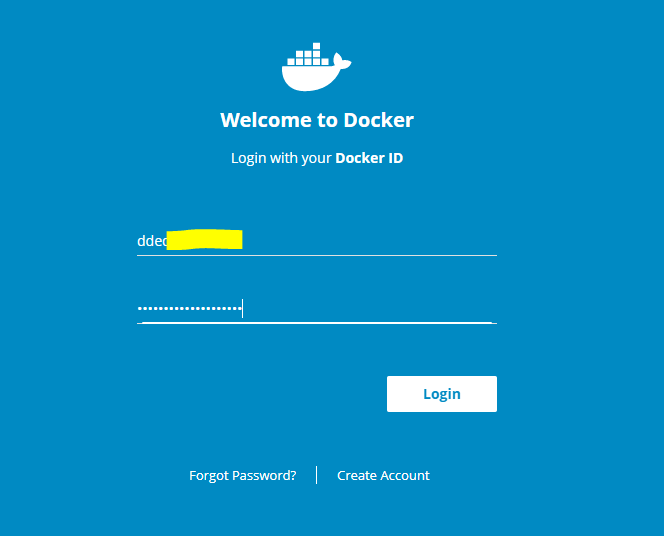
Enter your username and password and click Login .
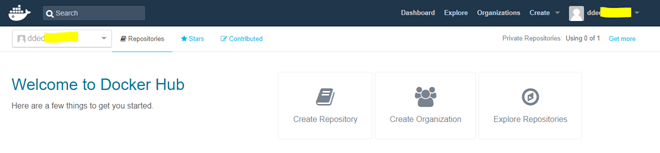
Assuming you have successfully signed in to Docker Hub, you have a little more setup to do.

Link GitHub to your Docker Hub Account

Click on the drop down arrow next to your username.
The dropdown should reveal a sub menu of options, click Settings.
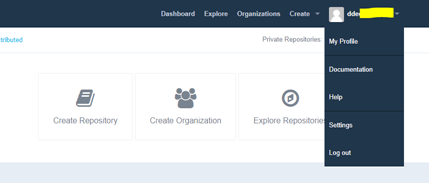
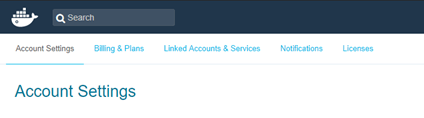
Click on the third tab across the top of the page … Linked Accounts and Services . You will link the Git and Docker Hub accounts such that certain activity in your GitHub account will trigger an automated build of a Docker image (containing the MedRec project) and then store the built docker image in Docker Hub where it can be pulled from into your OCCS environment.
Note that you can link to both GitHub and BitBucket. BitBucket provides a web based software version control system similar to GitHub.
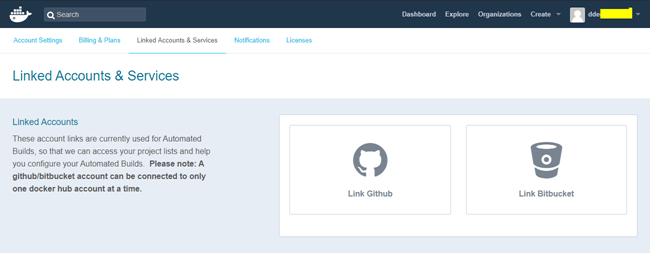
Click the Link GitHub icon.
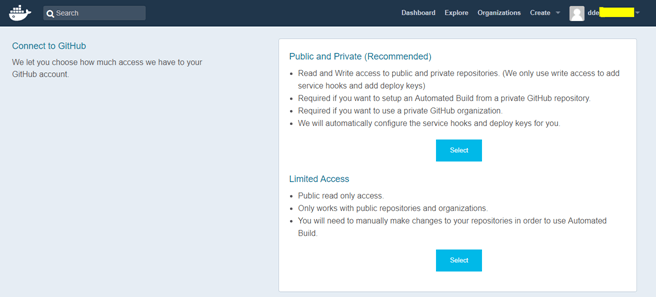
Select the Public and Private (Recommended) option.
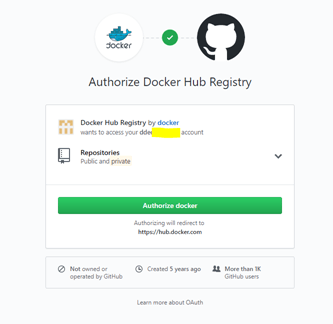
Click the Authorize docker button
to setup the authorisation trust relationship (OAuth) between GitHub and Docker Hub.
Note: If you weren’t already signed into GitHub you would be prompted to do so.

As I was already authenticated to GitHub I could simply Authorise Docker Hub to be part of the OAuth trust.
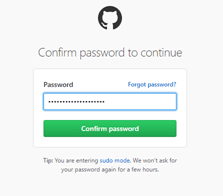
GitHub will request your password confirmation before completing the OAuth setup.
Enter your GitHub password and press Confirm Password.
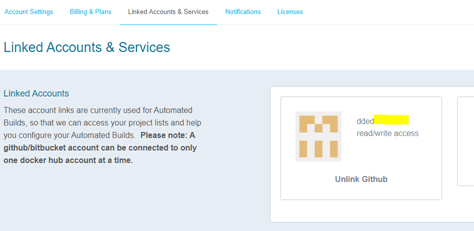
You should see the above image highlighting that your Docker Hub account is now linked to your GitHub account.

Create Automated Build Job to build Docker image

Creating an automated job is a very simple task and the official Docker documentation provides a good explanation;

You can build your images automatically from a build context stored in a repository.
A 
build context is a Dockerfile and any files at a specific location.
For an automated build, the build context is a repository containing a Dockerfile.

Automated Builds have several advantages:

  • Images built in this way are built exactly as specified.
  • The Dockerfile is available to anyone with access to your Docker Hub repository.
  • Your repository is kept up-to-date with code changes automatically.

Automated Builds are supported for both public and private repositories on both GitHub and Bitbucket.

As I want an automatic build of my docker image triggered by GitHub events I need to define my Automated Build.
I already have a Dockerfile in my ankimedrec-apis, so once I configure the automated build I should be good to go.

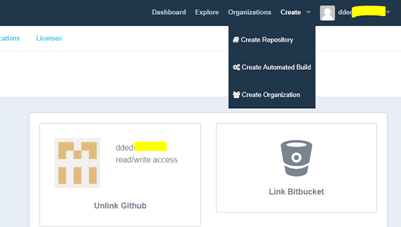
In Docker Hub, under the Create sub menu I chose Create Automated Build. This is where I specify the project git repository that I want Docker Hub to subscribe to for events.
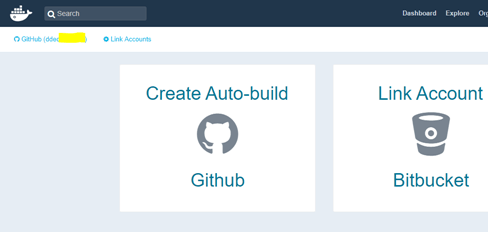
I clicked the Create Auto-build GitHub icon.
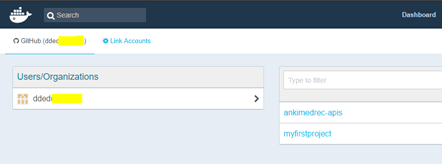
From the list of repositories associated with your git hub account, choose the git repository you forked previously – ankimedrec-apis.
In the Create Automated Build page you can specify a repository name for docker image but I suggest that you accept the default repository name so that it matches the Github repository name. You can enter a description such as … “Docker build for ankimedrec-apis repository.”
Note: The description field has a 100 character limit.
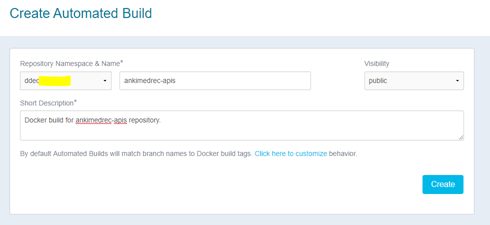
Click the Create button.
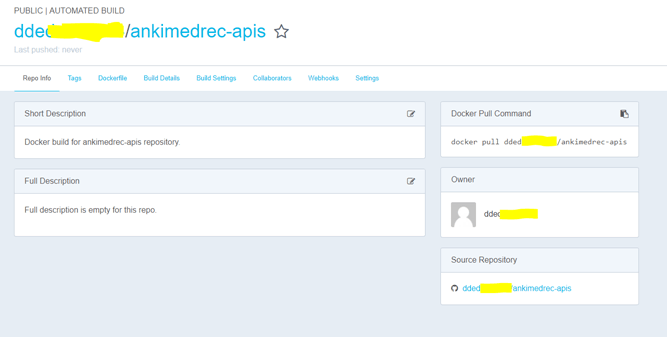
Next configure Docker Hub to do an automated build based on changes to the Master Branch of the git repository

The steps required are very well documented on the Docker Hub site but I have recorded them here so that this blog post is pretty much self-contained. Click the Build Details tab.
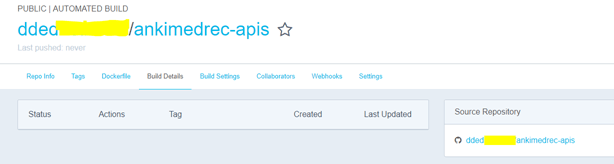

Note that no build of a docker image has been actioned yet.

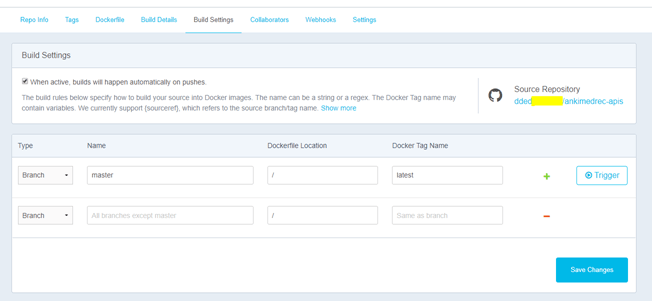
Click on the Build Settings Tab.

Builds of a docker image can be triggered automatically (based on a commit/push of the git repository that is linked to the docker hub automated build.

Builds can also be triggered manually by pressing the trigger button on the Build Settings tab..

Click the Trigger button

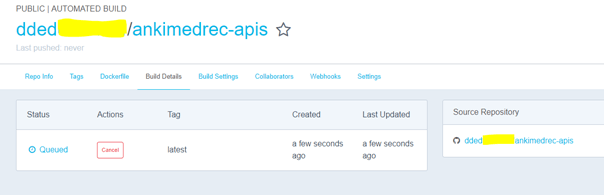
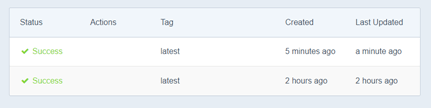
Once a build has been triggered (either manually or automatically) the status of the build job is made available in the Build Details tab.

Within a few minutes, you should see a newly built image appear on the Docker Hub image Dashboard.
Periodically refresh the browser page to see status updates.
Initially the status will be Queued, then Building as per below screenshots.
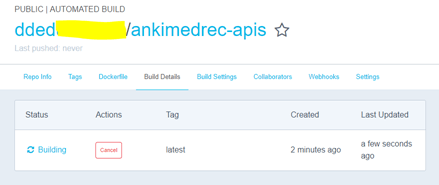
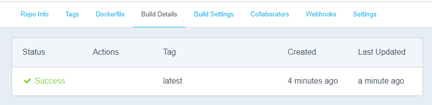


A few bullet points gleaned from the official documentation covering how all this magic works.

  • During the build process, Docker copies the contents of your Dockerfile (from your Git repo) to Docker Hub.
    The Docker community (for public repositories) or approved team members/orgs (for private repositories) can then view the Dockerfile on your repository page.
  • The build process looks for a README.md in the same directory as your Dockerfile.
    If you have a README.md file in your repository, it is used in the repository as the full description.
    If you change the full description after a build, it’s overwritten the next time the Automated Build runs.
    To make changes, modify the README.md in your Git repository.
  • You can only trigger one build at a time and no more than one every five minutes.
    If you already have a build pending, or if you recently submitted a build request, Docker ignores new requests.
  • The Build Settings page allows you to manage your existing automated build configurations and add new ones.
    By default, when new code is merged into your source repository, it triggers a build of your DockerHub image.

If you click on the Repo Info tab within Docker Hub after the initial Docker build has successfully completed, you will see that the README information is now displayed under the Full Description section.
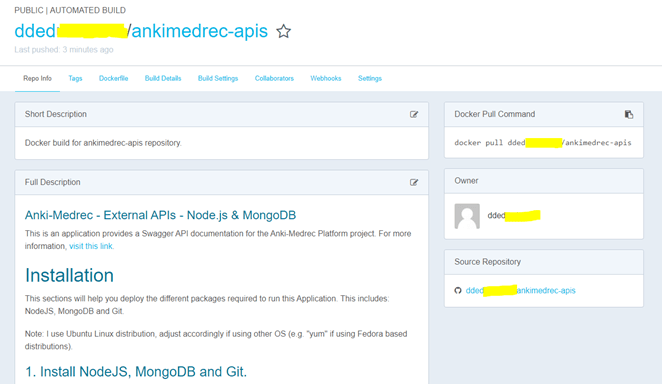

Update a forked ankimedrec-api project file to trigger an automated build job

Next you will update one of the files (occs-stack.yml) in your ankimedrec-apis GitHub repository. The reason for this update two fold;

  1. The above file currently references an incorrect docker image (currently shows it is owned by barackd222).
  2. The update and subsequent commit/push will trigger a fresh build of the docker image

In your browser navigate to your GitHub repository
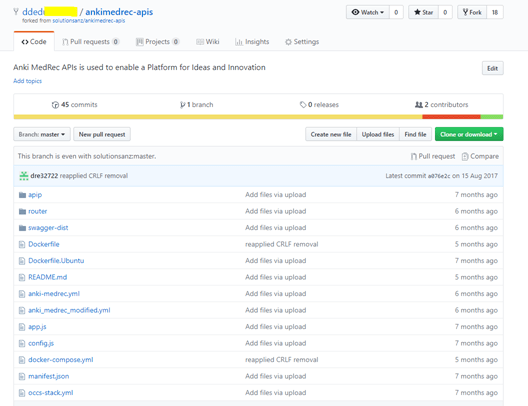
Click on the link to the occs-stack.yml file.
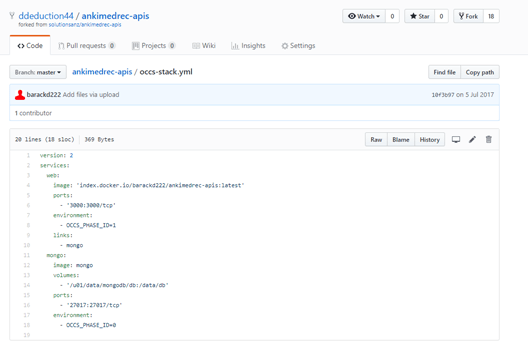
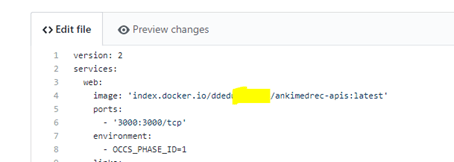
modify the line containing ‘index.docker.io/barackd222/ankimedrec-apis:latest’ to reflect your Docker Hub user (eg jsmith001 ) instead of barackd222 .

Note: you will need to copy the contents of this file later. When you do click the RAW button so the copy doesn’t include the line numbers.
Scroll down the page and enter the following information in the short and long descriptions within the Commit Changes area.
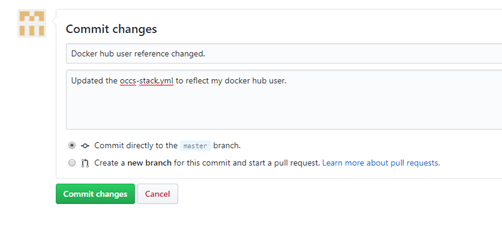
Press the Commit changes button. This will update the Master branch of your GitHub repository. Once this happens you should see soon after that a new Build of the docker image that will contain the ankimedrec-apis application will show on Docker Hub.
Note: Best practice would dictate that we should have development branches and not work directly on the Master branch, but in an attempt to keep this blog post as simple as possible I have cut corners.

In Docker Hub check the build status of your image under the Build Details tab.
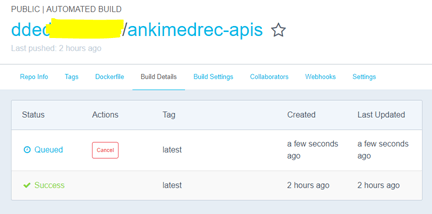
Once you get a successfully built image you are now ready to create a Stack definition within the Oracle Container Cloud Service to pull down and run the docker image you just created.
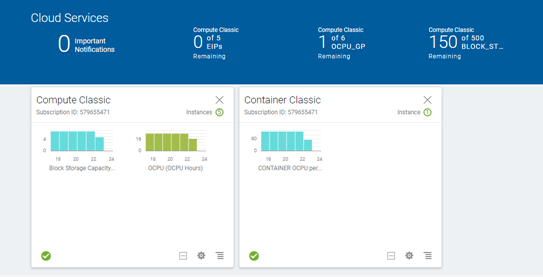
With your Docker image built, login to your Oracle Cloud Account and access the MyServices Dashboard.
Click the hamburger icon on the bottom right of the Container Classic box.
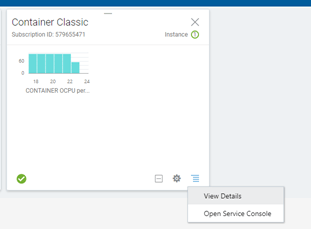
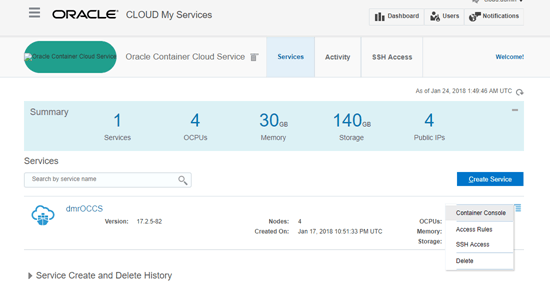
Click Open Service Console, and then click the hamburger icon on the right of the Oracle Container Cloud Service Instance and choose Container Console.
In my example my Service was named dmrOCCS.
Login to the OCCS Container Console using the specified username / password provided by your Cloud Service Administrator.
Note: you will get a Security Exception as at this stage we don’t have a valid certificate recognised by the browser for our OCCS instance.
In Chrome browser the Security Exception will appear as follows.
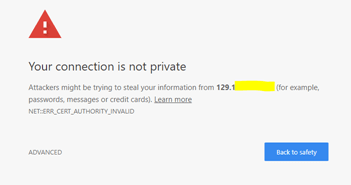
Click Advanced to bring up the process to IP Address (unsafe) link…
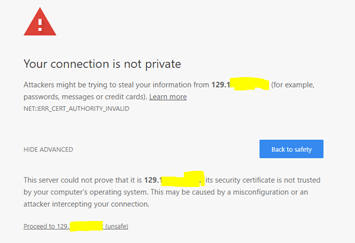
Click the Proceed link

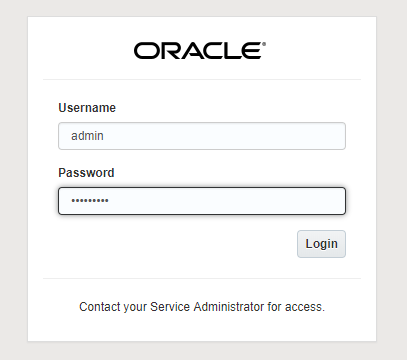
Enter your username (eg admin ) / password for the OCCS Container Console and press the Login button.
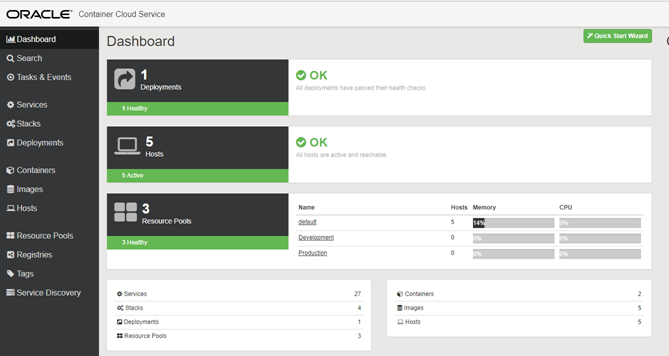
The Container Console should be displayed as per below. The console allows the user to create/edit/browse Services and Stacks, and deploy the Service and Stacks of interest to the Container Service runtime.
To clarify some of the terminology used within the console I have included the following definitions from the official Docker documentation ;
“- An image is a lightweight, stand-alone, executable package that includes everything needed to run a piece of software, including the code, a runtime, libraries, environment variables, and config files.
– A container is a runtime instance of an image—what the image becomes in memory when actually executed. It runs completely isolated from the host environment by default, only accessing host files and ports if configured to do so.
Services
In a distributed application, different pieces of the app are called “services.” For example, if you imagine a video sharing site, it probably includes a service for storing application data in a database, a service for video transcoding in the background after a user uploads something, a service for the front-end, and so on. Services are really just “containers in production.” A service only runs one image, but it codifies the way that image runs—what ports it should use, how many replicas of the container should run so the service has the capacity it needs, and so on. Scaling a service changes the number of container instances running that piece of software, assigning more computing resources to the service in the process.
A stack is a group of interrelated services that share dependencies, and can be orchestrated and scaled together. A single stack is capable of defining and coordinating the functionality of an entire application (though very complex applications may want to use multiple stacks).”

The occs-stack.yml file was included in the ankimedrec-apis repository as it defines the stack (web application service and mongodb database service) that will need to be deployed to OCCS. Services and Stacks need to pulled from a Registry in order for you to be able to deploy the image. An example registry definition for Docker Hub registry is included in the OCCS instance when it is created, but you will create a registry definition to Docker Hub using your Docker Hub credentials.

Define a Registry in OCCS

Click Registries in the left menu.

You should see a link to the docker hub image registry as part of the OOTB experience within OCCS.
You will essentially create a modified copy of this Registry Definition in order for you to target your image that was created previously and stored in Docker Hub.
As I have used this environment, my credentials were already added and the details validated, so we are good to go.
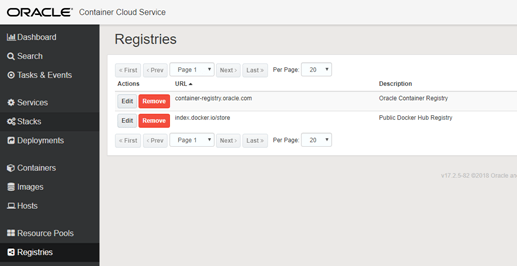
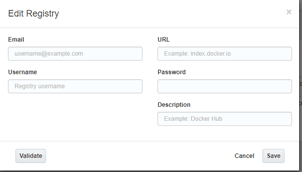
Ener your credentials as per below.
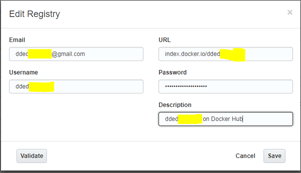
Press the Validate button

Press Save to save the registry configuration.

If the validation step worked successfully, then we are in good shape to pull the built docker image that was created previously from docker hub when we deploy our Stack.
A Stack is a composition of services and in our case the sample application (ankimedrec-apis) consists of a Node.js application service and a MongoDB database service.
After you have successfully deployed the stack within OCCS, you will have end up with two docker containers, one for the web application tier and one for the database tier.
The Stack configuration will deal with the networking between the two containers.

Click on Stacks in the left hand menu.

Click the New Stack button on the right of screen.

Enter a name for your Stack eg MyMedRecAPP then click the Advanced Editor link.
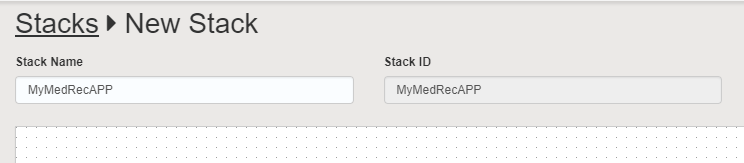
Next copy the contents of the occs-stack.yml you edited and committed previously.
Note: Use RAW format when copying from GitHub repository.
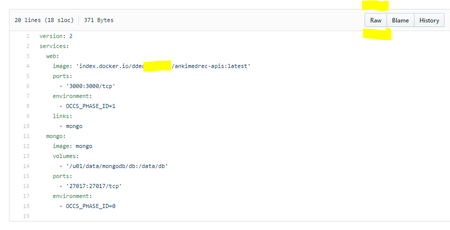
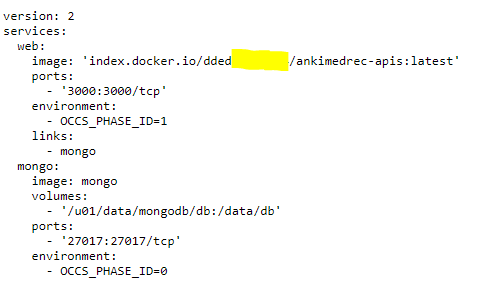
Copy the RAW content and then Paste it into the Advanced (YAML) Stack Editor as per below.
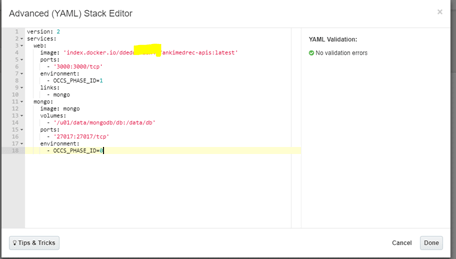
Click Done.

Note: we are only pulling one image from Docker Hub and from the screenshot above you will see that it is the web application tier.
Out of the box, the mongo image is defined as a service within OCCS and the image is available locally.
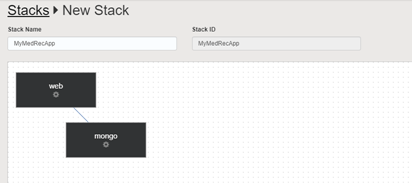
Click Save button.

Your newly created stack definition should appear as per screenshot below;
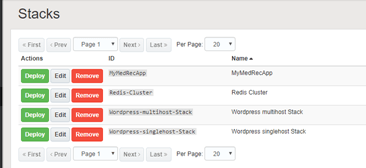
Now that you have created a Stack, your next step is to deploy the Stack to the Container Service.

Click the green Deploy button adjacent to your Stack definition.
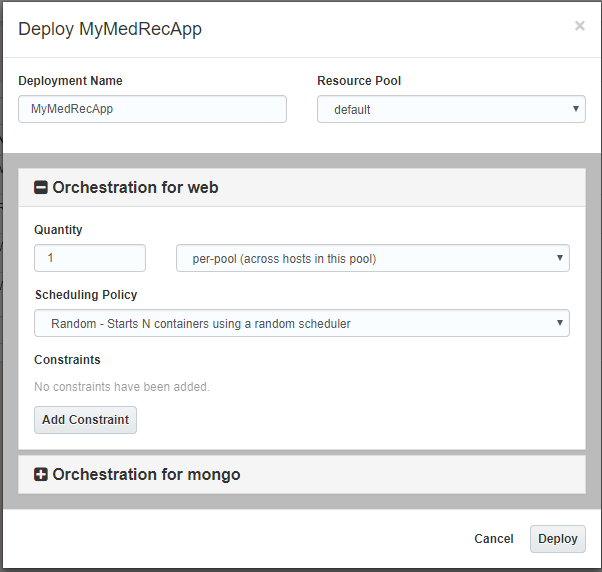
Note that the Oracle Container Cloud Service Classic offers orchestration for the database and application tiers of the MedRec application.
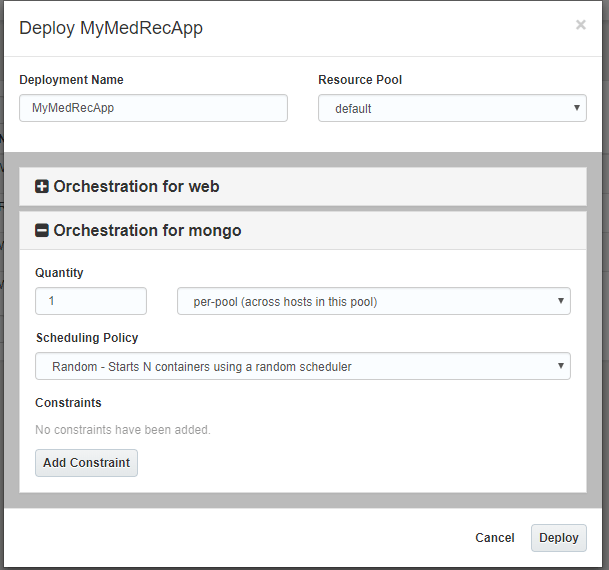
Accept the default values of 1 per-pool (across hosts in this pool) for both the (Node.js) Web Application and (mongoDB) Database Tiers.
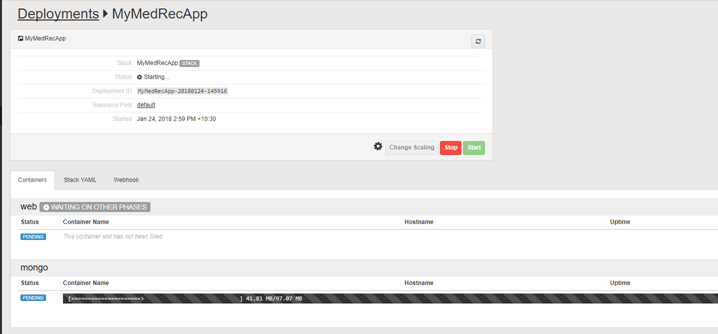
You will see that the required docker images are now being pulled from the local (OCCS) repository (eg mongo image) and / or the Docker Hub repository (ankimedrec-apis image).
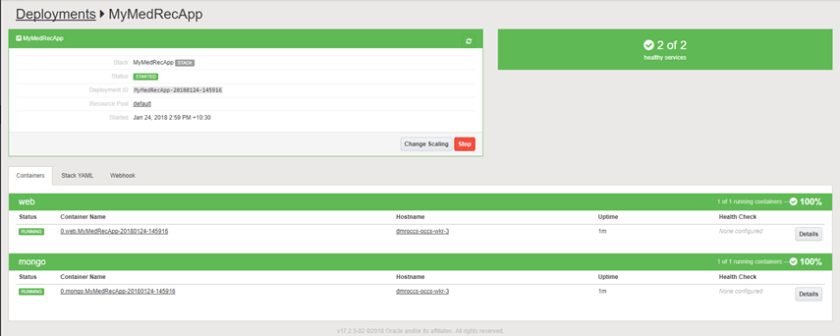
You might see the screen change colour from green to orange and eventually to green as per screenshot below.
Once the containers have successfully started for both mongo and the web application tier then you will see a green RUNNING indicator on the screen.

With the application successfully deployed and running, the next thing for you to do is to interact with the deployed application.
In the sceenshot above you will see the Hostnames for the web application tier (dmroccs-occs-wkr-3).
Click on the hostname for the web tier in order to get additional information about the host, including public IP address and any other containers already deployed on the host.
In the example below you will see that the web app con and mongodb containers are both deployed and running on worker node 3.
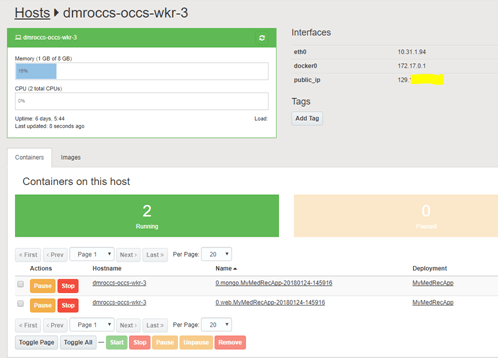
Copy the Public IP address.

In a browser tab enter the following – http://xxx.xxx.xxx.xxx:3000 – where xxx is the IP address of the host you just copied.

You should now see the Anki-MedRec Application running.
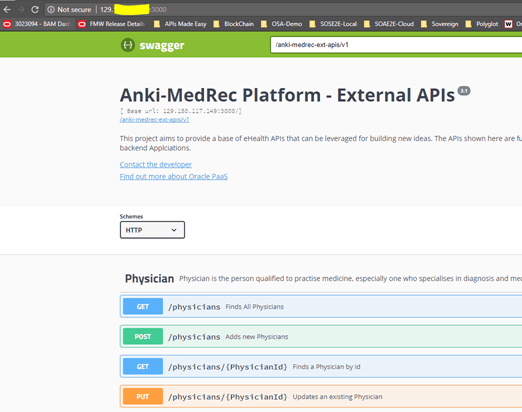
Click the Blue GET button adjacent to /physicians, we will execute this to return any Physicians that have been created and stored within MongoDB.
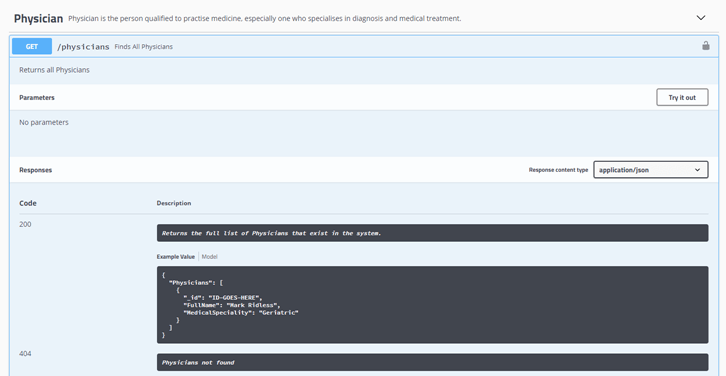
Click the Try It Out button.

Click the Blue Execute button.

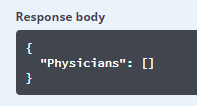
Note that the Response Body is an Empty Array.
Click the Green POST adjacent /physicians which will allow use

Click Try It Out button

You can now edit the sample Physician data or leave it as is ..
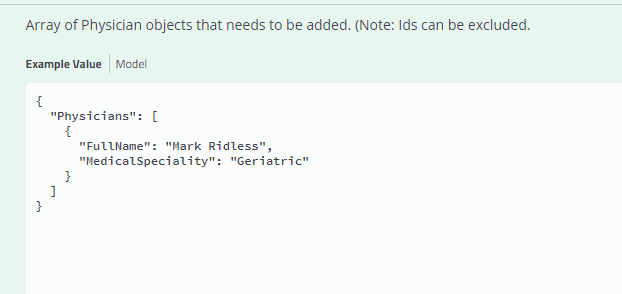
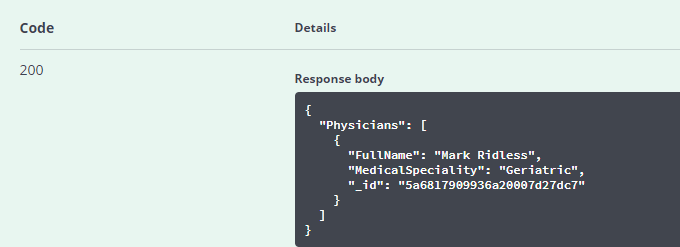
Click the Execute button

You should see that an HTTP-200 (Success) has been returned.
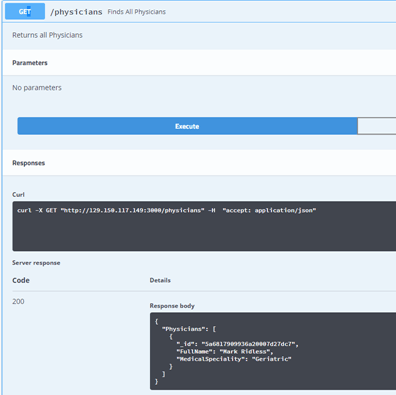
Now repeat the steps for the GET /physician to see if the data is retrieved.
Finally, within the Container Console, click on Images to see the image that was pulled from Docker Hub.
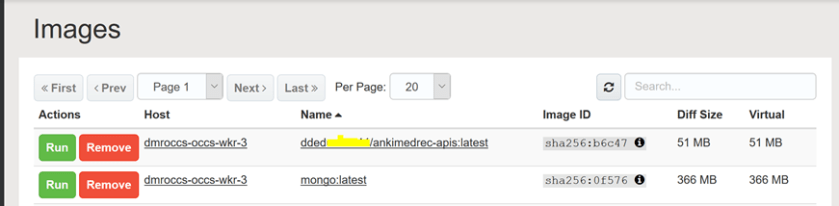
As a logical next step and in order to understand the steps required to cover the design of the secured API layer using Apiary.io and to secure the REST APIs that are part of the AnkiMedrec application using the Oracle API Platform check out this blog.

I hope you found this useful.

REST Enable Anything?

I think I’m living in a strange world.  With all the technology swirling around my head I find myself asking, “I wonder if I could REST enable that” or “I wonder if I could automate that device with micro services.”  Yes, I am crazy!!!

Case and point:  I bought my six-year-old son a remote control digger.  It wasn’t terribly expensive, but it was also not terribly good.  The remote control was cumbersome and it couldn’t do very much.  The “I wonder if I could automate that” in me decided to make a few modifications.  That led to a few more modifications…. The final result was a pretty cool remote control digger!

DiggerImage.jpg

I mention it here on this blog because I also asked the question “I wonder if I could REST enable that” too.  Yes… yes I can.  What am I going to do with that?  I have no idea.  I have grand ideas of being able to say, “Alexa, dig a swimming pool in the back yard” followed by the wonderful Alexa reply, “Ok.”

Here is a link to all the details on this project in case anyone would like to do something similar.

http://convert-rc.blogspot.com.au/2017/12/digger-ps3-convert.html

Thanks for reading.

-John

How to Customise (reskin) API Platform Developer Portal

Information is power and monetisation of data is a common theme in the corporate world today.  One of the common use-cases for the API Platform is to leverage corporate services and data and provide it to a broader internal and external development community.  Control is kept in-house through security, policies, throttling, etc, but it dramatically increases the pool of developers working with our services.

API Platform is a great tool for this, but if I’m going to expose services to a developer community, I don’t really want to have an Oracle branded developer portal exposed.

fortunately, rebranding the developer portal is as easy as one, two, three! Continue reading “How to Customise (reskin) API Platform Developer Portal”