OCI Application Performance Monitoring for PeopleSoft


The OCI Application Performance Monitoring (APM) service enables administrators to monitor and observe the PeopleSoft web applications.

It provides deep visibility into the application performance from end-user experience down through to the application server requests.

For many customers, the PeopleSoft (PSFT) Application is critical to business operations. With OCI Application Performance Monitoring (APM) service, administrators can:

  • Analyze all end user experience with accessing PeopleSoft web pages.
  • Trace transactions across various components and isolate problems to the impacting application or infrastructure tier.
  • Has ability to drill into application code.
  • Generally, APM tools cannot drill into the SQL code for the PeopleSoft application. This inability occurs is because, the SQL call is performed in the Tuxedo layer. However, OCI APM service offers a unique feature to overcome this limitation. It can perform instrumentation of outbound JOLT calls from WebLogic to Tuxedo. This helps at least understand how much time is spent in this layer.
  • Easily Capture End Username for user sessions without modifying application code
  • Search in context based on PeopleSoft attributes including:
    – Portal Name
    – Portal Object Name
    – and more
Continue reading “OCI Application Performance Monitoring for PeopleSoft”

Deploying OCI APM Service for Optimal EBS Application Observability


The OCI Application Performance Monitoring (APM) service allows administrators to monitor and observe the E-Business Suite web applications.

It provides deep visibility into the application performance from end-user experience down through to the application server requests.

For many customers, the E-Business Suite (EBS) Application is critical to business operations. With OCI Application Performance Monitoring (APM) service, administrators can:

  • Analyze all end user experience with accessing EBS web and form pages.
  • Trace transactions across various components and isolate problems to the impacting application or infrastructure tier.
  • Has ability to drill into application code and SQL calls to the database
  • Easily Capture End Username for user sessions without modifying application code
  • To search in context, you can use out of box EBS attributes auto generated from traces. These attributes include:
    – EBS Function Name
    – EBS Class Package Name
    – EBS Forms Name
    – and more ….
Continue reading “Deploying OCI APM Service for Optimal EBS Application Observability”

How To Capture Client IP in OCI Application Performance Monitoring

The Oracle Cloud Application Performance Monitoring (APM) service collects end user trace sessions for Real User Monitoring (RUM). By default the client IP is not captured for the end user session. For some customers, default Geolocation info (eg. Country, Region, City) may be sufficient for end user monitoring. However, for those who want to collect Client IP information as well, to enable this setting please see the following example.

Enable Client IP Collection for End User Session

For every End User Session, we want to capture the Client IP address location.

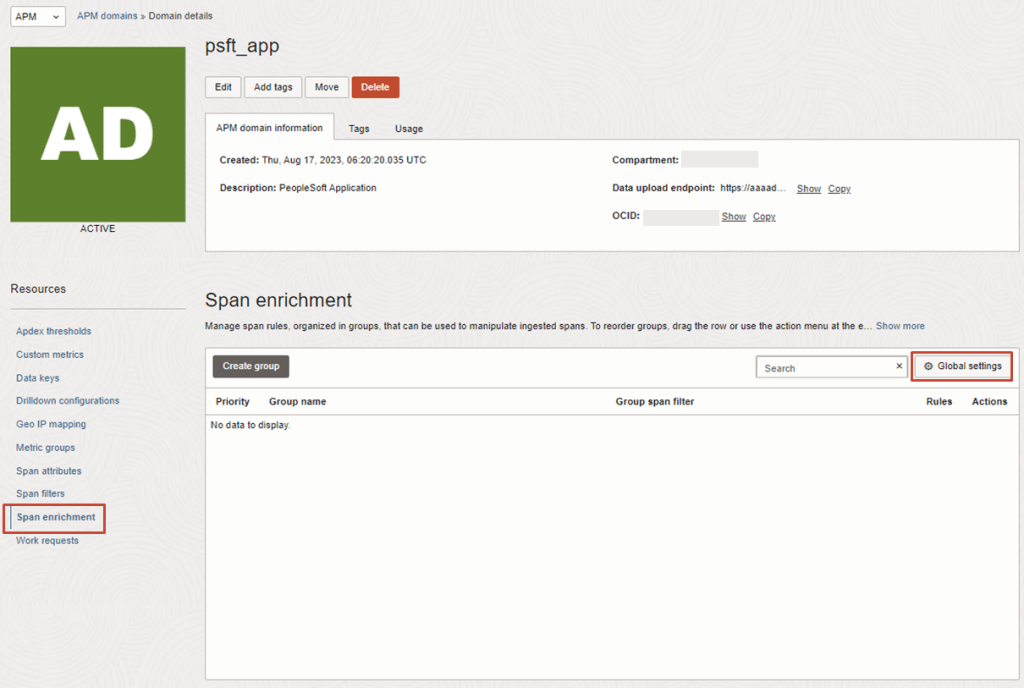
1. To do this, in the OCI Console, navigate to the OCI APM Service

OBSERVABILITY & MANAGEMENT > APPLICATION PERFORMANCE MONITORING > ADMINISTRATION

2. Then navigate to:
APM DOMAINS > [Select APM Domain eg. psft_app] > Span Enrichment > Global Settings

Continue reading “How To Capture Client IP in OCI Application Performance Monitoring”

Guide to OCI Custom Metrics and Monitoring Options

OCI gives you flexibility to create custom metrics when no out of box metrics are available. There are two options on how this can be achieved. Depending on your use case let’s take a look at which choice works for you.

RequirementsOCI Monitoring Service OCI Stack Monitoring Service
View Metrics in Monitoring Service
YesYes
Create AlarmsYesYes – Automatically, emitted to Monitoring Service once Metric Extension is enabled for target resource
Metric DimensionsYesYes
Frequency CollectionControl by client API execution, cron job, scheduler or agentYes – can be configured when creating the metric extension.
Collection can be directly executed by OS command, Script(eg. Shell, Python), SQL, JMX or HTTP (REST API) Custom Metrics can be published using OCI CLI or REST APIYes – Use Metrics Extensions
Centrally manage Custom Metrics for single or multiple resources – Enable, Clone, Export/ImportYes
Define collection based on Resource Types (eg. apache_http_server, apache_tomcat, oci_oracle_db, ebs_instance, host_linux, host_windows, miscrosoft_iis, sql_server etc…)Yes
Baseline and Anomaly detection in Metrics using ML based algorithms Yes
Perform correlation across multiple metricsYes
Apply Metric Extension lifecycle phases: Test and Validate, PublishYes
Custom Metric Collection from OCI, on-premise and/3rd party CloudYesYes
Alert against log data from OCI Logging AnalyticsYes – The Detection Rule needs to be created in OCI Logging Analytics
Custom Metric collection using Prometheus Exporter YesYes
Continue reading “Guide to OCI Custom Metrics and Monitoring Options”

Stack Monitoring for EBS

The Stack Monitoring service is a recent addition to the OCI Observability & Management family.

If you are running Oracle E-Business Suite (EBS) application today you will now be able to perform an auto discovery of all related resources in OCI Stack Monitoring. It will collect metrics specific for your EBS resources as well as ability to perform correlation across the EBS application and infrastructure stack as well as enable proactive alerting.

Components that will be auto discovered includes:

  • Concurrent Processing Node
  • Workflow Manager
  • WebLogic
  • Forms

Today, Stack Monitoring service supports EBS version 12.1 and 12.2 deployments hosted on OCI, On-Premise or Third Party Cloud (eg. AWS, Azure). 

In the example, I will show you how you can configure Stack Monitoring for EBS version 12.2.

Continue reading “Stack Monitoring for EBS”

A Better Mechanism for Periodic Functions Invocation?

Update: There is now an even better way to do this, with first-class support from the OCI Resource Scheduler – just set it to ‘Start’ your Function, and it will be invoked based upon the configured schedule.

Functions in Oracle Cloud Infrastructure are great. As a serverless execution environment with pre-built logging, metrics, etc. it allows developers to simply focus on their code and not worry about all of the supporting infrastructure, while still providing a lot of flexibility through the use of container primitives. As great as Functions are, they are reactive, they can only be invoked and can’t natively be configured to be executed in a spontaneous or scheduled manner. Often this won’t matter, as Functions will be invoked directly or indirectly by users, or in response to events, but sometimes you simply need a bit of code to run periodically.

Continue reading “A Better Mechanism for Periodic Functions Invocation?”

Using OCI Burstable Instance

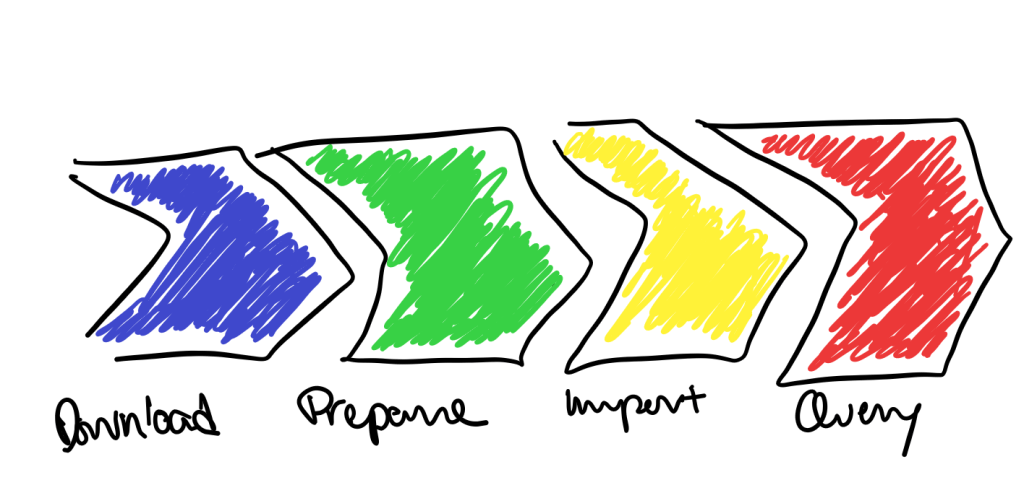
With the work that I’ve been doing with Open Street Map (here), I’ve been provisioning Pelias (here) – an open-source implementation of geocoding. This architecture is not small (consisting of 10+ docker images, and potentially 100+GB of raw geo data) especially if you are looking to geocode the whole world. The workload (or pipeline) had 4 main stages – download, prepare, import and query.

  • Download – to get the raw data sources
  • Prepare – to get the raw data into a format that can be easily imported
  • Import – to import the data into the elastic search (which is the backend)
  • Query – to accept geocode queries

Each of these stages have different performance characteristics and required different resources. The main thing that I’m looking at here is the use of compute. The need for compute during the prepare and import stages is significantly different from the download and query stages. I’m also not confidently in terms of when or how much I need.

And this is why I configured a burstable instance.

Here’s a couple of things to know …

  • There is a baseline utilisation OCPU. Consider this as a the minimum compute you want. For my scenario, it was primarily how much compute that I needed for the download and query stages.
  • There is full utilisation OCPU. Where this is can be 2x or 8x the baseline utilisation. (in the terms of the documentation – the baseline utilisation can be either 12.5% or 50% of the full utilisation OCPU). For my scenario, it was primarily the prepare and import stages that needed the additional compute.
  • The increased capacity is based upon the CPU utilisation metrics to determine whether to burst.
  • The average CPU utilisation for the month needs to up to the baseline utilisation OCPU.

Burstable Instances billing is known. It doesn’t come with Bill Shock.

You can find out more about Oracle Cloud Infrastructure burstable instances (here). If you want to try this out yourself or work on your own application, sign-up (here) for the free Oracle Cloud Trial. I’d be interested to hear your experiences and learn from others as well. Leave a comment or contact me at jason.lowe@oracle.com if you want to collaborate.