Teaching how to use Bitnami to deploy any Image into Oracle Public Cloud

Recently, I was challenged at work, to make my drone take off, using a simple voice command via “Alexa”. Given this challenge came from my boss, I decided to happily accept it. I ended up writing some simple NodeJS code that interfaces with my drone and used a series of new Echo skills and a Home Assistant bridge to easily command my drone to take off and follow simple orders, something like “Alexa, please take off my drone and make it back flip twice“.

After some hours and many coffees, I got to the point that I was done and ready to show my working demo. However, I needed to take my NodeJS code and put it somewhere in the cloud to run it. I had a few options, like deploying my code into Oracle Application Container Cloud Service, which runs NodeJS natively over docker containers, but given that I have done this in the past and I was in an “adventurous mode”, I decided to try something new.

I wondered how simple would it be to use Bitnami to spin up a new NodeJS VM in Oracle Public Cloud… Well, I was amazed how pleasant the experience was, so I decided to capture this excitement in a quick blog for you to try as well.

Continue reading “Teaching how to use Bitnami to deploy any Image into Oracle Public Cloud”

Teaching how to use MongoDB and expose it via NodeJS APIs


Hi, we are starting to use different technologies to build complex scenarios around APIs. It’s getting common to use popular NoSQL DBs like MongoDB.

For this reason, I decided to build this very easy to follow blog that will help you get started with MongoDB and build simple REST APIs using NodeJS via the Express module.

The use case is simple, we are going to build a MongoDB to store users information that eventually (in a future blog) we are going to use to send SMS and Voice call notifications… But for now we are keeping things simple, we are starting by demystifying the use of MongoDB with NodeJS.

The code that sends the SMS/Voice call notifications in NodeJS via Twilio is out of the scope of this blog, but if you want to use it, you can find it here.

Pre-requisites


This blog is about simplicity, so we are going to build a simple HelloWorld sample that starts from scratch and interacts (GET and POST) with a MongoDB via Express APIs.


Installing and playing with MongoDB


In this section, I am going to show you how to install and get your MongoDB up and running. This is going to be the DB that we are going to use in a future blog to send SMS and voice call notifications to people.

Note: I am using Ubuntu, adjust if using other OS (e.g. yum if using OEL/RH):

sudo apt-get install mongodb

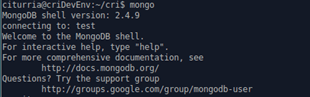
  • Validate the installation by running mongo client – This should connect to the running MongoDB Server
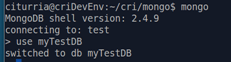
  • In the mongo client prompt, create a simple test database called myTestDB:

    use myTestDB


  • The database doesn’t really exist until we add some data. The best thing of MongoDB is that you store JSON payloads into it. This makes it very friendly when interacting with APIs.


    In our case, we want to build a notification service and we want to store the contact details of the recipients. Something like:


    {“name”:”Carlos”, “mobile”:”+615550505″, “msg”:”Hello World”}


    Note that we are not defining ids, mongoDB will take care of it.


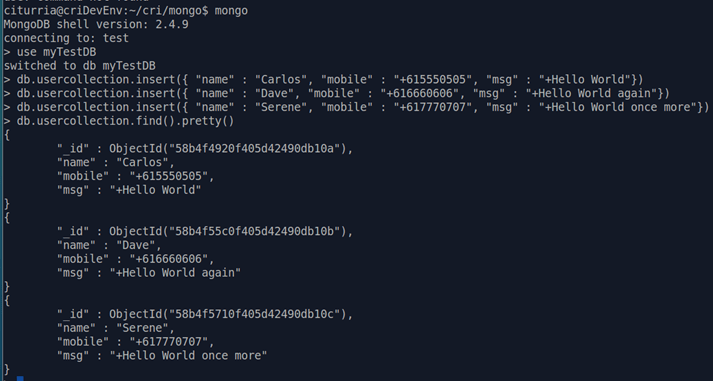
  • Still within the mongo client db type the following inserts each followed by ab enter:


    db.usercollection.insert({ “name” : “Carlos”, “mobile” : “+615550505”, “msg” : “+Hello World”})

    db.usercollection.insert({ “name” : “Dave”, “mobile” : “+616660606”, “msg” : “+Hello World again”})

    db.usercollection.insert({ “name” : “Serene”, “mobile” : “+617770707”, “msg” : “+Hello World once more”})


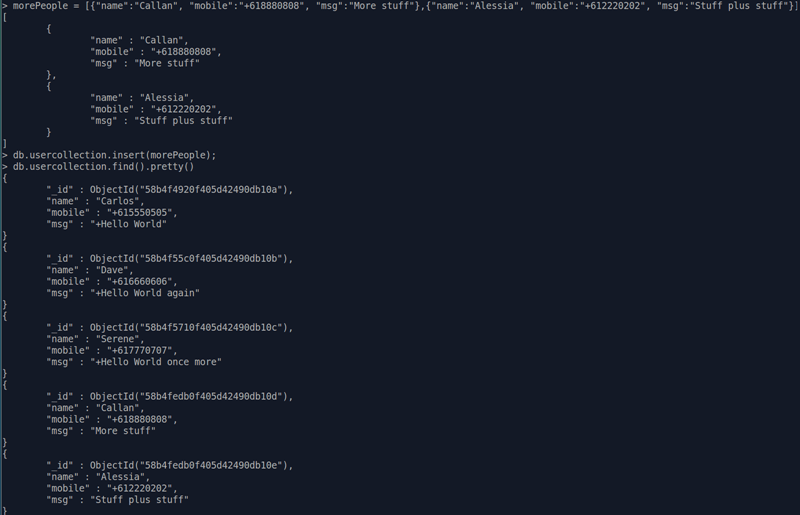
  • Now, simply retrieve the inserted collection

    db.usercollection.find().pretty()

  • You can also add a JSON array of JSON payloads, so that you can insert a bulk of entries to MongoDB. For example:


    users = [{“name”:”Callan”, “mobile”:”+618880808″, “msg”:”More stuff”},{“name”:”Alessia”, “mobile”:”+612220202″, “msg”:”Stuff plus stuff”}]


    db.usercollection.insert(users);


  • Once again, retrieve the inserted collection:

    db.usercollection.find().pretty()

  • You can also use the usercollection object to remove individual entries by _id:

    db.usercollection.remove( {“_id”: ObjectId(“ID_GOES_HERE”)});

  • To completely clean up all your entries, you can simply use:

    db.usercollection.remove()


  • If you only want to use mong client to switch to a MongoDB and print a specific collection you can do this:


    • From Linux shell:             mongo [db_name]
    • Then, from within the mongo client:

      c = db.[collection_name];

      c.find().pretty()

  • To list all Collections in current db:

    db.getCollectionNames()

  • If you are using a MongoDB that requires authentication, you might need to create a specific user(s) under specific databases. For this follow the next steps:


  1. Using mongo client, login to admin db as administrator:


    mongo admin –username root –password [GIVEN_PASSWORD]


    Note: If using Bitnami, [GIVEN_PASSWORD] is the same as the OS root password.


  2. Switch to your MongoDB database:


    use [DATABASE]


  3. Create a new user(s)


    db.createUser(

    {

    user: “USER-GOES-HERE”,

    pwd: “PASSWORD-GOES-HERE”,

    roles: [ “readWrite”, “dbAdmin” ]

    }

    )


    Note: Substitute USER-GOES-HERE and PASSWORD-GOES-HERE with your own values.


  4. That’s it, you can now use that username and password to authenticate and grant read and write access to your db. If using monk in NodeJS as shown below in this blog, make sure to add the credentials in the connection string. A simple way to achieve this is by adding “USER:PASSWD@” before the server name.


    For example:


    var db = monk(USER + ‘:’ + PASSWD + ‘@’ + MONGODB_SERVER + ‘:’ + MONGODB_PORT + ‘/’ + DB_NAME);


For more information: https://docs.mongodb.com/manual/reference/mongo-shell/


Ok, our MongoDB is behaving well. Let’s run it together with our Express NodeJS code.


Building a simple Express JS API that interacts with a MongoDB


Now that we have a running MongoDB server running, let’s build a simple NodeJS code that will expose simple Express REST APIs to interact with your MongoDB.

I am going to explain below those snippets that require explanation, however before continuing make sure that you have downloaded/cloned the NodeJS project found here: https://github.com/barackd222/s2v-iia-nodejs-mongodb-crud-demo

The bits that you need to pay special attention from the NodeJS code:
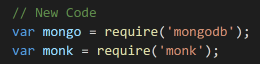
  • app.js – This is a very standard Express JS code that starts a service listening in a specific port. In terms of MongoDB, notice the following snippets:


    • You need to require mongodb module, as well as monk.

  • Monk is going to give you the ability to connect to a MongoDB running somewhere. Think of it as a JDBC connection, in the relational database world, if you like.

  • Configuring the Express app to add the Monk db as part of it, so that it can be accessed within the request variable in each REST API.
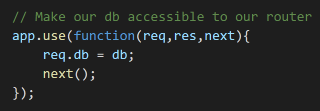
 

  • The rest is just adding the right headers for the requests and starting the listening service.
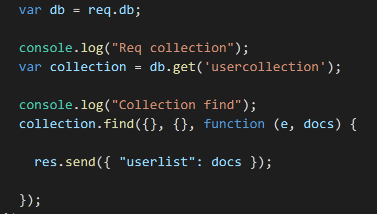
 

  • mongoDBCrudAPIs.js – This file is where I define my REST APIs. At the time of writing this blog I just added 2 APIs, one that GET all Users in the MongoDB and the other that POST a new user.


    • GET /users – This is a very
      typical Express GET API. Inside the body though that’s where we:
      • Retrieve the monk DB connection that points to the MongoDB
      • Builds the Collection object as we did in the MongoDB console before
      • Runs a Find ALL function on the collections object that it built in the previous step
      • Sends back the resulting JSON payload as the API response. Notice that you can iterate and do whatever you want with this result

  • POST /user – Once again, this is a very typical POST Express API that retrieves some JSON body elements from the request. In terms of MongoDB, the bits that are worthwhile showing are:
    • Retrieve the monk DB connection that points to the MongoDB

  • Builds the Collection object as we did in the MongoDB console before
  • Uses the collection to insert the new user in a JSON format
  • Then it just handles errors if any. Otherwise return a successful response
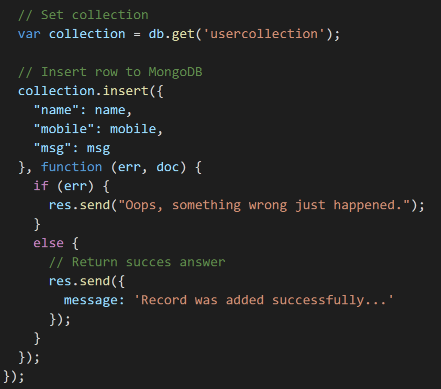

  • Package.json – Make sure to add the right modules, so that you can run your NodeJS Application without having to manually install dependencies. In this case I am using:
    • express – To build the REST APIs
    • mongodb – To bring internal MongoDB libraries
    • monk – To help establish the MongoDB db connection
    • body-parser – To parse the incoming JSON requests


Let’s test our NodeJS Application

If you have been following this blog, at this point you have a few users in your “myTestDB” MongoDB, that you enter via the mongo client command line earlier.

  • I am using Postman to call the APIs, you can use your preferred test REST client. Let’s first try to retrieve these users.
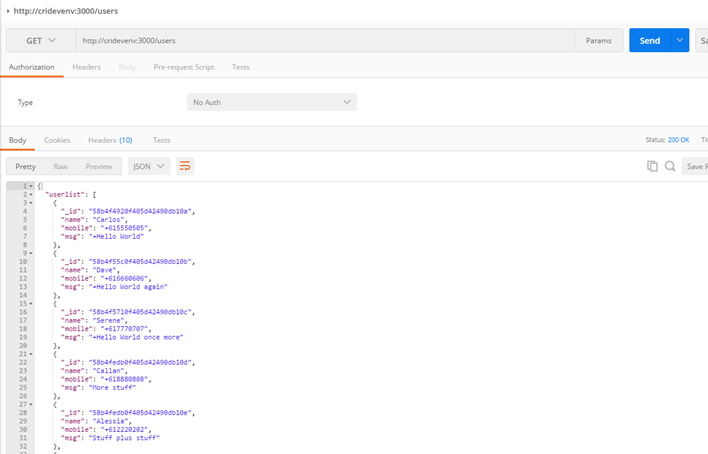
  • Great job, now invoke your POST API to create a new one. In my case this is the JSON that I am sending:

{“name”:”Jason”,

“mobile”:”+6115791010101″,

“msg”:”Hi. This message comes from POSTMAN “}


Note: Make sure to add your header Content-type set to application/json
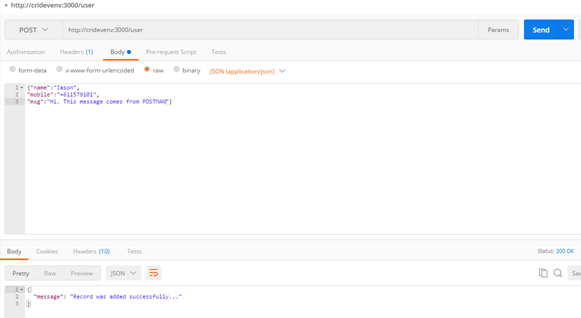


  • Now call the GET
    /users API again and make sure your new user is retrieved
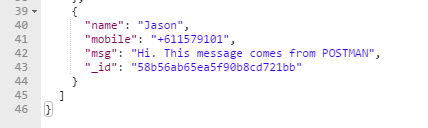
Congratulations, you just managed to do very basic, yet powerful tasks using MongoDB as the backstore and NodeJS to expose interactive REST APIs via Express JS


If you have any comment, feel free to contact any of the authors of solutionsanz.blog – We are here to help you!

Thanks,



Teaching how to use Developer Cloud Service to promote ICS Integrations into new Environments

Why not to have the best of the two worlds? That is, a simple web UI that allows you to easily integrate your SaaS and On-Premise applications, as well as a mature DevOps tooling, that allows you to store your integrations in a corporate version control repository and fully automate your deployments, continuous integration and continuous delivery of your integration projects.

Well, in this blog I am going to show you how simple it is to use Developer Cloud Service to manage your ICS Integrations in a DevOps fashion.

That is:

  1. DevOps person pushes a change in an ICS Integration into the corporate Git repository,
  2. A build task is triggered based on a Git code change being detected. Hudson will automatically trigger a build task,
  3. Hudson will build and package the ICS Integration and archive the result as a release for future deployment,
  4. A deployment task is triggered to deploy the ICS Integration into a configurable target ICS environment.
  5. Optionally, we could run tests and report status, to ensure the new code release is functional as expected.

Continue reading “Teaching how to use Developer Cloud Service to promote ICS Integrations into new Environments”

Teaching how to integrate Sales Cloud with Integration Cloud Service

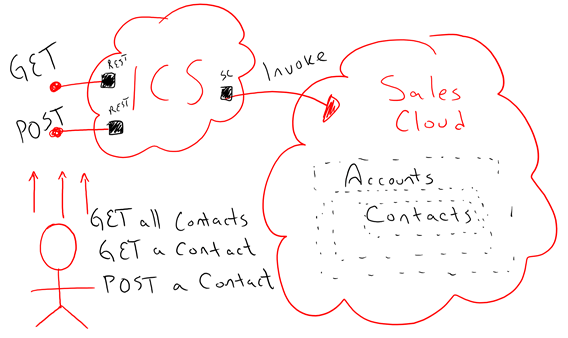
In this blog, I am going to show how simple it is to use ICS (Integration Cloud Service) to integrate to Oracle Sales Cloud easily and quickly. The steps that I am going to show are tailored for Sales Cloud, but in reality, they are almost the same steps to integrate virtually any Application whether it is on premise or in the cloud.

Using ICS Sales Cloud connector, allows you to fully introspect into all Business objects, custom objects and Services while building an Integration, so you can literally choose depending on your needs the object to interact with, either to Create, Read, Update or Remove; specific queries, services, etc. In this case I am mainly going to work with the “Contact” Business object that belongs to a particular “Account”.

This is the use case that I am going to develop:

  • REST API to create (POST) new a new “Contact” for an existing “Account” in Sales Cloud
  • REST API to retrieve (GET) all “Contacts” from an existing “Account” in Sales Cloud
  • REST API to retrieve (GET) a specific “Contact” from an existing “Account”, given a unique identifier in Sales Cloud

Continue reading “Teaching how to integrate Sales Cloud with Integration Cloud Service”

Teaching how to use the Integration Cloud Service Connectivity Agent

I have been Integrating applications for the last 15+ years and normally every integration is a new challenge. It really doesn’t matter what technology or standards you use or have used in the past, the reality is that integrations come a new set of challenges. In the past few years the pre-built adapters have simplified in a way these challenges, but with hybrid architectures a new set of challenges comes to the picture, for example; connectivity, security, simplicity, message reliability, etc.

I was very excited when I learned the way Oracle Cloud is using to solve this problem. It is with something called Oracle ICS (Integration Cloud Service) Connectivity Agents, that basically get installed close to the Application being integrated, for example on-premise or in IaaS. Then using ICS in a browser, you can introspect into the backend application as if it was close to ICS, in fact with this solution ICS is completely oblivious of the location of the actual backend application. The Connectivity Agent will in this case connect internally with the back-end applications and communicate to ICS by pushing out messages via Messaging Cloud Service.

Continue reading “Teaching how to use the Integration Cloud Service Connectivity Agent”

Teaching how DevOps Automate your SOA workload using Oracle Public Cloud

This is a 3-part series blog that teach with plenty of detail how to automate building, assembling, deploying and testing SOA workloads into SOA Cloud Service either using a Local Development Environment or Oracle Developer Cloud Service, which is part of Oracle Public Cloud. The reason I decided to write these as a series of consecutive blogs is to allow a cohesive series of steps to ensure a completely brand new development environment could be fully configured to automate building and deployment of SOA Application.

There are 3 main ways you can build, package, deploy and test your SOA Applications in SOA Cloud Service using Oracle Developer Cloud Service and a series of technologies like Maven, Hudson, Git, Etc.

Continue reading “Teaching how DevOps Automate your SOA workload using Oracle Public Cloud”

Teaching How DevOps can use Oracle Developer Cloud Service to Automate your SOA Workloads Deploying into SOA Cloud Service

This is a 3-part series blog that teaches with plenty of detail how to automate building, assembling, deploying and testing SOA workloads into SOA Cloud Service either using a Local Development Environment or Oracle Developer Cloud Service, which is part of Oracle Public Cloud. The reason I decided to write this as a series of consecutive blogs is to allow a cohesive series of steps to ensure a completely brand new development environment could be fully configured to automate building and deployment of SOA Application.

Continue reading “Teaching How DevOps can use Oracle Developer Cloud Service to Automate your SOA Workloads Deploying into SOA Cloud Service”

Teaching How DevOps Can Automate Testing of your SOA Workloads

This blog will teach you how to use Oracle SOA 12 Testing Framework to “Unit test” and “System test” your SOA workloads as part of an automated Continuous Integration approach. This will showing how powerful it is to use the out-of-the box SOA Test framework and automate with Maven the full cycle of a SOA Project, including SOA project cleaning, compiling, packaging, deploying, testing and reporting.

Continue reading “Teaching How DevOps Can Automate Testing of your SOA Workloads”

Teaching How DevOps can Locally Automate your SOA Workloads Deploying into SOA Cloud Service

This is a 3-part series blog that teaches with plenty of detail how to automate building, assembling, deploying and testing SOA workloads into SOA Cloud Service either using a Local Development Environment or Oracle Developer Cloud Service, which is part of Oracle Public Cloud. The reason I decided to write this as a series of consecutive blogs is to allow a cohesive series of steps to ensure a completely brand new development environment could be fully configured to automate building and deployment of SOA Application.

Continue reading “Teaching How DevOps can Locally Automate your SOA Workloads Deploying into SOA Cloud Service”

Teaching How to Provision an Oracle Java Cloud Service Environment Using REST APIs

We just covered in previous blogs how to provision environments with components such as: Database Cloud Service, Java Cloud Service, SOA Cloud Service (SOA, OSB, SOA & OSB, API Manager), etc. via the various Cloud Services Console web pages.

In this section I am going to demonstrate how to provision the same type of environments, this time a Java CS environment using REST APIs. REST APIs are very well documented for the vast portfolio of Oracle Cloud Services. For more information refer to http://docs.oracle.com/cloud

Notice that being able to script, version and test the creation of environments via REST APIs, can facilitate the life cycle of not only software, but also environments, which is a crucial aspect in devops.

Continue reading “Teaching How to Provision an Oracle Java Cloud Service Environment Using REST APIs”