Oracle Integration & AI: Accelerating OIC Development Phases

In the evolving digital era, Oracle is embedding AI deeply into its Integration platform to streamline, automate, and enhance the development process. Rather than seeing AI as an add-on, Oracle’s strategy ties together infrastructure, development tools, and application integration so that teams can build faster and smarter.

Oracle’s AI-Innovation in Integration can be declined in 2 ways.

  1. How the AI can be a value add for OIC developers
  2. What OIC can offer in the Agentic AI area to simplify and accelerate AI adotpion in enteprise projects

In this article, I’m focused on the first point and I will try to explain how developers can take advantage of such AI features.

What coming from Oracle AI World event , recently occurred in Las Vegas, gave us the opportunity to be aware of:

  • Embedded AI capabilities: Oracle Integration includes embedded AI that helps with creating integrations (supported by using natural language), defining schedules, writing documentation about integration components, generating queries (e.g., FHIR, ATP), and resolving errors in B2B .
  • Connection with OCI AI Services and OpenAI: The platform allows use of Oracle Cloud Infrastructure (OCI) AI Services or OpenAI large language models in integrations. That means processes can use text/image processing, content generation, analysis, etc., directly as part of integration workflows.
  • “Use AI to Create an Integration”: A concrete feature allows a user via a natural-language prompt (in a chat interface) to ask Oracle AI to build the skeleton of an integration. The system determines which “nodes” (trigger/invoke), adapters, and connections are needed, builds a draft and lets the developer accept or modify it.

Here are key ways AI supports or accelerates development in Oracle Integration:

Phase of Development  Traditional ChallengesHow Oracle’s AI Helps
Requirement Spec / Planningdefining what systems need to interact; understanding triggers; mapping workflowsUse natural language to describe needed integration; AI proposes flow, nodes, connections. Reduces time in planning and help you to build the skeleton of your rintegration flows
Design / Prototypingdeciding adapters, interfaces; drafting initial workflowsAI suggests adapters, trigger/invoke components; creates skeleton flows that devs can edit. Speeds prototyping
Implementation (Coding / Configuration)manual building of integration flows; error handling; repetitive tasksAI can assist in resolving errors; suggest corrections; provide diagnostics
Deployment / Maintenancemaintaining integrations as systems change; resilience; monitoringAI helps with scheduling, modifying flows; possibly assisting in content or error handling maintenance. ”

Having said that, what’s the benefit coming from AI adoption in development?

I share with you some steps where the conjunction between AI and OIC is for sure a very good help

  • Faster development cycles — less time spent on repetitive or boilerplate tasks.
  • Lower barrier to entry — using natural language turns non-expert users or less technical team members into potential contributors.
  • More consistency — AI can enforce patterns, use standard connections, reduce errors.
  • Scaling & productivity — teams can do more, focus on higher-value logic rather than plumbing.

In my opinion, at the same time, it’s helpful is to get the most out of Oracle’s Integration + AI strategy, Organizations should:

  1. Define clear prompts and use cases — specify systems, conditions, failure handling when using natural language with AI to build integrations.
  2. Review and validate AI’s generated flows thoroughly, especially for critical business logic.
  3. Invest in governance — keep track of which integration pieces were AI-generated, maintain documentation, versioning.
  4. Train teams on AI usage: how to write prompts, how to troubleshoot AI suggestions.
  5. Monitor performance and cost — AI services (especially LLMs) bring compute and data costs; ensure ROI.

I hope this content helps the community something like a sort of brainstorming and at the same time it helped me to point out some aspects

Conclusion

Oracle’s strategy of embedding AI into its Integration platform represents a significant shift in how enterprise software can be developed. By providing tools that allow parts of the development workflow — planning, design, implementation — to be partly automated or assisted, Oracle is helping developers move faster, reduce errors, and focus on more strategic problems.

The future path will require careful balancing of innovation with oversight, but for companies willing to adopt and adapt, the promise is strong: more agile, intelligent, and automated integration development.

Stay tuned … the future is now and several other news are already in plans!
Decisions and Business Rules in Oracle Integration (OIC) to support an Automation Process Platform

Business rules (later “decisions”) always play a crucial role in a process automation platform

As you probably already know, Oracle Integration (OIC) is a complete business automation platform cloud based, fully Oracle managed, that enables customers to connect their applications and data, automate business processes, and innovate with AI. This is what we define a unique and complete toolkit for integrating and connecting applications and technologies

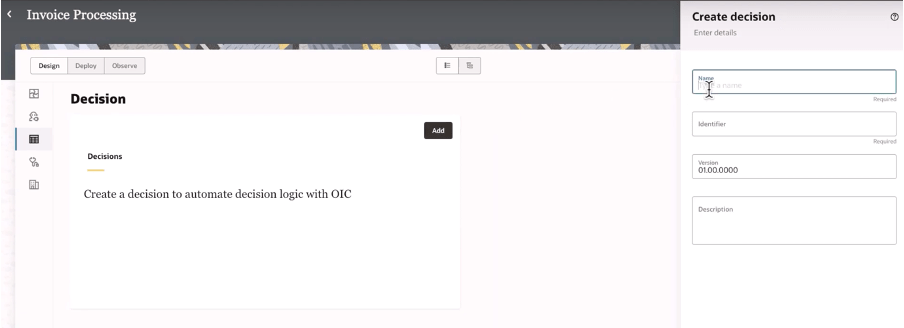
Today, as a new enhancement of this platform, we have the chance to build decision rules directly in integration projects giving you the power of the flexibility and agility in building new automation processes leveraging rules based on “if-then-else” or “decision tables” patterns

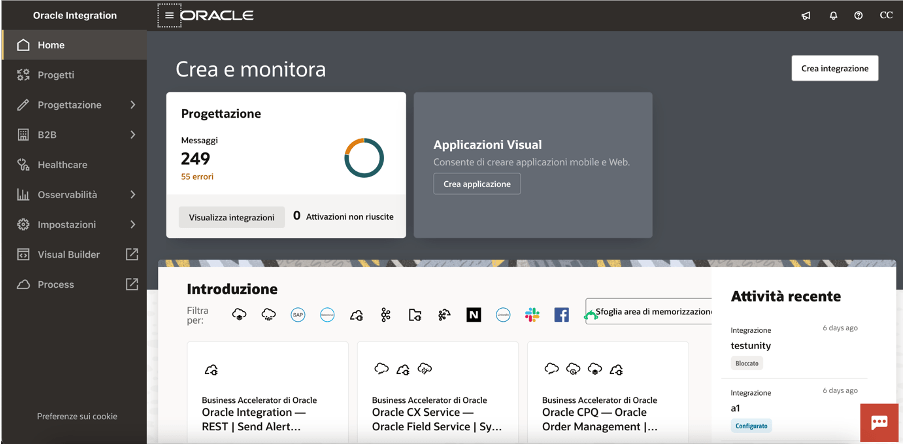
When building your integration projects in OIC, you are now able to add several components so to build your specific implementation leveraging the components you need adding to the project the functionalities like the pure integration flows with connections, robots, B2B, Healthcare and now Decisions, too

Once decisions are added to your project, you can design and later test what you have implemented to verify the correctness of the rules

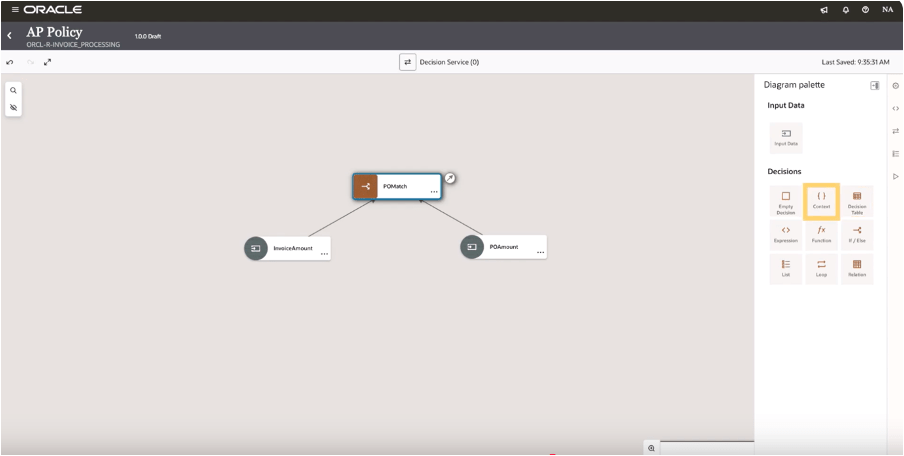
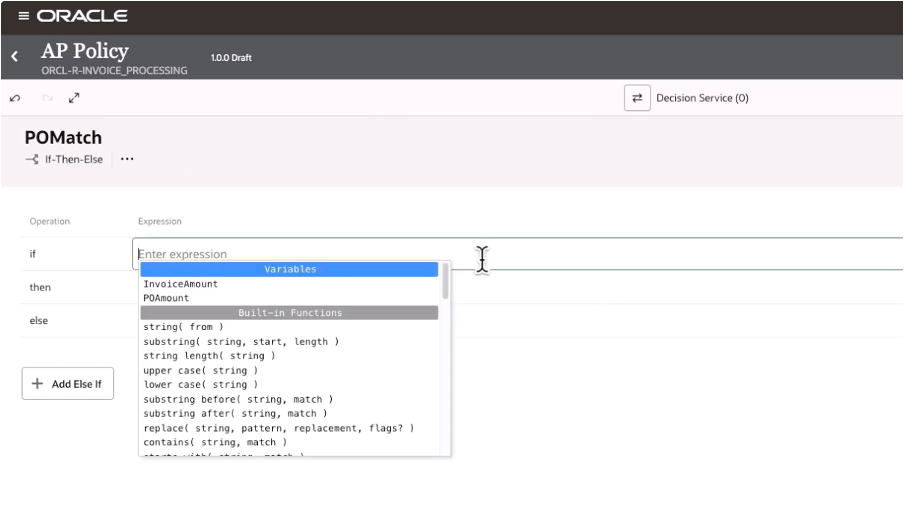
And selecting the decision type you can design your logic

In this way, decisions allow you to ensure consistency in decision-making throughout the organization. Decisions ensure that the same conditions always lead to the same outcomes, reducing the risk of errors due to subjective or inconsistent judgments. This standardization now extended to all components in OIC, and it’s particularly useful when the same decisions are made across multiple processes helping also the reuse of those rules

Decisions define a clear decision points which can be automated within a process, such as determining eligibility for a loan, assessing the risk level of a transaction, or triggering approvals. Automating these rules you can reduce manual intervention, accelerating processes, and ensuring timely and accurate outcomes.

Consider that “decisions” are typically decoupled from the process logic, meaning they can be modified independently of the core workflow. This makes easier to adjust processes when business requirements change—whether due to new regulations, market conditions, or organizational changes—without needing to re-engineer the entire process. This flexibility helps the business to remain agile and responsive.

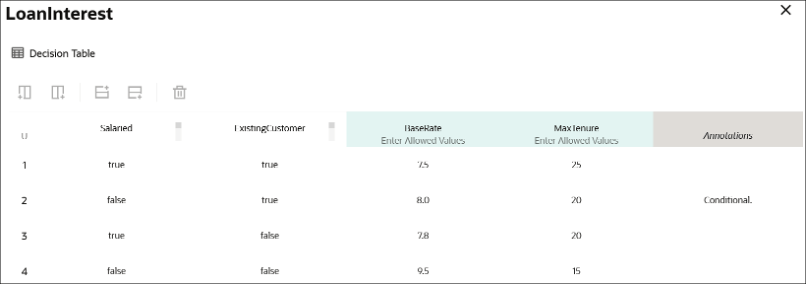
Below a sample just to consider how business rules, via a decision table, can be built leveraging a flexible and easy way to maintain the changes and using a simple and standard browser

A decision table, like that one shown before, can consist of an input expression and several input entries. It is represented as columns within a table. You can use input variables, outputs of other decisions, or built-in functions to define input expressions.

Of course, business rules (decisions) are essential for ensuring that processes are compliant with laws, regulations, and internal policies. For example, in industries such as finance, healthcare, or insurance, where compliance is critical, business rules ensure that processes adhere to the necessary legal requirements. Decisions can be updated when regulations change, ensuring ongoing compliance without the need for manual oversight.

Looking at the decisions use, we can put in evidence and summarize some advantages and especially those ones listed below.

Reusability: you can build your rules once and reuse those ones, gaining efficiency in making & maintaining them with a faster policy change approach without impacting an automation solution. Furthermore you can reuse those from within an integration flow, process workflow or any application

Efficiency: the policy maker doesn’t have to rely upon an integration specialist; he can build and maintain their own policies by themself

Fast policy change: you can change policies quickly without disrupting the areas of an automation solution that’s because you can change policy details independently from the components which use a decision

Now, stay tuned… very soon this feature will be available in GA, and not only Limited Availability, on all OIC instances

In summary:

Decisions and business rules in general enable greater flexibility, reducing operational risks, and improving both internal operations and external customer experience

References:

https://docs.oracle.com/en/cloud/paas/application-integration/

https://docs.oracle.com/en/cloud/paas/process-automation/user-process-automation/model-decisions.html

Process Automation helps you to rapidly design, automate, and manage business processes in the Cloud

Step-by-step guide discovering how to provision and build a business process with OCI Process Automation

OCI Process Automation (shortly OPA) is an OCI PaaS Oracle Managed cloud service which helps customers to build their business processes based on Structured or Unstructured models. This is the best solution to easily manage business processes granting to business users to build their own implementations without coding but just using a web browser and drag&drop capabilities… what we usually call a “no code” environment

The article has the goal to explain how, step by step, we can quickly test the features included in OPA… starting from my experience with the tool.

Just to simplify the explanation, I will describe a “happy path” process … in my example building one business process which usually is quite loved by everyone…. mainly when talking about the Vacation Request Approvals 🙂

Continue reading “Process Automation helps you to rapidly design, automate, and manage business processes in the Cloud”

Enter The Robots (A Different Kind)

Last week, I had the opportunity to do some work and part of the engagement there was to integrate some data. Easy right? It’s not that hard especially with the technology and standards we have these days. However, what was not apparent upfront until after some digging (ie research), an email and a phone call that there were no APIs to be found. “Ha ha ha … we’ve got you … there is no way you can do it now” So the challenge was accepted and instead of time travelling into the future to find a new way of doing things, I went totally retro. And hence the title “Enter The Robots“. I didn’t go and create new versions of robots or AI. I don’t create a new quantum computing paradigm. What I did do was classically known as screen-scraping. “ick“, I hear from the crowd. “How dare you?“, someone else yells out. But I say this honestly, if there is no other way to integrate and capture data, then I rather do it knowing that it is a last resort.

In this article, I walk through a few of the tips and tricks with what’s currently available to help out in this situation.

Continue reading “Enter The Robots (A Different Kind)”