Oracle Integration & AI: Accelerating OIC Development Phases

In the evolving digital era, Oracle is embedding AI deeply into its Integration platform to streamline, automate, and enhance the development process. Rather than seeing AI as an add-on, Oracle’s strategy ties together infrastructure, development tools, and application integration so that teams can build faster and smarter.

Oracle’s AI-Innovation in Integration can be declined in 2 ways.

  1. How the AI can be a value add for OIC developers
  2. What OIC can offer in the Agentic AI area to simplify and accelerate AI adotpion in enteprise projects

In this article, I’m focused on the first point and I will try to explain how developers can take advantage of such AI features.

What coming from Oracle AI World event , recently occurred in Las Vegas, gave us the opportunity to be aware of:

  • Embedded AI capabilities: Oracle Integration includes embedded AI that helps with creating integrations (supported by using natural language), defining schedules, writing documentation about integration components, generating queries (e.g., FHIR, ATP), and resolving errors in B2B .
  • Connection with OCI AI Services and OpenAI: The platform allows use of Oracle Cloud Infrastructure (OCI) AI Services or OpenAI large language models in integrations. That means processes can use text/image processing, content generation, analysis, etc., directly as part of integration workflows.
  • “Use AI to Create an Integration”: A concrete feature allows a user via a natural-language prompt (in a chat interface) to ask Oracle AI to build the skeleton of an integration. The system determines which “nodes” (trigger/invoke), adapters, and connections are needed, builds a draft and lets the developer accept or modify it.

Here are key ways AI supports or accelerates development in Oracle Integration:

Phase of Development  Traditional ChallengesHow Oracle’s AI Helps
Requirement Spec / Planningdefining what systems need to interact; understanding triggers; mapping workflowsUse natural language to describe needed integration; AI proposes flow, nodes, connections. Reduces time in planning and help you to build the skeleton of your rintegration flows
Design / Prototypingdeciding adapters, interfaces; drafting initial workflowsAI suggests adapters, trigger/invoke components; creates skeleton flows that devs can edit. Speeds prototyping
Implementation (Coding / Configuration)manual building of integration flows; error handling; repetitive tasksAI can assist in resolving errors; suggest corrections; provide diagnostics
Deployment / Maintenancemaintaining integrations as systems change; resilience; monitoringAI helps with scheduling, modifying flows; possibly assisting in content or error handling maintenance. ”

Having said that, what’s the benefit coming from AI adoption in development?

I share with you some steps where the conjunction between AI and OIC is for sure a very good help

  • Faster development cycles — less time spent on repetitive or boilerplate tasks.
  • Lower barrier to entry — using natural language turns non-expert users or less technical team members into potential contributors.
  • More consistency — AI can enforce patterns, use standard connections, reduce errors.
  • Scaling & productivity — teams can do more, focus on higher-value logic rather than plumbing.

In my opinion, at the same time, it’s helpful is to get the most out of Oracle’s Integration + AI strategy, Organizations should:

  1. Define clear prompts and use cases — specify systems, conditions, failure handling when using natural language with AI to build integrations.
  2. Review and validate AI’s generated flows thoroughly, especially for critical business logic.
  3. Invest in governance — keep track of which integration pieces were AI-generated, maintain documentation, versioning.
  4. Train teams on AI usage: how to write prompts, how to troubleshoot AI suggestions.
  5. Monitor performance and cost — AI services (especially LLMs) bring compute and data costs; ensure ROI.

I hope this content helps the community something like a sort of brainstorming and at the same time it helped me to point out some aspects

Conclusion

Oracle’s strategy of embedding AI into its Integration platform represents a significant shift in how enterprise software can be developed. By providing tools that allow parts of the development workflow — planning, design, implementation — to be partly automated or assisted, Oracle is helping developers move faster, reduce errors, and focus on more strategic problems.

The future path will require careful balancing of innovation with oversight, but for companies willing to adopt and adapt, the promise is strong: more agile, intelligent, and automated integration development.

Stay tuned … the future is now and several other news are already in plans!
Take advantage of using Recipes in OCI Process Automation

Today, Oracle Process Automation with its Recipes helps organizations to reach process excellence faster. The recipes are business process solutions developed with OCI Process Automation (OPA) and available for you once you have provisioned OCI Process Automation service.

Recipes can be deployed as-is, or extended to meet requirements customer-specific.

In addition, to expediting time-to-value for new deployments, the available recipes can be used also as a sort of blueprints for organizations who want to start with new processes built on OPA.

So, just to position the recipes and when better to use them, we can try to post some questions.

  1. Are you a Developer and looking for quickly deploying new business processes?
  2. Are you a System Integrator needing to start from a pre-built asset so to be later customized meeting better your needs without reinventing the wheel?
  3. Are you looking for some samples to be used for demo purposes to test capabilities and functionalities without starting from scratch?

All these questions can find in the OPA Recipes the right answer.

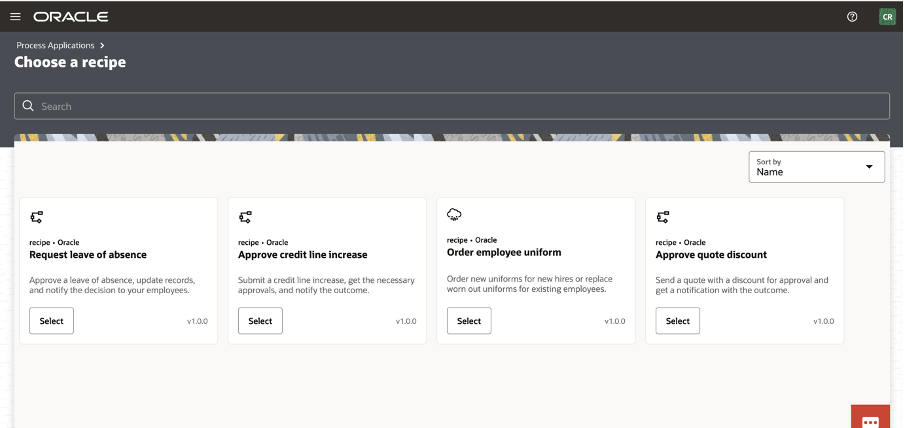
Now, OPA includes the following recipes … and much more will come soon.

Every single Recipe has its own documentation to drive the implementer.

I suggest to carefully look at the system requirements before using those ones; all those recipes are intended only for guidance.

In order to run those recipes, you must perform the following configuration tasks on your Oracle Identity Cloud Service (IDCS) instance in order to successfully run the recipe.

  • Assign IDCS application roles
  • Create the required users in IDCS

After you’ve configured the roles and other resources, you can activate and run the application and test the process and some capabilities like business searches, how to escalate tasks using the native workspace or the analytics graphical view to see if the process flow is altered by manual intervention.  

Now you can see how the “Credit Increase Request” can be imported into your own OPA instance:

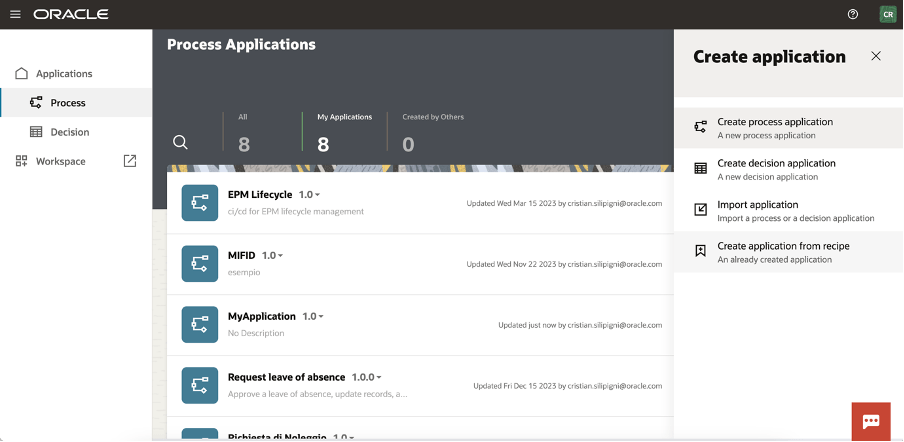
Create a new process in the application process section

Click on the “Create Application from Recipe” action from the palette:

Select, for example, the Approve Credit Line increase

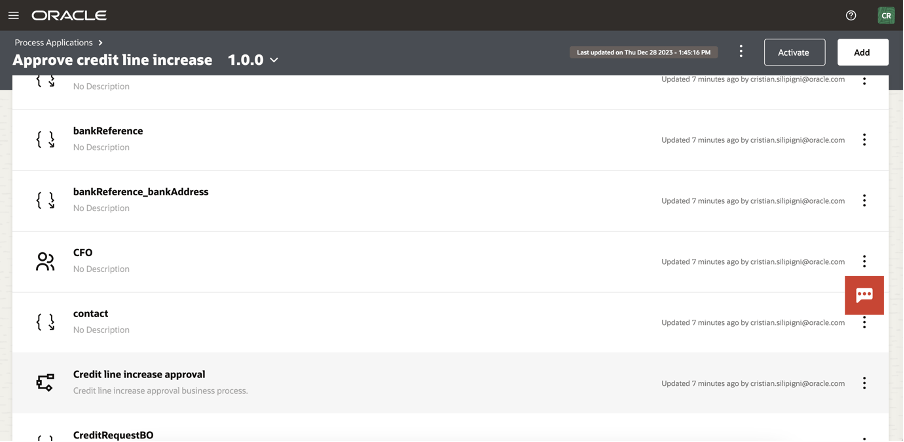
And now, you can see all the artifact imported in your application.

Selecting the “Credit Line Increase Approval” link, you can access the BPMN design of the process

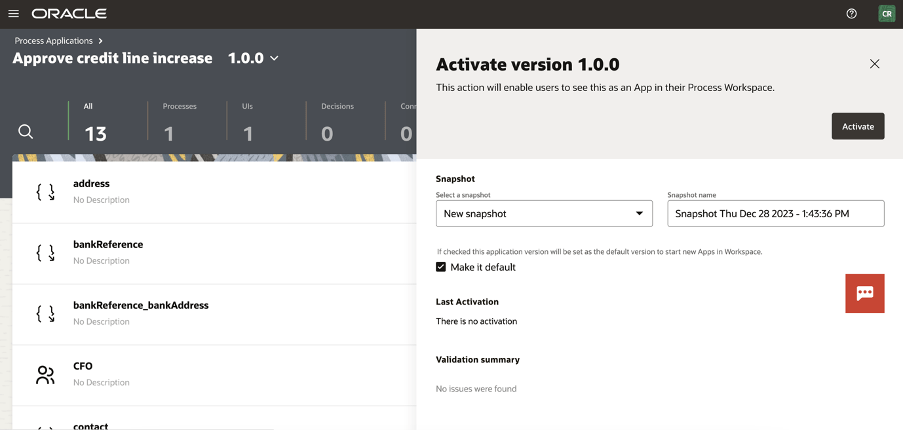
The process is now ready for you to be activated (or customized) selecting the “activate” button at the top of your page

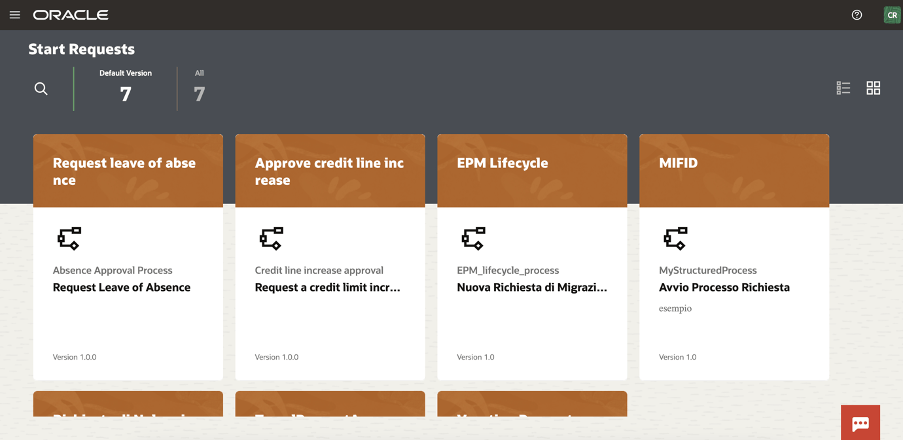
And now ready to be tested in the workspace

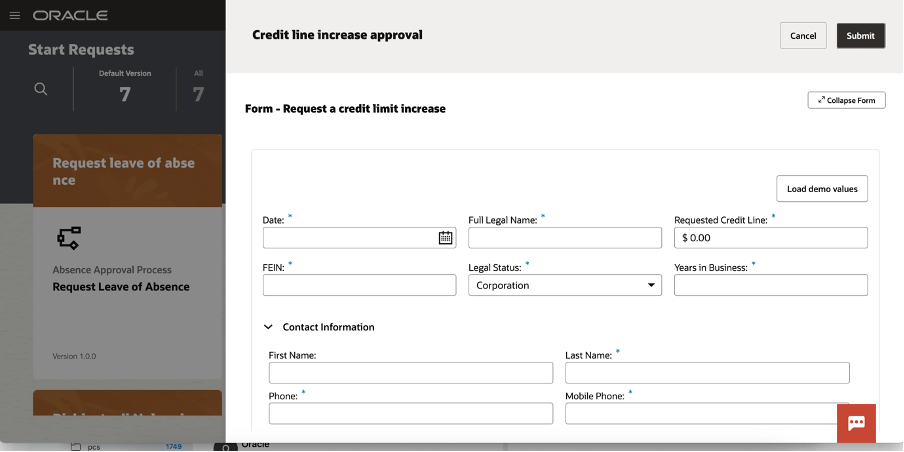
You can now start a new request and the web application will appear to you, something like that one here included:

You can load demo values to speed up the test so to quickly see the outcomes of the execution

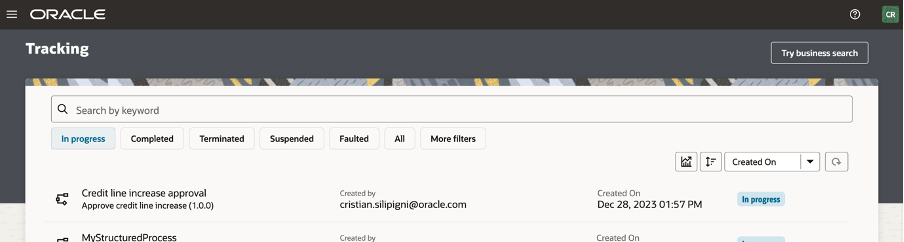
A new item is now available to be worked by the assignee approving, rejecting, … all the actions that the human workflow will be configured for the specific user, group or application role

As we know, OPA can be used to support business processes to build “system 2 system” or “system 2 human” implementations and when the User Interface is required to interact with the running process you can also modify or extend the web UI  leveraging  the powerful features to adapt your web page, embedding basic and advanced controls so to drive the business user and simplifying his job reducing errors due to wrong data input

Try it by yourself… it’s a very good accelerator!!

Public and Additional Documentation

https://docs.oracle.com/en/cloud/paas/process-automation/recipes.html

https://www.oracle.com/it/integration/process-automation/features/

Access Oracle Autonomous Database (ADB) resides in Private Subnet via Oracle Integration Cloud (OIC) connectivity agent

Recently came across interesting use case, so thought to cover blog on that topic. One of my Customer was having issue to connect OIC to Oracle Autonomous Database (ADB) which is sitting in private subnet via Oracle Integration Cloud connectivity agent. So, I did some debugging and fix the issue and that learning I am going to cover here. I will explain here how we can setup an ATP Database in private subnet, setup all required security/firewall rules, setup OIC connectivity agent, bastion compute in public subnet and then connecting OIC to ATP DB sitting in private subnet via Connectivity agent.

In this fictitious scenario, customer HR division representative sending employee code to OIC REST endpoint to retrieve detailed information for an employee record which is been stored in Oracle ADB instance located in private subnet. Since, ADB is in private subnet it’s not accessible to outside world even app tier, and that’s where OIC Connectivity agent comes into picture to provide connectivity between OIC which is public internet and ADB database which is in private subnet.

Continue reading “Access Oracle Autonomous Database (ADB) resides in Private Subnet via Oracle Integration Cloud (OIC) connectivity agent”