RPA vs AI: Perspectives, Applications, and the Power of having both in Oracle Integration Cloud

I’ve had meetings with clients and colleagues who thought RPA and AI were the same thing, or at least part of the same philosophy.

In my opinion, this is only partially true and for this reason, I have decided to write this article to help clarifying where the two solutions differ.

Robotic Process Automation (RPA) and Artificial Intelligence (AI), although often mentioned together in the context of digital transformation, are two distinct technologies, each with its own characteristics and purposes. Let’s remember that RPA has been talked about since the early 2000s and was certainly created to introduce the first concepts of automation within industrial and enterprise processes.

Let’s take a closer look at these technologies.

RPA is essentially a technology focused on automating manual and repetitive activities according to predefined rules. You can think of RPA as a “digital workforce” that performs actions on software and systems just like a human operator would: it opens applications, copies and pastes data, fills in forms, sends emails, or updates databases. Its great advantage lies in the ability to speed up and make more efficient low-value processes, eliminating errors due to distraction and freeing people from monotonous tasks. However, RPA is not “intelligent” in the strict sense: it operates within very rigid parameters and cannot adapt to new situations or understand context. For example, an RPA bot can extract data from an electronic invoice, but only if the layout remains the same; unexpected changes to the format could stop the automated process.

AI, on the other hand, encompasses a set of technologies inspired by human cognitive capabilities such as learning, reasoning, language understanding, image or sound recognition, and decision-making. AI can analyze large amounts of data, identify hidden patterns, make predictions, adapt to new conditions, and learn from previous results. Therefore, it doesn’t just follow predefined instructions but is able to evolve over time, improving its accuracy and handling situations not explicitly foreseen by developers. For example, an AI system can read text written by customers, understand its meaning, and determine its sentiment (positive, neutral, negative), or it can recognize and classify objects within an image, even if those objects are arranged differently than those seen in past images.

In summary, while RPA is ideal for improving efficiency in repetitive, standardized, and structured tasks, AI comes into play where flexibility, understanding of context, predictive ability, and adaptation to unstructured data are needed. The two technologies can also be combined—for example, using RPA to manage operational workflow and data collection, and AI to add intelligence at specific points in the process, such as document classification or handling requests in natural language.

This integrated approach enables companies to get the most out of automation: RPA brings speed and efficiency, while AI introduces the ability to solve complex problems and add intelligence to business processes.

To summarize, we can recap as follows:

RPA (Robotic Process Automation):

  • Focuses on automating repetitive tasks based on fixed rules.
  • Replicates human actions on software interfaces (clicks, data entry, data extraction).
  • Does not “learn” from data: follows predefined procedures without adapting.
  • Ideal for well-structured processes such as data entry, system-to-system transfers, extracting data from structured PDFs, updating records.

AI (Artificial Intelligence):

  • Is based on machine learning, deep learning, and NLP (Natural Language Processing) algorithms.
  • Can solve complex problems, learn from data, adapt, and improve over time.
  • Manages less-structured scenarios such as image recognition, text analysis, virtual assistance, natural language interpretation, trend forecasting.

So, RPA focuses on repetitive and structured tasks, while AI focuses on complex and unstructured tasks; RPA does not learn or adapt, while AI learns from data and improves its performance to automate processes that require cognitive capabilities and not just “mechanical” functions.

The good news is that today, Oracle Integration Cloud (OIC) is a platform capable of combining Robotic Process Automation (RPA) tools and Artificial Intelligence (AI) capabilities, integrating both technologies within business processes.

This means a company can use OIC not only to automate repetitive and manual tasks through RPA—such as extracting and automatically entering data into business systems—but also to enrich these processes with intelligent components based on AI.

For example, OIC allows the incorporation of natural language analysis to better understand customer requests, supports agentic AI, orchestrate tools and actions, integrate document data extraction services through automatic recognition, or use predictive models to support more informed decisions.

All of this is orchestrated in a centralized and user-friendly environment, often without the need to write code, thanks to OIC’s visual tools and intuitive interfaces. In practice, a company can build workflows in which RPA and AI activities follow one another automatically: for example, a bot can gather data from different systems, pass it to an AI service for advanced analysis or classification, and finally archive the results in a management platform such as Oracle ERP Cloud.

The integration between RPA and AI in OIC brings tangible benefits: it speeds up processes, reduces manual errors, and introduces advanced automation capabilities that allow handling both simple activities and more complex tasks that require “intelligence,” always ensuring security, compliance, and adherence to policies.

References:

https://docs.oracle.com/en/cloud/paas/application-integration/

https://docs.oracle.com/en/cloud/paas/application-integration/robots.html

Oracle Integration & AI: Accelerating OIC Development Phases

In the evolving digital era, Oracle is embedding AI deeply into its Integration platform to streamline, automate, and enhance the development process. Rather than seeing AI as an add-on, Oracle’s strategy ties together infrastructure, development tools, and application integration so that teams can build faster and smarter.

Oracle’s AI-Innovation in Integration can be declined in 2 ways.

  1. How the AI can be a value add for OIC developers
  2. What OIC can offer in the Agentic AI area to simplify and accelerate AI adotpion in enteprise projects

In this article, I’m focused on the first point and I will try to explain how developers can take advantage of such AI features.

What coming from Oracle AI World event , recently occurred in Las Vegas, gave us the opportunity to be aware of:

  • Embedded AI capabilities: Oracle Integration includes embedded AI that helps with creating integrations (supported by using natural language), defining schedules, writing documentation about integration components, generating queries (e.g., FHIR, ATP), and resolving errors in B2B .
  • Connection with OCI AI Services and OpenAI: The platform allows use of Oracle Cloud Infrastructure (OCI) AI Services or OpenAI large language models in integrations. That means processes can use text/image processing, content generation, analysis, etc., directly as part of integration workflows.
  • “Use AI to Create an Integration”: A concrete feature allows a user via a natural-language prompt (in a chat interface) to ask Oracle AI to build the skeleton of an integration. The system determines which “nodes” (trigger/invoke), adapters, and connections are needed, builds a draft and lets the developer accept or modify it.

Here are key ways AI supports or accelerates development in Oracle Integration:

Phase of Development  Traditional ChallengesHow Oracle’s AI Helps
Requirement Spec / Planningdefining what systems need to interact; understanding triggers; mapping workflowsUse natural language to describe needed integration; AI proposes flow, nodes, connections. Reduces time in planning and help you to build the skeleton of your rintegration flows
Design / Prototypingdeciding adapters, interfaces; drafting initial workflowsAI suggests adapters, trigger/invoke components; creates skeleton flows that devs can edit. Speeds prototyping
Implementation (Coding / Configuration)manual building of integration flows; error handling; repetitive tasksAI can assist in resolving errors; suggest corrections; provide diagnostics
Deployment / Maintenancemaintaining integrations as systems change; resilience; monitoringAI helps with scheduling, modifying flows; possibly assisting in content or error handling maintenance. ”

Having said that, what’s the benefit coming from AI adoption in development?

I share with you some steps where the conjunction between AI and OIC is for sure a very good help

  • Faster development cycles — less time spent on repetitive or boilerplate tasks.
  • Lower barrier to entry — using natural language turns non-expert users or less technical team members into potential contributors.
  • More consistency — AI can enforce patterns, use standard connections, reduce errors.
  • Scaling & productivity — teams can do more, focus on higher-value logic rather than plumbing.

In my opinion, at the same time, it’s helpful is to get the most out of Oracle’s Integration + AI strategy, Organizations should:

  1. Define clear prompts and use cases — specify systems, conditions, failure handling when using natural language with AI to build integrations.
  2. Review and validate AI’s generated flows thoroughly, especially for critical business logic.
  3. Invest in governance — keep track of which integration pieces were AI-generated, maintain documentation, versioning.
  4. Train teams on AI usage: how to write prompts, how to troubleshoot AI suggestions.
  5. Monitor performance and cost — AI services (especially LLMs) bring compute and data costs; ensure ROI.

I hope this content helps the community something like a sort of brainstorming and at the same time it helped me to point out some aspects

Conclusion

Oracle’s strategy of embedding AI into its Integration platform represents a significant shift in how enterprise software can be developed. By providing tools that allow parts of the development workflow — planning, design, implementation — to be partly automated or assisted, Oracle is helping developers move faster, reduce errors, and focus on more strategic problems.

The future path will require careful balancing of innovation with oversight, but for companies willing to adopt and adapt, the promise is strong: more agile, intelligent, and automated integration development.

Stay tuned … the future is now and several other news are already in plans!

Decisions and Business Rules in Oracle Integration (OIC) to support an Automation Process Platform

Business rules (later “decisions”) always play a crucial role in a process automation platform

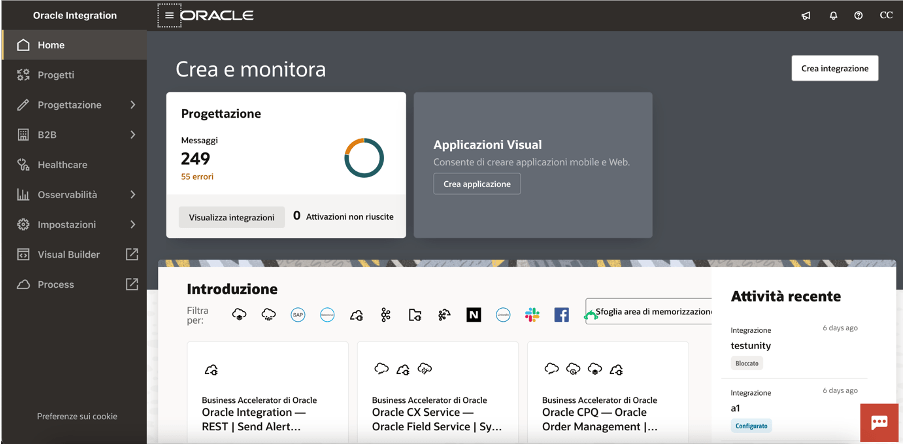
As you probably already know, Oracle Integration (OIC) is a complete business automation platform cloud based, fully Oracle managed, that enables customers to connect their applications and data, automate business processes, and innovate with AI. This is what we define a unique and complete toolkit for integrating and connecting applications and technologies

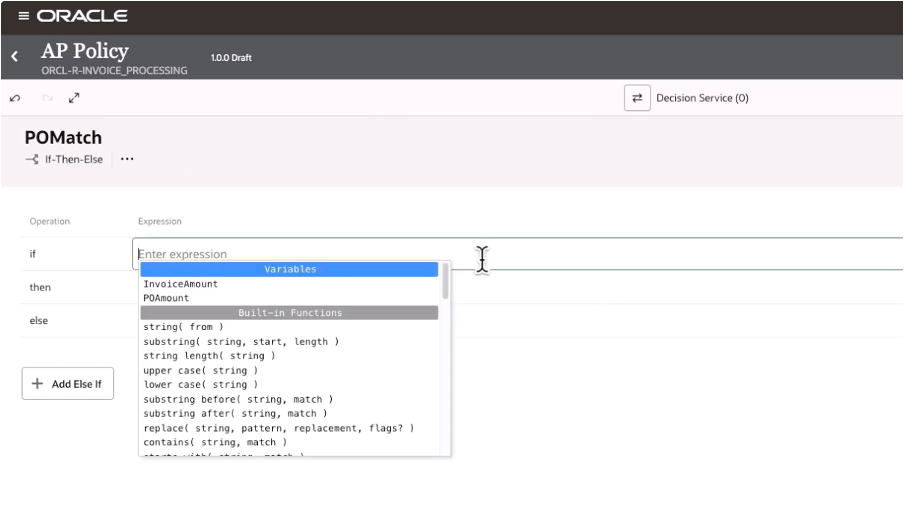
Today, as a new enhancement of this platform, we have the chance to build decision rules directly in integration projects giving you the power of the flexibility and agility in building new automation processes leveraging rules based on “if-then-else” or “decision tables” patterns

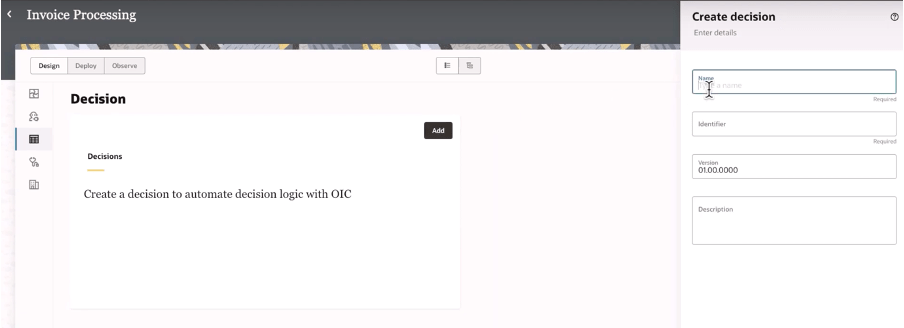
When building your integration projects in OIC, you are now able to add several components so to build your specific implementation leveraging the components you need adding to the project the functionalities like the pure integration flows with connections, robots, B2B, Healthcare and now Decisions, too

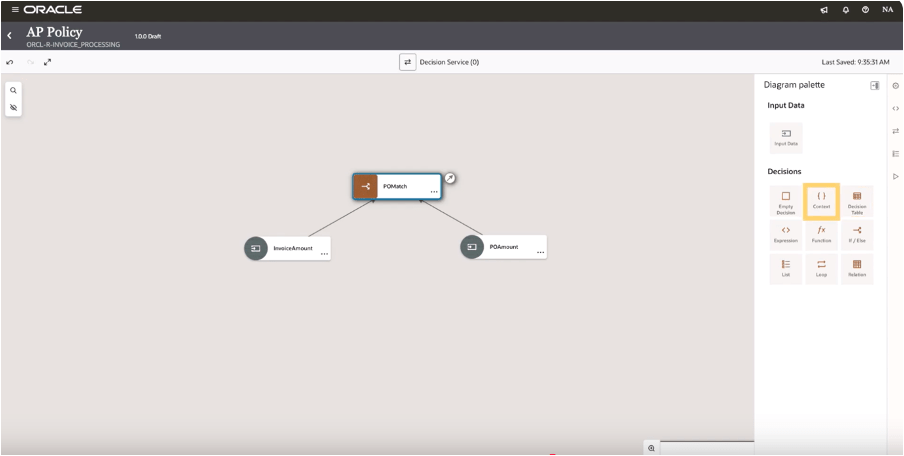
Once decisions are added to your project, you can design and later test what you have implemented to verify the correctness of the rules

And selecting the decision type you can design your logic

In this way, decisions allow you to ensure consistency in decision-making throughout the organization. Decisions ensure that the same conditions always lead to the same outcomes, reducing the risk of errors due to subjective or inconsistent judgments. This standardization now extended to all components in OIC, and it’s particularly useful when the same decisions are made across multiple processes helping also the reuse of those rules

Decisions define a clear decision points which can be automated within a process, such as determining eligibility for a loan, assessing the risk level of a transaction, or triggering approvals. Automating these rules you can reduce manual intervention, accelerating processes, and ensuring timely and accurate outcomes.

Consider that “decisions” are typically decoupled from the process logic, meaning they can be modified independently of the core workflow. This makes easier to adjust processes when business requirements change—whether due to new regulations, market conditions, or organizational changes—without needing to re-engineer the entire process. This flexibility helps the business to remain agile and responsive.

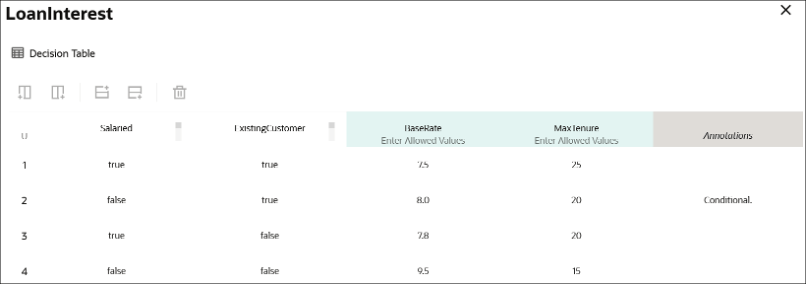
Below a sample just to consider how business rules, via a decision table, can be built leveraging a flexible and easy way to maintain the changes and using a simple and standard browser

A decision table, like that one shown before, can consist of an input expression and several input entries. It is represented as columns within a table. You can use input variables, outputs of other decisions, or built-in functions to define input expressions.

Of course, business rules (decisions) are essential for ensuring that processes are compliant with laws, regulations, and internal policies. For example, in industries such as finance, healthcare, or insurance, where compliance is critical, business rules ensure that processes adhere to the necessary legal requirements. Decisions can be updated when regulations change, ensuring ongoing compliance without the need for manual oversight.

Looking at the decisions use, we can put in evidence and summarize some advantages and especially those ones listed below.

Reusability: you can build your rules once and reuse those ones, gaining efficiency in making & maintaining them with a faster policy change approach without impacting an automation solution. Furthermore you can reuse those from within an integration flow, process workflow or any application

Efficiency: the policy maker doesn’t have to rely upon an integration specialist; he can build and maintain their own policies by themself

Fast policy change: you can change policies quickly without disrupting the areas of an automation solution that’s because you can change policy details independently from the components which use a decision

Now, stay tuned… very soon this feature will be available in GA, and not only Limited Availability, on all OIC instances

In summary:

Decisions and business rules in general enable greater flexibility, reducing operational risks, and improving both internal operations and external customer experience

References:

https://docs.oracle.com/en/cloud/paas/application-integration/

https://docs.oracle.com/en/cloud/paas/process-automation/user-process-automation/model-decisions.html